


The display still shows a temperature and the switch port light is on, yet the machine has stopped updating its data. There is no contradiction: a working cable, a responsive network connection and a working application are three different things. To decide whether an industrial device is truly online, check both whether information can arrive and whether it is newly produced. Heartbeat counters and communication watchdogs help separate those questions.
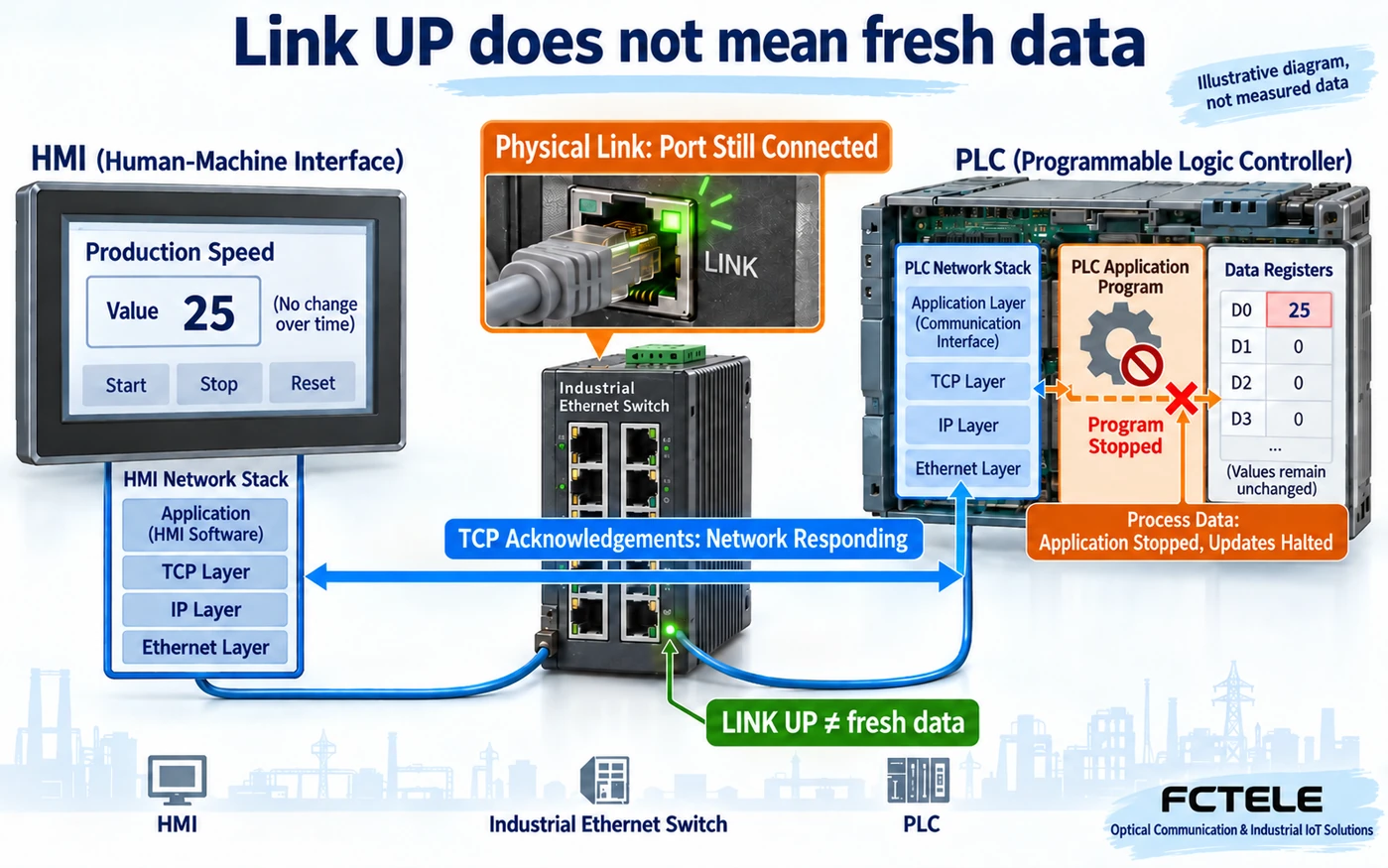
Three kinds of “alive”—the port light answers only one
An industrial Ethernet switch’s LINK light mainly reports the physical link state. Think of it as a telephone line that is connected: it does not tell you whether the person at the other end is still speaking. A PLC, or programmable logic controller, runs control tasks. An HMI, or human-machine interface, reads and displays their data. The physical link may stay up even when a PLC task pauses or an acquisition program stops updating its registers.
The second level is the transport connection. In TCP communication, the device’s network stack maintains the connection and acknowledges received bytes. A responsive stack does not prove that the application has processed a request, or that the temperature on screen comes from a recent sample. The third level is the actual process update: did the acquisition task run, was the agreed control data produced, and is the value fresh enough? Record these states separately when troubleshooting. One green lamp cannot answer all three questions.
Why successful reads may still mean false online status
Suppose a monitor keeps reading a PLC register and always receives 25. The temperature may really be stable, or the acquisition task may have stopped at its last value. Watching the number alone cannot distinguish them. Successful communication alone cannot either: receiving a value does not automatically supply its sampling time.
To assess freshness, send a sampling timestamp, a quality indication or an update counter alongside the value. A quality indication explains whether data is valid, stale or faulty; its encoding depends on the interface documentation. Without such information, the receiver can say that communication succeeded, but cannot immediately conclude that the process is healthy. The display should distinguish the current value, the last valid update and the fault state. If it retains an old value after a timeout, mark it clearly as stale.
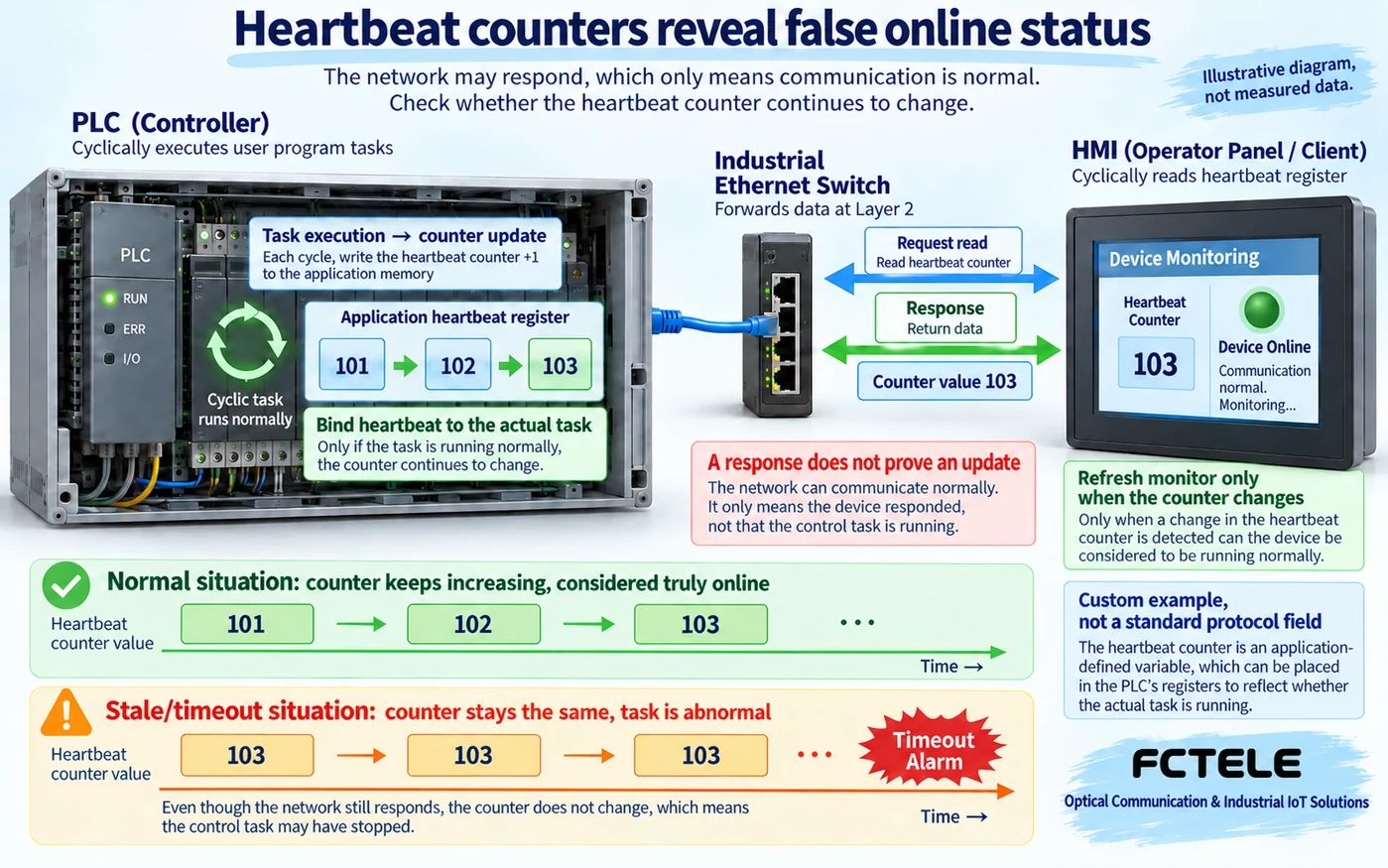
Bind the heartbeat to the work you actually want to monitor
A heartbeat is an agreed sign of life, but its producer must be tied to the work being monitored. One common design changes a counter whenever the target PLC task completes an update. A receiver periodically reads it. Seeing 101, then 102 and 103 gives evidence that this task has continued to run. Those numbers are illustrative; the counter size, update interval and reading method must be agreed by both ends. This is not a universal field built into every industrial protocol.
If replies keep arriving but the counter remains at 103, do not reset the business-level monitoring timer simply because any packet arrived. Check the device identity, the matching request, data validity and the agreed counter change. Handle counter wraparound, device restarts and late responses. Most importantly, do not let an unrelated background thread keep sending heartbeats while the acquisition task has stopped. That would create another form of false online status.
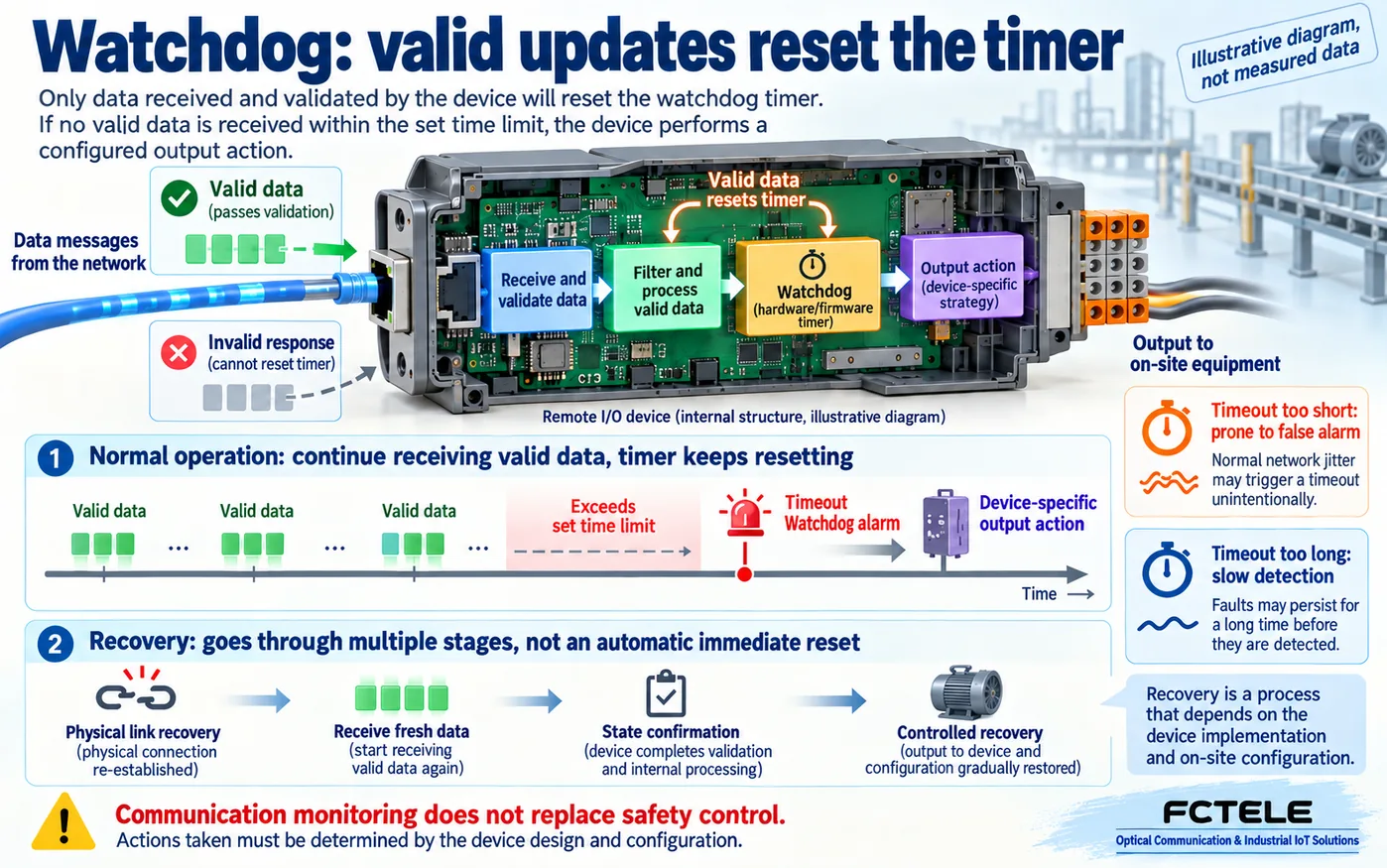
Set a timeout around normal variation, not a copied number
A timeout defines how long to wait without a valid update before declaring a problem. Too short, and normal queueing, a busy device or a brief path change may cause false alarms. Too long, and a failure can remain undetected for too long. First understand the normal update interval, response behaviour under maximum expected load, packet loss and retries, and the permitted detection delay. Then choose a window that fits the process. Do not copy one millisecond value into every production line.
Request timeout, TCP keepalive and process-data timeout are different timers. Request timeout asks whether one request received a matching response in time. TCP keepalive checks whether an idle connection’s peer remains reachable. Process-data timeout asks whether the target data continues to update as agreed. A keepalive success does not prove that the business task is running. Limit retry counts and intervals too, so that a failure does not trigger a storm of requests that consumes capacity needed by healthy control traffic.
How a watchdog works—and what it does not certify
A watchdog monitors whether a valid update arrives on time and triggers a defined response when it does not. Imagine a countdown timer: valid process data resets it; if no valid update arrives before expiry, the device reports a fault or handles its outputs according to configuration. The mechanism may run in hardware, firmware or application software. It may monitor incoming network process data, or communication between a device’s internal processor and its interface.
For example, Beckhoff’s EtherCAT documentation distinguishes network-side process-data monitoring from internal-interface monitoring. This example helps explain what is being watched. It does not mean that a FCTEL switch implements the same mechanism, and a default time for one terminal must not be applied to unrelated devices. Whether expiry holds the last value, clears it or selects another configured state depends on the actual device documentation. An ordinary communication watchdog is not the same as a certified safety-control function and does not replace the machine’s required safety design.
Recovery and acceptance testing need more than one unplug test
Confirm recovery in layers. A port returning UP establishes the physical link. Next verify the connection and request processing, fresh valid data, and the correct device operating state. Only then resume control through the intended procedure. One late old response or one heartbeat must not automatically restore every output. Which states need operator confirmation and which can recover automatically depends on the equipment and the process.
For acceptance testing, introduce three controlled faults in turn: disconnect the communication cable, pause the target business task, and delay a valid response. Change only one condition each time. Record port state, response matching, heartbeat or sampling-time changes, alarm timing and the recovery action. If pausing the task leaves the link up but produces a business-level alarm, the system has demonstrated that it monitors freshness. An unplug test alone cannot demonstrate that capability.
Read switch evidence together with application evidence
FCTEL’s documented managed switch with 24 Gigabit copper ports and four Gigabit copper/fibre combo ports can provide network connectivity for PLCs and monitoring terminals; consult the linked product page for its interface arrangement. When choosing an actual model with the required management functions, verify whether it exposes the port status, error counters and event records you need. The switch provides the communication path. Application heartbeats and quality information usually require cooperation from the PLC, gateway or monitoring software. Replacing a switch alone does not automatically solve false online status.
Align network logs and application logs by time. If the port is stable but valid updates stop, investigate the program, acquisition task and interface definition. If the port repeatedly drops, first inspect cables, power and connections. If response intervals grow, investigate load, queueing and retries. In short: the lamp confirms a link, a response confirms a reply, and only valid fresh data provides evidence that the target business task is still working.
Technical references: Beckhoff: watchdog settings for a specific EtherCAT terminal and Modbus Organization: protocol and implementation resources. Related FCTEL resources: Technical Articles and industrial switch product documentation (Chinese).
