


Whether an fiber optic transmission device can connect directly to a fiber switch depends on whether its optical port uses a compatible Ethernet interface. Ethernet transceivers may connect directly to compatible switch optical ports; dedicated video, telephone, or E1 fiber optic transmission devices usually need a matching far-end device and cannot be plugged into an Ethernet switch just because the connector is the same.
First draw the signal, not just the fiber
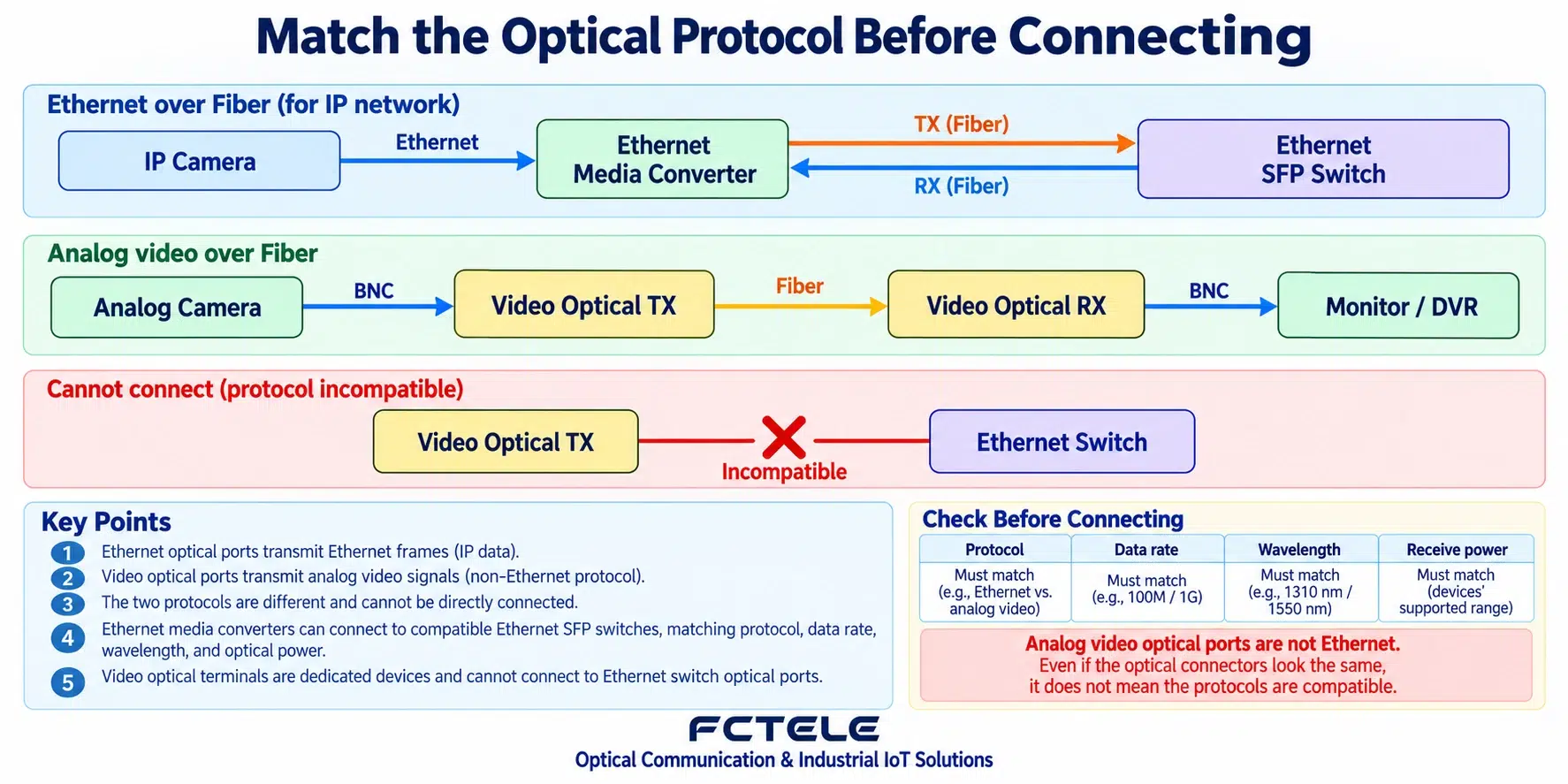
An IP camera produces Ethernet traffic, and a transceiver can extend a copper cable link into an optical link. An analog camera outputs a dedicated video signal, which usually first connects to a video fiber optic transmission device and is then restored by the corresponding receiving device. Both paths may use fiber, but the protocols they carry are not the same.
Telephone, serial port, and E1 also have their own interfaces and encapsulation methods. The fact that some multi-service devices include Ethernet ports does not mean all optical ports can connect directly to an Ethernet switch. You need to look at the service definition of that port and the complete connection instructions, rather than judging based on the appearance of a network port on the chassis.
What items does compatibility include
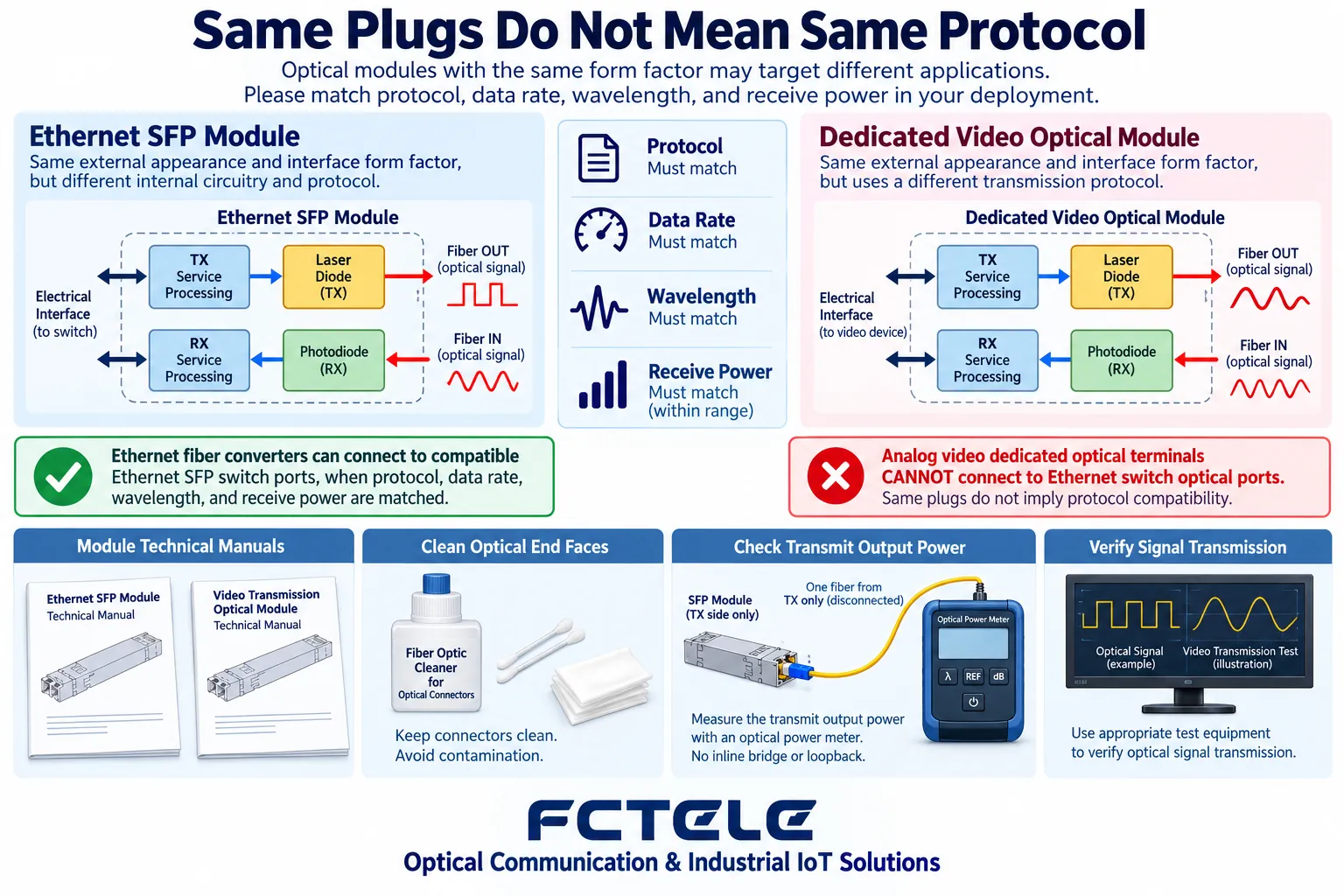
First check the protocol and rate, then check single-mode versus multimode, transmit and receive wavelengths, single-fiber or dual-fiber, connector, and allowed optical power. SC and LC describe connectors, not protocols; changing the patch cord to a pluggable connector will not turn a dedicated optical signal into Ethernet.
For single-fiber BiDi, the transmit wavelength of end A and the receive wavelength of end B must match, and the same applies in the reverse direction. For a dual-fiber link, TX must connect to the RX of the far end. The transmit and receive power ranges of both sides and the actual line loss must all be suitable; you cannot just look at whether the advertised distances are equal.
How Ethernet devices connect to a switch
After confirming that the transceiver optical port is compatible with the module used by the switch, the local terminal connects to the transceiver electrical port, and the fiber connects to the corresponding optical port of the switch. The switch port rate, management settings, and VLAN also need to be checked. The electrical port rate supported by the transceiver does not mean the optical port can be adjusted arbitrarily.
First test with an isolated short link, then connect the on-site fiber cable. After the link is established, verify the actual IP service and traffic, and check VLAN and uplink allowed ranges if necessary. Ordinary media conversion will not automatically replace routing or access policies; a lit link light does not mean cross-subnet communication is already correct.
How dedicated services enter the network
If analog video or other dedicated signals need to be connected to an IP network, corresponding encoders, gateways, or protocol conversion devices are usually required. They handle service format conversion, while an ordinary fiber transceiver only performs media conversion. You cannot expect one fiber or one adapter to complete this work.
For example, a video encoder turns a supported video input into a network stream, which is then transmitted through a switch; analog telephone entering the network may require a corresponding voice gateway. Specific capabilities, latency, and service compatibility depend on the product implementation and cannot be directly inferred from the name “fiber optic transmission device.”
Boundaries for purchasing and acceptance
Describe the source device, target device, actual signal, number of channels, and on-site conditions, and let the supplier confirm the complete path. When replacing one end of an existing system, especially check the dedicated pairing and version. Do not repeatedly plug a production optical port into an unknown far end before the protocol is confirmed.
Acceptance should include interface compatibility, optical power, actual service, continuous operation, and recovery testing, and the topology and configuration should be saved. Specific Feichang Technology devices can be checked from Product Center For direct-connection combinations that cannot be confirmed, first test them in an isolated environment, and do not use “they are all fiber devices” as the basis for compatibility.
For old equipment with no clear label on the appearance, first check the serial number, model, and as-built records, and contact the supplier to confirm if it cannot be identified. Do not use “plug it in and try” as a substitute for interface identification, especially for dedicated optical ports and powered telephone interfaces.
Translated from the Chinese technical article. Source first published: 2019-08-05. Source last revised: 2026-10-13T23:18:15+08:00. Read the Chinese source
