


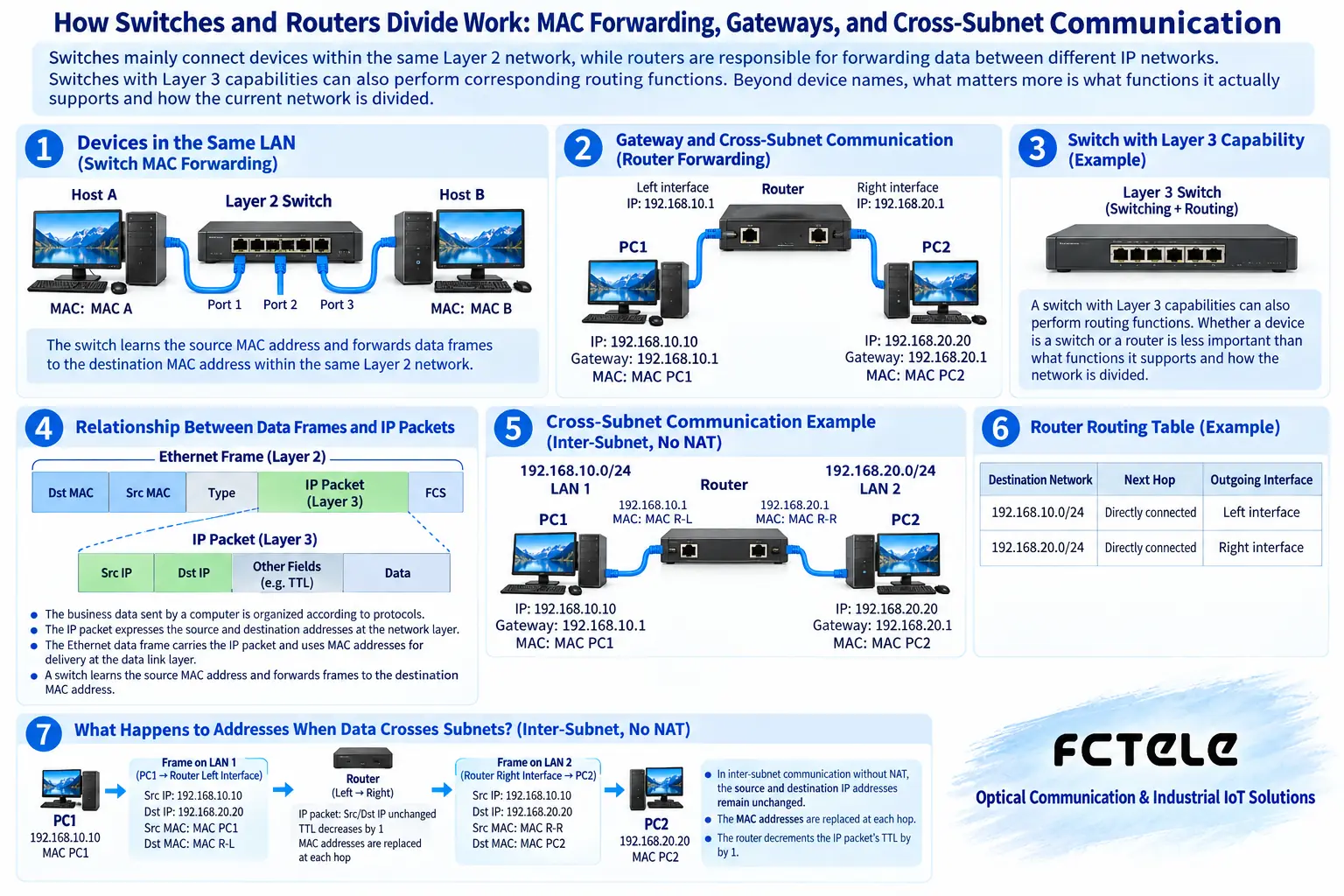
Switches mainly connect devices within the same Layer 2 network, while routers are responsible for forwarding data between different IP networks. Switches with Layer 3 capabilities can also perform corresponding routing functions. Beyond device names, what matters more is what functions it actually supports and how the current network is divided.
1. What is the relationship between data frames and IP packets?
The business data sent by a computer is organized according to protocols. The IP packet expresses the source and destination addresses at the network layer, while the Ethernet data frame is responsible for transmission on the corresponding local link and contains MAC addresses. You can understand this as outer delivery information and inner destination information, but you must not treat the analogy as the actual format.
MAC addresses help devices identify interfaces in the local Ethernet, while IP addresses and subnet conditions help hosts determine whether the destination is local or requires a gateway. The two perform different jobs. Having the network cable connected is only a physical condition; it does not mean that addresses, routing, and application services already meet the requirements.
Therefore, when communication fails, first ask whether it is communication within the same network or across networks. The former requires checking the local connection and Layer 2 division, while the latter also requires checking the gateway and routing. Blaming all faults on the switch or all on the router will miss key conditions.
2. How does a switch decide which port to send to?
A switch can learn the port where a source MAC is located from received data frames and build a forwarding table. When it encounters a unicast frame with a known destination MAC, it selects the port based on the corresponding relationship, rather than unconditionally sending every frame to all computers. This is a basic mechanism of switch forwarding.
Unknown destination addresses, broadcasts, or certain multicast scenarios are handled differently, and the known unicast rule cannot be applied to all data. Configurations such as VLANs may also place ports into different Layer 2 networks. Two devices plugged into the same switch are not guaranteed to be in the same broadcast domain.
A switch’s forwarding capability is also affected by actual port rates, egress load, and internal processing conditions. When multiple ingress ports compete for the same egress port at the same time, they need to queue or be handled according to policy. You cannot promise that the entire network will never be congested just because ‘each port has dedicated bandwidth.’
3. Why can routers connect different subnets?
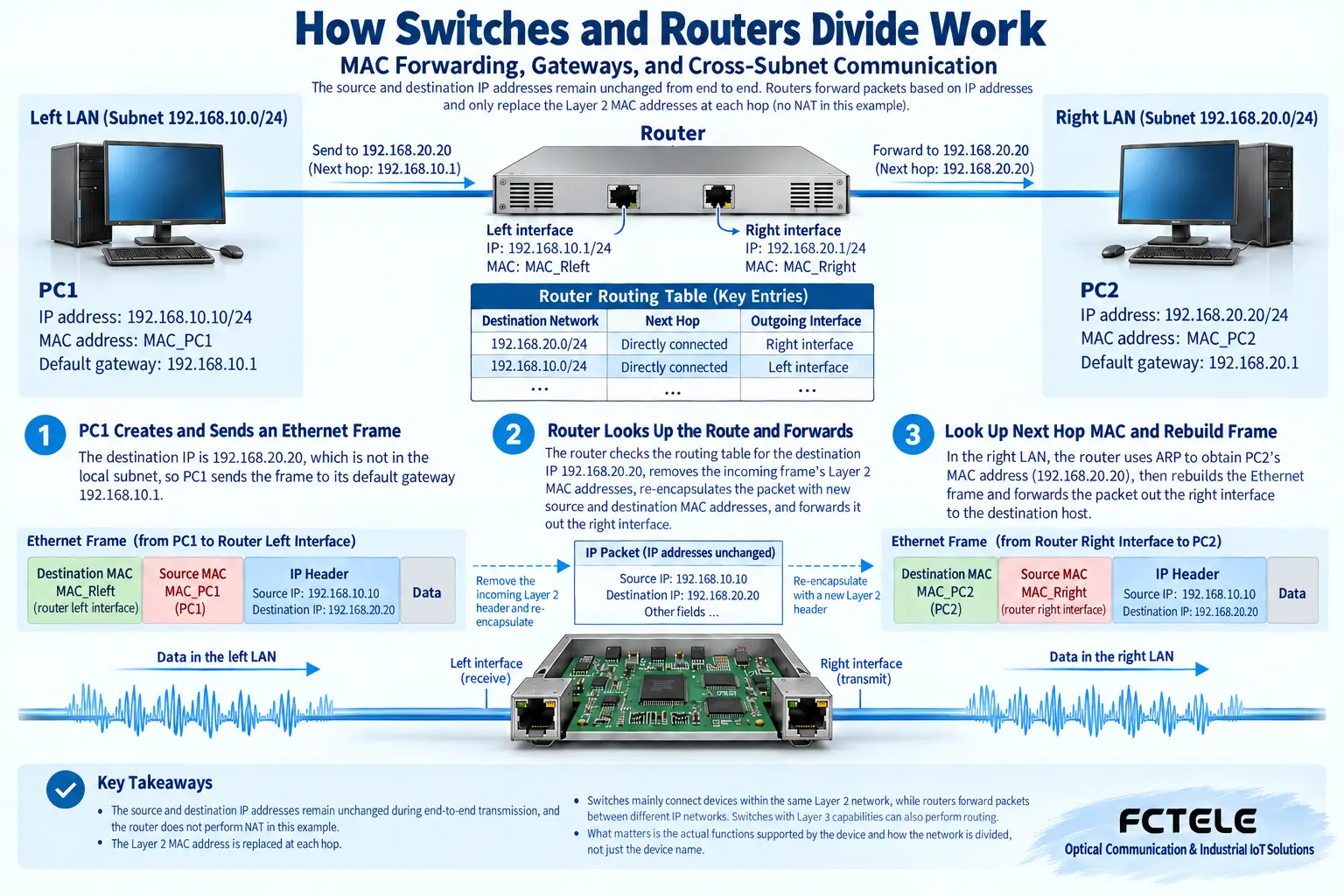
When a host determines that the destination IP is not in the local subnet, it usually hands the corresponding data to the configured gateway. A device with routing capability queries the routing table based on the destination IP, selects the applicable next hop or output interface, and then organizes transmission on the new link. Routing is not simply connecting two network cables together.
The default gateway can use a private IP address, such as 192.168.10.1 in a certain LAN, and is not necessarily a public address assigned by an operator. The gateway needs to be reachable on the corresponding local network and have routing conditions to the destination network. Merely entering an address that looks like a gateway cannot establish a path.
NAT is an address translation function often used in specific access scenarios, but it is not a required condition for the definition of a router. Two internal subnets can rely on routing and forwarding without using NAT. Whether to translate addresses should be based on the overall design, rather than assuming that cross-subnet communication necessarily requires translation.
The Feichang Technology Layer 3 switch with 10G 4-optical-port and Gigabit 8-electrical-port details lists Layer 2 management and Layer 3 routing management capabilities.
DHCP can provide devices with network configurations such as addresses, making centralized management convenient. What it solves is how to obtain configuration, not replacing the router in finding all business paths. A device that obtains an IP address may still lack an applicable gateway or be restricted by access policies.
A managed switch has an IP address, often used by administrators to enter the interface or read status. This does not automatically prove that it can perform Layer 3 forwarding for business traffic. The management address and business routing are two different responsibilities. You should check the product’s explicitly supported routing functions and the current configuration.
VLANs divide Layer 2 business traffic and will not automatically make all VLANs communicate with each other. If cross-VLAN access is needed, corresponding Layer 3 interfaces, routing, and access policies are required. If isolation is required, you should instead confirm that no unintended interworking path has been enabled.
5. How are Layer 3 switches used in industrial networks?
A Layer 3 switch can support corresponding IP routing while providing Layer 2 switching. Whether it supports a certain routing protocol, redundant gateway, and access control should be verified according to the specific model; you cannot classify any managed switch as a Layer 3 device, nor treat ‘industrial grade’ as the name of a functional protocol.
The Feichang Technology 10G 4-fiber 8-copper Layer 3 switch details list Layer 2 management and Layer 3 routing management capabilities. When multi-subnet aggregation is needed, you can check ports, routing, and maintenance requirements accordingly. Actual use should still be combined with firmware and project design, and the classification name should not be taken as evidence that configuration has already been completed.
Industrial networks should also consider power supply, installation, and operating environment. Correct network functions do not mean the on-site electrical conditions are qualified. Back up configurations before changes, clarify the maintenance window and rollback method, and accept gradually according to actual business to avoid changing multiple settings at once and affecting production.
6. Use an example of two workshops to understand the division of work
Assume Workshop A is 192.168.10.0/24 and Workshop B is 192.168.20.0/24. Local Ethernet communication within each workshop can be handled by switches. When A accesses B, a gateway with applicable routing is needed, and the addresses, return path, and access rules of both sides must be satisfied.
If Workshop A works normally internally but cross-workshop communication fails, you can check the host gateway, routing table, and policies, rather than only replacing the fiber. If the gateway addresses on both sides are correct but there is no return path, successful one-way sending does not mean the application will receive a complete response.
Beginners can use three questions for a first round of judgment: How is forwarding done within the same Layer 2 network, who routes across IP networks, and who provides address configuration. Only by distinguishing switching, routing, and address allocation can you avoid replacing a complete network design with a vague name like ‘router-switch.’
Verification materials:IPv4 router requirements;DHCP address configuration mechanism;Feichang Technology Layer 3 managed switch. The principle diagrams are used to explain general mechanisms and are not measured diagrams or wiring diagrams for specific models.
Translated from the Chinese technical article. Source first published: 2020-03-06. Source last revised: 2026-10-13T20:43:40+08:00. Read the Chinese source
