


Connecting and using a serial server has three steps: first match the RS-232/485/422 electrical wiring and serial parameters, then establish the correct network connection, and finally verify requests and responses with the actual protocol. It can move bytes transparently, but it does not automatically make different business protocols interoperate; virtual COM and direct Socket access also require corresponding software support.
Check the serial port definition on the device side
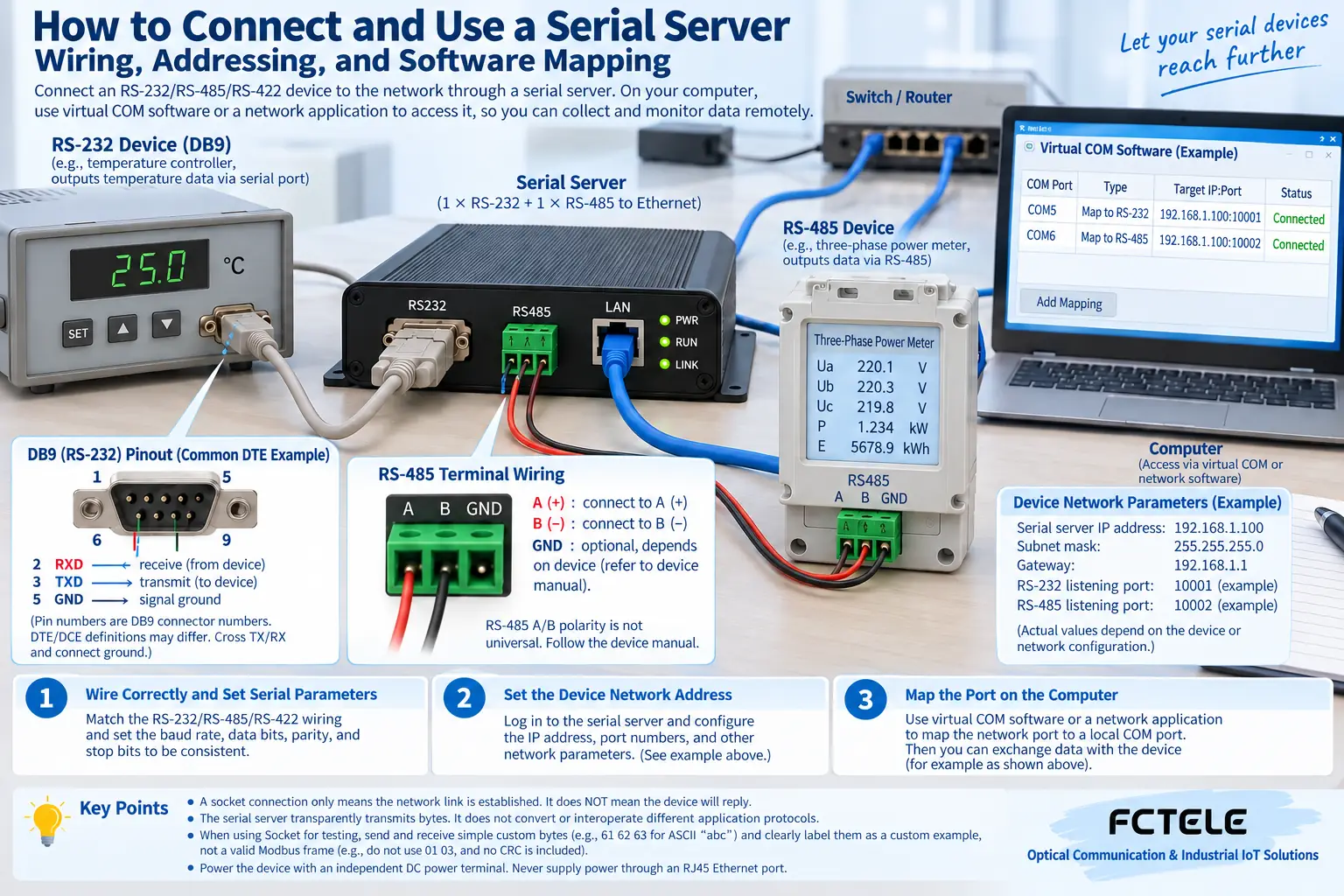
RS-232 is commonly a point-to-point connection. You need to check the transmit, receive, reference, and pin definitions, and not treat two DB9 shapes as the same wiring. The two ends need to match according to definitions such as transmit connecting to the other side’s receive, and whether control lines are used also depends on the device requirements.
Two-wire RS-485 uses a differential bus, and the A/B naming may differ across manufacturers, so it should be confirmed according to the actual signal definition. RS-422 may have separate differential pairs for transmit and receive, and the two-wire wiring method cannot be directly applied. Each electrical standard and communication protocol is not the same layer.
How to obtain serial parameters
Read the baud rate, data bits, parity, and stop bits from the device manual or existing configuration. The business protocol may also require a station number and command format. First connect one device with a short cable for testing, and after confirming it works, connect it to the field bus. Do not change all parameters at the same time from the start.
RS-485 also requires evaluating the linear trunk, branches, termination, and reference conditions. Bus devices cannot all transmit at the same time without coordination, and polling and timeouts need to be arranged by the business logic. A high network port rate does not mean the serial line can automatically withstand any polling frequency.
Which side initiates the network connection
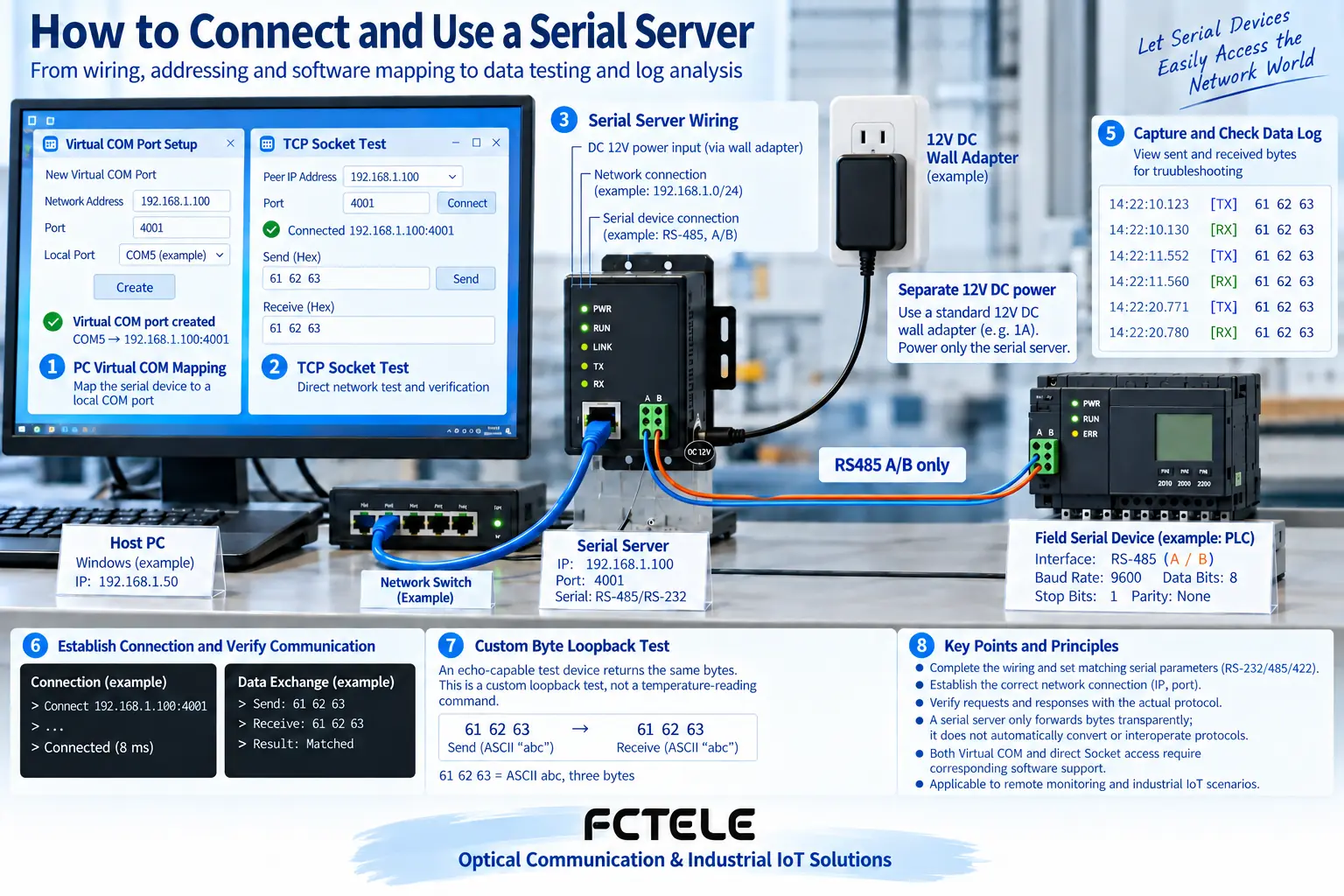
In TCP server mode, it listens on a specified port and the computer connects to it; in TCP client mode, it actively connects to the target host. The roles, IPs, and ports on both ends should correspond, and network reachability is only a prerequisite. If both ends are waiting, there may never be a business connection.
Set a unique IP, subnet, gateway, and access policy. Manage addresses and business ports according to the system plan. Do not copy default example addresses into production and cause conflicts, and do not directly expose management and control entrances to the public network for convenience.
How legacy software uses virtual COM
A virtual serial port driver maps a computer COM port to a remote server, and the old program still calls the original serial interface. The driver, operating system, and device model need to match. Control lines, exclusivity, and reconnection behavior must be tested. You cannot assume it is complete just because the COM number appears.
New software can establish a network connection directly according to device support, but TCP provides a byte stream and does not guarantee that each read corresponds to a complete command. The application should handle it according to protocol length or boundaries, and the serial packing conditions and application timeout also need to be coordinated.
How to choose between transparent transmission and a gateway
If the host computer still sends the original serial format, transparent transmission may be applicable; if the host computer sends Modbus TCP while the device uses RTU, a corresponding protocol gateway or software conversion is required. Ordinary transparent transmission will not automatically generate the correct address, CRC, or MBAP structure.
When data is received but the values are abnormal, check the address offset, type, multiplier, and byte order. If there is no response at all, observe whether the request reaches the serial port and whether the device recognizes it. Save the raw requests and responses to reduce guessing based only on displayed results.
Final verification before going live
Test continuous polling, network disconnection reconnection, and power failure recovery. For control commands, especially check the risk of repeated execution. For multiple channels, create a device-to-port comparison table. Through Feichang Technology Product Center check the specific mode and protocol capabilities, and do not equate the number of ports with concurrency capability.
Keep the configuration, version, topology, and normal messages, and back up before changes. Production equipment operations must follow shutdown and permission requirements. Communication recovery should not come at the cost of losing access control; this record can also help quickly distinguish network, serial, and business problems later.
The illustrations are schematic diagrams of scientific principles and application scenarios. The interfaces, structures, and measurement values in them do not represent specific product parameters; actual specifications must be based on model data and on-site measurements.
Translated from the Chinese technical article. Source first published: 2022-04-29. Source last revised: 2026-10-13T20:54:09+08:00. Read the Chinese source
