


An industrial switch whose power light is on but cannot be used is not necessarily a “dead motherboard.” The device may be starting up, repeatedly resetting due to unstable power, or already running but with incorrect management address or service configuration. First distinguish these states, then collect the model, light status, and startup logs to avoid mistaking a network problem for a hardware failure.
1. First define what you mean by “not starting”
Some people call it not starting when the power light is on but the ports are not lit. Some call it not starting when the web page cannot be opened. Others see all lights on for a while and think the self-test failed. These descriptions are too broad. You should clearly write down how much time has passed since power-on, how each indicator light changes, whether there is a repeating cycle, whether a link is established after connecting the port to a known good device, and whether operation logs can be observed.
The color of indicator lights and startup display are determined by the model design. All lights on for a period may be a normal self-test, or it may need further judgment. Do not copy the light status rules from another manufacturer. Managed and unmanaged products are also different: an unmanaged switch without a management page cannot be checked for “successful startup” by logging into a web page in the first place.
2. What else is there between the light being on and the system being ready?
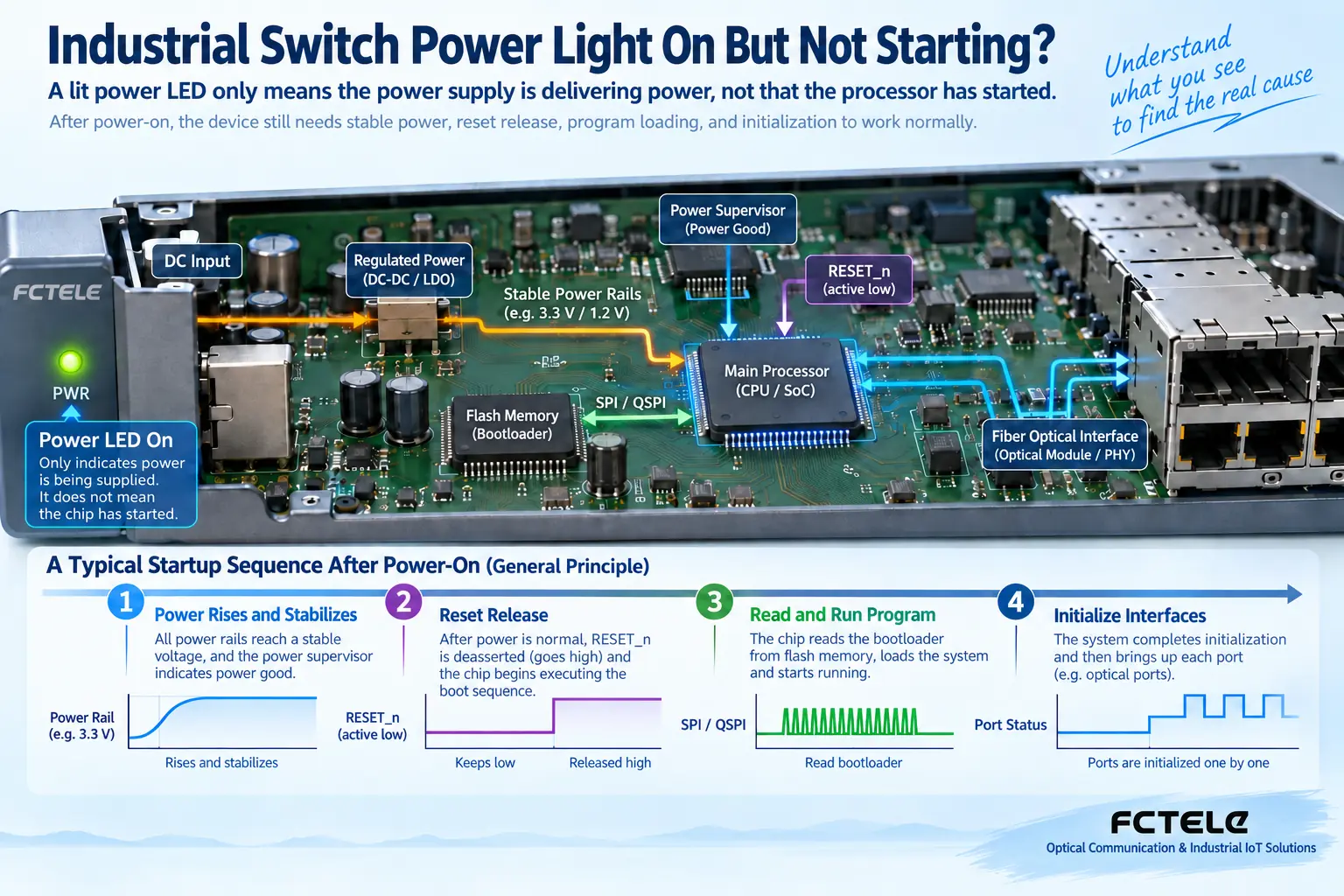
In managed devices with a processor, after power-on, the internal power supply usually needs to enter an allowed state, the clock and reset conditions must be met, the processor reads the boot program, and then initializes the switch chip and interfaces. Reset can be understood as keeping the device temporarily at a known starting point, and it begins running only after conditions are suitable. It is not a simple power switch, and it should not be released by shorting pins on site.
Power monitoring may observe whether the voltage is stable and affect reset release; low voltage may cause the system to return to the starting point. The node connected to the power indicator light and the processor operating conditions are not exactly the same, so the light being on cannot prove that the clock, storage, all power branches, and boot program are normal. A certain fault symptom also cannot directly correspond to a particular chip; there must be model circuitry and measurement evidence.
The process is not the same for different hardware architectures. Unmanaged products may not have such a management processor startup chain. The figure below is used to explain the general relationship of managed devices, not a repair schematic for a specific Feichang Technology model. Internal inspection requires authorized technicians; ordinary users should judge the scope of the problem from external evidence.
3. Repeated startup: first look at power changes
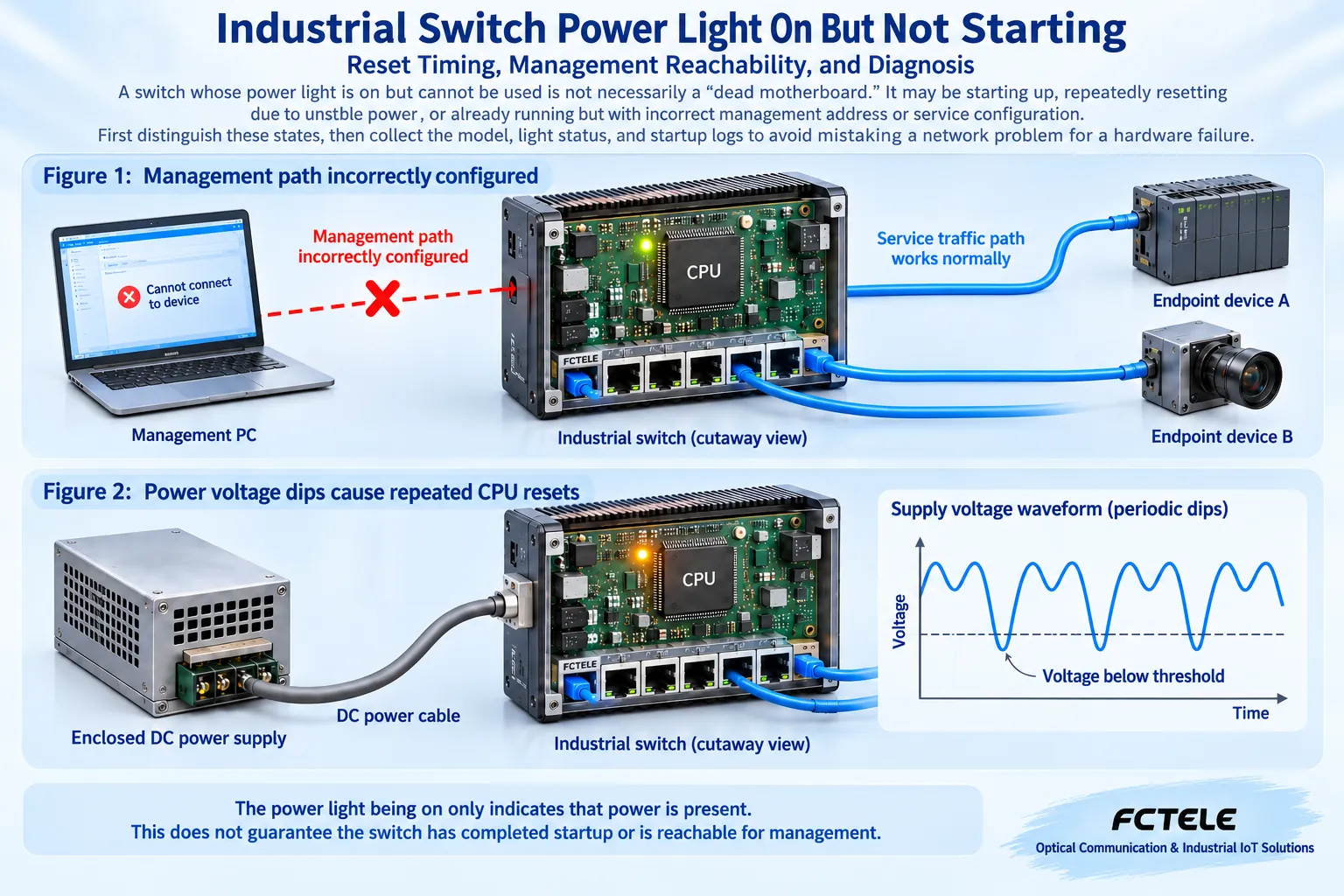
Repeated changes in light status, periodic port disconnections, and startup logs appearing again and again suggest that a restart may be occurring, but the cause still needs investigation. Insufficient power capacity, voltage drop at the device end, poor connectors, internal protection, software abnormalities, etc. can all produce similar results. First record the cycle pattern and its relationship with load changes, then have qualified personnel check the loaded voltage at the device end, rather than only looking at the power supply nameplate.
In a safely isolated environment, using a known good power supply with matching parameters and minimal peripherals to establish a baseline can help distinguish external power problems from device problems. The test power supply must meet the requirements of that model; do not try an unknown voltage just because the plug can be inserted. When AC power, opening the case, and live measurements are involved, stop ordinary user operations and leave them to capable personnel.
4. The device may already be running, but management is unreachable
If real terminals can communicate through the switch but the management web page cannot be opened, first check the management address, computer address, subnet, management VLAN, and access permissions. The management plane is the path for administrators to enter the device, and service forwarding is the path for terminal data to pass through. They are not the same thing. Normal service does not mean any terminal is allowed to manage the device, and management being unreachable does not mean the switch chip is not working.
The computer address and the device management address not being in the same subnet, accessing an old address, the management port belonging to a different network, or the required service not being enabled can all cause unreachability. Confirm according to the saved configuration and model instructions; do not restore factory settings right away. For devices without management functions, you should certainly not guess a “default management IP.”
Port lights not being on may also be because the peer is not powered, the cable is faulty, the optical module does not match, or the port is configured as shut down. First use a known good short link with matching parameters to check port capabilities, to avoid mistaking an optical port pairing problem for a complete device startup failure. A failed ping only means that this particular check did not get the expected response; it cannot independently prove that the device is frozen.
5. How do startup logs help with judgment?
If the model supports diagnostic interfaces such as Console, you can read logs using the corresponding cable and communication parameters according to the manufacturer’s instructions. Console is a local management entry point and is not the same as an ordinary Ethernet service port; similar interface appearance does not mean the same electrical definition. Without clear documentation, do not try to connect a serial cable, and do not connect live terminals to a computer interface.
The log should save the complete power-on process, not just the last line. If it stops at the same stage each time, you can give the firmware version, hardware version, and information about that stage to the manufacturer; if the log repeatedly appears from the beginning, continue investigating the restart cause. The meaning of specific error messages and recovery methods depend on the platform. This article does not provide cross-model universal flashing commands, nor does it treat someone else’s firmware from the internet as a replacement file.
6. Why can’t factory reset and upgrade be done first?
Factory reset may clear the management address, VLAN, ring role, and service configuration. A problem that was originally only about the management entry point may become a production interruption. Firmware upgrade requires confirming the model, hardware version, file source, upgrade path, and recovery method. If power is already unstable, rashly upgrading may also expand the problem. Before making changes, obtain on-site authorization, back up usable configurations, and arrange a maintenance window.
You can first check port status, uptime, and logs in a read-only way, then decide whether a restart or change is needed. Do not frequently cut power for trial and error, and do not randomly add cables in a production ring network. If there is abnormal heat, burning, water ingress, or a burnt smell, isolate according to procedures and do not continue trying to “fix” it by restarting.
7. Feichang Technology model verification and repair handover
Feichang Technology’s industrial switch categories include managed and unmanaged, different optical/electrical port and power supply versions. The official website’s four-electrical two-optical managed product information provides network functions and options such as dual DC and built-in AC, which can help confirm the purchased version, but the page cannot prove that all shipped models have the same startup process or the same management interface. The actual label, latest manual, and firmware information should be checked together.
When submitting a fault, write down the complete model, time of first occurrence, light status changes after power-on, actual power supply method, peripherals and topology, and whether there was a recent upgrade or configuration change. Attach logs and on-site photos that are allowed to be obtained, removing sensitive content such as account names and passwords. Only then can the manufacturer distinguish power, program, interface, and service problems, rather than directly suggesting a motherboard replacement based on the phrase “not starting.”
After repair, first confirm stable operation on a minimal link, then restore the original configuration and terminals according to the approved plan. Verify management access, actual services, continuous operation, and necessary fault recovery, and record the test conditions. The power light being on is one observation point, not a complete acceptance result; being able to stably complete the planned services is the final goal.
References:Feichang Technology industrial switch categories; Four-electrical two-optical managed product details; TI power good signal and reset relationship explanation. The device mechanisms are for science popularization and do not mean that a specific switch uses the same chip or the same circuit.
Translated from the Chinese technical article. Source first published: 2019-09-05. Source last revised: 2026-10-13T20:37:04+08:00. Read the Chinese source
