


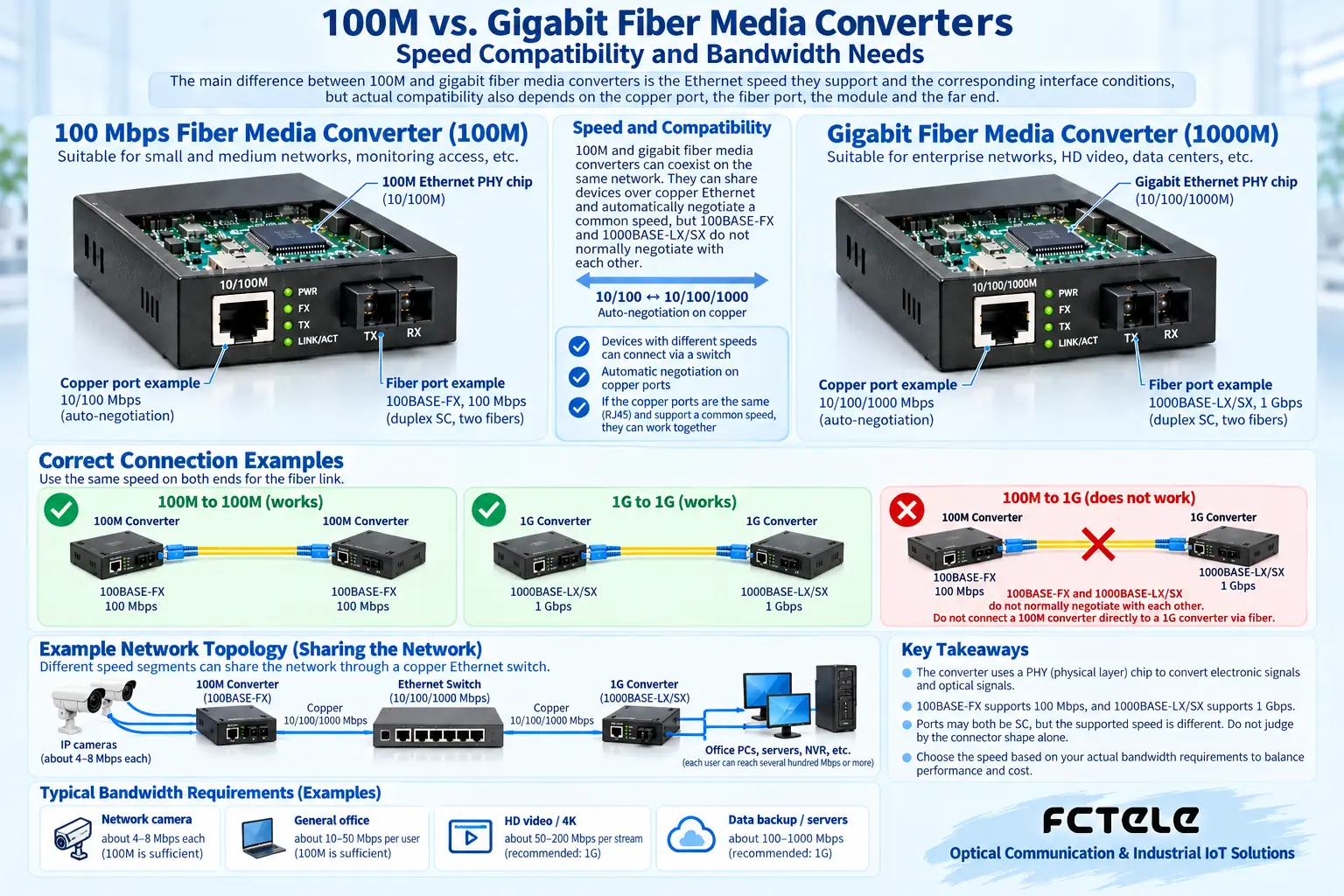
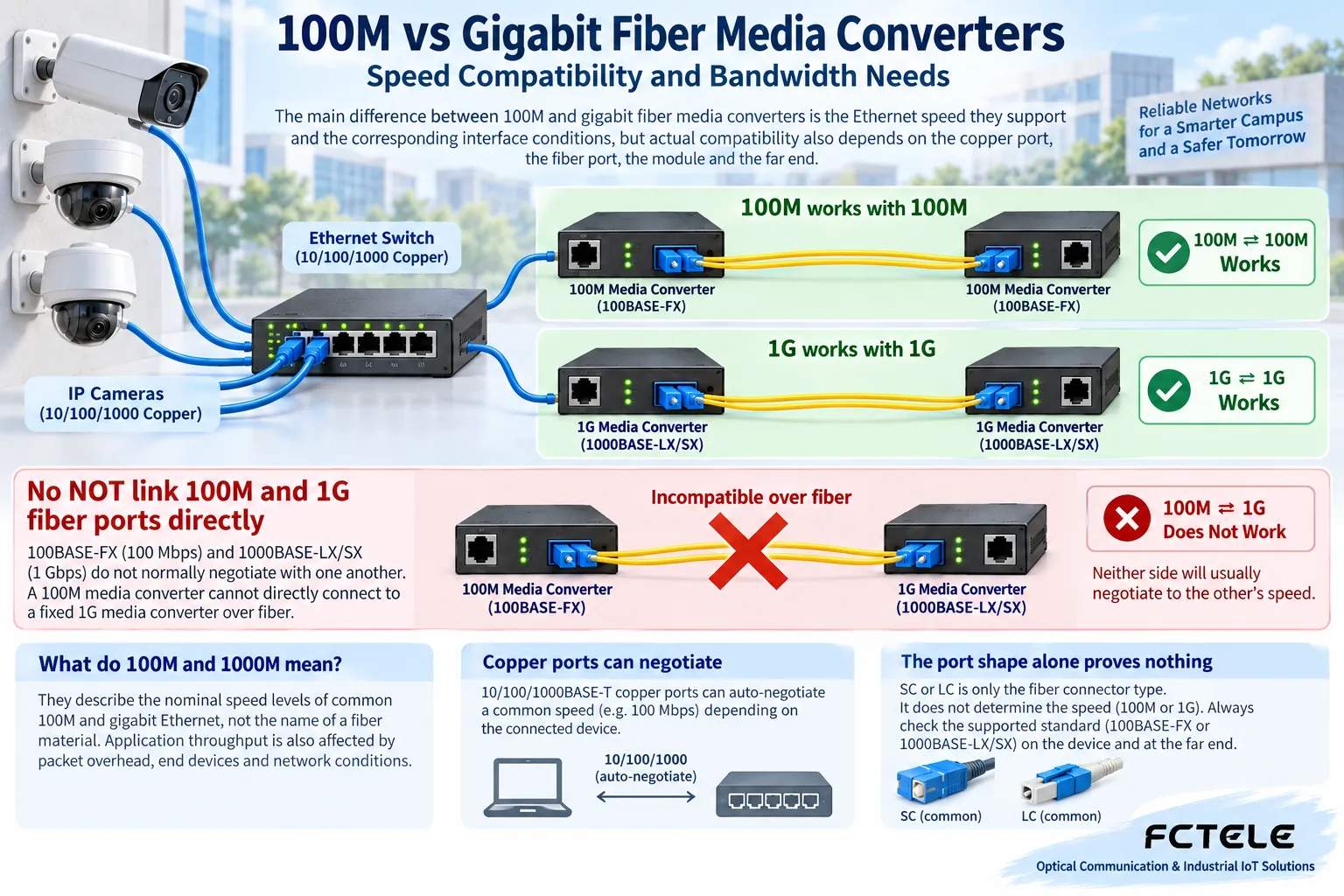
The main difference between 100M and gigabit fiber media converters is the Ethernet speed they support and the corresponding interface conditions, but actual compatibility also depends on the copper port, the fiber port, the module and the far end. A gigabit device will not automatically turn a 100M uplink into gigabit, and you cannot judge the speed just from an SC or LC connector.
What do 100M and 1000M mean
They describe the nominal speed levels of common 100M and gigabit Ethernet, not the name of a fiber material. Application throughput is also affected by packet overhead, end devices and network load, so the nominal number cannot be treated as a guaranteed speed for file copying or camera services.
The copper port and the fiber port of a media converter need to be checked separately. Some devices support multi-speed negotiation on the copper port or specific speed conversion, while others use a fixed combination. The fact that a light comes on after plugging a gigabit device into the copper port does not prove that the fiber link is already running at gigabit.
Can the original fiber cable still be used
You need to compare the fiber type, distance, wavelength and actual loss that the new module supports. Whether a fiber cable is suitable is determined by the corresponding optical standard and line conditions. It is not true that because it previously ran 100M it can always run gigabit, nor is it true that gigabit always requires replacing all fiber.
The speeds and optical standards at both ends need to be compatible, and single-fiber BiDi also requires complementary transmit and receive parameters. SC, LC and patch cord colors are not enough to judge speed; an adapter changes the physical interface but will not automatically convert incompatible protocols or optical conditions.
Why changing one device does not necessarily make things faster
The most limited link in the chain may be the terminal, the copper port, the fiber port, the uplink or the application server. If the other end only supports 100M, adding a gigabit media converter does not guarantee interworking, let alone overall gigabit. You need to confirm the complete path and the specific speed conversion capability.
When multiple cameras share an uplink, capacity and margin should be planned according to actual bitrate and peak demand, not just by counting cameras. Device compression method, frame rate and scene affect the bitrate, so a single fixed per-camera bandwidth number cannot summarize all surveillance.
When is an existing 100M system suitable for upgrading
When traffic approaches available capacity and queuing or packet loss affects the business, you should first measure to confirm the bottleneck, then evaluate an upgrade. If the business volume is small and the fault comes from power, contaminated end faces or configuration, switching to gigabit may not solve it. Speed and stability cannot be directly equated.
An upgrade should also check the far-end switch, optical module, copper cable, optical power and terminal capability, arrange a maintenance window and back up the configuration. Do not randomly mix unknown modules at a production site, especially since dedicated optical ports and Ethernet optical ports may be different.
How to verify a new link
First test compatible devices with a short cable, record the negotiation and optical status on both sides, then connect the site line and measure power. Test the actual business and error counters, and use a suitable load tool when necessary. Ping reachability cannot replace throughput and continuous operation checks.
The measurement method needs to record frame length, traffic, tools and test path, to avoid mistaking computer storage or CPU limits for insufficient network bandwidth. After a power failure and recovery, you should also confirm speed and business, not just check that a light is on once.
Write these items clearly when selecting a model
Provide business volume, copper port and fiber port capability, far end, fiber type, core count, wavelength and environment, and check the specific model through Feichang Technology Product Center. Keep the measurements of the original system and after the upgrade, so you can explain where the improvement comes from.
Gigabit does not mean the fiber will supply power; the far end still needs a correct power supply. Industrial applicability also needs to be confirmed independently; you cannot infer water resistance, wide temperature range or interference resistance from a speed label. End-face maintenance and label records are equally indispensable after an upgrade.
The figures are illustrations of scientific principles and application scenarios; the interfaces, structures and measurement values in them do not represent specific product parameters. Actual specifications must be based on model documentation and on-site measurements.
Translated from the Chinese technical article. Source first published: 2020-06-18. Source last revised: 2026-10-13T20:58:17+08:00. Read the Chinese source
