


The most direct difference between 100M and gigabit is port speed: 100Mb/s versus 1000Mb/s, a tenfold difference. But gigabit does not mean every application is ten times faster, nor does it automatically mean management, PoE, or stronger security features. When choosing an industrial switch, first look at how much data each link actually carries, then separately check management, power supply, environment, and redundancy requirements.
Speed means how many bits a link can transmit per second
The lowercase b in Mb/s means bit; the uppercase B in MB, commonly used for file size, means byte, and one byte equals eight bits. Therefore, 100Mb/s converts to 12.5MB per second, and 1000Mb/s converts to 125MB per second. This is only a unit conversion and cannot be directly taken as actual file download speed. Ethernet frames, network protocols, acknowledgment messages, and application processing all take time, and server disks, terminal performance, and other links may also become the limit first.
Comparing the same example data block of 1500 bytes, without extra overhead, serial transmission on a 100Mb/s link takes 120 microseconds, and on a 1000Mb/s link it takes 12 microseconds. Gigabit shortens the time to send these bits; it does not eliminate propagation time, switch queuing, application computation, or recorder disk-write waiting. The actual line time occupied by a complete message should also account for the corresponding overhead, and this set of examples cannot be used to promise end-to-end latency.
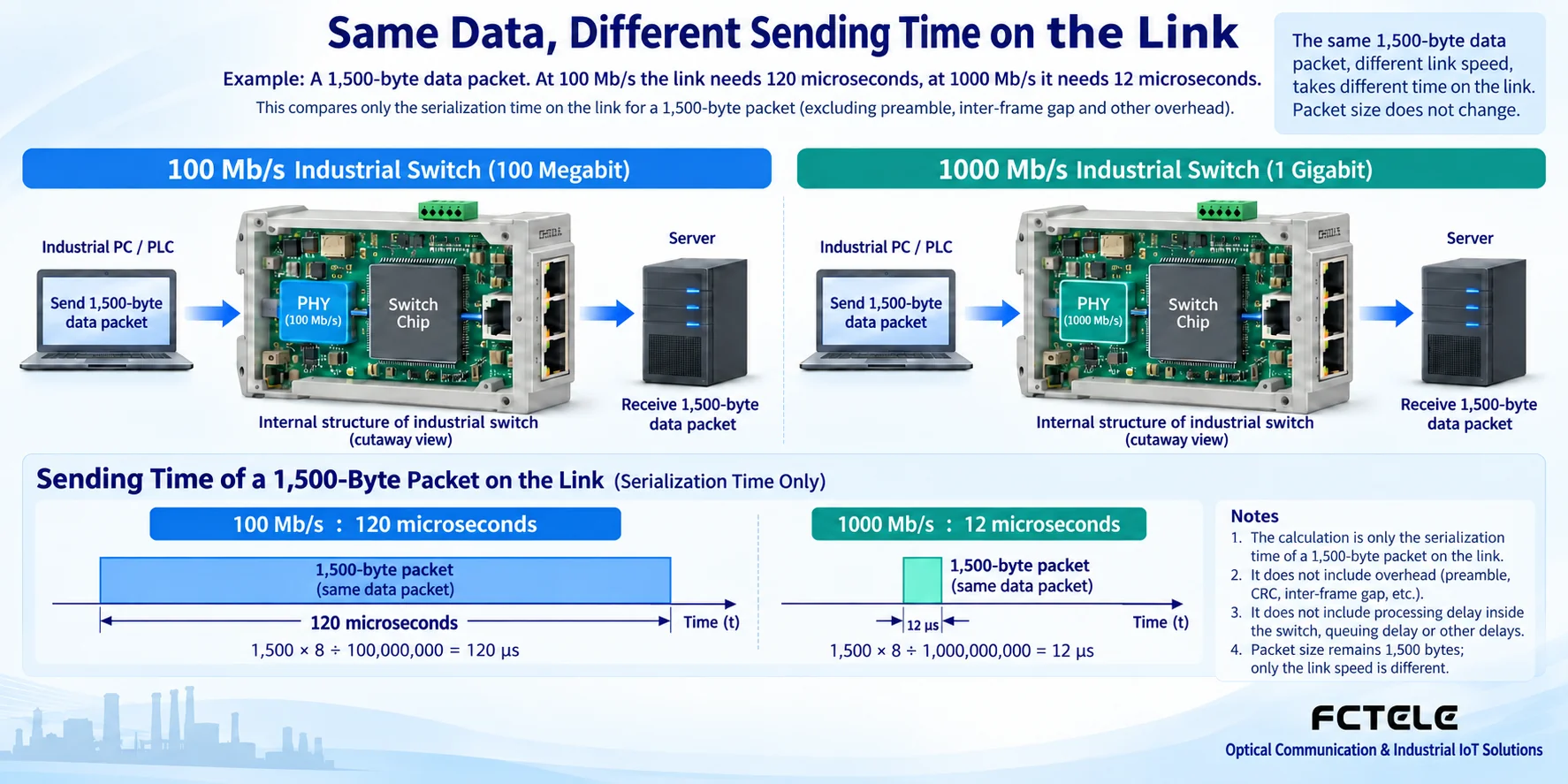
How a switch sends data from multiple ports
After a cable connects to an electrical port, the physical layer circuit receives the signal and recovers the data. The switch chip decides the output port based on the forwarding table and configuration, and then the corresponding port sends it. When multiple inputs transmit to one output at the same time, messages need to queue; if the output cannot keep sending fast enough, the queue will build up, and after the buffer is exhausted, packets may be dropped. The number of ports, output speed, internal switching capacity, and forwarding performance are all worth checking; you cannot just look at the word “gigabit” on the casing.
For example, four access links each transmit 20Mb/s to the same output, totaling about 80Mb/s. If each becomes 30Mb/s, the total is about 120Mb/s, which already exceeds the line rate of a 100Mb/s output, before considering other overhead. Changing the aggregation output to gigabit may solve this capacity limit, but if the network port behind the recorder is still 100M, the bottleneck has only moved. The judgment should be made segment by segment along the complete data path.
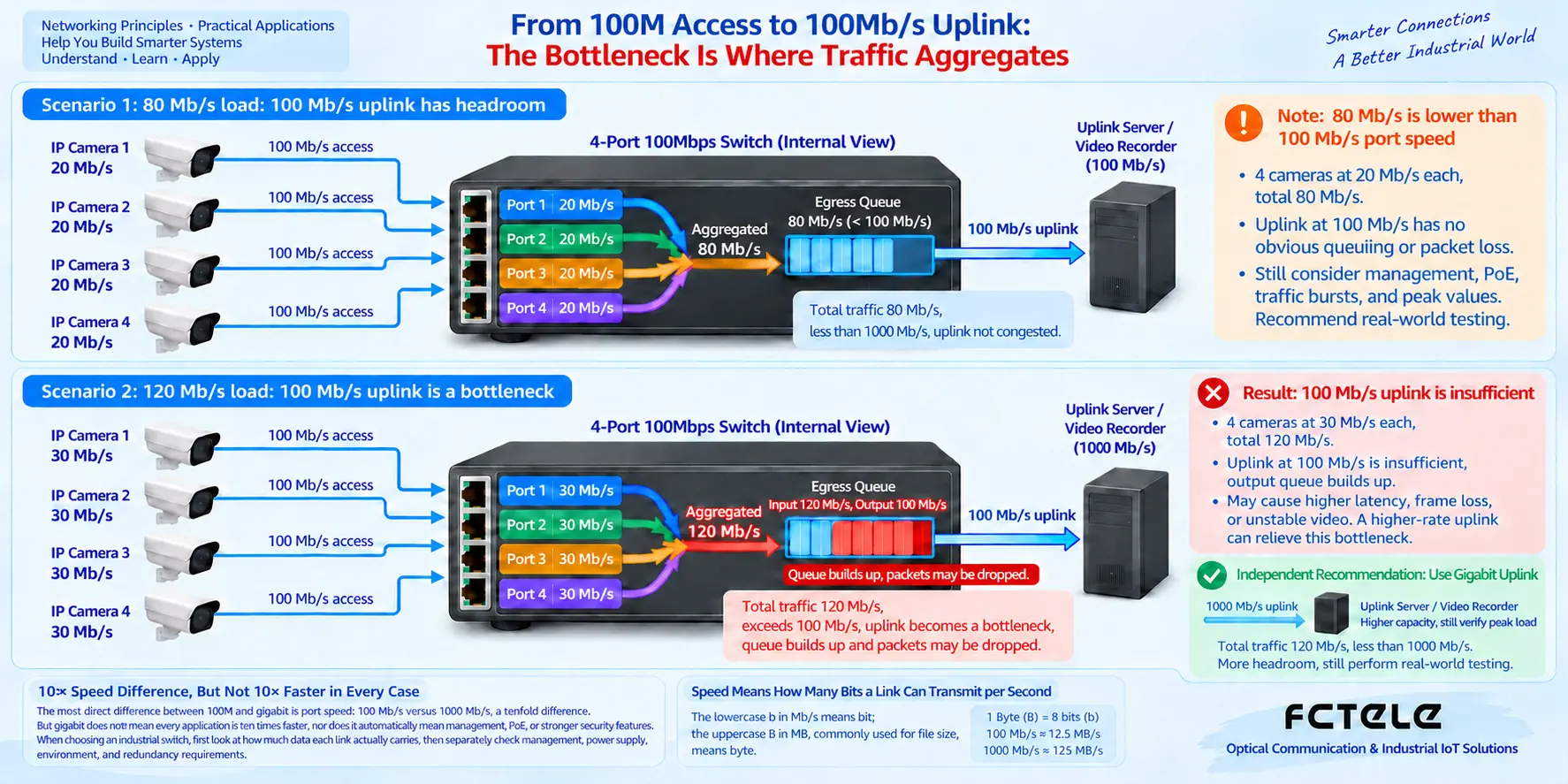
100M access with gigabit uplink is a normal mixed configuration
A terminal’s traffic volume is very small, so its 100M access port can meet the need; after multiple terminals are aggregated, the uplink may need gigabit. Therefore, a product may be all-100M, all-gigabit, or 100M electrical ports plus gigabit optical ports. The procurement list should clearly state the quantity and speed of each type of port, to avoid mistaking “has gigabit uplink” for every port being able to run gigabit. The shape of an SFP slot also cannot prove speed; the compatibility relationship between the slot, module, and the opposite end must be checked.
The negotiation result of a twisted-pair electrical port depends on the capabilities of both sides and the cabling quality. When a gigabit switch connects to a device that only supports 100M, under normal conditions they can only communicate at a commonly supported speed. When gigabit is needed but negotiation results in 100M, check the terminal network card, all wire pairs in the cable, connectors, and port settings; you cannot assume the speed is up to standard just because the indicator light is on. Do not arbitrarily force speed on one end while leaving a mismatched setting on the other; check speed and duplex status according to both devices’ manuals.
Speed, management, and PoE must be selected separately
Management features let people view and configure the device, and may include VLAN, ring networking, multicast, logs, or access control, depending on the model and firmware. A 100M device can have management, and a gigabit device can also be unmanaged. Industrial environment adaptability also needs to be checked separately; you cannot say 100M is only suitable for home use, or use gigabit speed to prove suitability for any production control network.
PoE is the ability to power compatible terminals through Ethernet cabling, and it is a different metric from link speed. The power supply standard, per-port capability, total power budget, and terminal requirements must be checked separately; “gigabit” itself does not guarantee PoE+ support, and “100M” does not mean power cannot be supplied. Device power consumption and price are determined jointly by ports, chip, management, power supply, and environmental design; conclusions such as gigabit always being more power-efficient or fixed at four times the price cannot be applied.
How specific products should be put into the procurement list
Feichang Technology’s DIN-rail switch catalog lists both 100M and gigabit products, which can be filtered by on-site port combination. Its “Managed Industrial DIN-Rail 4-Port 10G Optical + 8-Port Gigabit Ethernet Layer 3 Switch” details separately describe electrical ports, optical ports, and management capabilities, showing that port speed and overall device functions need to be looked at item by item. When multi-node aggregation is needed, a high-speed uplink may be valuable; when only connecting a few low-traffic terminals, this configuration does not need to be copied. Modules, power supply options, and firmware functions should still be confirmed according to the specific order configuration.
Requirements given to a supplier should at least include terminal interfaces, traffic volume per channel, uplink aggregation volume, whether ring networking or management is needed, whether power is supplied, and installation and environmental conditions. Quotes should be compared for the same configuration, while also considering whether existing cabling can continue to be used, whether maintenance is convenient, and where future expansion will go. Increasing link speed is only one option and should not replace a complete engineering check.
During acceptance, look at port status and also real services
First record the negotiated speed, duplex, and connected object of each key port, and confirm they match the plan. Then run the planned concurrent services in an isolated or approved test environment, and check packet loss, errors, output utilization, and application response. Test once when terminals are working normally, and observe again during peak business hours and when multiple users access simultaneously. If only one link is congested, locate that segment first; if network counters are normal but the application still lags, then check the server, disk, and terminal processing.
Before changes, back up the configuration and prepare a rollback method; do not randomly conduct full-load stress tests on a production network. The acceptance report should save device configuration, port status, test load, and service results, rather than just writing “cable plugged in.” Only in this way can it explain whether 100M is sufficient, which segment gigabit specifically improved, and also leave a comparable baseline for future expansion.
Product basis:Feichang Technology DIN-rail industrial switch catalog,10G 4-optical 8-Gigabit Ethernet product details. The schematic diagrams in this article are general illustrations, not actual product photos or measurement results.
Translated from the Chinese technical article. Source first published: 2020-08-03. Source last revised: 2026-10-13T20:24:48+08:00. Read the Chinese source
