


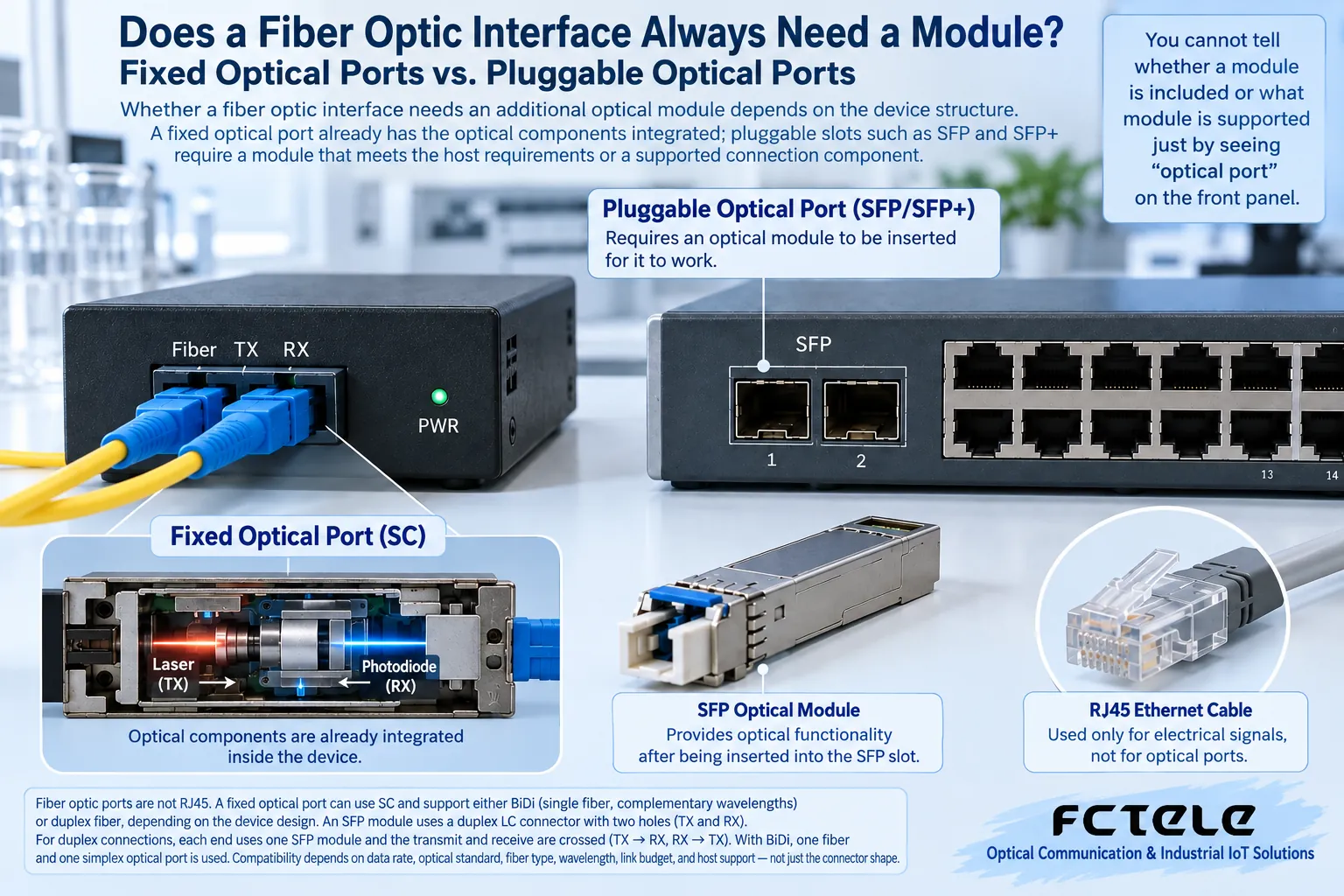
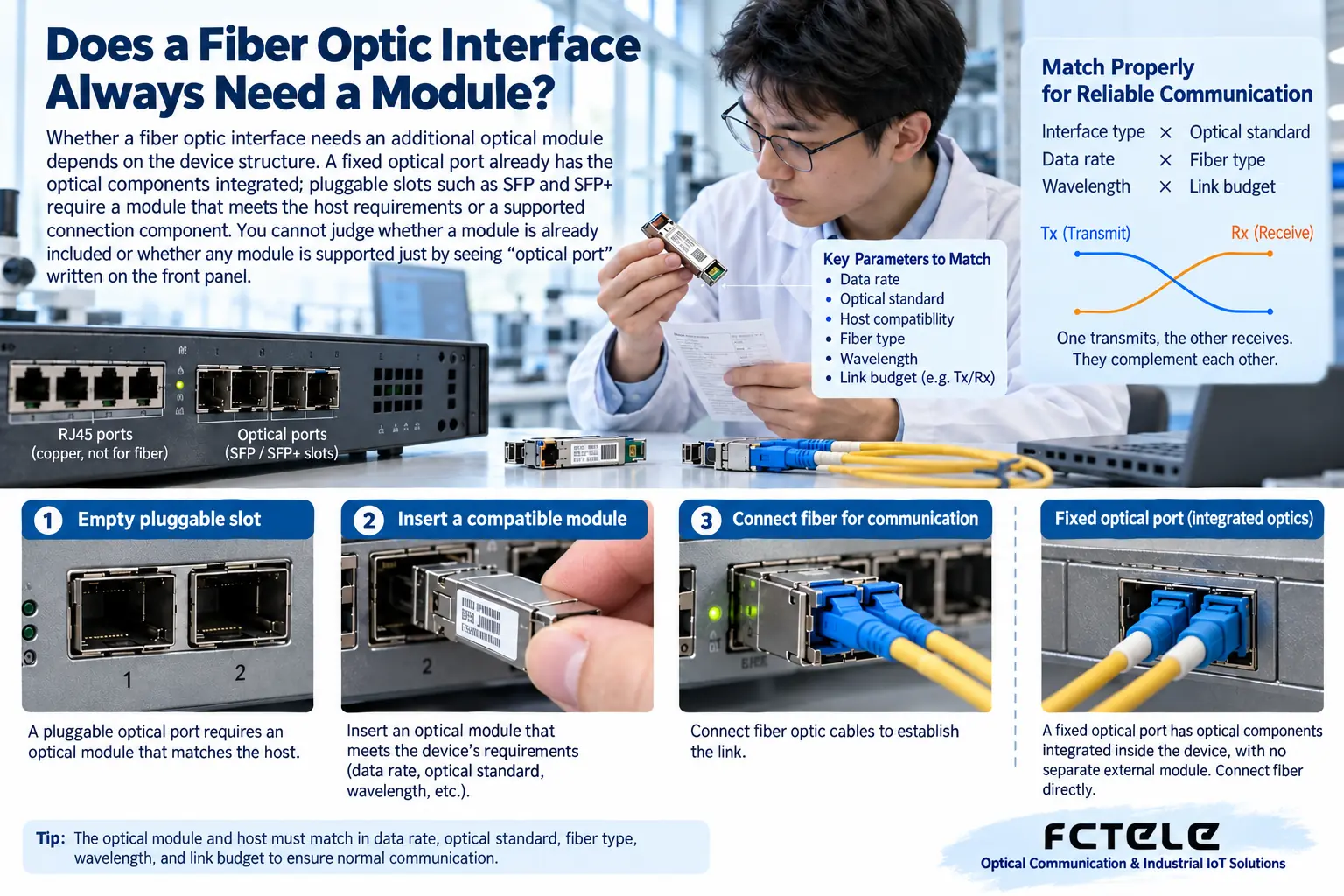
Whether a fiber optic interface needs an additional optical module depends on the device structure. A fixed optical port already has the optical components integrated; pluggable slots such as SFP and SFP+ require a module that meets the host requirements or a supported connection component. You cannot judge whether a module is already included or whether any module is supported just by seeing “optical port” written on the front panel.
Two similar-looking interfaces can be different inside
The transmit, receive, and related circuits of a fixed optical port are already inside the device, and the corresponding fiber is connected directly on the outside. The SC interface of a common transceiver may belong to this structure. Its rate, wavelength, and fiber type are usually determined by the product configuration; changing the patch cord cannot change the internal optical standard.
A pluggable interface separates the host from the external optical component. An empty SFP slot does not have complete external optical transmit and receive capability and needs the correct component. Choosing this structure makes it easier to replace modules according to the plan, but it does not mean that anything can be used in an empty slot.
Why modules of the same size may still not work
The rate, module type, power consumption, firmware, and vendor compatibility rules supported by the host need to be checked. SFP and SFP+ are similar in appearance, but that does not mean all hosts support cross-rate operation. Just because a module can be inserted does not prove electrical and protocol compatibility.
Some host slots may also support components such as electrical port modules, DAC, or AOC, depending on the documentation. The slot name does not guarantee that the connection medium must be detachable fiber. Do not treat the RJ45 port of a copper SFP module as an optical connector.
If the module is chosen correctly, the opposite end must also be chosen correctly
Both ends must be checked for rate and optical standard, single-mode or multimode, wavelength, number of fiber cores, connector, and optical power conditions. For dual fiber, TX commonly connects to the opposite end RX; for single-fiber BiDi, the transmit and receive wavelengths need to be complementary. Two modules both marked with a certain distance do not prove that they are a matched pair.
The optical power budget includes line, connection, and splice losses, and appropriate margin must also be left while avoiding exceeding the receive range. The kilometer figure is only a clue to capability under specified conditions; even a short distance may fail if the configuration or power conditions are unsuitable.
How to confirm at purchase whether a module is included
Ask clearly whether the device is a fixed optical port or an empty slot, whether the quotation includes a module, and if so, the included module model, rate, and pairing parameters. Also confirm whether patch cords, optical cables, and splicing materials are billed separately. Writing only “two optical ports” easily creates delivery ambiguity.
If on-site replacement is needed, record the original host, module labels, and version, and first have the supplier confirm compatibility. Do not treat a new module as a complete replacement just because the old module uses LC and the new module also uses LC.
Inspection order before and after installation
According to the host instructions, confirm whether replacement and hot swapping are supported, use anti-static measures, clean and inspect the optical end face, and avoid looking directly into the optical output port. First test with a short link under known normal conditions, then connect the on-site optical cable and check status and power.
After the optical port is established, the actual service, error counters, and specified recovery conditions still need to be tested. Being able to read module information in the management interface does not mean the network is already forwarding correctly; VLAN or opposite-end configuration may also prevent the application.
Replace “Does it need an optical module?” with one complete description
Describe the host model, slot, opposite end, fiber type, number of cores, and distance, then use Product Center to check the components. The difference between a fixed optical port and a pluggable optical port is structure and maintenance method; you cannot simply judge which one is necessarily better.
A fixed component failure may require replacing or maintaining the entire device, while a pluggable solution adds module compatibility and spare-parts management work. The choice should match the project maintenance capability, interface requirements, and available evidence, rather than only pursuing a front panel that can be plugged and unplugged.
Spare parts should also record the ports used and opposite-end configuration, keep dust caps and original packaging, and avoid mixing modules that look the same but have different optical specifications. After replacement, retest the service, not just confirm that the module can be recognized.
Translated from the Chinese technical article. Source first published: 2021-02-04. Source last revised: 2026-10-13T20:58:17+08:00. Read the Chinese source
