


Fiber can be connected to Ethernet through suitable equipment, but it cannot be turned directly into RJ45 with a passive adapter. Carrier PON broadband usually requires an optical modem ONT; point-to-point Ethernet optical links can use matched fiber media converters or switch SFP optical ports. First identify the protocol carried over the fiber, then choose the equipment. The same connector does not mean the two ends can interoperate.
What needs converting is not just the appearance of the cable
Ethernet electrical ports in network cables transmit electrical signals, while fiber transmits optical signals. Conversion equipment needs to handle the corresponding physical interfaces and move recognizable data from one medium to another. Fiber cannot be connected directly to copper wire like changing a fitting on a water pipe; optical-to-electrical conversion requires active circuits and power.
More importantly, fiber can carry different communication systems. PON access, point-to-point Ethernet, video optical transmission, and other optical communications may have completely different interface protocols even if the connectors look the same. Before looking for equipment, ask clearly where the line comes from, what system is on the other end, what the current interface standard is, and what the service requirements are, instead of only saying “there is a fiber.”
Home broadband: ONT connects to the carrier PON system
A PON network connects multiple user-side ONTs through a carrier-side OLT, fiber, and passive splitters. What people commonly call an optical modem is usually an ONT or a related terminal. It needs to complete registration or authentication according to the access system requirements and handle that system’s upstream and downstream mechanisms. It is not a simple replacement for an ordinary Ethernet media converter.
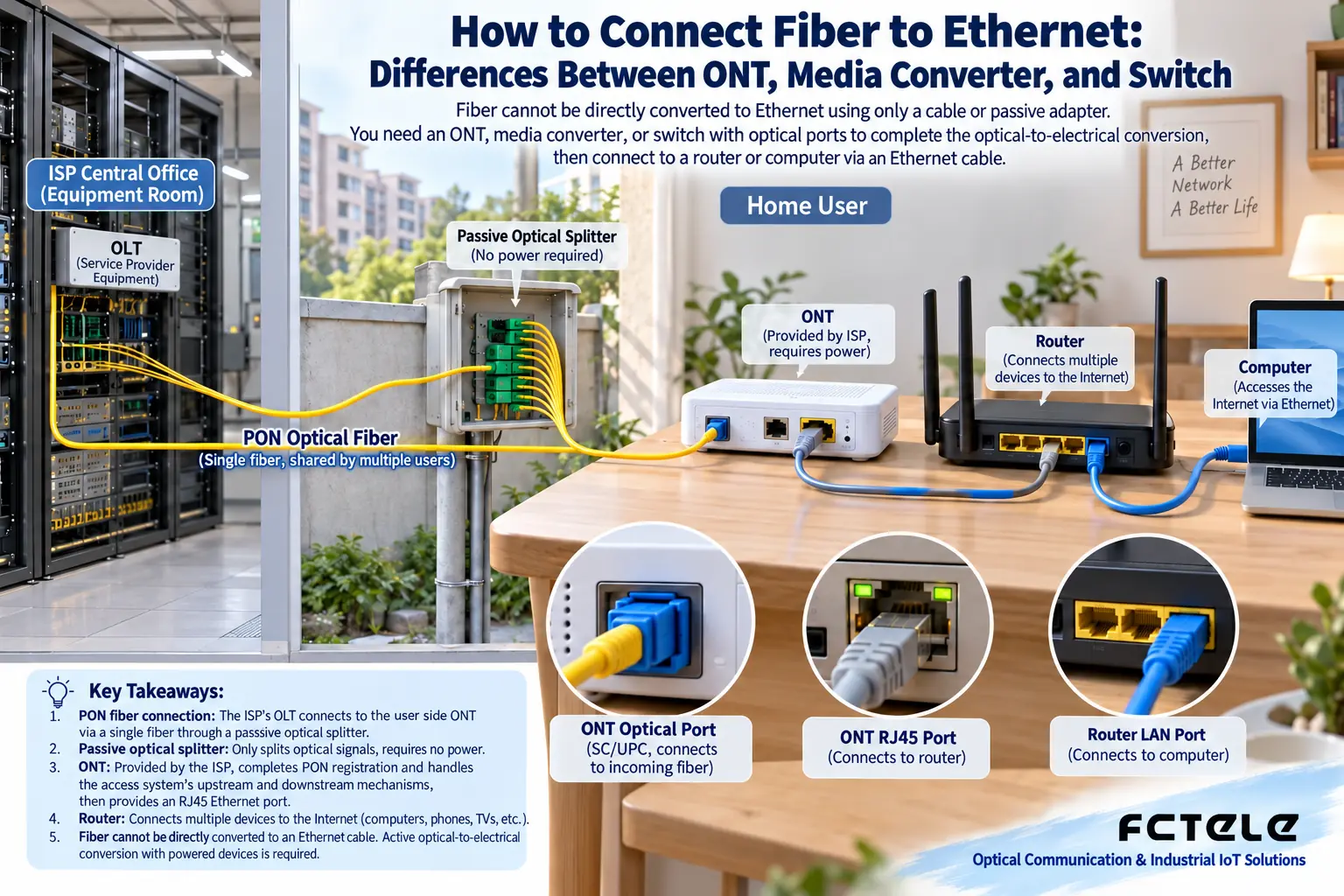
The optical modem may work in bridge or router mode, and may also integrate Wi-Fi, voice, and other functions. Bridge mode does not mean the optical modem is unnecessary, and a router may not necessarily connect directly to the carrier fiber. Whether you can provide or replace the optical modem depends on the access standard, device compatibility, and carrier configuration requirements. Confirm first; do not buy a similar-looking optical device and try plugging it in.
When the LAN port of the optical modem connects to a router, it should be clear according to the configuration who is responsible for the internet connection, address allocation, and authentication. If the optical modem is already routing and the router behind it also performs routing, double address translation may occur, and some remote access and applications require extra handling. A fault may also be a configuration problem, not a failure to convert fiber to Ethernet.
Campus point-to-point: media converters extend Ethernet
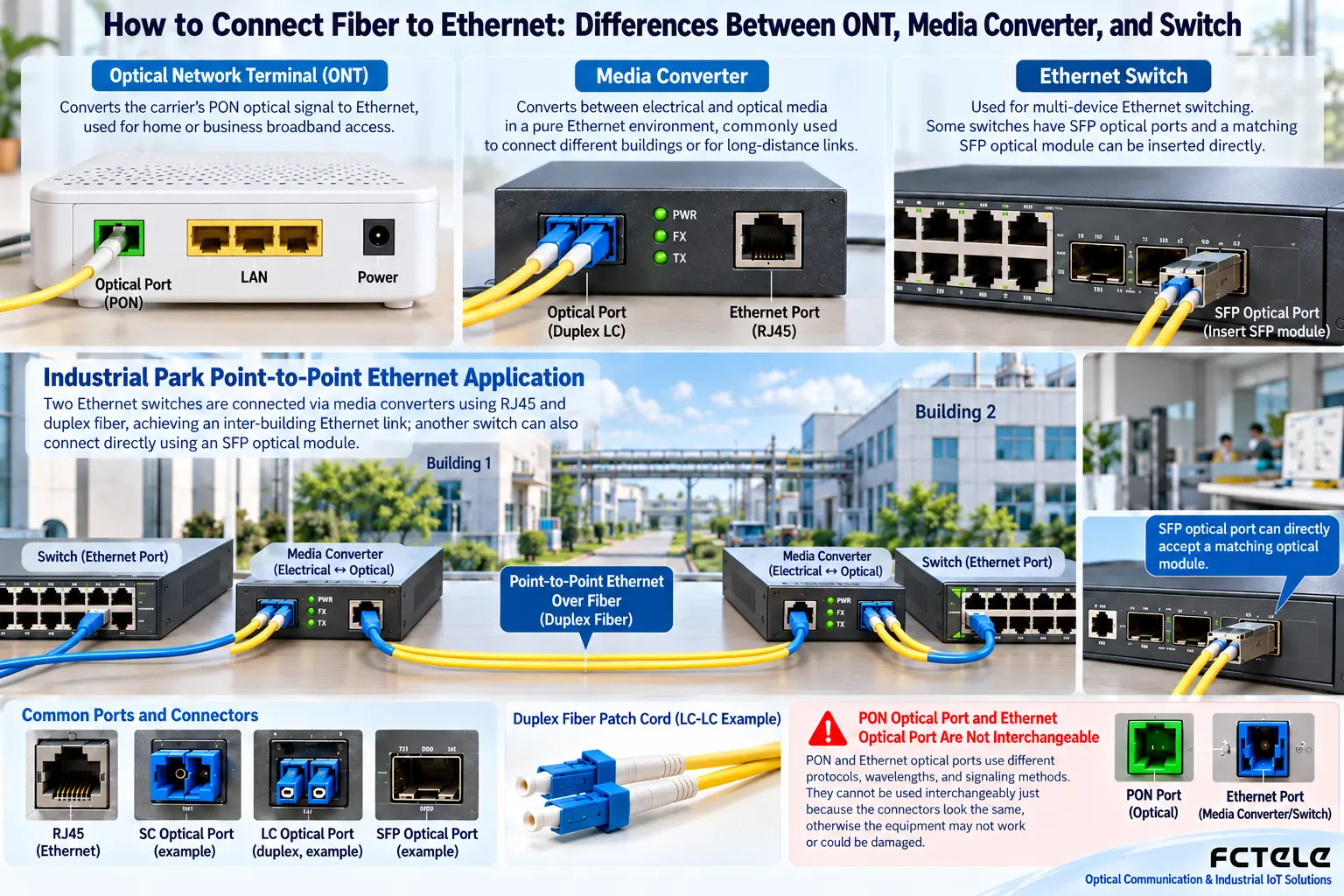
When the distance between two switches exceeds the design range of a copper cable link, the local end RJ45 can connect to media converter A, fiber can connect to remote media converter B, and RJ45 can then connect to the remote switch or terminal. Both ends need to match in rate, fiber type, wavelength, and power range. Usually each unit has both transmit and receive capability; it is not one end only transmitting and the other only receiving.
If the switch already has an SFP optical port that supports the corresponding module, a matched optical module can directly connect to the other end, without adding a separate media converter on each side. Whether a media converter and a switch optical port can be mixed depends on checking the interface standard and configuration. It is not necessary for both devices to have the same housing or brand.
Three devices, what problem does each solve?
The optical modem solves user terminal access to a specific optical access system; an Ethernet media converter focuses on connecting copper ports and optical ports; an optical port switch can also connect multiple ports and perform switching and forwarding, and managed models may provide VLAN, redundancy, or routing functions. You cannot assume that because all can accept fiber, their functions and network roles are the same.
A media converter may also integrate a switching chip or multiple electrical ports; specific capabilities depend on the model. An ordinary converter does not necessarily provide routing, address allocation, PoE power, or full network management. If the remote end connects to a PoE camera, confirm a compatible power supply device separately; if cross-subnet access is needed, there must be a corresponding routing design. Optical-to-electrical conversion itself will not automatically solve these requirements.
One of the most common wrong purchases: treating the connector as the standard
SC or LC describes the connector shape, and APC and other endface types involve connection requirements, but neither can independently explain the protocol of the entire link. When purchasing, check the remote device model and documentation, and verify module rate, single-mode or multimode, single-fiber or dual-fiber, wavelength, and receive power window. Do not judge compatibility solely by connector color.
For single-fiber BiDi, the transmit and receive wavelengths at both ends should be complementary; for dual-fiber, make sure TX goes to the remote RX. When a long-distance model is used on a short link, it may also be necessary to check the overload risk. The nominal distance is only one selection condition; connectors, splices, and line loss in the actual optical path should still be included in the budget.
If the line source is unknown, first ask the line management party for the remote end and standard information. Do not casually connect test equipment to fiber that is in service. When planning a new line, also specify whether it is carrier access or a self-built Ethernet interconnection, so that later construction, procurement, and maintenance use the same set of interface conditions.
Divide acceptance into three layers: access, link, and internet
In a PON scenario, first confirm terminal registration and access status, then confirm the LAN connection and internet configuration; in an Ethernet scenario, first confirm the optical port and electrical port link, then confirm VLAN, address, and routing. Finally, test stability with real services. A single light being on only represents the condition it corresponds to and should not be taken as proof that the entire network is normal.
Organize the line source, remote device, fiber, and port numbers, and record normal status and configuration. When a problem is found, first determine whether it is power, optical path, physical link, network configuration, or application service, then replace sections and change only one condition at a time. Only in this way can you accurately answer “which conversion device should be used,” instead of continuously buying more adapters.
Ethernet optical module type reference:Cisco Ethernet SFP documentation. Carrier access should separately verify PON equipment requirements.
Translated from the Chinese technical article. Source first published: 2020-01-02. Source last revised: 2026-10-13T23:18:15+08:00. Read the Chinese source
