


A multi-serial server sends multiple RS-232, RS-485 or RS-422 serial data streams into an IP network, letting a computer remotely access the original serial devices. Each channel needs its own electrical wiring, serial parameters and network connection; transparent transmission only moves bytes, and does not automatically translate any serial protocol into another protocol.
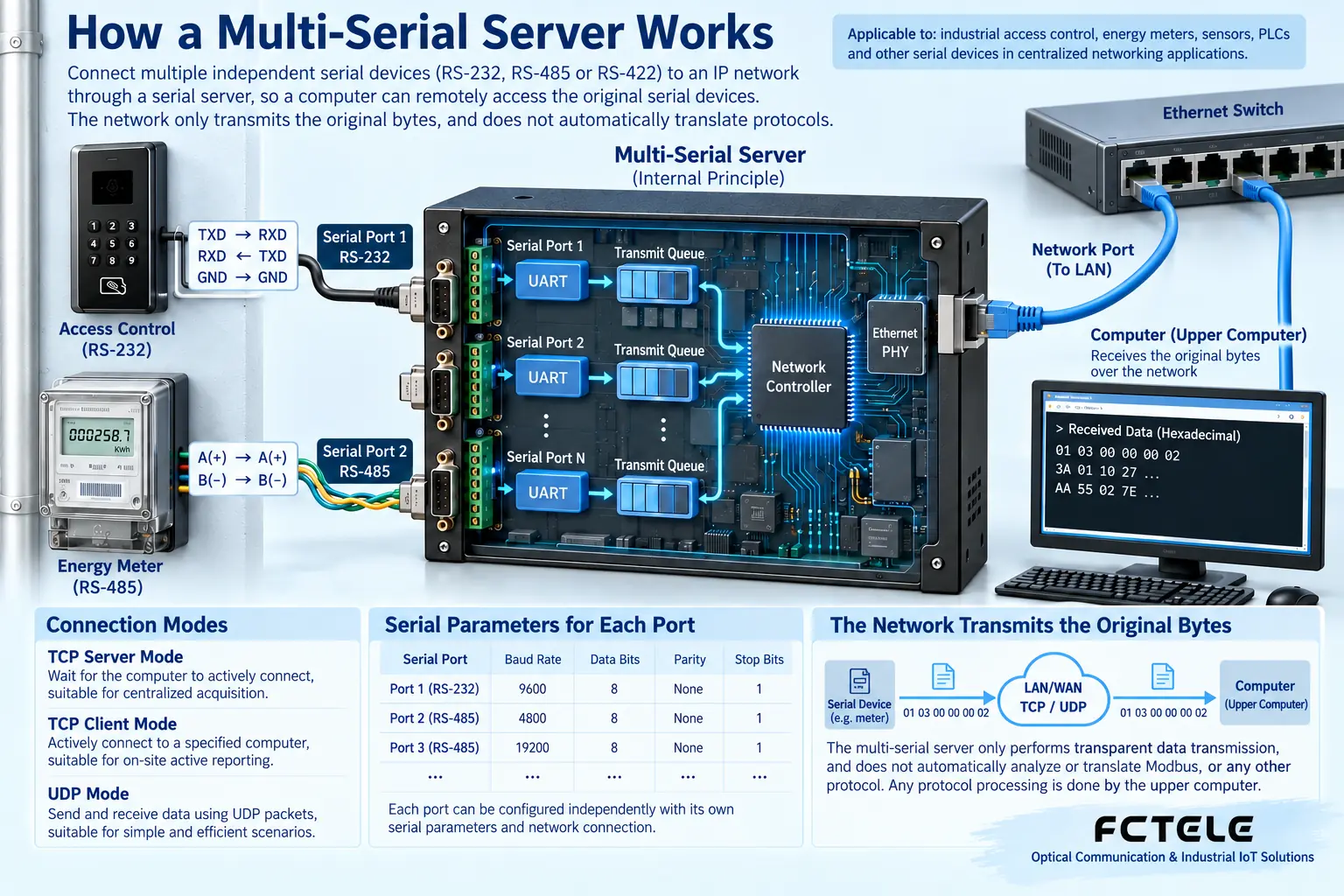
Inside one device, which functions work together
The instrument first organizes measured values into serial bytes. The serial server uses a UART to receive these bytes, then sends them into the network according to the packing conditions. After the remote software receives them, it interprets the business meaning. Reverse control commands travel back to the instrument through the network, buffer and serial output, forming a two-way channel.
Multiple serial ports do not mean all data is mixed onto the same line. Each channel usually has independent parameters and mapping relationships; for example, the first channel connects to access control, and the second channel connects to an electricity meter. Whether a specific model can establish multiple connections at the same time and how network ports are assigned must be checked in the manual, and cannot be directly inferred from the number of ports.
Who establishes the connection first determines which mode to choose
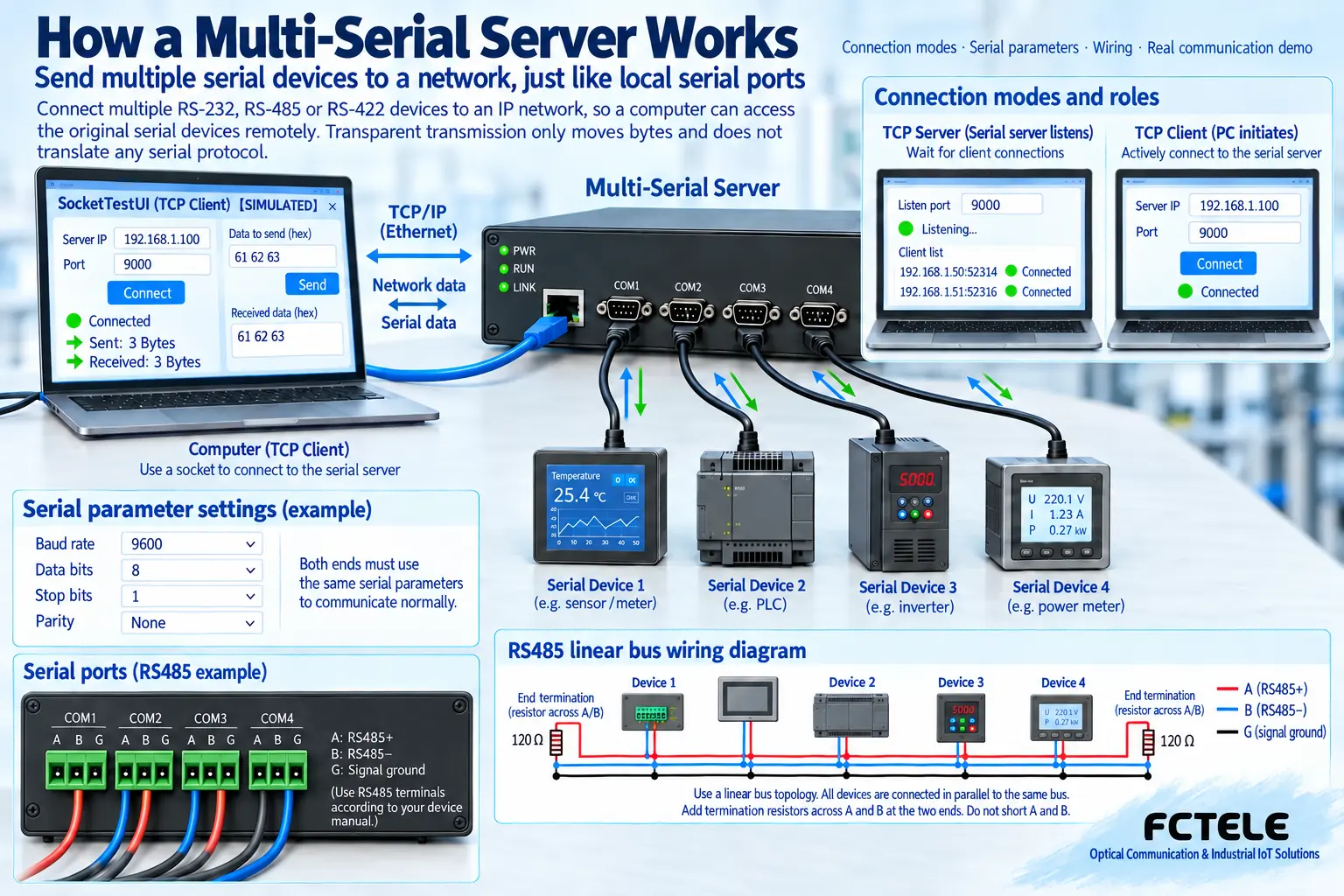
In TCP server mode, the device waits for a connection at a specified address and port, and the computer actively connects to it. In TCP client mode, the serial server actively connects to the host computer. This is the network connection role, and it is not the same concept as who sends business commands on the serial bus.
When two devices are connected, one end can listen while the other end actively connects, extending the serial link. If virtual serial port software is used, the computer application still sees a COM port, and the driver is responsible for mapping it to the remote end. Whether the timing, control lines and exclusive access of the original software can be supported must be tested in practice.
UDP has no TCP-style connection state. The services it suits and how packet loss is handled depend on the application. UDP should not be chosen just because it requires less configuration. When the system needs reliable responses, retries, timeouts and duplicate command handling should be checked, and “the network can connect” should not be treated as business reliability.
Check the electrical standard before wiring
RS-232 is usually used for point-to-point connections, and TX, RX, reference ground and interface pins must be confirmed. RS-485 is commonly a two-wire half-duplex bus; the differential lines should be connected according to the device definition, and a linear trunk with short branches should be maintained. The names A/B may differ between manufacturers, so signal definitions should be compared rather than relying only on the letters.
RS-422 commonly uses separate differential pairs for sending and receiving, and the two-wire RS-485 wiring method cannot be directly applied. Termination matching, biasing, shielding and reference connections must all be combined with the device manual, cable and site environment. Fiber optic or network channels only transmit data, and do not replace remote power supply.
How to reduce variables during first commissioning
First connect only one device, use a short cable to confirm that baud rate, data bits, parity and stop bits match, then set a unique IP, subnet and port. Verify the original request and response on the same experimental network, and after clarifying which device the channel number corresponds to, add other channels.
If only half a response is received, check the packing length, serial idle interval and application timeout. TCP is a byte stream and does not guarantee that one send corresponds to one receive, so the software needs to frame data according to protocol length or boundaries. Transparent transmission also does not identify complete commands for the software.
Records after multiple devices go online
Create a comparison table of channels, serial parameters, IP ports and device addresses to avoid mistaking an electricity meter response for access control data. Test network disconnection and reconnection, power failure recovery and continuous operation; record whether commands are executed repeatedly and whether buffering accumulates. When there are many devices, also check the polling cycle and bus occupancy.
Do not directly expose the management interface to the public network. For cross-region access, a controlled network, access policies and a secure tunnel can be used, and permissions and upgrade methods should be implemented according to system requirements. When selecting a Feichang Technology model, first check the serial standard, connection count and protocol capability in the Product Center, then verify with the actual host computer software.
For services such as Modbus, serial transparent transmission and a protocol gateway are different solutions. If the host computer sends Modbus TCP while the instrument only supports RTU, it must be confirmed that the device has the corresponding conversion capability. You cannot simply set the same port and expect the two message types to communicate directly.
Translated from the Chinese technical article. Source first published: 2019-11-29. Source last revised: 2026-10-13T22:21:36+08:00. Read the Chinese source
