


A PLC can be discovered and short commands receive replies, but recipe uploads or remote displays keep stalling. Changing an optical module or increasing a switch port speed may leave the problem unchanged. Alongside power, link quality and software, check an easily overlooked boundary: how large a packet can this communication path carry? MTU describes size, not speed. Separating it from Ethernet frame length, jumbo frames and TCP segments helps explain why small packets can work while large ones fail.
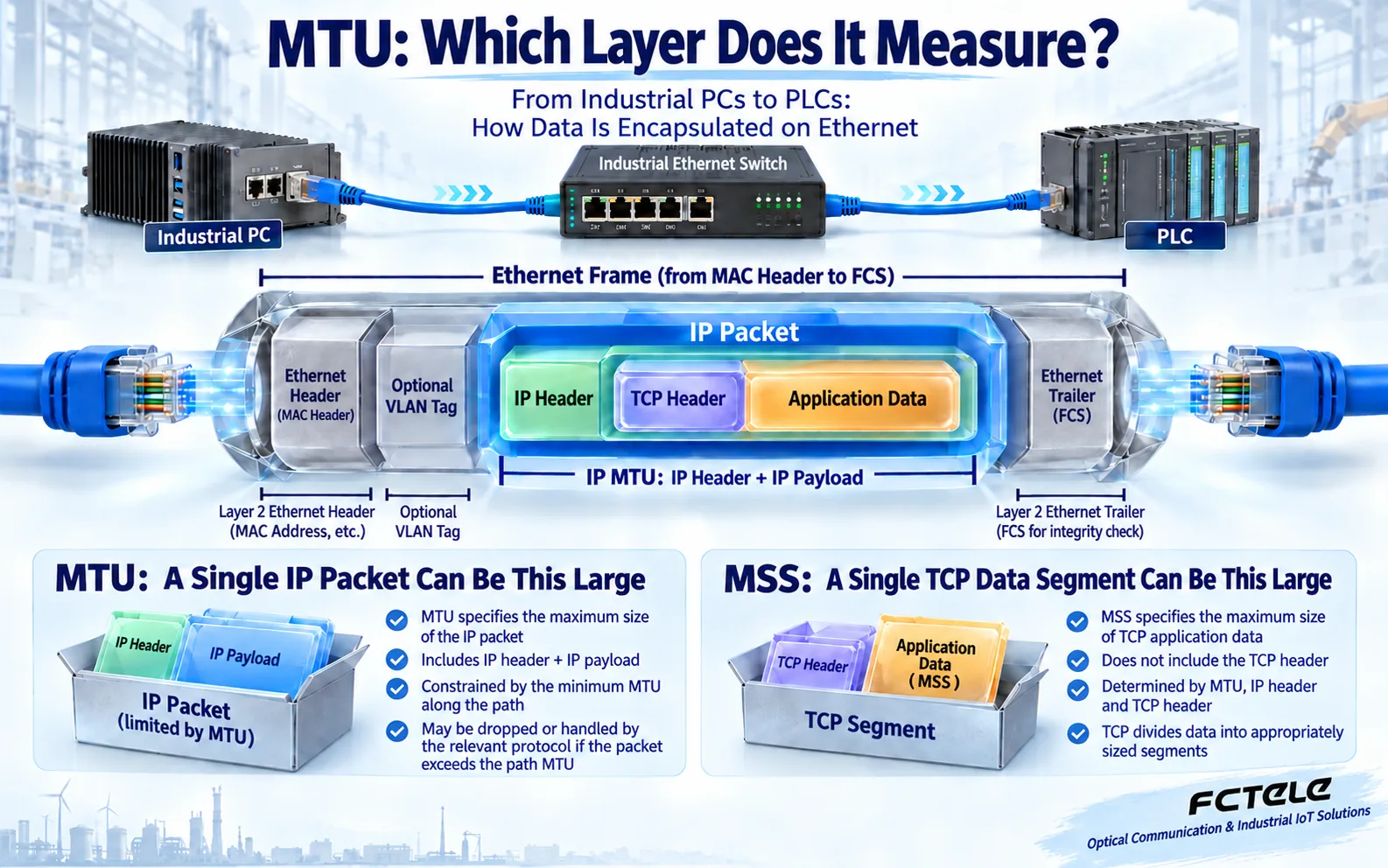
Start with the wrapping: application data has several outer layers
Information from a computer or controller does not usually appear on a cable exactly as the application created it. In a TCP connection, application data first receives a TCP header containing transport information such as ports and sequence numbers. An IP header then identifies where the packet comes from and where it is going. Finally, an Ethernet frame carries it over the local link. The receiver removes these layers in reverse order. Each layer has its own length; one number cannot describe them all.
Here, IP MTU means the largest complete IP packet an interface can transmit. It includes the IP header and IP payload, but excludes the outer Ethernet header and frame check sequence. Many ordinary Ethernet interfaces use an IP MTU of 1500 bytes, but that is not a universal setting. A VLAN tag adds information to the outer frame. Whether a manual’s maximum frame length includes tags and the check sequence depends on that manual’s definition. A statement that a device supports large frames is not enough to determine its exact configuration.
MSS and jumbo frames: one limits TCP data, the other expands frame capacity
MSS, or maximum segment size, limits the application-data portion carried in one TCP segment. Think of MTU as the size of a wrapped parcel and MSS as the contents inside. When a TCP connection starts, each receiver advertises the MSS it is prepared to receive. The sender must also account for its own interface and the path. Simply choosing a number at the two endpoints does not guarantee that the entire route can carry it. TCP options, IP version and additional encapsulation can affect the available space.
Jumbo frames generally exceed the conventional Ethernet frame size. They may reduce the number of frames needed to carry a given amount of data, but they do not create extra port bandwidth or guarantee faster control responses. Endpoint network adapters, switch ports, router interfaces and intermediate equipment must all meet the relevant requirements. Enabling jumbo frames on one switch cannot make an unsupported PLC or remote device accept them. Short control messages may gain no practical benefit from increasing the frame limit.
Check the narrowest part of the route, not just its endpoints
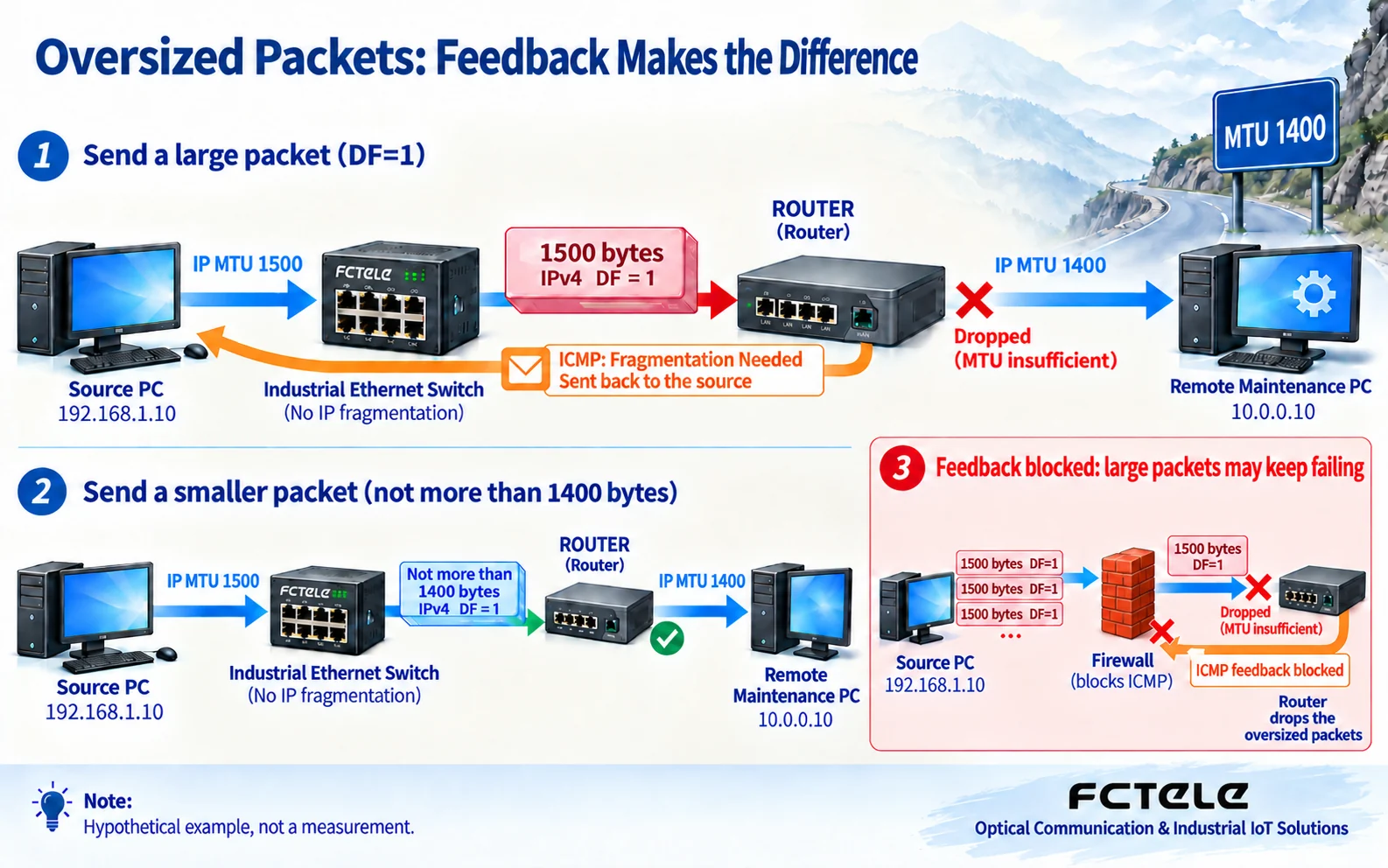
Imagine a delivery vehicle leaving on a wide road and later reaching a narrow bridge. A large parcel can fit at the starting point without being allowed across that bridge. Path MTU is the size boundary imposed by the links along the route from sender to receiver. Routing, remote access or a tunnel can make it smaller than the local LAN’s limit. A backup route or a newly added security gateway can also change a size that previously worked.
A Layer 2 switch primarily forwards Ethernet frames. If a frame exceeds its acceptance limit, the switch may discard it and increment a relevant counter. It does not help by splitting the enclosed IP packet into smaller pieces. IP fragmentation is an IP-layer function. Do not confuse a switch’s frame-length setting with a router’s IP MTU. Draw the actual equipment and interfaces along the path, distinguishing local switching, routing between subnets and tunnel encapsulation. Comparing only two endpoint configuration screens is insufficient.
How IPv4 reports an oversized packet, and how IPv6 differs
In traditional IPv4 path MTU discovery, the sender sets the DF, or Don’t Fragment, flag. If a router must forward that packet onto a link with a smaller MTU and cannot fragment it, the router discards it and returns an ICMP fragmentation-needed error to the source. The source uses this feedback to reduce the packet size for that path and tries again. ICMP is like a delivery rejection notice: it is not an application command, but it can help application communication continue.
If this necessary feedback is filtered, the sender may see repeated timeouts. Short commands may work while a large transfer makes little progress. Real systems can also use other probing or fallback mechanisms, so this does not mean every filtered error inevitably causes a permanent stall. When IPv4 fragmentation is permitted, a router can fragment a packet and the receiver reassembles it. IPv6 routers do not perform this fragmentation in transit; a Packet Too Big message tells the source to adjust. These mechanisms should not be merged into a universal repair procedure.
A tunnel adds another wrapper, so a previously suitable packet can grow
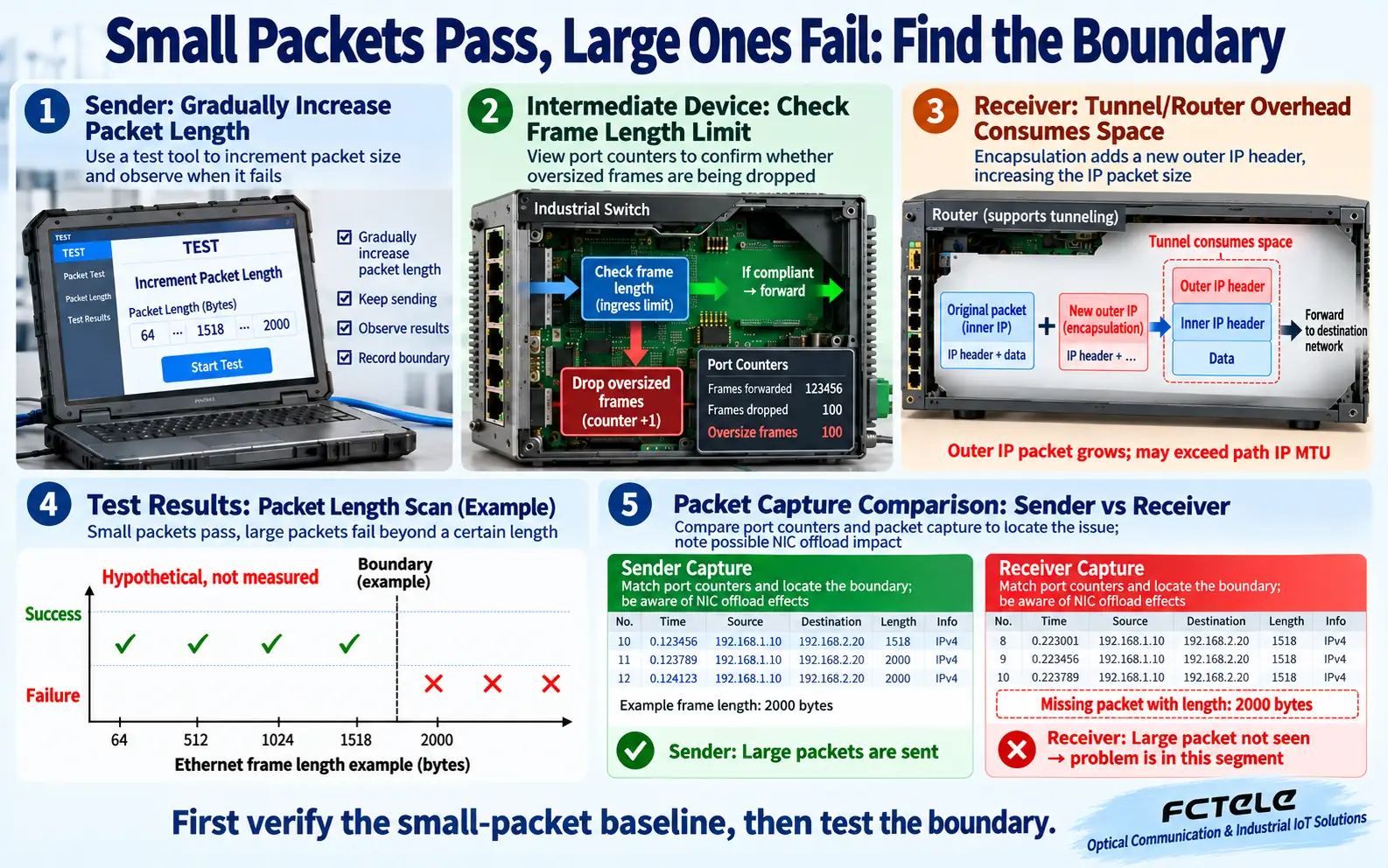
A remote-maintenance connection may place an existing packet inside new outer encapsulation. It is like putting an already packed box into a shipping crate: the path must carry the combined size. The application data has not changed, but the packet seen along the outer route is larger. If the equipment does not correctly account for the tunnel’s effective MTU and sending policy, failures may appear only on the remote path while local access continues to work.
Do not subtract one fixed number of bytes from every VPN or tunnel. Protocol, encryption method and the number of encapsulation layers affect the overhead; consult the specific implementation. Adjusting TCP MSS can reduce TCP segment sizes on a particular path, but it does not automatically handle all UDP traffic or replace frame-capacity checks. Preserve the original security-device configuration, identify the affected traffic and verify the necessary error feedback. Do not disable an entire security policy merely to make large packets pass.
Troubleshooting: vary test length for a clear reason
During a maintenance window, record a working small-packet baseline, then gradually increase the test length. Look for failures near a consistent boundary. Establish whether the tool displays application payload, IP packet length or complete frame length; command parameters do not have identical meanings across operating systems. One successful ordinary ping does not prove that large frames work over the entire path. Do not run unrestricted stress tests on a production control link.
Compare evidence at the sender, receiver and intermediate devices. Was the request sent? Was a length-related error returned? Did a switch port count oversized-frame drops? Did a router or tunnel report an oversized packet? An unusually large packet in a host capture can also be a result of network-adapter offload; it may not appear at the same size on the physical wire. Use an appropriate external observation point when needed. One loss counter alone cannot establish an MTU cause: congestion, cable errors and endpoint processing faults must also be considered.
Before testing, document which layer the tool’s length describes. Some tools accept a test-data length, some report a complete IP packet and others show the on-wire frame. Mixing these figures can make consistent equipment behavior appear contradictory. Record the tool, length definition, fragmentation setting and direction. Change one condition at a time so that the result has a clear cause. Changing the adapter, tunnel and switch together may restore service temporarily while hiding the original bottleneck.
Make the size boundary part of industrial acceptance testing
FCTEL’s published documentation for managed industrial switches is a starting point for checking interfaces and network conditions. Whether a particular model supports a given jumbo-frame size, and whether configuration is per port or global, still requires its manual or confirmed documentation. Gigabit speed and management capability alone do not establish jumbo-frame support. Copper and optical ports use different physical media; replacing copper with fiber does not remove frame-length or IP-packet limits.
An acceptance record can list endpoint MTUs, each device’s definition of maximum frame length, routing and tunnel constraints, test conditions in both directions, and the point where failure occurs. If the application needs large frames, verify each part of the route. If it does not, a tested conventional configuration is often easier to maintain. Answer three questions: what size can pass, what happens above the boundary, and can the application recover when the path changes? Sizes in these illustrations are explanatory examples, not FCTEL product specifications or field measurements.
Technical references: RFC 1191: IPv4 path MTU discovery; RFC 8201: IPv6 path MTU discovery; Cisco: fragmentation, MTU, MSS and tunnel behavior; Cisco: a switch MTU troubleshooting example. Related FCTEL resources: Technical Articles and industrial switch product documentation (Chinese).
