


Not enough space, hard to find power, inconsistent interfaces—one small device solves them together
Adding networking capability to serial devices often runs into three problems on site: the cabinet is already full, so where can the device go? There is no suitable power source nearby, so do you need to run new wiring? Serial types are not unified, so what if you choose the wrong model? Feichang Technology’s lipstick-style industrial serial server uses a compact body, optional PD power, and the ability to configure three serial types on site to make installation, power supply, and model selection simpler.

Only 8 cm long, put the networking node next to the device
When retrofitting old equipment, installation space often has to be arranged centimeter by centimeter. PLCs, terminal blocks, relays, and wiring ducts already fill the control cabinet. Adding an ordinary-sized converter box may require moving existing components or even rearranging the enclosure.
The Feichang Technology lipstick-style serial server has a body size of only 24×80×20mm, about 8 cm long, 2.4 cm wide, and 2 cm thick, and weighs about 68.9 grams. The slim, elongated structure makes it easier to use leftover space in the cabinet and reduces adjustments to the existing layout. It provides 1 three-in-one serial interface and 1 Fast Ethernet interface, suitable for adding network access capability to a single device or one serial branch that meets communication requirements.
More flexible installation location
A small remaining section of DIN rail next to a PLC, the mounting plate inside an instrument box, or a fixing position on the back of testing equipment can all be candidate installation points. The product supports 35mm DIN rail and wall mounting, bringing the networking node closer to field devices, shortening serial cables, and tidying wiring inside the cabinet.
During installation, space should still be reserved for the network cable plug, top terminals, cable bending, and heat dissipation, and the device should be securely fixed to avoid hanging from cables.

Optional PD power, one less power cable to run
The device may have a place to go, but power is not necessarily convenient. Many retrofit sites already have network cabling, but there is no suitable DC power source near the device. Adding a separate adapter, finding an outlet, and laying a power cable for one small serial server increases construction work and makes wiring inside the box more complicated.
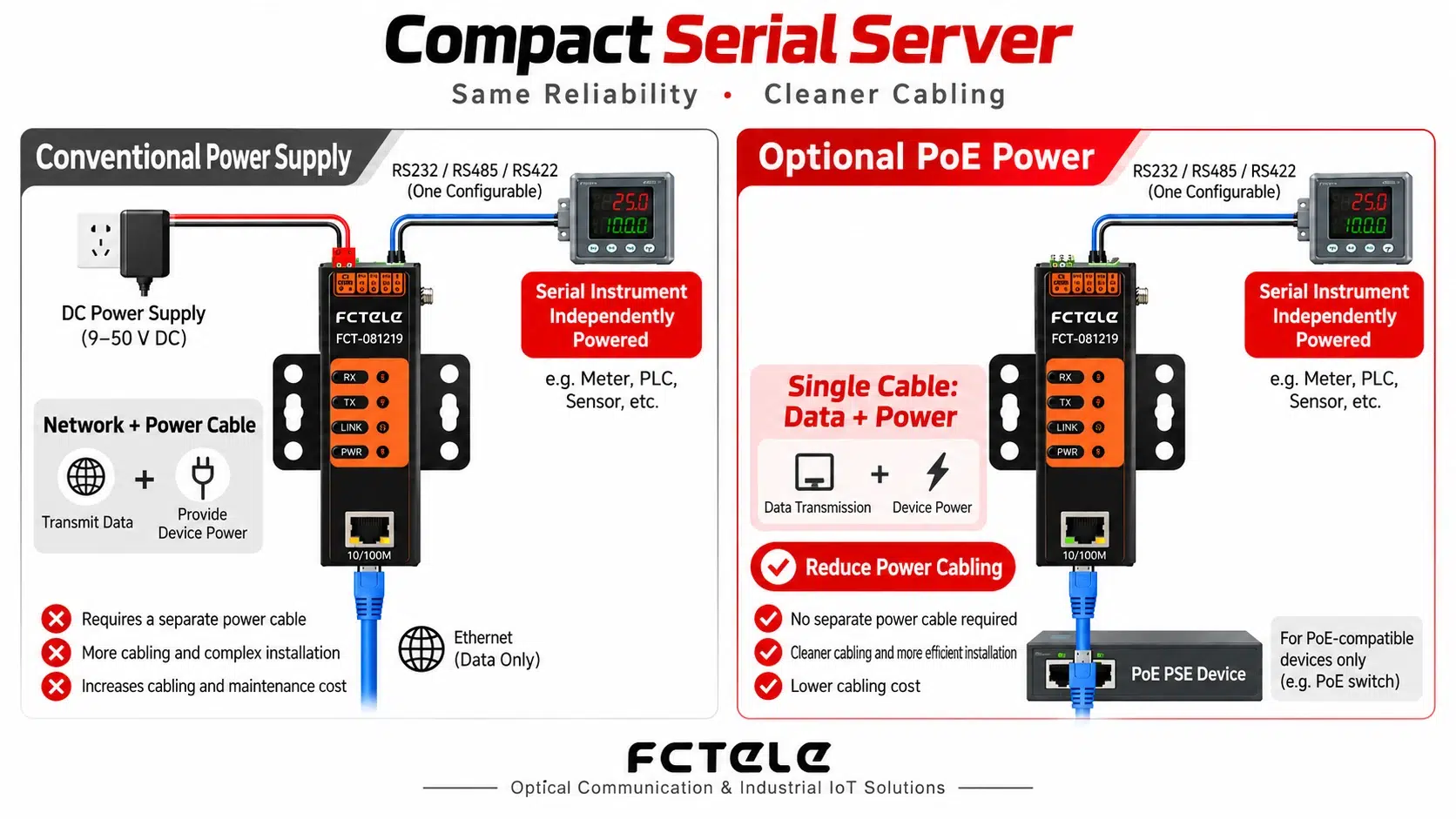
With the optional PD power function, the serial server can be powered through a compatible PoE switch or PoE injector, and the same network cable transmits both network data and power.Once the network line reaches the installation location, the power cable that would otherwise be laid to the server can be omitted, reducing the number of field power connectors and adapters. This method is especially convenient for floor instrument boxes, corridor weak-current boxes, and scattered device points.
Three serial types configured on site, reducing the trouble of choosing the wrong interface
Metering instruments commonly use RS485, some testing instruments and old devices use RS232, and other devices use RS422. When a project involves multiple types of devices, purchasing multiple networking converters separately increases the complexity of selection, stocking, and maintenance.
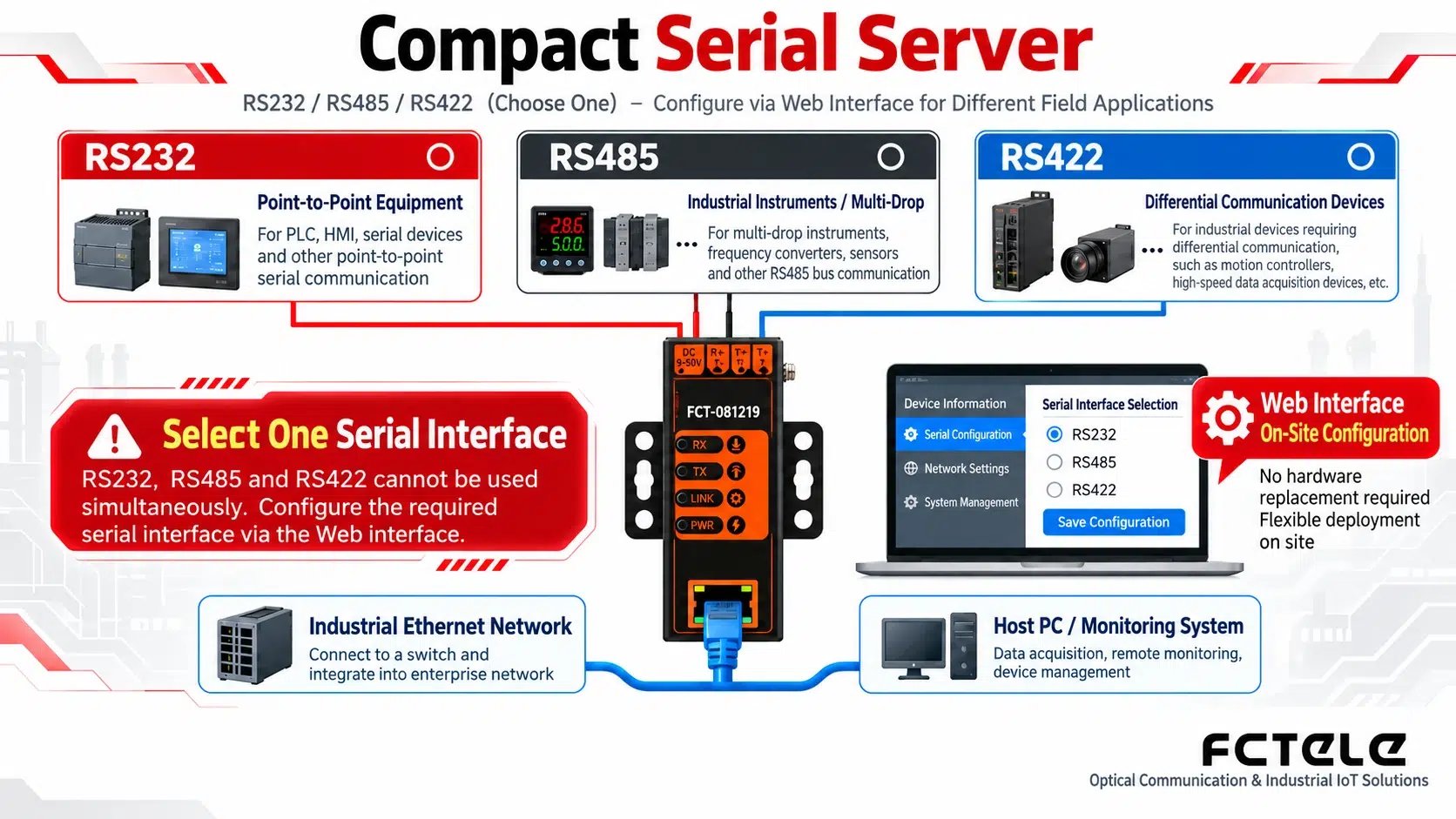
After confirming the device interface, engineers select the corresponding type in the Web interface, then wire according to the terminal instructions and set matching baud rate, data bits, parity, and stop bits to complete communication debugging. For integrators, one product covers more interface requirements; for equipment manufacturers, the same networking solution is easier to adapt to different versions; for maintenance personnel, spare part types are also more concentrated.
Application case: networking an old metering box with fewer cabinet changes and fewer cables
Suppose a building needs to connect data from scattered electricity meters to a management platform. The existing meters have RS485 interfaces, but space inside the metering box is limited, and no power has been reserved for newly added networking equipment. The lipstick-style server can be fixed to a suitable DIN rail or mounting plate inside the box, connected to the meter with a shorter serial cable, and then connected to the network through a network cable.

If the PD version is selected and compatible PoE power sourcing equipment is used, separate power wiring for the server can be omitted. After the serial port is configured as RS485, select the working mode according to the meter protocol and platform requirements. For eligible Modbus RTU devices, the product’s supported Modbus RTU and Modbus TCP conversion capability can be used to connect field data to the corresponding system.
The benefits of this solution are straightforward: the added module takes up little space, making it easier to fit into the original box; the device is close to the meter, so serial-side wiring is shorter; and when PD power conditions are available, power wiring can also be simplified. The above is a typical solution illustration; the actual number of meters, bus conditions, and software integration need to be confirmed according to the project.
More sites: testing equipment, PLCs, and standalone instruments connected to the network
Place the server near the equipment, connect to the tester with a shorter RS232 serial cable, and then transmit results to a remote management computer through the existing Ethernet.
Select RS232, RS485, or RS422 according to the PLC interface, and connect uniformly to the host system through the network, making it easier for equipment manufacturers to reduce matching model numbers.
Install near instruments on floors, in corridors, or in equipment rooms. With optional PD, there are fewer restrictions from local power locations, reducing the workload of adding new wiring.
The product supports Web access and a Windows configuration tool, and provides working modes such as TCP Server, TCP Client, and UDP, so the connection method can be selected according to the host computer software. Serial status and parameter monitoring make debugging easier. The automatic connection recovery function after network interruption helps daily operation. For multi-device deployment, SNMP management capability can also be used for unified management.
Confirm three site conditions before selecting a model
How much installation space is there? Is PD power over the network cable needed? What serial type do the field devices use? Tell these three items to Feichang Technology technical personnel to confirm the version, wiring, and communication solution more quickly.
Selection basis and verification boundaries
Nature of the material: the following product capabilities come from public specifications on the Feichang Technology official website. They are manufacturer statements and do not represent independent testing or on-site measurement. Purchasing is subject to the confirmed model, version, and technical agreement. Material compilation date: 2026-10-01.
Procurement scenario, product basis, and applicable boundaries (Chinese source resource)
Corresponding product specifications. Parameters come from the manufacturer’s public materials; this compilation did not add actual measurements, certifications, or customer case evidence.
Download the blank selection and acceptance record form (Chinese source resource), used to record the delivered version, conditions, results, and evidence location.
Translated from the Chinese technical article. Source first published: 2026-09-10. Source last revised: 2026-10-13T23:36:13+08:00. Read the Chinese source
