


Network faults should be located layer by layer: physical link, Layer 2 forwarding, IP path, and application services. Routers, switches, servers, and transceivers each do different jobs, so they cannot all be handled with “just try restarting.” First record the scope and time of impact, then use targeted tests to avoid mistaking an application problem for a broken fiber or device.
First question: who is affected, and when did it start
When only one terminal is abnormal, the direction of checking is different from when an entire floor or the whole site is abnormal. Compare the access locations of normal and abnormal devices, and ask whether there have been changes to cabling, power, configuration, or software. Record the symptoms, error messages, and time; this information helps identify the common node.
Do not repeatedly restart all devices before collecting evidence. Restarting may clear counters or temporarily hide the problem, but it cannot explain the cause. Production systems need the impact assessed first, existing configurations and logs protected, and then necessary operations arranged.
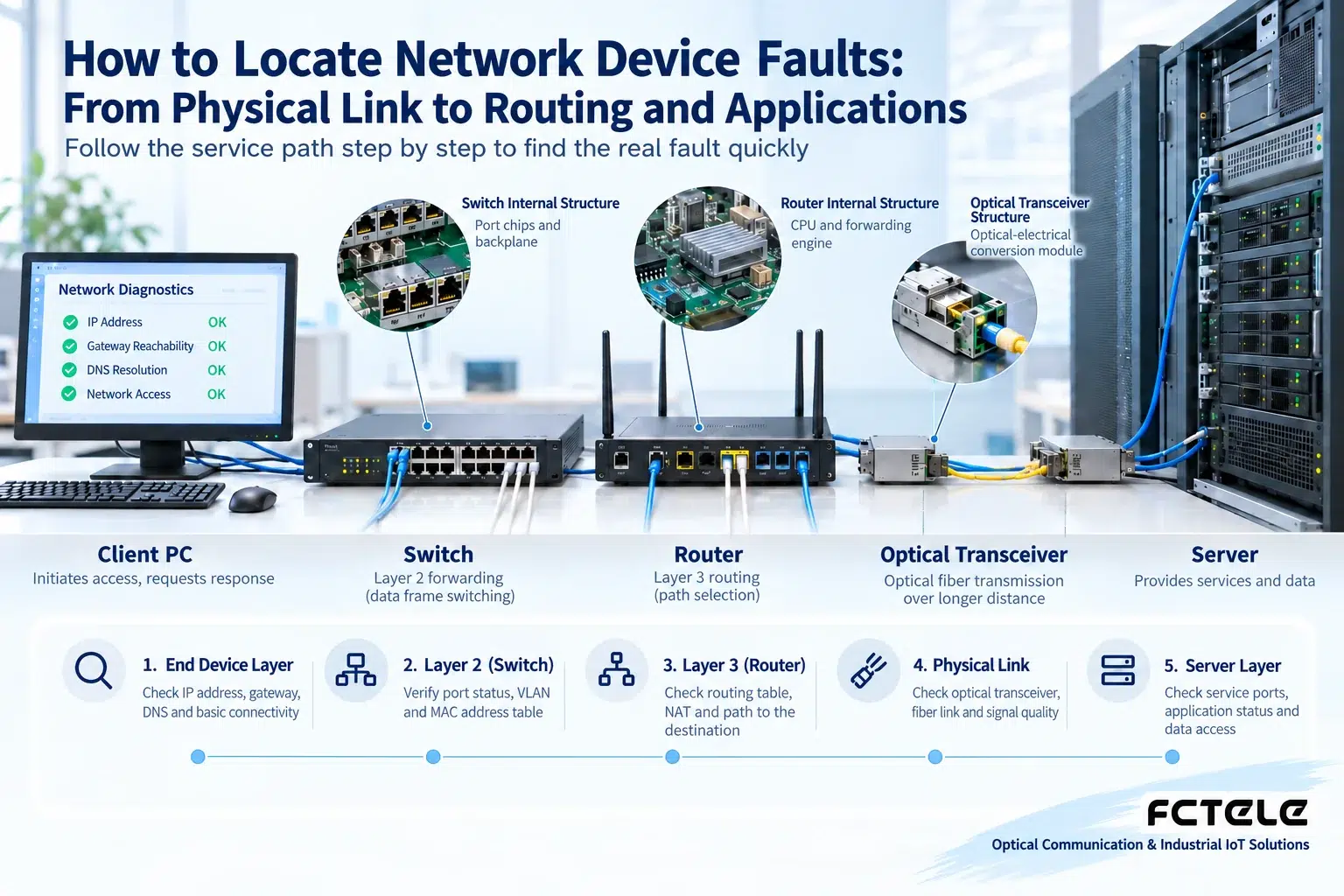
Physical layer: can power and the link remain stable
Check the power, ports, network cables, and optical modules of terminals and network devices. A link light that is off may be caused by the cable, a disabled port, a speed mismatch, or power loss at the far end; it does not necessarily mean the switch is broken. When a link reconnects frequently, record error counters and power status, and use known-good cables or ports for planned replacement.
Fiber optic transceivers also need checks for single-mode versus multimode, wavelength, transmit and receive direction, and allowed optical power. An optical port being lit does not mean IP services are already working, nor does it mean the optical power definitely has enough margin. Inspect the end face before cleaning, and do not look directly into the optical port; change only one condition at a time so it is easier to judge which one made a difference.
Layer 2: is the terminal entering the correct network
Check whether the port belongs to the expected VLAN, whether the uplink allows that VLAN, and whether MAC learning is normal. CRC errors in interface statistics may indicate a physical transmission problem, and drops may also be related to congestion; not every increase in counters should be explained as the same cause.
A loop may cause abnormal broadcast behavior and MAC table flapping. When this phenomenon is found, isolate the problem link according to a predetermined plan and check the protection protocol and topology, rather than continuing to plug in cables. A VLAN configuration error may appear as a port light being normal but terminals unable to find each other.
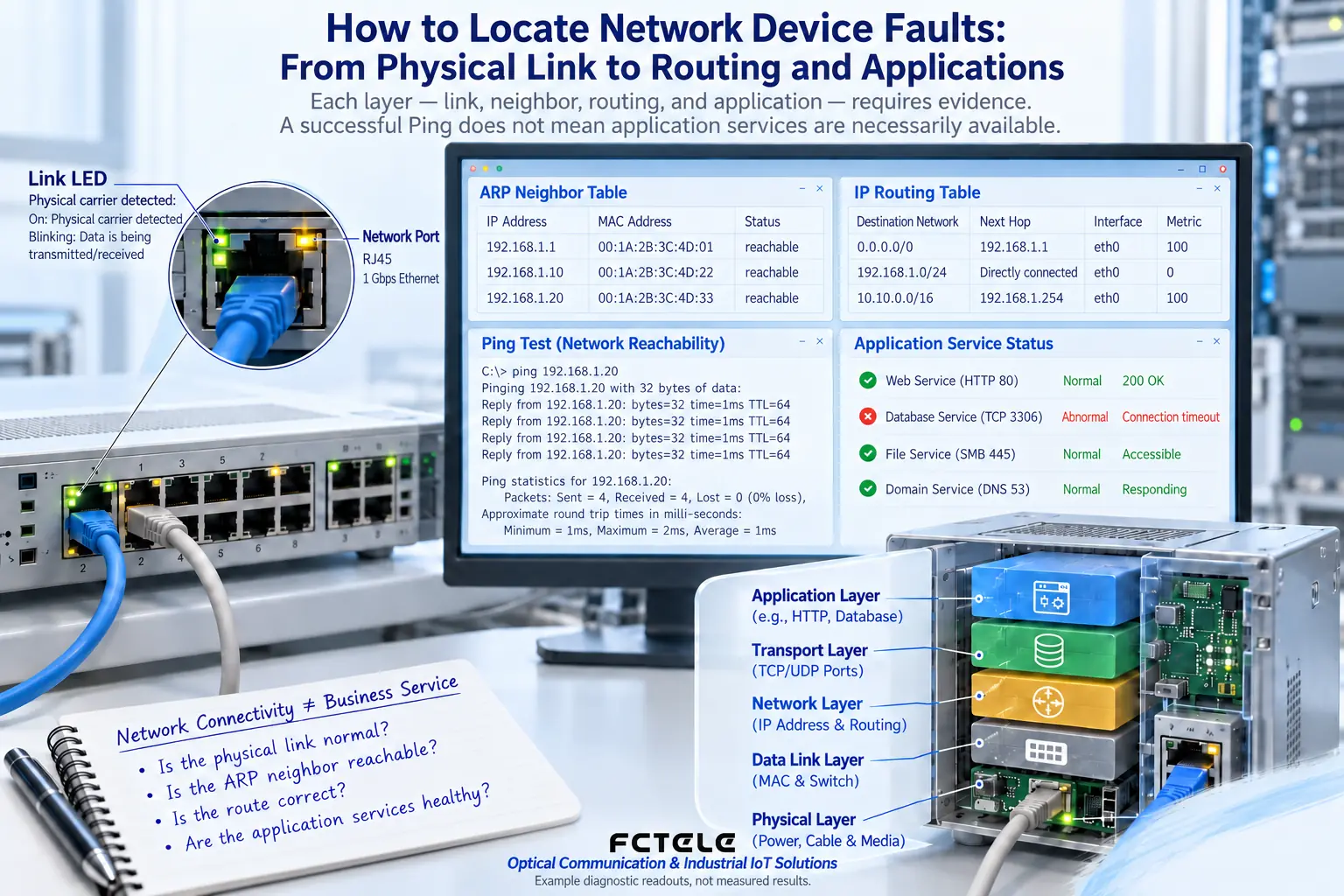
Layer 3: are addresses and routes consistent
Check the terminal IP, mask, gateway, and address conflicts. Verify the local network first, then check the path across network segments. A router’s routes, access policies, or address translation may all affect communication in a specific direction. Reachability in one direction does not guarantee that the reverse path is also correct.
A failed Ping may also be because test traffic is restricted by policy, so the device cannot be directly judged as offline. Judge by combining neighbor tables, routes, device logs, and permitted business tests. When DNS is abnormal, accessing a domain name may fail while a direct address may succeed, but it is still necessary to confirm whether the application depends on the domain name or a certificate.
Application: is the server really providing the service
A server can respond to network probes, but the application may not be started, may be listening on the wrong address, may lack resources, or may depend on a failed database. Check service status, ports, logs, and resource usage; the network is only responsible for delivering data to the path and will not automatically fix errors inside the application.
After recovery, verify real user operations, not just connectivity. Record the cause, handling, and retest in a maintenance report, and keep a normal baseline. When routes, firewalls, or production configurations need to be changed, back them up first and prepare a rollback; do not unconditionally open all access just to “make it work.”
If the fault only appears under high load, compare traffic and resource curves, rather than testing only when idle. Test traffic also must not be poured into the production network without control; set the range and rate to avoid the diagnosis itself causing congestion.
Translated from the Chinese technical article. Source first published: 2020-05-20. Source last revised: 2026-10-13T23:18:15+08:00. Read the Chinese source
