


Optical transceivers should be classified by package, speed and optical standard, fiber type, wavelength, and transmit/receive method. SFP or QSFP mainly describes the component form, single-mode or multimode describes the applicable fiber, and single-fiber or dual-fiber describes the path arrangement. All dimensions need to match together; you cannot judge whether it can be used based only on size and connector.
First distinguish between the module and the host slot
An optical transceiver integrates the corresponding transmit and receive components, and the host slot provides the conditions for interacting with the component. An empty slot does not mean external optical communication capability is already present. A fixed optical port may already have optical components integrated inside the device, so no additional pluggable component is needed.
Components with the same appearance may also be used for different speeds, optical standards, or electrical media. When selecting, look at the host support list, interface electrical capabilities, and firmware compatibility. Do not treat “it can be plugged in” as already supported, and even less should you assume all slots support all generation speeds.
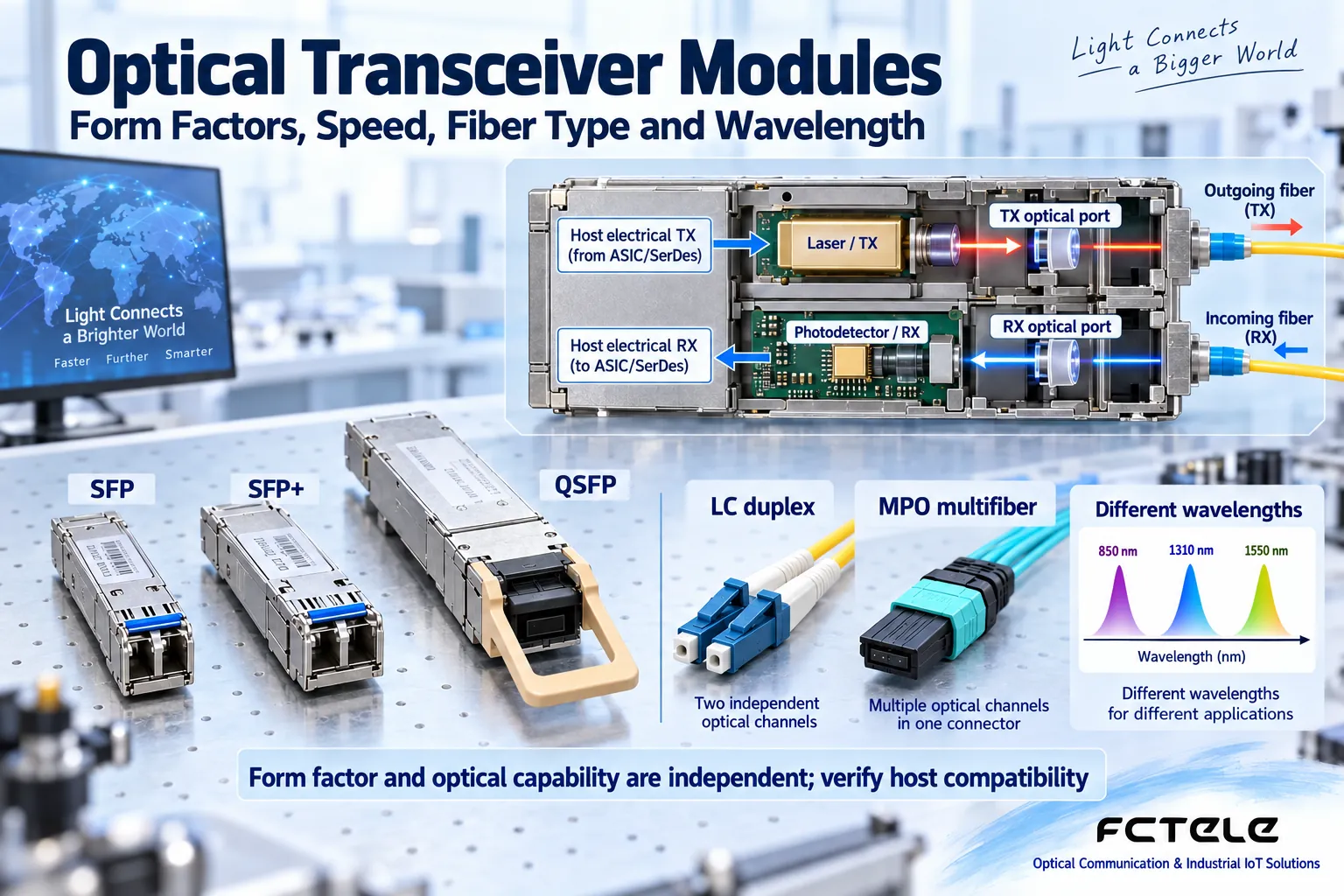
Why package and speed cannot be judged by only one factor
SFP, SFP+, and the QSFP series can be used to organize different module forms, but the actual usable speed is determined jointly by the module and the host. Some platforms have specific compatibility modes, while others do not. You cannot infer all devices from the experience of one platform.
Multi-channel modules may also involve parallel optics or multiplexing of different wavelengths, and the connectors and matching optical cables need to correspond. Seeing the same optical fiber interface does not mean the channel mapping, optical standard, and transmission path are the same. Conversion and branching components also need to be checked item by item.
Look at single-mode, multimode, and wavelength together
Single-mode and multimode refer to the fiber transmission mode conditions, not the color of the optical transceiver housing. The module should conform to the target fiber type and the corresponding standard. Patch cord color can help with on-site management, but it cannot replace labels, datasheets, and actual fiber core identification.
Wavelength, transmit capability, receive sensitivity, and overload together determine the usable link. Include fiber loss, connection points, and maintenance margin in the budget, rather than only comparing “how many kilometers it can transmit.” Choosing a longer-distance module does not automatically improve all short links.

Why single-fiber bidirectional must be paired
BiDi modules use different wavelengths to carry the two directions on the same fiber core, and the transmit at one end must correspond to the receive at the other end. Markings such as A/B or U/D help with pairing, but markings from different products cannot be mixed directly without the manual.
Dual-fiber modules often consist of one TX and one RX, and the two ends must be crossed. Connection forms such as LC, SC, or MPO also involve endface and polarity, and do not only solve the plugging problem. Wrong paths, contamination, or bends can all prevent components with matching parameters from communicating stably.
Diagnostic information is not the entire acceptance test
Some modules provide diagnostics such as temperature, voltage, and transmit/receive optical power, which facilitate maintenance, but the host needs to support reading them, and the numerical accuracy and thresholds follow the product instructions. Being able to recognize the module does not mean the opposite end’s optical standard is correct, and an optical port being Up does not mean the application VLAN configuration is working.
Installation and removal should be performed according to host requirements, with anti-static and endface cleaning measures taken, and direct viewing of optical ports is prohibited. Test real services, error counts, and recovery behavior, and record module labels, host versions, and used ports to facilitate later replacement.
Build a spare parts table that will not cause confusion
The spare parts table should at least include package, speed and optical standard, fiber type, core count, wavelength relationship, power range, and host support conditions. When purchasing, specify the combination at both ends to avoid giving an incomplete specification based only on “gigabit single-mode.”
Viewable Cisco module support information Understand the host compatibility checking method; other vendors still need corresponding information. Specific vendor support conclusions cannot be transplanted to Feichang Technology or other devices.
Save the original module label and used port, and retest receive power and services after replacement, to avoid spare part mismatches caused by similar appearance.
Translated from the Chinese technical article. Source first published: 2019-10-30. Source last revised: 2026-10-13T22:35:50+08:00. Read the Chinese source
