


An RS485 serial server sends serial bytes to an Ethernet application, but it does not necessarily understand what those bytes mean. Networking must handle three layers at the same time: whether the RS485 electrical bus is reliable, whether the network connection is correct, and whether the host computer’s application protocol matches. A transparent serial server and a Modbus protocol gateway are not the same thing, and they cannot be swapped just because both have RS485 and an Ethernet port.
First, clarify who is responsible for what
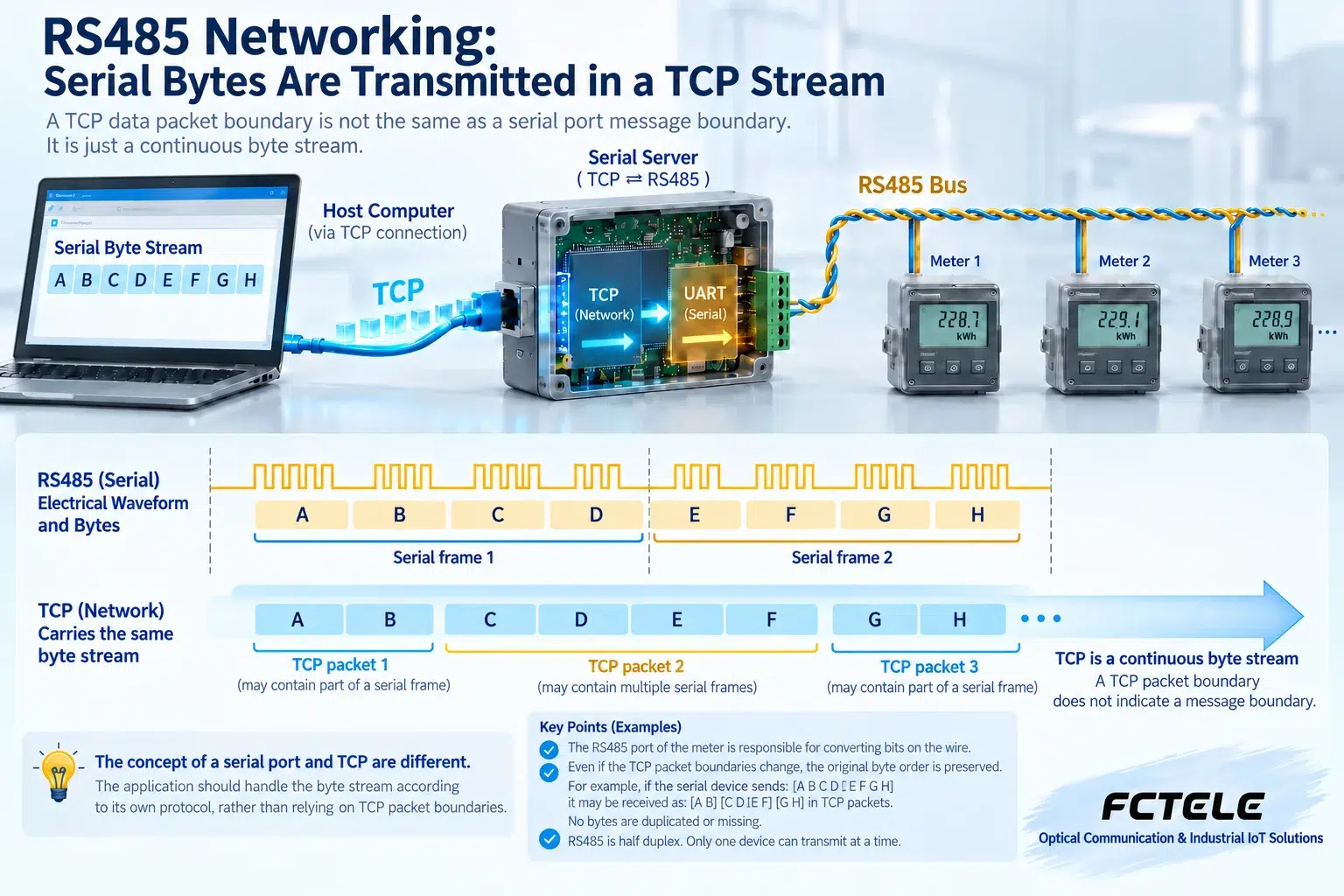
The meter’s RS485 port is responsible for converting bits into a voltage difference between two wires; the serial server receives bytes and carries them over TCP or UDP; the host computer interprets addresses, functions, and values according to the meter protocol. A successful TCP connection only means the network connection has been established; it does not prove that the meter is responding correctly. When selecting equipment, first write down the device protocol, serial parameters, number of devices, and software access method. TTL serial, RS232, and RS485 have different electrical standards and cannot be directly mixed.
A bus is not a network cable that can be branched at will
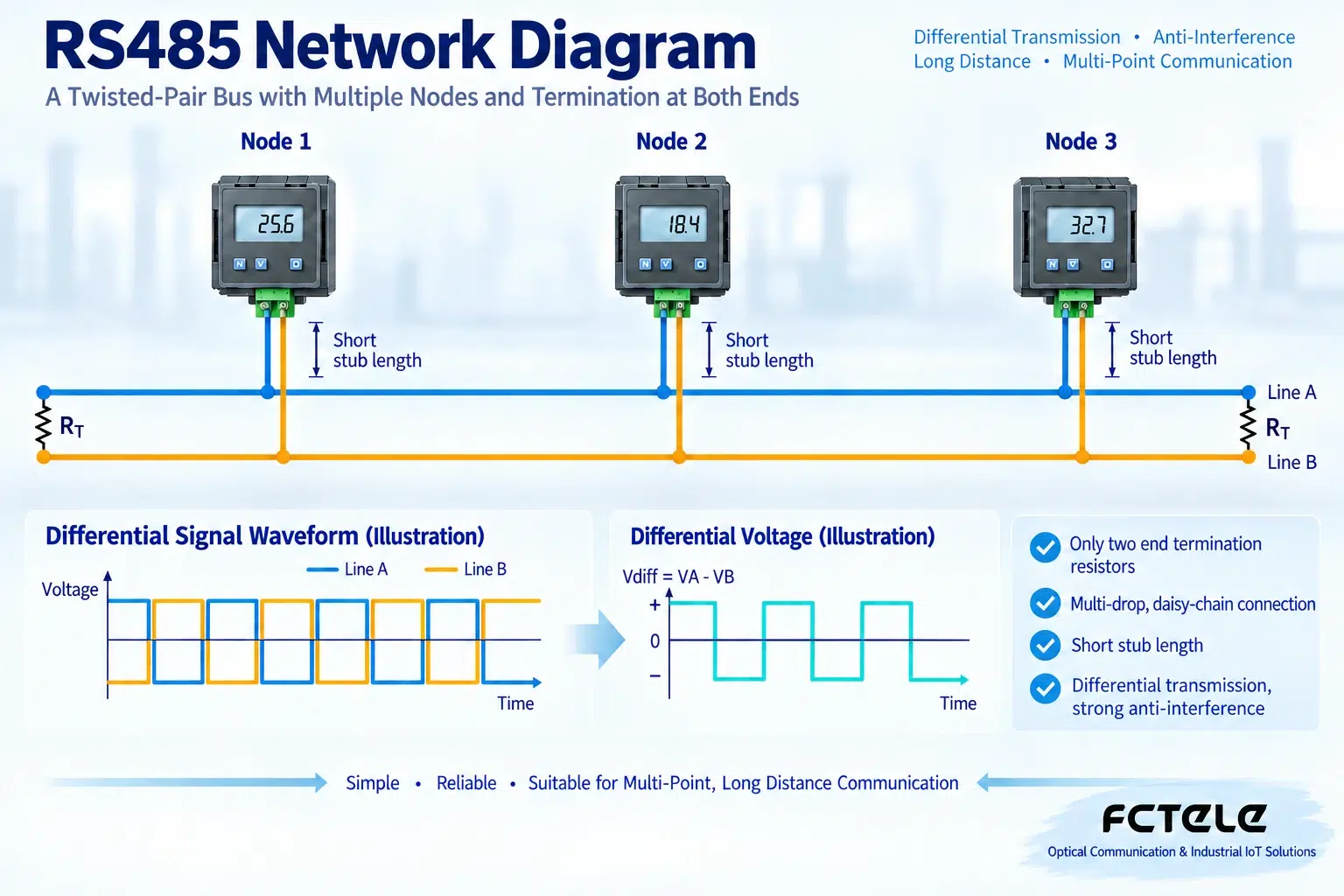
Common two-wire half-duplex RS485 uses one main trunk passing through each node in sequence, with branch lines as short as possible. Termination at both ends is used to reduce signal reflection and should be configured according to the cable and device manuals; do not add a resistor at every node. Idle biasing and termination solve different problems: the former stabilizes the logic state when no one is transmitting, while the latter handles transmission line reflection. If built-in biasing or termination already exists, check first before adding more. A/B naming may vary by manufacturer; verify the positive and negative definitions, and do not wire only by the letters.
How to choose among TCP Server, Client, and virtual serial port
In TCP Server mode, the host computer actively connects to the serial server; in TCP Client mode, the serial server actively connects to a specified service. The choice depends on the software and network reachability, and does not mean one mode is faster. A virtual serial port driver lets old software continue to access a COM port, but you still need to check driver compatibility, reconnection after disconnection, and serial port occupation. Transparent transmission does not automatically turn Modbus RTU into Modbus TCP; if the software requires an MBAP header, a gateway with the corresponding protocol conversion capability is needed.
Why there must be a clear poller
On the same half-duplex bus, multiple devices share the transmission opportunity. Taking common Modbus RTU master-slave polling as an example, the host computer asks different addresses one by one, and the devices respond in turn. If two network clients send requests to a transparent server at the same time, serial requests may interleave; TCP multi-connection support cannot be equated with serial multi-master coordination. A single polling entry point should be agreed upon, or a gateway that can queue and match transactions should be used. The timeout must cover request transmission, device processing, return transmission, and network buffering, and cannot be blindly reduced to a very small value.
Start acceptance testing with one device and proceed step by step
First use a short cable to connect one device, unify baud rate, data bits, parity, and stop bits, read one known register, and verify the value. Then add nodes and formal cabling, and observe timeouts, checksum errors, and response times. Record device addresses, wire order, termination positions, software mode, and reconnection strategy; test whether recovery occurs after unplugging the network cable and after power-off and power-on. For lines crossing buildings or with obvious ground potential differences, evaluate isolation, surge protection, and grounding; the shield layer cannot replace all protection.
Example: connecting three meters to a local area network
Assume three meters use the same Modbus RTU baud rate, but their addresses are 1, 2, and 3. First connect one meter to the serial server with a short cable, and use host software that supports RTU bytes or a virtual serial port to read a known energy value. Then add the remaining meters along the main trunk and poll in address order. If the software only supports Modbus TCP, use a compatible gateway instead, and do not treat RTU frames directly as TCP application messages. The polling interval includes the processing time of slow devices; check response ownership, and do not let three software programs each grab one meter while ignoring bus sharing. Direct connection to a computer is suitable for establishing a baseline; after connecting to a switch, check addresses, access permissions, and reconnection after disconnection.
Principle reference:Official technical materials. The structural diagrams in this article do not represent specific product specifications; when selecting equipment, check the model manual.
Translated from the Chinese technical article. Source first published: 2019-11-22. Source last revised: 2026-10-13T22:21:36+08:00. Read the Chinese source
