


A wireless router does not use just one “network protocol.” Wi-Fi handles the wireless link, IP handles network addressing, routing handles choosing the next hop, and DHCP and DNS help obtain an address and resolve names, respectively. A device connecting to Wi-Fi only proves that part of the wireless connection is established; it does not guarantee that the internet, DNS, or application services are all working normally.
Why does one home device have so many names?
A common wireless router puts a wireless access point, wired switching, and IP routing into one chassis, and may also provide functions such as NAT and a firewall. A phone connects wirelessly, a computer can connect via a network cable, and then the device connects to the upstream network. Each function handles a different task.
The antenna and wireless circuitry handle over-the-air signals, the switching part forwards local frames, and the routing part handles IP packets between different networks. Understanding these divisions helps distinguish poor wireless coverage, a disconnected uplink, and application failures, instead of saying the router is broken whenever a problem occurs.
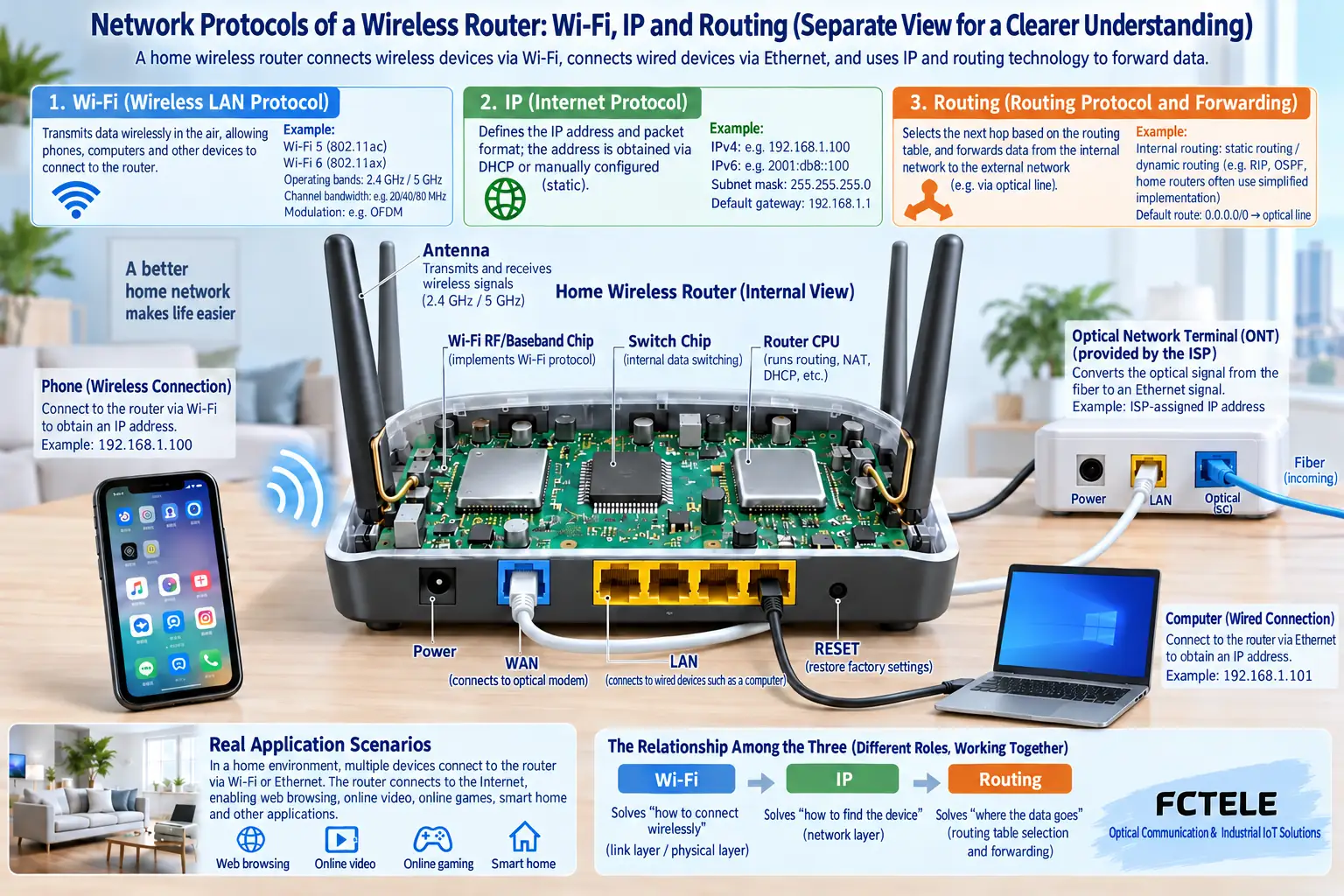
What does a Wi-Fi connection solve first?
Only after a terminal selects a wireless network and completes the corresponding authentication and association can it transmit data over the wireless link. Different frequency bands, bandwidths, terminal capabilities, and on-site interference can affect performance. Advertised rates are not the application speeds that all users can achieve at the same time.
A wireless connection also needs security configuration; open networks and weak passwords can bring risks. Protocols and security methods should be combined with device support and current system requirements. Do not treat hiding the network name as complete protection, and do not leave necessary authentication disabled for a long time just for commissioning.
Only after getting an address do you know where you are
A terminal can obtain parameters such as IP, mask, gateway, and DNS through DHCP, or it may use manual configuration. Address conflicts or a wrong gateway can cause some connection abnormalities. Being connected to Wi-Fi but without a suitable IP, and already having an IP but failing to access the internet, are two different troubleshooting paths.
When accessing other network segments, the terminal usually hands data to the default gateway; when accessing devices on the same local subnet, it may communicate directly. NAT is often used for address translation, but it is not a Wi-Fi protocol, and it does not mean there is security isolation in all cases.
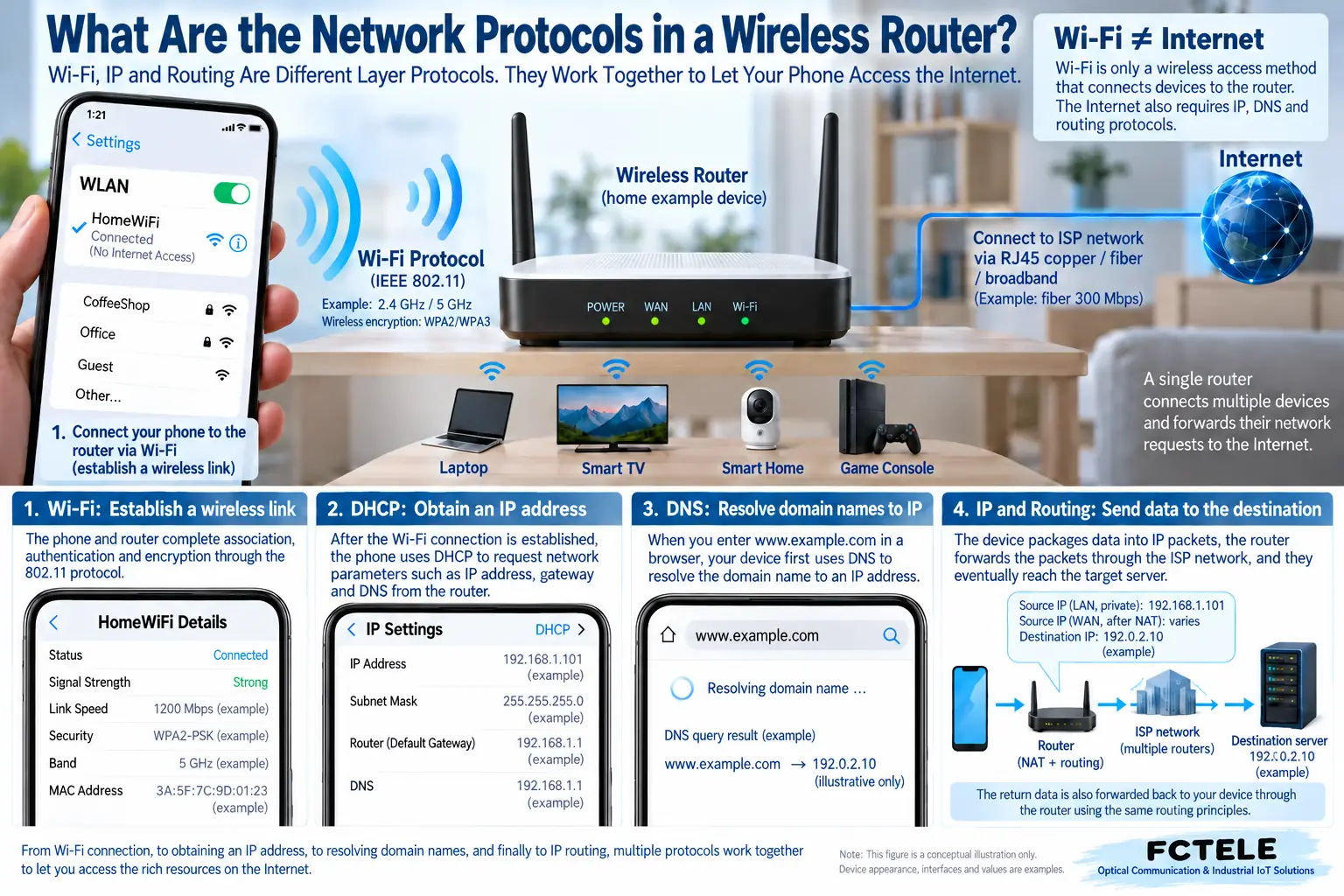
Why can DNS and applications still fail?
When a domain name is entered in a browser, name resolution is usually needed first to obtain the target address. If IP connectivity is reachable but the domain name fails, you can check DNS, but you cannot conclude from this that all application failures are DNS. The target service, certificate, permissions, and service port can also affect the result.
Ping tests part of network reachability, and the target may also prohibit responses. You cannot directly judge no response as being offline, nor can you judge a response as meaning web pages, cameras, or control systems are normal. When testing, choose applications related to the actual fault.
What is the relationship between an optical modem and a wireless router?
A PON optical modem connects to the corresponding carrier optical access system, while a wireless router provides local wireless and network functions. Some optical modems also have routing and Wi-Fi, and some use bridging with a separate router. The mode, uplink authentication, and address allocation should be arranged according to the actual network.
Do not connect the PON optical port directly to an ordinary Ethernet optical module, and do not assume they are interchangeable just because the devices both involve optical fiber. Wireless gateways, switches, and home routers in industrial sites should also be selected separately according to protocol, environment, and management requirements.
Where is it clearer to start troubleshooting?
First confirm whether the terminal is associated and whether the signal is stable, then look at the IP and gateway, then test the uplink and name resolution, and finally look at the specific application. Comparing wired and wireless performance can reduce variables, but the results still need to be combined with the terminal and on-site conditions; do not draw conclusions from one phone and one speed test.
Save the uplink method, network parameters, and security settings, and back up before changes. Feichang Technology network devices can be checked from Product Center to verify actual functions; if industrial applications are needed, do not treat home wireless coverage and industrial reliability as the same capability.
When multiple routing devices are connected in series, you also need to identify whether address allocation or address translation is being repeated. Adding one chassis may introduce a new subnet and access restrictions; you cannot ignore changes in network structure just because the wireless signal is stronger.
The illustrations are conceptual diagrams of scientific principles and application scenarios; the interfaces, structures, and measurement values in them do not represent specific product parameters; actual indicators must be based on model data and on-site measurements.
Break “connected to wireless” into several observable stages
When a terminal shows that it has connected to a wireless network, it first means wireless authentication and association are complete; this is the process by which the terminal establishes a link with the access point. Only afterward may it obtain an address through DHCP. The DHCP client requests configuration, the server provides an available address and related parameters, and manages them according to a lease; it may also be statically configured by an administrator. IP itself specifies addressing and packet format, and is not responsible for automatically assigning an address to every device. Where the address comes from and how packets are addressed are different questions.
Checking the terminal’s address, mask, default gateway, and DNS configuration can determine whether it has entered the expected subnet. The terminal retaining old configuration, connecting to the wrong DHCP server, or having duplicate addresses can all appear as a strong signal but failed services. Do not just copy the IP of a device that can access the internet to another device, because this may create a conflict; check against lease records, static address planning, and parameters provided by the administrator.
Access point mode and router mode change the network boundary
Wireless access point mode usually bridges the wireless side and the wired LAN, letting the upstream network take responsibility for address allocation and so on; router mode forwards IP data between different networks, often together with address translation and access rules. Which modes the device supports and which port serves as the uplink should be based on the actual manual. When there is already an upstream router, adding another routing device may create a second subnet; when a camera is on one side and a management computer is on the other, device discovery and active access may produce different results.
For example, if a computer and a printer are on the same subnet, local printing communication does not necessarily go through the internet. When the internet is disconnected, local services may still work; if the access point isolates clients or LAN access is restricted, local services may also fail. Therefore, test local devices, the default gateway, and the actual external service separately, and record which segment the failure occurs in. When production equipment is involved, adjust settings during a permitted test window to avoid trial-and-error operations affecting running control services.
Successful name resolution does not mean the application has succeeded
DNS helps look up a name into the relevant record, and the browser then still needs to establish a connection and complete the application request. Directly testing a known address can help distinguish name resolution from partial connectivity problems, but some services handle requests by domain name, certificate, and virtual host, so the result after entering an IP cannot be treated as complete web page acceptance. When checking, combine resolution results, connection status, and application error information, and avoid attributing all faults to changing DNS.
Wireless signal quality should also be viewed separately from congestion. Multiple terminals share air resources, and distance, interference, retransmission, and terminal capabilities all affect the experience; one no-load speed test cannot show all-day performance. Fixing the terminal and test location, comparing wired and wireless results for the same service, and then checking device statistics makes it easier to determine whether the wireless link is the main bottleneck. Record and back up the configuration, then change items one by one, to avoid modifying the frequency band, address, and uplink mode at the same time and making the cause hard to confirm.
Protocol references: address configuration process refers to RFC 2131 (DHCP) ; domain name system responsibilities refer to RFC 1034 (DNS) . The above are general network mechanisms and do not mean that all wireless routers have the same management functions.
The illustration is a general conceptual diagram and does not represent the internally measured structure of a specific model.
Translated from the Chinese technical article. Source first published: 2019-08-07. Source last revised: 2026-10-13T11:18:55+08:00. Read the Chinese source
