


The difference between gigabit and 10-gigabit switches is first the corresponding port speeds and supported interfaces, but the actual effect also depends on the uplink, endpoints, optical modules, storage, and software. 10-gigabit suits corresponding capacity needs; it does not mean every application automatically becomes ten times faster. When selecting, you should first find the business bottleneck, then check the entire path.
Device names do not necessarily describe all ports
A given switch may have gigabit access and 10-gigabit uplink, or all or some ports may support other combinations. You should read the port table, rather than understanding a “10-gigabit switch” as meaning every electrical port can freely negotiate all speeds.
RJ45, SFP, and SFP+ describe different interface forms and device support conditions; even if the shapes look similar, you still need to check the speed and module. Being able to insert into a slot does not prove that the firmware, module standard, and port mode are compatible.
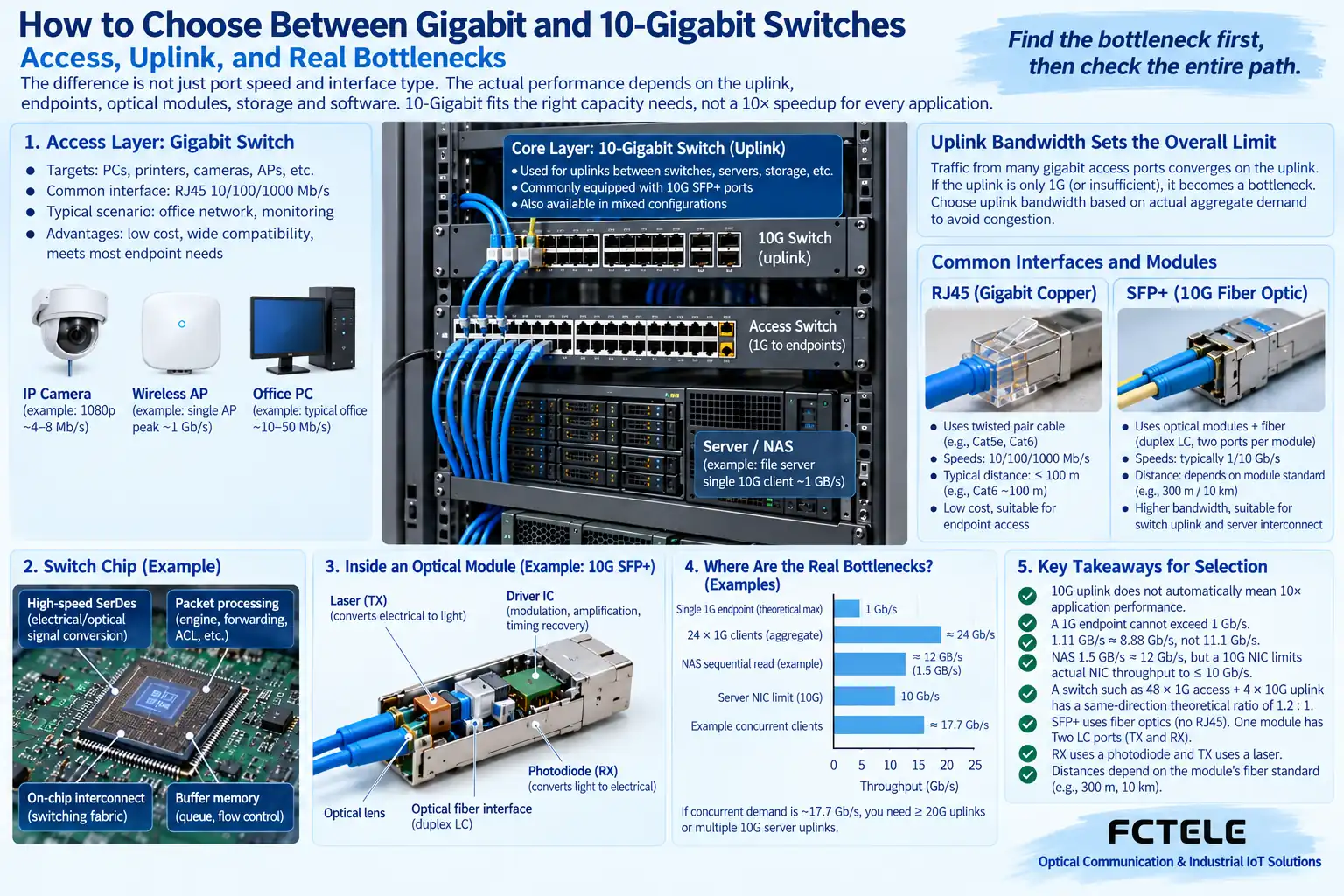
Why aggregation locations more easily become bottlenecks
When multiple endpoints transmit data through the same uplink at the same time, the combined demand may exceed the uplink capacity. Upgrading the aggregation link helps reduce this kind of limitation, but you still need to confirm the peer port and processing capability. It is not that the more access ports there are, the more the uplink automatically expands by the total.
Video, file transfer, and control services have different peaks and timing requirements, and should be evaluated according to the actual load. Whether oversubscription is acceptable depends on simultaneous usage; there is no single fixed ratio that suits every network.
10-gigabit optical links also have different conditions
Check the selected optical standard, single-mode or multimode, distance, wavelength, and power, and use compatible modules and cabling. The same connector does not mean the same optical standard, and an adapter patch cord will not automatically change the interface protocol. The device support list and on-site measurements should be referenced together.
Copper 10-gigabit requires checking port capability and cabling conditions; do not treat existing network cables as unconditionally suitable. Module power consumption and heat dissipation may also affect cabinet planning; you cannot compare only speed numbers while ignoring the environment.
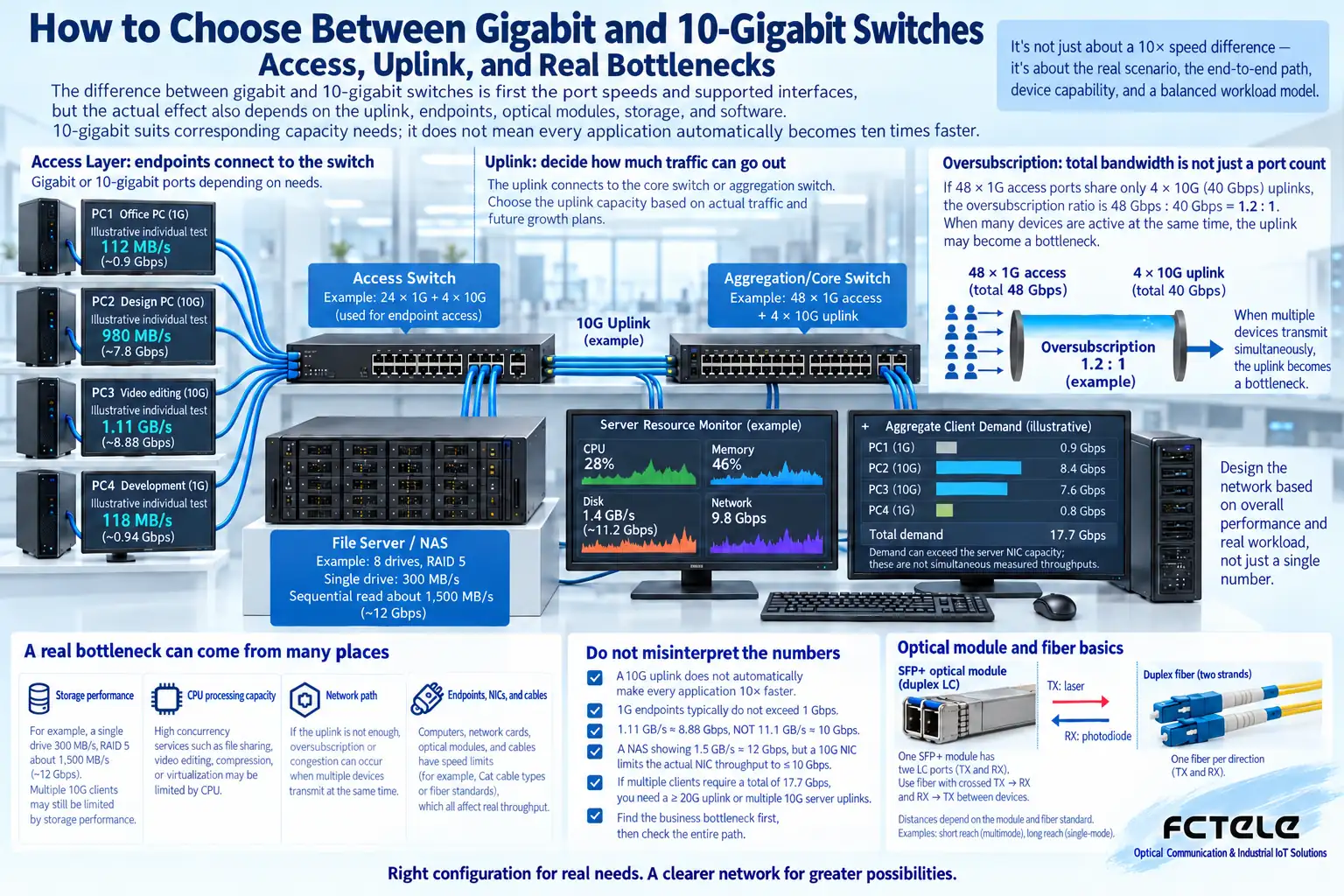
File copy is slow: check which link first
Check the endpoint network card negotiation, link errors, uplink usage, and network policies, then look at the CPU, disk, and software. If storage reads are already slow, upgrading the network will not automatically remove the storage bottleneck. A single copy result also cannot represent the switch’s entire performance.
Throughput testing should use tools capable of generating and receiving the corresponding load, and record frame length, number of flows, and direction. Latency, jitter, and packet loss are separate indicators; you cannot use one peak throughput number to answer all business reliability questions.
Which scenarios need to consider 10-gigabit
Scenarios such as multi-endpoint aggregation, server connections, high bitrate, and centralized data transmission may need higher capacity, but this should be determined by measured requirements. When the load is small and the bottleneck is not in the network, a gigabit solution may already meet the goal, and there is no need to replace it merely because of a new speed.
Industrial sites also need to confirm temperature, power supply, redundancy, and management functions. Higher-speed devices do not automatically have all industrial capabilities; network performance and environmental suitability need to be verified separately.
How to avoid interruption during upgrades
Record the existing topology and configuration, confirm the complete old-new compatibility combination, and arrange a maintenance window after verification on a test network. Check VLANs, allowed uplink ranges, routing, and applications, then observe continuous operation and recovery. A port light being on does not mean the service migration is complete.
Feichang Technology devices can be checked through Product Center for port and module support. Keep measurements under the same conditions before and after the upgrade, explain where the improvement comes from, and do not use “10-gigabit is necessarily ten times faster” to replace actual test conclusions.
When adding endpoints or servers later, recheck the shared capacity and failure scope. Backup links need a correct redundancy mechanism; directly connecting one more cable may cause a Layer 2 loop, and you cannot understand physical dual cables as automatically doubling bandwidth.
The illustrations are schematic diagrams of scientific principles and application scenarios; the interfaces, structures, and measurement values in them do not represent specific product parameters. Actual indicators must be based on model documentation and on-site measurements.
Translated from the Chinese technical article. Source first published: 2019-08-22. Source last revised: 2026-10-13T22:35:50+08:00. Read the Chinese source
