


Industrial Ethernet switches can be used for home wired networking, but “can connect” and “worth buying” are two different things. They mainly add LAN ports and will not automatically have broadband dialing, wireless coverage, or faster internet just because the casing is rugged. First clarify the division of roles between devices, then check speed, power, installation, and management to judge whether it suits your home.
1. First distinguish: expanding network ports is not the same as replacing a router
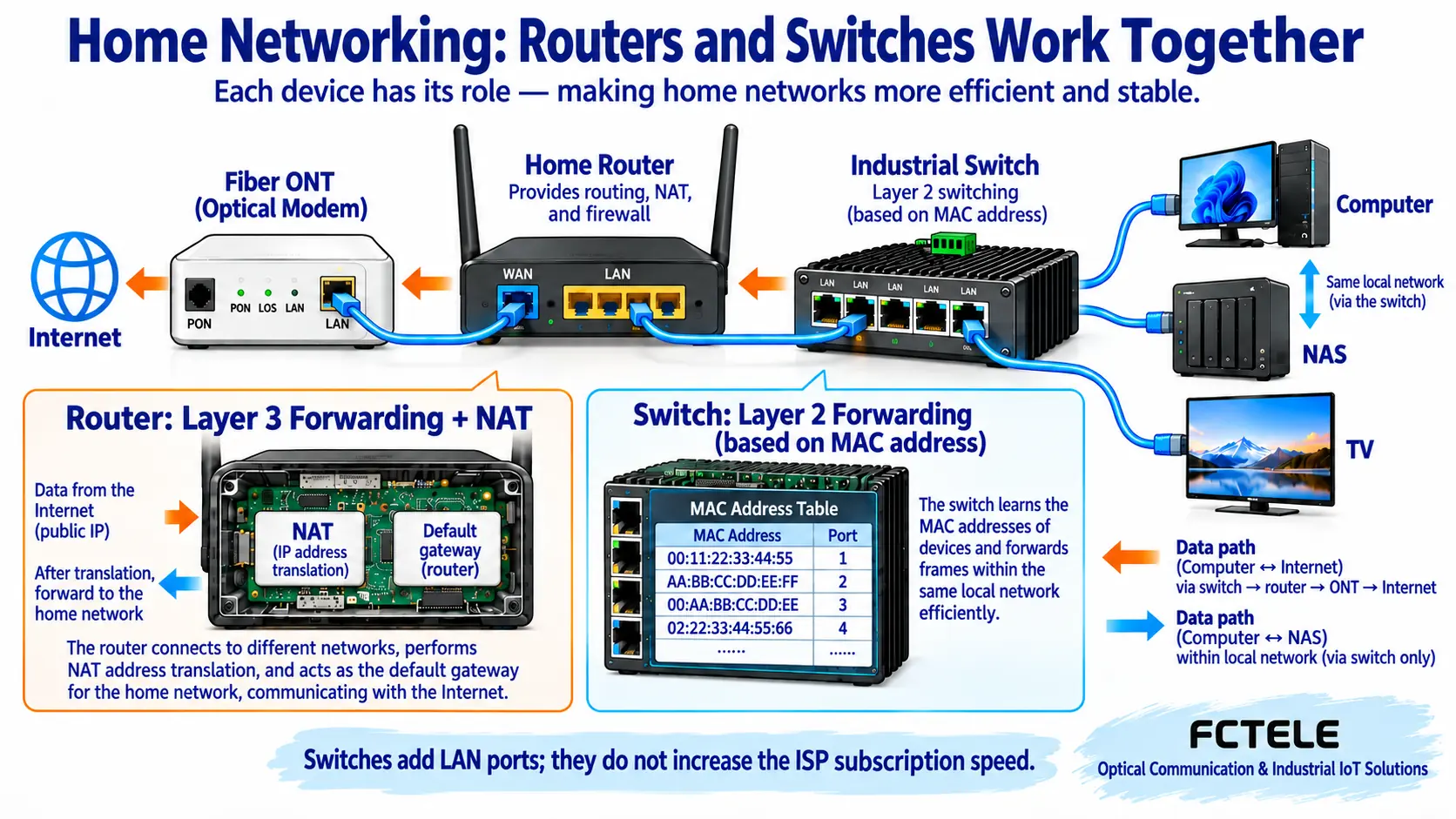
The optical modem at home is responsible for connecting to the carrier line; a home router usually handles connecting different networks, address translation, and wireless access; a switch connects computers, TVs, and network storage devices within the same LAN. Network storage devices are often called NAS, which you can think of as a file cabinet connected to the network. When a computer accesses a NAS on the same subnet, data can be forwarded inside the switch without going out to the internet.
An ordinary Layer 2 switch forwards based on the address in the Ethernet frame. A “frame” is a formatted piece of data transmitted on a link, and the MAC address is the address within it that identifies a network interface. The management IP of a managed switch is used to log in to the configuration page; it does not mean it automatically becomes a home internet gateway. Some Layer 3 switches do support routing, but whether they support the dialing, NAT address translation, and wireless functions needed for home broadband must be checked item by item in the manual, not just by looking at the words “Layer 3.”
2. Why it can communicate with a home computer
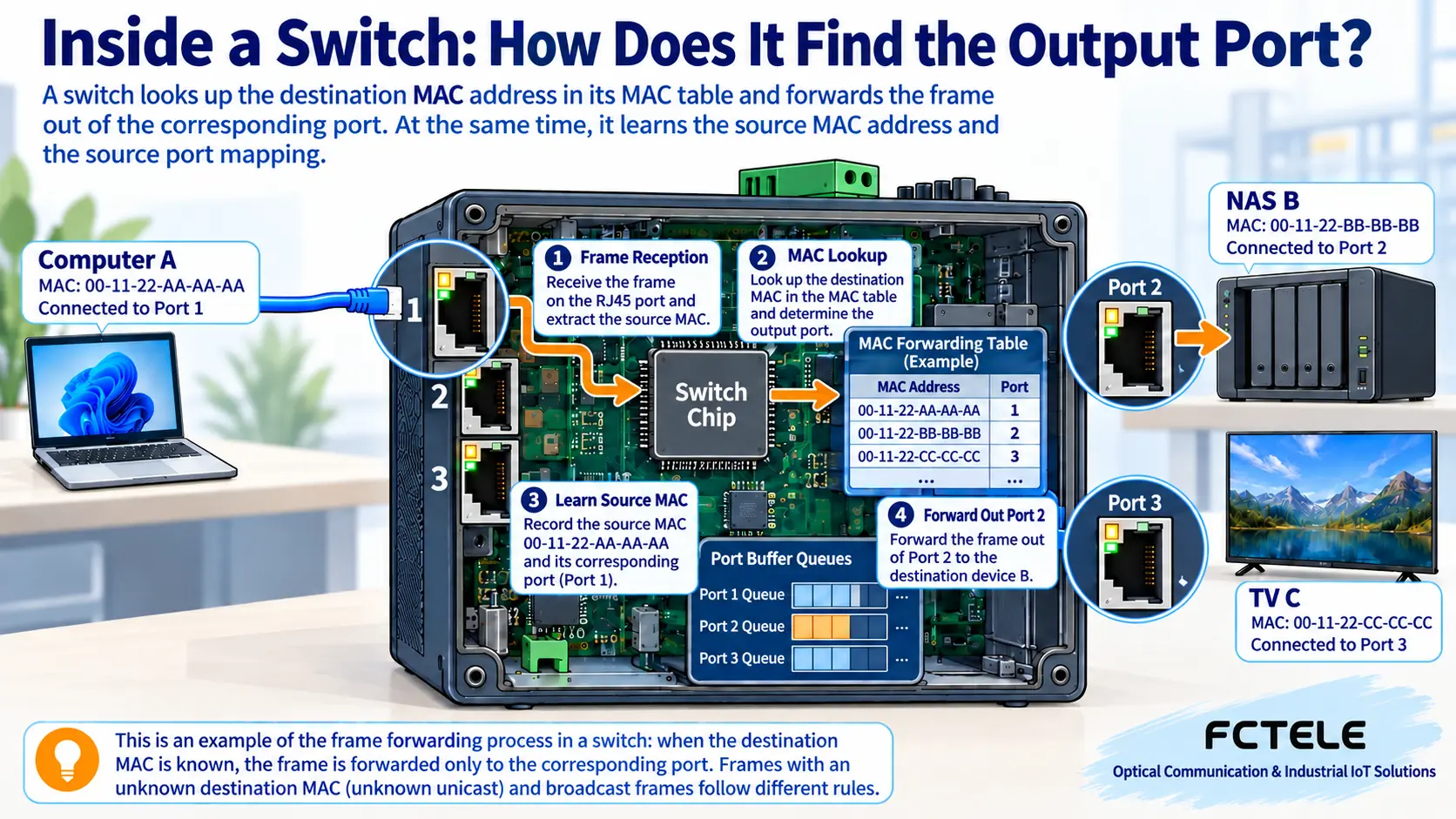
“Industrial” mainly describes the operating environment and design requirements the device is intended for; it is not another kind of Ethernet that only factory equipment may use. As long as both ends support compatible Ethernet interfaces, and the cable, speed negotiation, and configuration are correct, a link can be established. The receiving circuit restores the line signal to data, the switch chip looks up the destination address, queues the frame to the corresponding output, and then the transmitting circuit sends it to the next device.
The switch also learns the relationship between source addresses and ingress ports from received frames. Therefore, it does not need to send every known unicast to all ports. However, broadcasts, destinations not yet learned, and certain multicast traffic have different handling rules, so “only sent to the target” should not be understood as never flooding under any circumstances. A port light being on only shows that certain link states are true; it does not prove that IP, access permissions, and application software are all working normally.
3. Which home situations are worth considering an industrial model
If the device is placed in a weak-current box or attached equipment room with obvious temperature changes, or if you truly need DIN-rail mounting, specific DC power, and manageable functions, an industrial model can be put on the candidate list. First record the maximum ambient temperature inside the box, the power conditions, and the available space, then compare them against the specific model. If you only want to add a few network ports in a room-temperature living room, an ordinary qualified switch is often simpler; there is no need to pay for ring networking, alarms, or serial ports that have no use case.
A metal casing is not a waterproof promise, and an IP rating does not prove network throughput, interference resistance, or lifespan. Fanless design only reduces fan noise and related maintenance; the chip still generates heat, and heat dissipation space must be left according to the instructions. When the casing is hot, you cannot declare a fault by feel alone, nor should you hide the device in a corner wrapped in clothing. If there are children or pets at home, also avoid exposed wiring terminals, loose power supplies, and network cables that are easy to pull.
4. Before buying, look at the ports, not just the “gigabit” title
Confirm the speed of each port separately: how many electrical ports, how many optical ports, which can be used as uplinks, and whether there are combo ports shared between electrical and optical. When a 100 Mbps port connects to a gigabit computer, communication can only occur at the speed negotiated by both sides. The gigabit bit rate divided by eight gives the theoretical byte ceiling; actual file transfer is also affected by protocol overhead, hard drives, computers, and software, so it cannot guarantee a fixed number of files transferred per second.
Suppose both the computer and NAS are connected to gigabit ports, but the router uplink is only 100 Mbps; file access within the same switch and internet access will encounter different limits. Replacing with a higher-spec switch will not automatically upgrade the carrier broadband plan, router performance, or remote servers. If you connect a wireless AP, the AP handles wireless access; an industrial switch without wireless functions cannot produce a Wi-Fi signal out of thin air. Standard PoE power supply must also be confirmed separately; an ordinary RJ45 port is not the same as a PoE port.
5. Start by connecting one computer; do not rush to fill every port
First power off and check the power input, polarity, power, and protective grounding requirements. Do not randomly replace with an adapter that looks the same, and do not connect mains electricity yourself to terminals that only accept low-voltage DC. Secure the device according to the instructions, leave space for heat dissipation and plugging/unplugging, then connect the router LAN port to one service port on the switch. Connect the computer to another service port, and during initial verification keep only this uplink to avoid accidentally forming a loop with two network cables.
Unmanaged models usually require no login setup. For managed models, first check whether the management address and the computer are on the same subnet, save the initial configuration, then change the administrator password. The management address must not duplicate that of the router or other devices. If you plan to divide VLANs, first understand port membership and uplink tagging rules, then implement them; when no corresponding gateway is configured, two VLANs cannot communicate as expected just because they are plugged into the same device. Any change should leave a way to restore management access.
6. How to accept the installation and locate “cannot access the internet”
First check whether the computer has established a link and negotiated the expected speed, then look at the IP address, subnet mask, gateway, and DNS it obtained. If it can access the LAN NAS but cannot access the internet, the focus is usually on the gateway, router, and external network; if devices on the same subnet also cannot be accessed, first check the network cable, port, VLAN, and terminal firewall. A management page that will not open and service data that cannot pass may also be two different types of problems, and you should not directly restore all devices to factory settings.
During acceptance, perform both LAN file access and internet access, and record the test time, wiring, and negotiated speed. For intermittent disconnections, first replace with a known-good short network cable, check the power supply, and view port error statistics, changing conditions one by one. Do not artificially short the power supply or create surges in a residence to “prove industrial grade.” Stable operation comes from matching devices, correct installation, and reasonable load, not a label.
7. How to refer to Feichang Technology products without buying unnecessary functions
On the Feichang Technology official website, the mini industrial DIN-rail 5-port gigabit electrical switch provides five electrical ports and DIN-rail or wall-mount installation options; this type of structure is suitable for wired access that needs to be fixed inside a cabinet. Whether to use it at home still requires checking the power accessories, installation space, and actual speed requirements. The five ports must also have the uplink port deducted; you cannot plan on all five ports connecting terminals.
If you only need ordinary wired port expansion, first compare the total cost after installation and ease of use; if you need management, fiber, or PoE, then choose a model with clearly corresponding configuration. The requirements given to the supplier should include the number of terminals, uplink type, power method, placement location, and future expansion, rather than just saying “the most industrial one.” Only by clarifying what you need can industrial equipment play an appropriate role at home.
Source note: Device roles refer to Cisco switch and router documentation; specific products are subject to the Feichang Technology product pages and corresponding ordering configurations. The two figures in this article are general mechanism illustrations, not physical photos or measured results.
Translated from the Chinese technical article. Source first published: 2020-11-17. Source last revised: 2026-10-13T17:34:48+08:00. Read the Chinese source
