


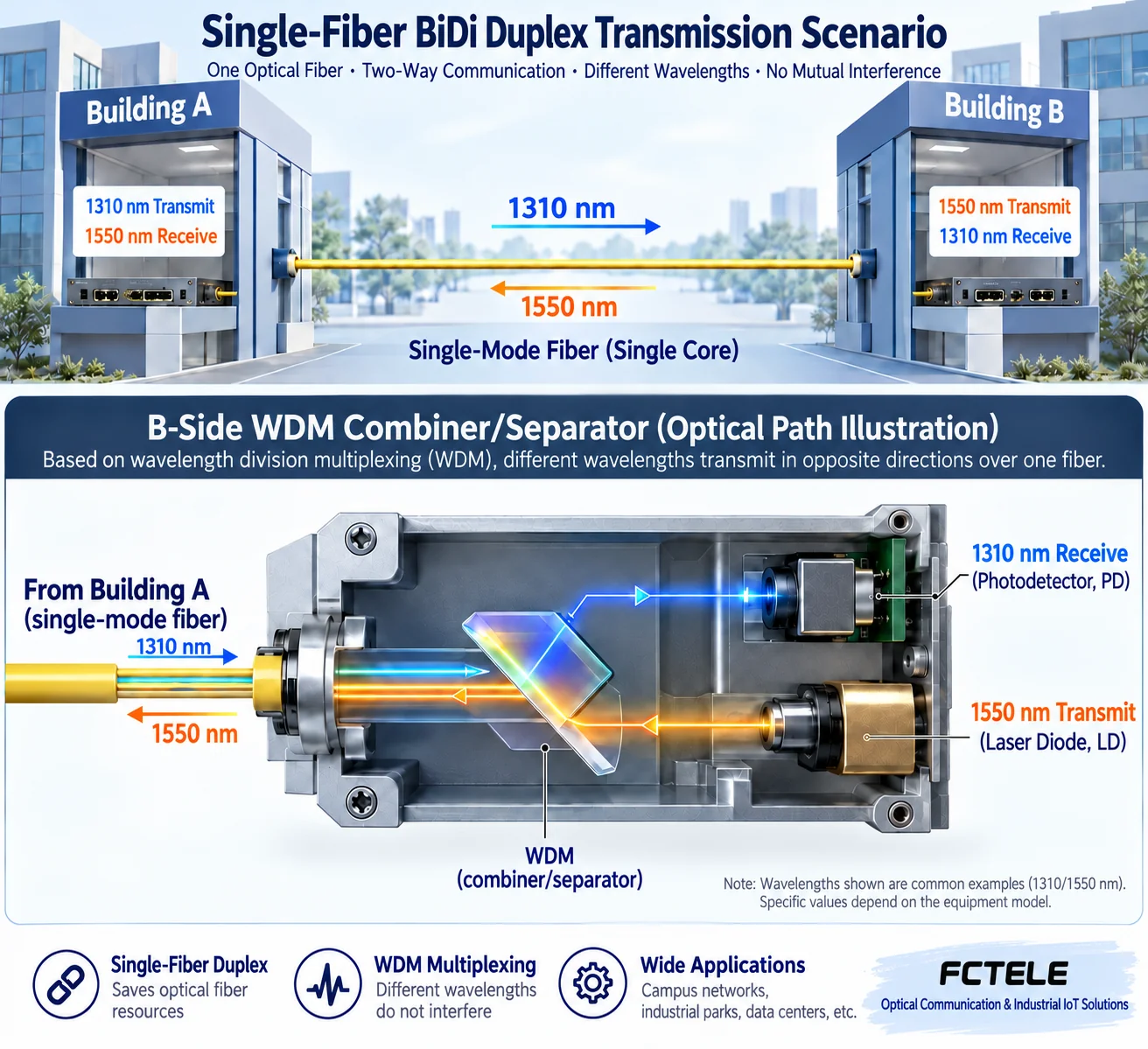
A matched single-mode single-fiber BiDi pair can usually communicate after the complete A and B units exchange sites because complementary wavelengths remain paired. Replacing just one endpoint with another A or another B normally does not work. Swapping also depends on rate, optical budget, copper settings and other features. A/B does not mean a fixed transmitter/receiver identity.
Why one fiber can carry two directions
BiDi separates directions by wavelength. In a common example, A transmits at 1310 nm and receives at 1550 nm, while B transmits at 1550 nm and receives at 1310 nm. Optical multiplexing/demultiplexing shares the core and directs each wavelength to its receiver. These are illustrative values; other combinations exist. Read the labels.
Both units transmit and receive. Treating A as transmit-only and B as receive-only cannot explain return traffic. A/B usually identifies pairing, not which building is central or remote.
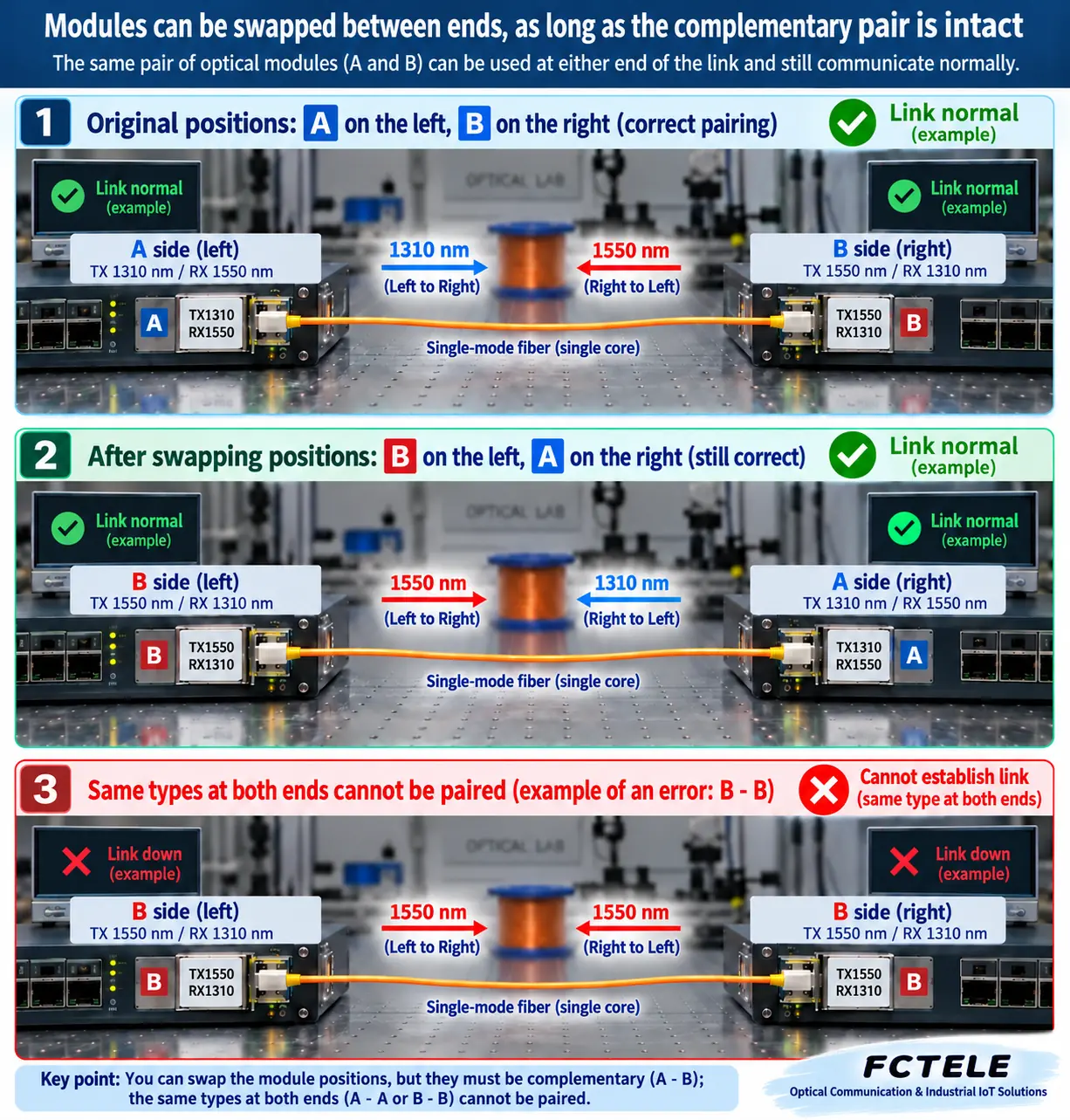
Swapping the pair differs from replacing one unit
If A starts centrally and B remotely, exchanging sites puts B centrally and A remotely. Provided the pair remains matched, each transmitter still meets the other receiver wavelength. Changing left/right positions alone therefore need not prevent communication. Site names do not change optical matching rules.
Replacing remote B with another A creates A–A. Both transmit the same wavelength while expecting another, so this is not a complementary pair. Manufacturers may define A/B differently; compare actual TX and RX wavelengths rather than letters alone.
Why matching wavelengths may still be insufficient
Speed and coding must match; identical connectors do not make Fast Ethernet and Gigabit interoperable.Receive power must fit each endpoint window. Transmit power and sensitivity may differ between directions, so calculate separately.Media and connectors must match single-mode fiber, connector and polish types. Do not mate incompatible end faces.
Check whether the device does more than convert media. PoE output, special power, management, alarms or dedicated service interfaces may no longer suit the new site. An optical link can establish while the terminal remains unusable. For example, moving a non-PoE unit to a camera site that depended on PoE may leave the camera unpowered.
Verify without disrupting the production network
Photograph and record models, TX/RX wavelengths, speeds, copper settings and power before an approved change window. Reconnect the identified core using cleaning procedures and never look into a port. Check optical links, copper links and service at both ends, then sustained bidirectional data. One LED or ping can miss asymmetry.
For long links, retain both power readings and compare sensitivity/overload limits. Short distance does not waive the check: high-power long-reach modules may need attenuation. If swapping fails, check optics, copper, power and service settings in layers instead of concluding that A must be central.
Specify spare pairing parameters, not only A/B
List complete model, rate, TX/RX wavelengths, fiber, reach class and power conditions. Identify the peer and required site features to avoid an incompatible replacement merely labeled single-mode single-fiber. Follow any role or site restrictions in the actual manual.
Three common site questions
Can the pair move to a spare fiber core?If the spare is continuous end to end and meets loss requirements, changing its identifier normally does not break pairing. Remeasure and update labels.Can any A and B labeled 20 km be mixed?Distance omits important parameters. Compare speed, wavelength, power windows and compatibility documentation too.
If only one direction works, is B receive-only?No. Verify the transmit, receive and service paths separately. Power, components, configuration or copper-side faults can affect one direction. A/B labels do not explain one-way communication.
If moving sites changes power or management addressing, verify the new voltage and access configuration. Managed units may have rate limits, VLANs or alarm coordination requiring reassessment. Optical compatibility is only part of replacement suitability.
Keep explicitly compatible spares and verify them on a short-link bench beforehand. Respect receiver overload conditions rather than repeatedly applying excessive power. Associate test results with serial numbers to distinguish model mismatch from an individual fault.
Move configuration and maintenance records with the equipment
Separate device configuration from switch-port configuration before moving a pair. Its management address may belong to the old subnet; external switch VLANs do not move with the enclosure. Record management, port status and wiring, then verify service and management separately. Do not alter production subnets indiscriminately merely to open a management page.
The environment is also a swap condition. Working in a control room does not prove suitability in a humid or hot cabinet. Check model limits, power, orientation, cooling clearance and jumper bends. Optical matching determines signal compatibility, not mechanical, electrical or environmental suitability. Use a maintenance window and retain a restoration plan.
The FCTEL Gigabit B-series distinguishes internal and external power. The remotely managed series describes compatible central management arrangements. Record these differences rather than comparing enclosures or letters alone. Series pages may combine versions, so obtain the actual purchased-model specification before moving equipment. Undocumented temperature, power or backup capability cannot be assumed.
Translated from the Chinese technical article. Source first published: 2020-04-08. Source last revised: 2026-10-13T15:39:27+08:00. Read the Chinese source
