


Storm control limits a category of traffic that grows abnormally; port mirroring copies selected traffic for authorized analysis. They solve different problems. Observe normal operation first, configure scope and actions for the actual equipment, then verify that necessary traffic remains unaffected. Rate limits do not repair loops, and packet capture does not automatically stop attacks.
1. When normal broadcast traffic becomes a burden
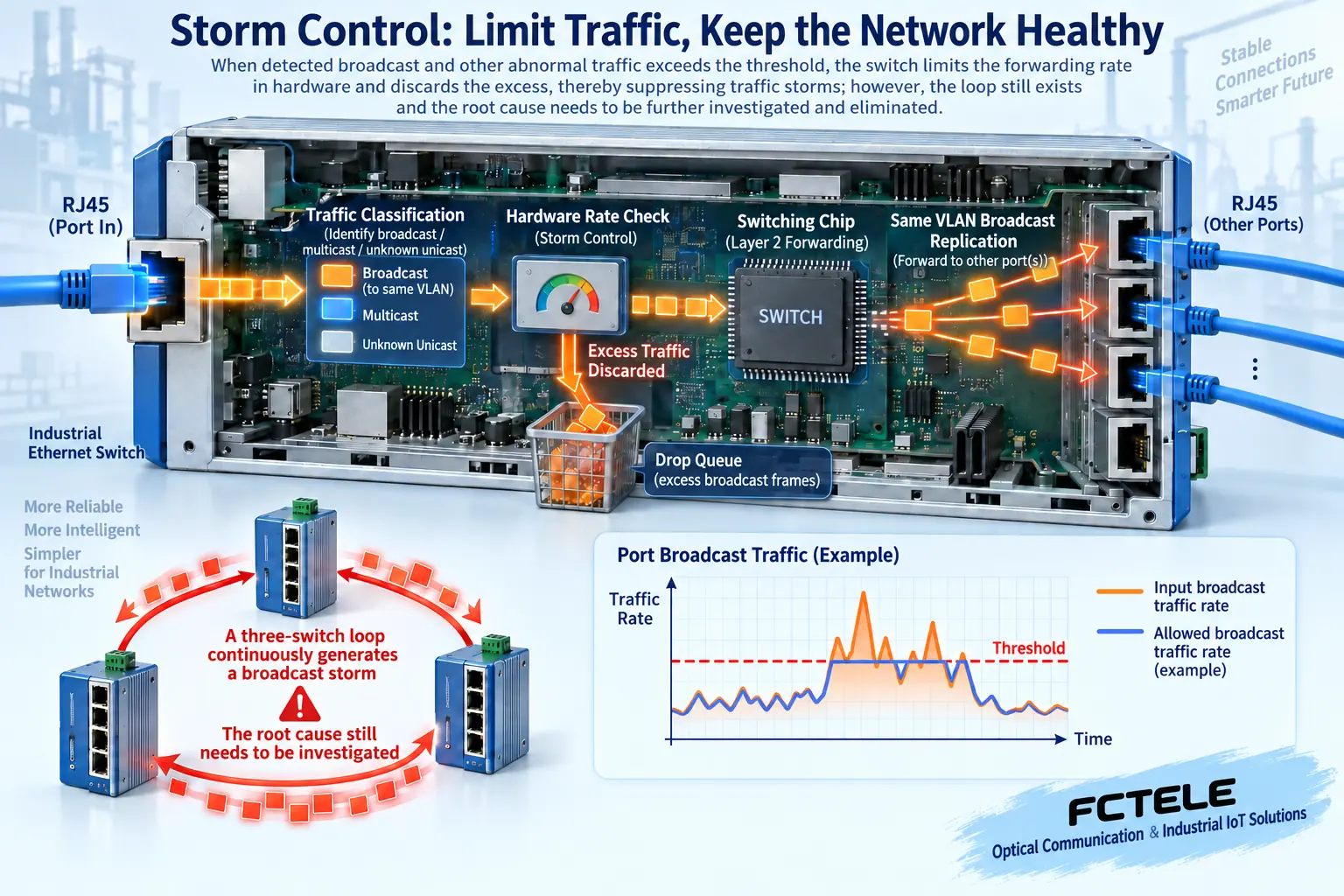
A switch forwards Ethernet frames: addressed units of data. Some frames need to reach devices throughout the same broadcast domain, for example to find the hardware address associated with a network address. Broadcast is not inherently a fault. Excessive traffic consumes link capacity, processing and buffers, preventing timely handling of ordinary requests.
A VLAN normally defines a Layer 2 broadcast scope. The switch copies a received broadcast to other relevant ports within that scope. With an improperly controlled Layer 2 loop, copies can return and be forwarded and copied again. Faulty endpoints or configuration errors can also produce surges. A high broadcast count alone does not establish an attack.
Unknown unicast is different again: a frame has an individual destination address, but the switch has no current forwarding-table entry and may flood it within the applicable scope. Unknown multicast handling also depends on configuration. These differ from known unicast. Check the model and firmware documentation for supported suppression classes, including whether a multicast category counts all multicast traffic.
2. How storm control works
The equipment identifies configured frame classes, measures or limits their rate, and applies thresholds and actions. A threshold may use bits per second, packets per second or a percentage of port bandwidth. Those units are not interchangeable. Some implementations suppress traffic above the permitted rate, others operate over observation intervals, and some can generate alarms or shut down ports. One product’s behavior is not universal.
Suppression can reduce propagation of abnormal traffic, but cannot turn incorrect cabling into a correct topology. If a loop remains, inspect cabling, redundancy protocols and port states. Repeatedly increasing the threshold may merely admit more abnormal frames. Setting it too low can instead disrupt legitimate address resolution, discovery or multicast, causing intermittent failures without an obvious physical disconnection.
3. Establish a normal-traffic reference first
Record endpoints, port purposes, VLANs and uplinks, and save the original configuration. Observe statistics during ordinary operation and normal peaks, separating broadcast, multicast, unknown unicast and total traffic. Averages do not represent brief peaks during startup, recovery or coordinated discovery. Settings copied from one quiet-period screenshot may suppress legitimate traffic during commissioning.
For example, several production-line endpoints may perform address resolution and discovery together after power is restored. Include this legitimate case in testing rather than suppressing every peak. An uplink aggregates endpoints, whereas an access port usually serves one or a few; do not copy the same threshold to both. This example explains an assessment method, not production-ready parameter values.
Within a maintenance window, first validate a clearly bounded, controllable port. Confirm triggers, counter increases and recovery. Correlate alarms, application responses and loss. Do not create a broadcast storm in a production network or disconnect a control uplink without a plan. Use an approved isolated setup for stress testing.
4. Port mirroring copies traffic rather than taking over the application
Port mirroring copies traffic received, transmitted or both at selected source ports to a destination port for an analysis computer or monitor. Original traffic continues on its normal path; the analyzer need not sit inline. Interpret ingress and egress relative to the switch, not the left or right position of a cable.
First identify the question: did the endpoint send a request, did a response arrive, or which interface originated abnormal traffic? Then choose necessary source ports and directions. Mirroring everything adds analysis work and can exceed the destination port’s capacity. A difference between source traffic and captured counts may reflect lost copies or analyzer limits, rather than application loss.
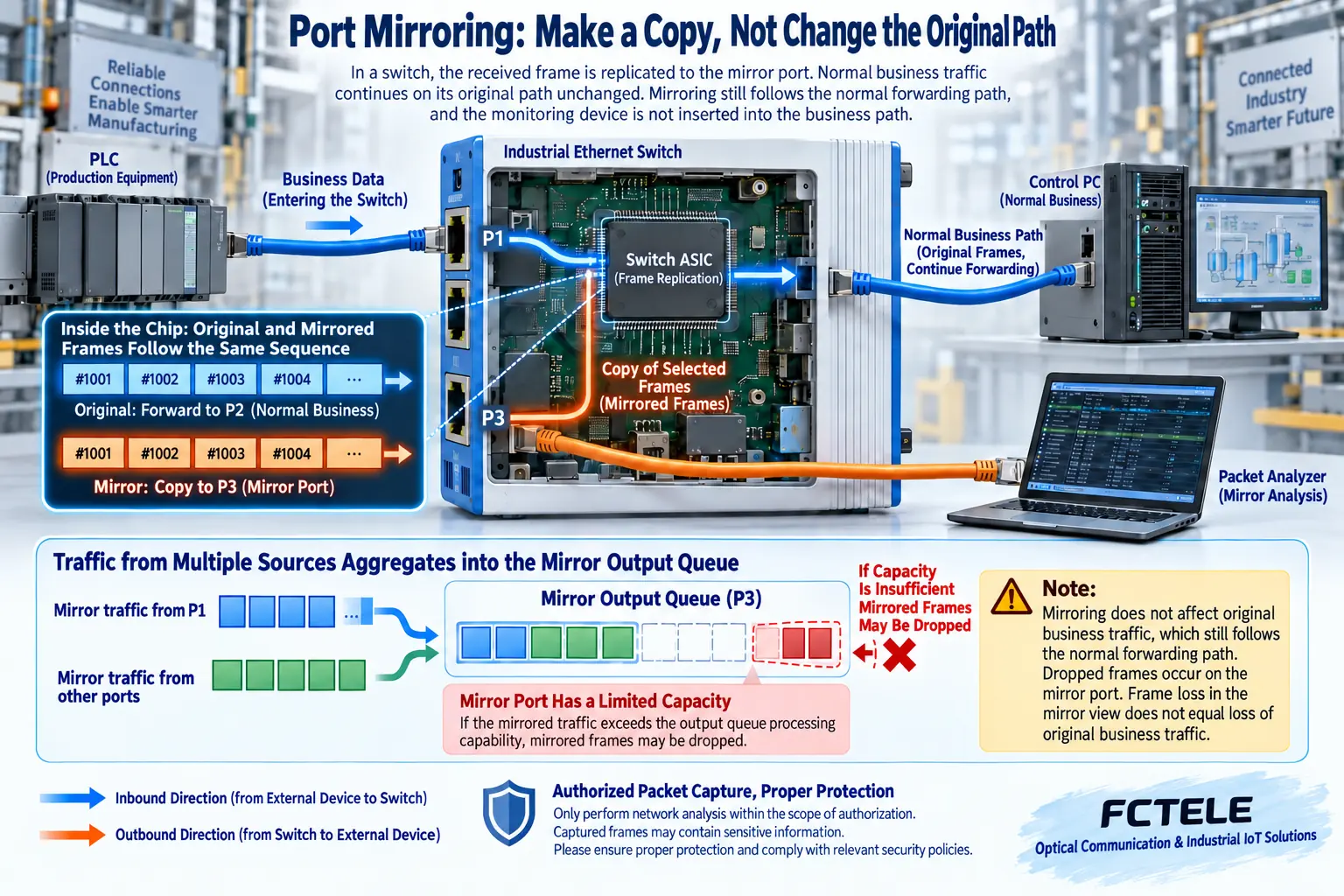
Whether a destination port can also carry ordinary traffic, how many sources are supported, how tags are preserved and what hardware limits apply are manual-specific. After enabling mirroring, use a known legitimate request to confirm direction and capture results. If only one direction appears, check mirror selection, capture filters and the analyzer before concluding that the peer never responded.
5. Apply documented FCTEL functions to the project
The FCTEL product page for the domestically sourced, lightly managed DIN-rail industrial switch with sixteen Gigabit copper and eight Gigabit SFP ports lists broadcast, multicast and unknown-unicast storm control, port mirroring and traffic statistics. Those documented functions support observing abnormal traffic per port, limiting relevant classes and retaining analysis copies. This describes that product page, not identical menus and parameters across all FCTEL switches.
The page also lists VLAN and loop-related protocols. Check isolation, redundancy and rate-limit configuration separately. A website overview cannot replace the firmware manual. Before procurement or deployment, confirm threshold units, suppression direction, alarm behavior, mirror restrictions and configuration persistence. Old fixed threshold ranges and interface screenshots are not retained as a guide for every model.
6. Keep evidence and limits with the diagnosis
Compare before-and-after statistics, application responses and alarm times. Suspected duplicate frames in a capture should be checked against topology and source-port records; a screenshot alone does not prove the cause. Test normal startup, normal peaks and link recovery, confirming that suppression preserves necessary traffic. Save the configuration before handing over records.
Capture only with authorization, limit its scope, and protect application data, addresses and any credentials it may contain. Disable temporary mirroring after analysis and retain or remove files as required. If a change causes problems, use the prepared recovery path to restore a known configuration and record the impact. Do not keep stacking rules to conceal a fault. Availability controls and diagnostic tools help the site when used within a sound engineering process.
References:FCTEL corresponding product details;Storm-control implementation and thresholds;Mirroring mechanisms and limits. Third-party documents verify generic mechanisms, not identical FCTEL implementation. Figures are generic illustrations, not product photographs or measurements.
Translated from the Chinese technical article. Source first published: 2022-11-21. Source last revised: 2026-10-13T14:51:17+08:00. Read the Chinese source
