


LLDP lets adjacent network devices actively introduce their own identity and ports, helping maintenance staff verify “which device this cable is actually connected to.” It does not assign IP addresses to terminals, does not automatically repair loops, and does not guarantee that video or control services are already working normally. Only by understanding how advertisements are received, how records refresh and expire, can you use the neighbor table as troubleshooting evidence, rather than declaring network acceptance complete just because you see a topology diagram.
1. First, clearly identify the device and the port separately
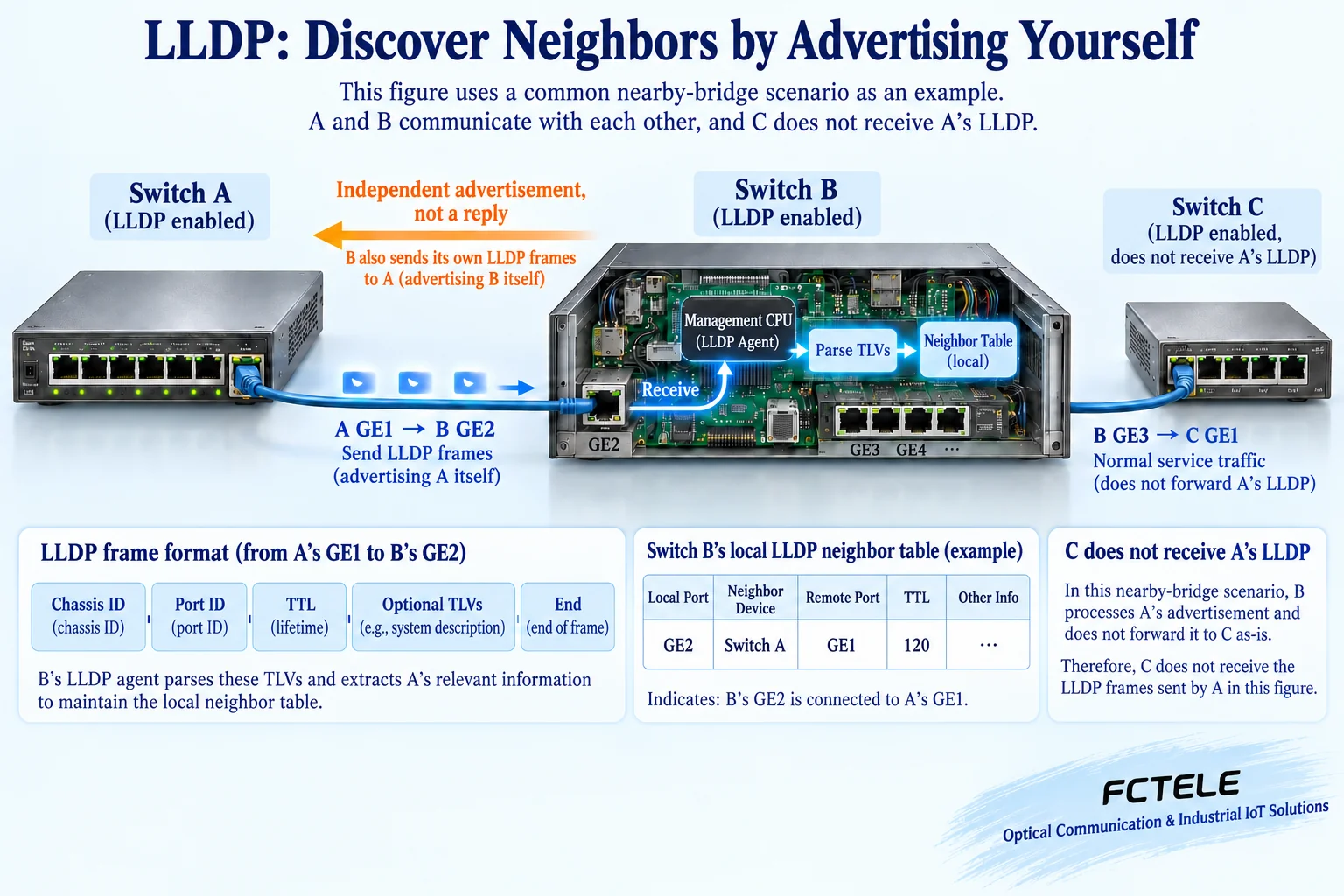
Assume switch A in the cabinet connects to GE2 of switch B through GE1. Looking only at the link lights at both ends, we know the interface has established some kind of connection, but we may not know the peer device name and port. The full name of LLDP is Link Layer Discovery Protocol, and IEEE 802.1AB defines the discovery mechanism between adjacent stations. It transmits information at the data link layer and does not need to first find the peer through IP routing, so it is suitable for helping identify directly connected relationships.
Device identity and port identity should be viewed together. Chassis ID is used to identify the device, and Port ID is used to identify the port from which it sends the advertisement; the specific encoding may be a MAC address, an interface name, or another form supported by the device, and every kind of Port ID should not be interpreted as a network port MAC. The system name is optional information for human readability and may be modified or duplicated. Recording “A’s GE1 connects to B’s GE2” is more useful for guiding on-site cable tracing than recording only two names.
2. So-called one-way means independent advertisements, not that only one direction can be seen
A’s LLDP transmit function sends local information according to configuration, and B’s receive function reads it. A does not need to first send a query to B, nor does it rely on B sending an LLDP acknowledgment to prove that this message arrived. B can also independently send its own advertisement to A, so both ends can establish neighbor records. These are two independent advertisement processes, not one request plus one response; older articles that only write “one-way protocol” can easily make beginners mistakenly think that the link can only be discovered in one direction.
Transmit and receive can usually be configured separately. If A only receives while B transmits normally, A may be able to see B, but B cannot see A. When there is no record in one direction, first check the actual enabled state at both ends, and do not immediately conclude that the fiber or network port is damaged. The transmit interval, change-triggered behavior, and startup behavior vary by implementation, and the default seconds or fast-start count of one brand cannot be written as being the same for all Feichang Technology models.
3. What is contained in one advertisement
LLDP is carried in Ethernet frames. The common destination MAC for the nearest bridge scope is 01:80:C2:00:00:0E, and the EtherType is 0x88CC; this is not the same kind of address as a management IP that can be pinged. The discovery information in the frame is called an LLDPDU and is organized using TLVs. A TLV is “type, length, value”: the type tells the receiver what this segment is, the length indicates how much content there is, and the value is the actual information provided by the device.
A basic advertisement includes device identity, port identity, and validity period TTL, and marks the end with an end TLV; depending on support and configuration, it may also carry system name, port description, capabilities, or management address. The receiving device checks and parses these fields, then associates “the local interface that received it” with “the identity declared by the peer.” The peer-declared Port ID cannot be treated as the local ingress port, and actual optical module parameters or certifications cannot be inferred from a port description.
4. Why it is not one switch broadcasting an entire network-wide topology
LLDP in the common nearest bridge scope is used for directly adjacent devices. In an ordinary switched connection A—B—C, B processes A’s advertisement within this scope and does not pass it along all the way to C unchanged like ordinary service broadcast traffic. B introduces B on its other enabled ports, rather than impersonating A as the source. Special-purpose scopes, pass-through, or tunneling schemes have their own rules, and the simple three-device example cannot be generalized to mean that all device types absolutely never forward.
For a management platform to obtain a relatively complete topology, it usually needs to read neighbor data from multiple devices through a controlled management channel, and then stitch relationships together by comparing devices, ports, and time. It does not rely on one LLDP frame traveling across the entire network to collect all nodes. The platform needs corresponding permissions, protocols, and device support, and management connection failures or unsynchronized collection can both affect the display. A device having a neighbor table also does not prove that any third-party platform can automatically be compatible.
5. TTL gives old records an expiration time; it is not how many hops a service packet can travel
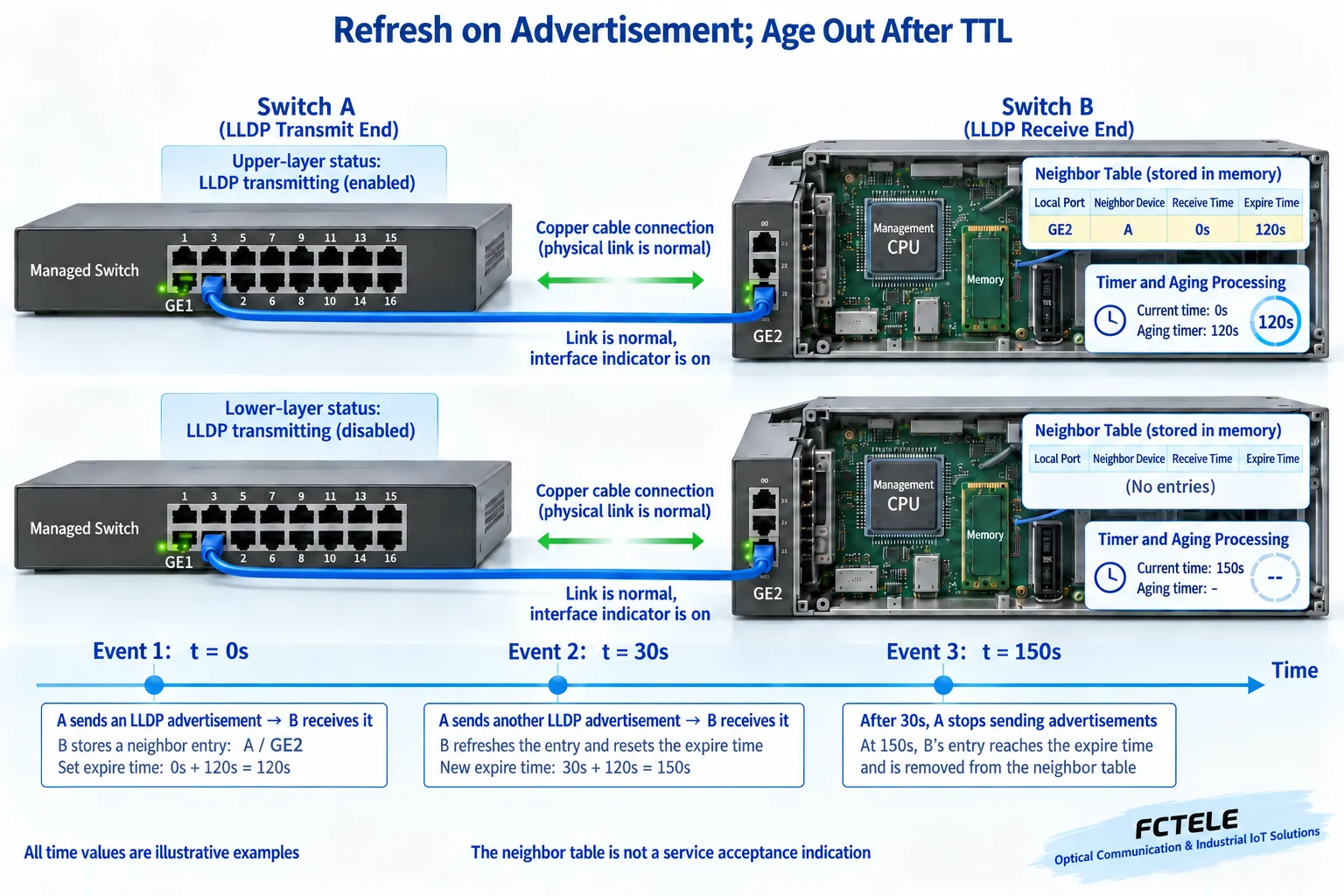
The TTL here is the time for which neighbor information remains valid, not the hop count that an IP packet decreases each time it passes through a router. Upon receiving a new valid advertisement, the receiver updates that neighbor information and its expiration condition; if nothing is received again for a long time, the record ages out and is removed. Events such as link state changes or disabling advertisements may cause the device to clear it earlier according to implementation, and any fault cannot be written as necessarily requiring waiting for the full TTL before it is discovered.
In the teaching example, B receives an advertisement at second 0 in which A declares a TTL of 120 seconds, and at second 30 receives another valid advertisement, so the expiration point of this record can be updated to second 150. If advertisements then stop and there are no other early-clearing events, it is removed after expiration. These are hypothetical numbers to explain refresh logic, not Feichang Technology model default values or recovery times. Stopping LLDP transmission also does not equal having unplugged the cable or stopped all service data.
6. How to put Feichang Technology model capabilities into an actual solution
The 3422 managed Layer 3 switch details in the Feichang Technology product center explicitly list LLDP, port statistics, mirroring, and management functions. A project can use LLDP for connection verification, use statistics to observe service counters, and when necessary, analyze packets through mirroring according to supported capabilities. These tools each answer different questions: who the neighbor is, how the service traffic is, and what frames are actually received; none of them can replace all acceptance checks.
The PoE section of that detail page states “none,” so it cannot be written as a PoE-powered model just because it has LLDP or the page mentions LLDP-MED.
7. Establish a baseline in configuration first, then open necessary information
First save device and firmware information, configuration backups, and management recovery paths, and check the transmit and receive status at both ends on a known-correct maintenance link. Fill in clear names or descriptions for switches and ports that do not reveal sensitive purposes, then select the optional fields that truly need to be advertised. Menu names and save or submit steps should be performed according to this model’s instructions, and default accounts or commands from other brands in old articles should not be copied.
Information such as system description and management address helps maintenance, but may also expose clues about the device and version. Which untrusted access ports need transmit or receive disabled or reduced optional information should be decided by the security design. A neighbor’s self-reported identity is not identity authentication, and being named “core switch” does not thereby earn trust. Coordinate access control and management permissions according to the service design, and do not equate enabling LLDP with completing network security construction.
8. When a neighbor disappears, troubleshoot layer by layer based on evidence
First confirm that you are looking at the current local port and the actual connected object, then check the physical link, functions at both ends, and whether advertisements are filtered by policy. Record whether receive or transmit counters increase, the most recent update time, and aging behavior. When packet capture is needed, use supported mirroring and analysis tools in an authorized isolated environment or approved window to check the actual frames; do not unplug cables, restore factory settings, or change many parameters on a production network without confirmation.
If B can receive A but A cannot receive B, check B’s transmit path and A’s receive path separately; if both ends have records but services do not work, then check VLANs, IP addresses, routing, access policies, and terminal applications. The appearance of LLDP does not prove that camera recording, PLC control, or cross-subnet communication is correct, and a neighbor disappearing may also simply mean the peer stopped sending. Keeping management evidence separate from real service testing is the only way to avoid misdiagnosis.
9. Complete acceptance with one controlled change
First record both devices’ and ports’ identities, optional fields, and update times in the normal state, and check them item by item against the wiring ledger. Under approved test conditions, change one description or pause LLDP transmission on one side, observe the peer update or age out, then restore the setting and confirm the record returns. This test verifies the discovery mechanism and is not proof of the entire network’s fault resistance or uninterrupted capability.
Finally, separately verify the planned services and management access, and save before-and-after records, times, device versions, and configurations. After replacing devices, changing connected ports, or adjusting naming, update the ledger in sync. The most valuable result of LLDP is not drawing a pretty line, but turning “which local port connects to which peer port” into time-sensitive, reviewable evidence, and making clear which service problems still require other methods to verify.
Verification materials: IEEE 802.1AB project description ; Cisco LLDP frame and advertisement mechanism ; Juniper neighbor discovery and configuration concepts ; Feichang Technology Layer 3 switch category ; Feichang Technology 3422 product details . Third-party materials are used for general mechanisms and are not proof of Feichang Technology commands or default parameters. The two principle diagrams are generic illustrations checked for content, not actual product photos, model internal circuits, or measurements. Example ports and timings are not specification commitments.
Translated from the Chinese technical article. Source first published: 2022-11-07. Source last revised: 2026-10-13T10:22:10+08:00. Read the Chinese source
