


Describe the fault first, don’t restart the device first
Maintenance of a program-controlled telephone exchange should revolve around the actual call process: whether the phone can go off-hook, dial, ring, hear two-way voice, and release on hang-up. A single line being abnormal, multiple extensions being abnormal at the same time, and only external calls being abnormal may involve different paths. First record the fault time, number, direction, and scope of impact, then check alarms and configuration. You cannot judge that communication is normal just because the chassis light is on.
This article discusses telephone connection systems. VLAN and MAC troubleshooting for ordinary industrial Ethernet switches cannot be directly copied over. The system may include analog subscriber ports, digital trunks, or IP voice gateways, so you need to list the interfaces and topology first. Older drafts that uniformly specify computer room temperature and humidity, protection for all lines, and general maintenance commands lack model conditions and cannot be used as on-site execution standards.
Why multiple extensions being abnormal at the same time requires checking common nodes
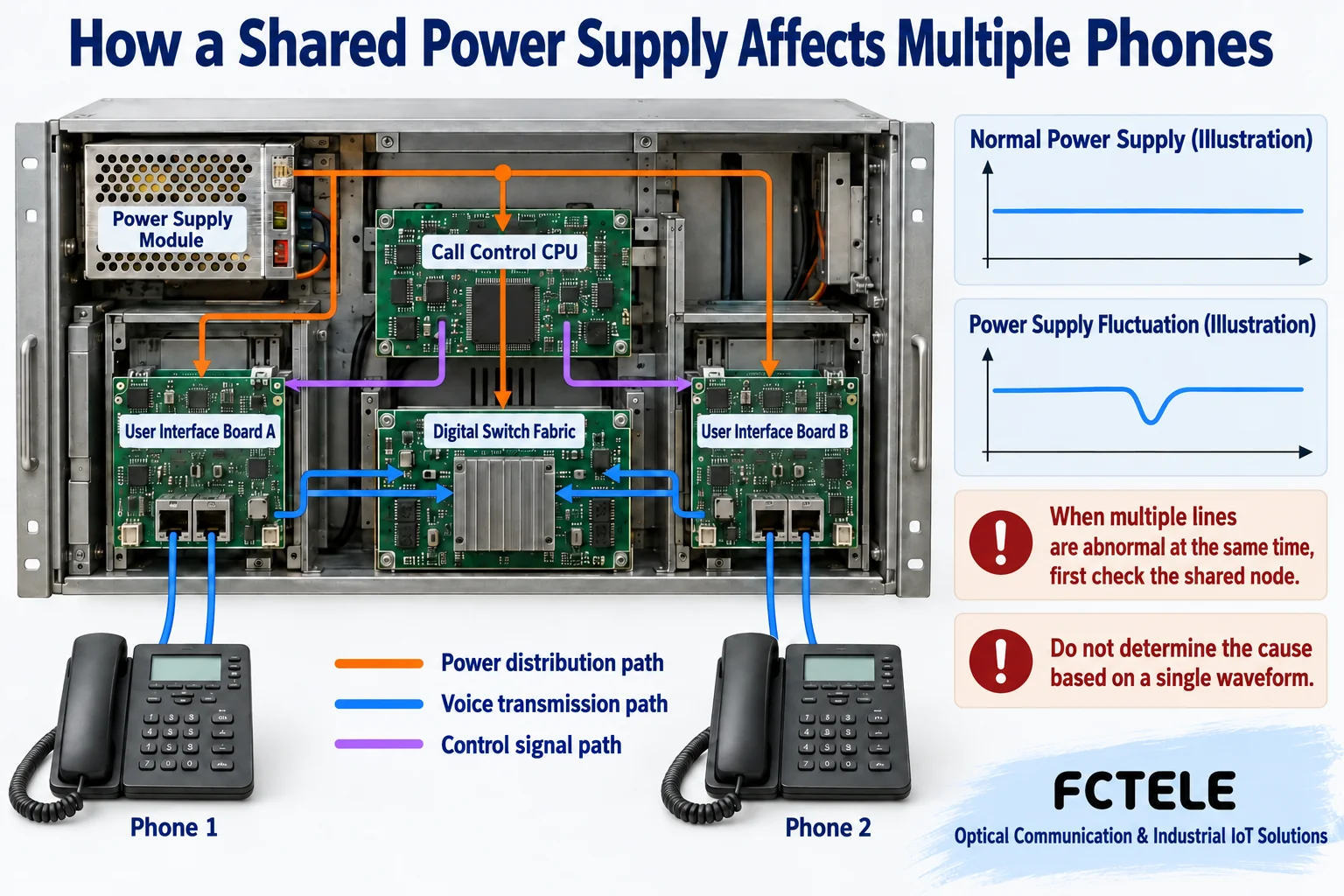
Power, control modules, switching fabric, trunks, and transmission nodes may be shared by multiple call paths. If they are abnormal, the symptoms may appear on multiple lines at the same time; poor contact on a single subscriber line is usually more localized, but this is only a troubleshooting clue, not a final diagnosis. You should compare alarms, power status, fault scope, and time, rather than directly replacing the mainboard based on one symptom.
The device power supply converts the input into the conditions required by the internal circuits. The control and interface boards depend on the corresponding power supply. Input fluctuations, load, or connection problems may cause components to reset or behave abnormally. A light being on does not prove stable operation under load, and you cannot attribute any telephone noise to the power supply. When approved for testing, use suitable instruments and manual methods. Do not open powered equipment and measure unknown nodes by yourself.
Environment and protection based on actual documentation
Operating temperature, humidity, condensation, heat dissipation, and installation space should be checked against the specific chassis and supporting equipment; storage conditions cannot be used as long-term operating conditions. Check whether ventilation is blocked, whether dust and moisture are abnormal, and whether new heat sources have been added to the cabinet. Do not ignore equipment requirements just to reach a uniform temperature mentioned in an article, and do not omit on-site monitoring just because there is air conditioning.
Grounding, surge protection, and telephone outside plant protection should be checked by qualified personnel according to engineering design and model documentation. Electrostatic protection must comply with maintenance procedures. Board storage, handling, and hot-swap conditions should also be confirmed according to the manual. Modularity does not mean you can hot-swap at will, and anti-static gloves cannot replace the entire protection process. Do not arbitrarily connect protective grounding and signal reference together.
How to confirm a single extension by segments
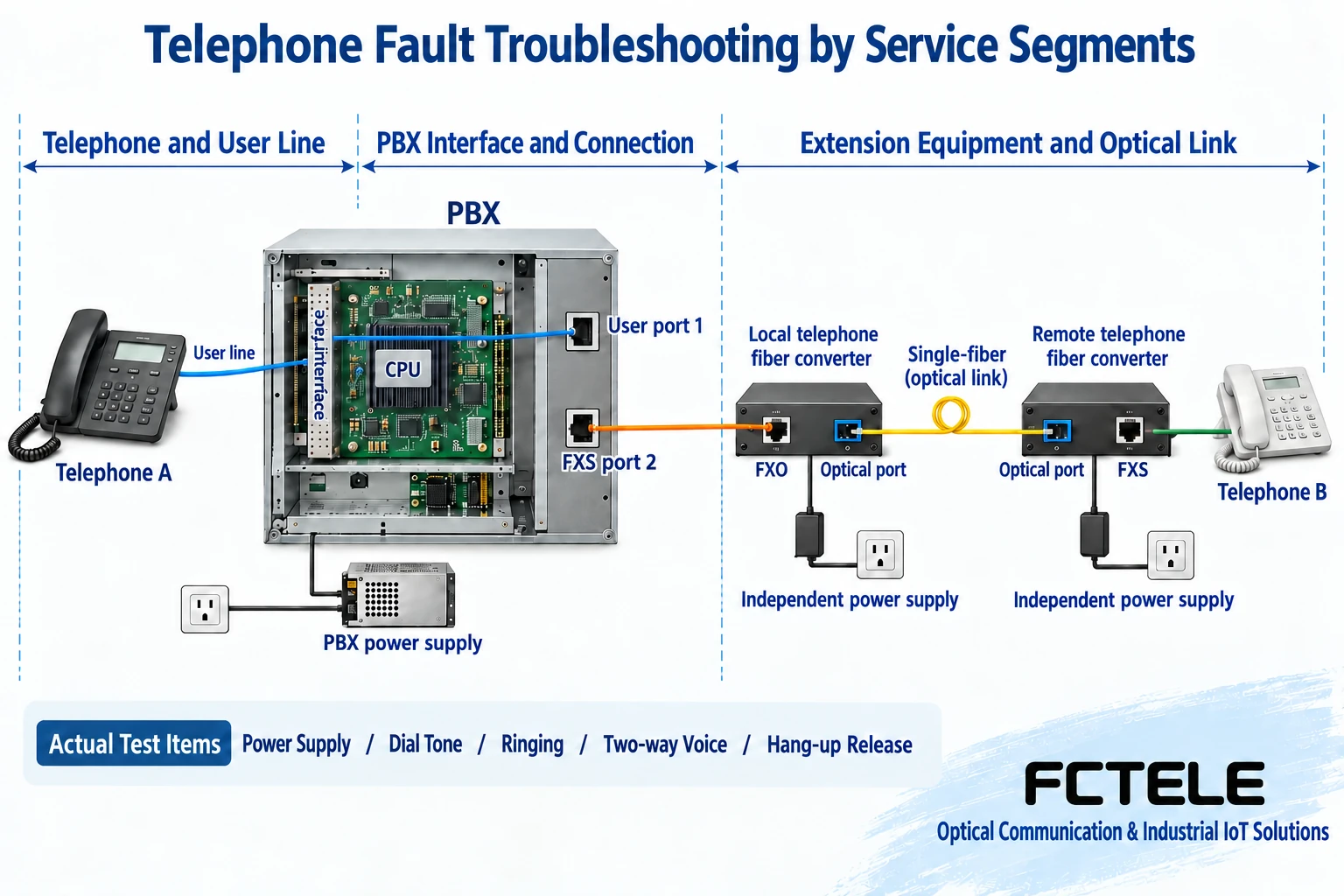
Check whether the telephone, subscriber line, wiring records, and exchange equipment port correspond; when necessary, during a maintenance window, use a known-good and compatible telephone or line for comparison. Change only one item at a time and record the original state. If the telephone is still abnormal after being moved to a confirmed-good interface, you can continue checking the terminal; if the abnormality always follows the original port, check that port’s configuration, line, and hardware conditions.
The role of the analog telephone interface must match. An ordinary telephone usually requires the corresponding FXS subscriber line conditions, and an unknown RJ11 port may also have different uses. Telephone lines may carry power and ringing conditions. Do not plug, short, or connect them to an Ethernet tester as if they were low-voltage network cables; read the labels and documentation first, then verify by appropriate methods. Do not guess compatibility based on appearance.
Sound and connection are different inspection items
If it can ring but there is no sound, it means part of the call control is working, but you still need to check answer detection, the voice path, and the endpoint. One-way voice and complete silence also need to be recorded separately. Digital or IP services may also involve direction, clocking, or media support. Do not just say the telephone is not working well; write clearly which step failed so you can choose the corresponding diagnostic documentation.
If resources are not released after hang-up, it may affect subsequent calls, but the release conditions depend on interface signaling. Number, permission, and routing errors may cause internal extensions to work while external lines fail; insufficient external trunk resources may also be exposed only during busy hours. The number of call ports does not mean that the same number of external connections can be established at any moment. You should check the actual concurrency and service direction.
How to check digital trunks and IP access
E1 digital trunks need to be checked according to the mode for line signal, framing, clocking, and signaling configuration. A valid line does not mean call control is already interoperable, and an E1 alarm cannot be solved by replacing the telephone. Analog access, digital trunks, and IP voice have different alarm meanings. You should clarify which segment is faulty and not mix up telephone numbers, timeslot numbers, and network port numbers.
IP access also needs to distinguish management reachability, signaling establishment, and media transmission; being able to open the gateway page does not prove that call media is normal in both directions. Relevant addresses, access policies, and codec parameters should be checked against the actual gateway and platform documentation. This article does not provide unified commands for all vendors, nor does it replace troubleshooting by disabling all authentication and access restrictions.
How to check after extension lines are added
If a remote extension passes through a telephone optical multiplexer, draw the local telephone interface, optical path, and remote subscriber line separately. Feichang Technology FCP-O16/FCP-S16 details list one to sixteen channels of FXO/FXS and other telephone configurations, which can serve as a reference object for checking this kind of extension scenario, but the optical multiplexer is responsible for transmitting already-supported services and does not replace the PBX’s number analysis, call permissions, or trunk selection.
A common solution is to connect the PBX’s FXS subscriber port to the local FXO optical multiplexer, then over the optical path to the remote FXS and then to the telephone. You should check the mapping at both ends, matching versions, optical fiber, and power supply channel by channel; you should look at both local and remote alarms and actually make inbound and outbound calls. Restoration of the optical path does not prove that the telephone has released the old call, and a remote power supply abnormality cannot be solved only by the central ring network.
Preserve evidence first for configuration and software maintenance
Before changes, back up the current configuration and record the equipment, boards, software version, and interface correspondence. Confirm that the backup file can be read and matches the device version. If it contains account and number data, store it according to permissions. After modifying permissions, routing, or the number plan, verify with representative extensions and external lines, then save according to the platform mechanism. Do not just keep a screenshot of a successful screen.
Upgrades, resets, restarts, and board replacement require maintenance arrangements, alternative communications, and recovery methods. Collect logs first before deciding how to proceed, to avoid restarting and clearing intermittent fault clues. Software upgrades may have applicable hardware and version limits. Do not assume that all models can be flashed just because you see a new version; identical spare part appearance does not prove functional and configuration compatibility.
Establish a reviewable daily maintenance baseline
Inspection records should include normal power supply, environment, alarms, and service spot-check results, so that later abnormalities have comparable data. Tests should cover near-end extensions, remote extensions, external calls, and agreed supplementary services, and verify recovery under approved conditions. When important communications are affected, first use the arranged alternative method. Do not arbitrarily interrupt all lines just to pursue troubleshooting speed.
At the end of a maintenance session, explain the fault scope, confirmed cause, actions taken, verification results, and unresolved items. Restoring dial tone is not the entire acceptance check; two-way voice, ringing, hang-up release, and necessary concurrency all need to be checked. Map the records to the topology, ports, and configuration so the next maintenance person knows whether to continue checking from the telephone, line, PBX, or extension equipment.
Documentation note: The schematic diagrams have been checked for technical content and are used to explain general mechanisms. They are not product photos or measured records. Specific interfaces, modes, and capabilities are subject to the selected model, version, and on-site verification.
Verification materials: ITU-T Q.512 Digital exchange subscriber access interfaces
Cisco voice gateway and telephone trunk interface documentation
Feichang Technology FCP-O16/FCP-S16 desktop telephone optical multiplexer
Feichang Technology pure telephone optical multiplexer category
Related technical topics: How a program-controlled telephone exchange works: call connection, voice switching, and extension
Translated from the Chinese technical article. Source first published: 2019-11-14. Source last revised: 2026-10-13T03:57:28+08:00. Read the Chinese source
