


A DVI fiber optic extender sends a suitable DVI video signal to the other end of a fiber and provides a corresponding video output on the receiving side. What it solves is long-distance transmission of an interface signal, not automatically turning any display format into any other format. When choosing a model, you should look at the digital or analog interface, the complete display timing, and the way capability negotiation works.
1. DVI interfaces look similar, but the signals are not necessarily the same
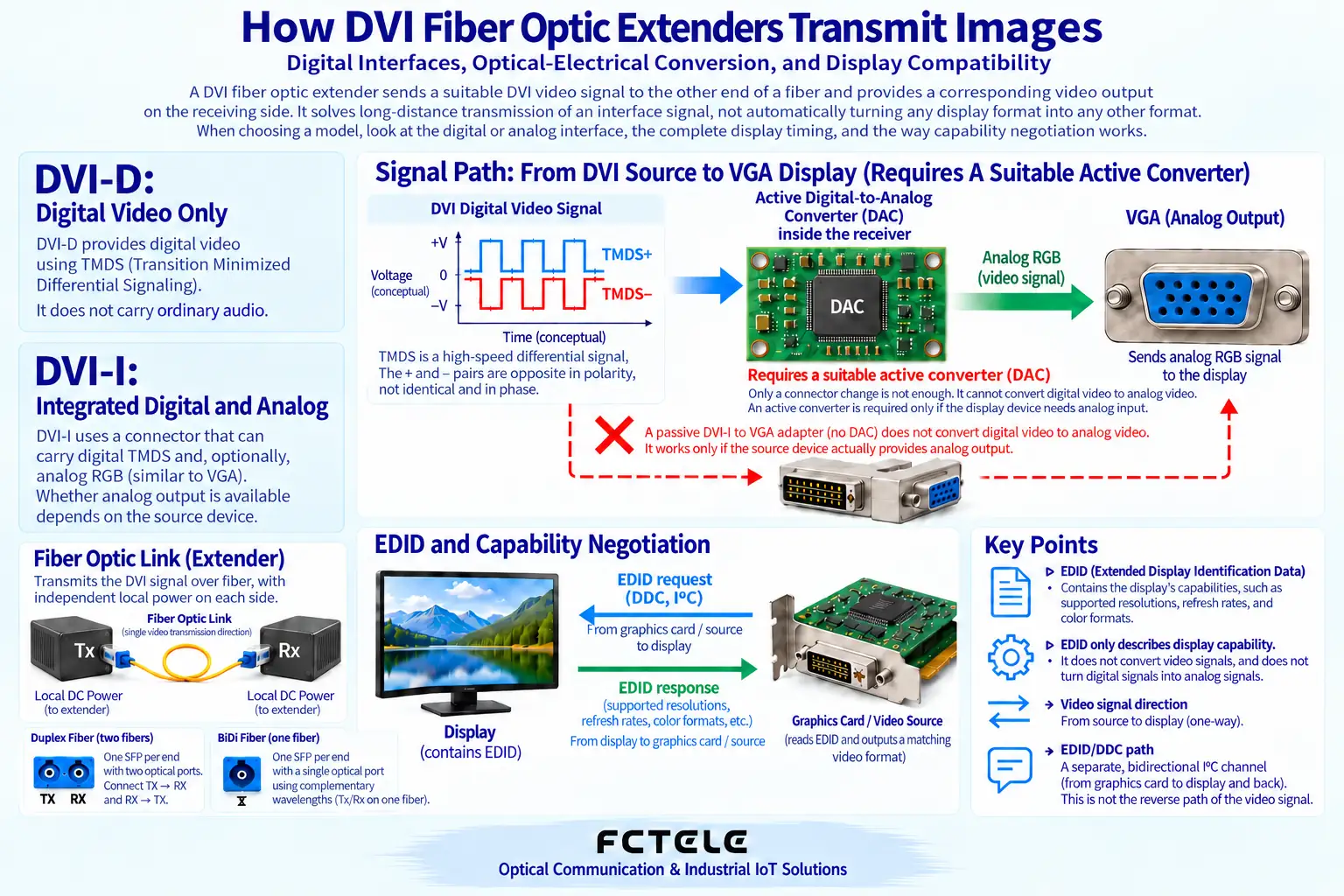
DVI is a type of display interface. DVI-D provides digital video, and a DVI-I connector can include both digital and analog parts; which part a device actually uses still depends on its circuitry and manual. Seeing one large connector and assuming it is compatible with both digital monitors and VGA is an easy first mistake.
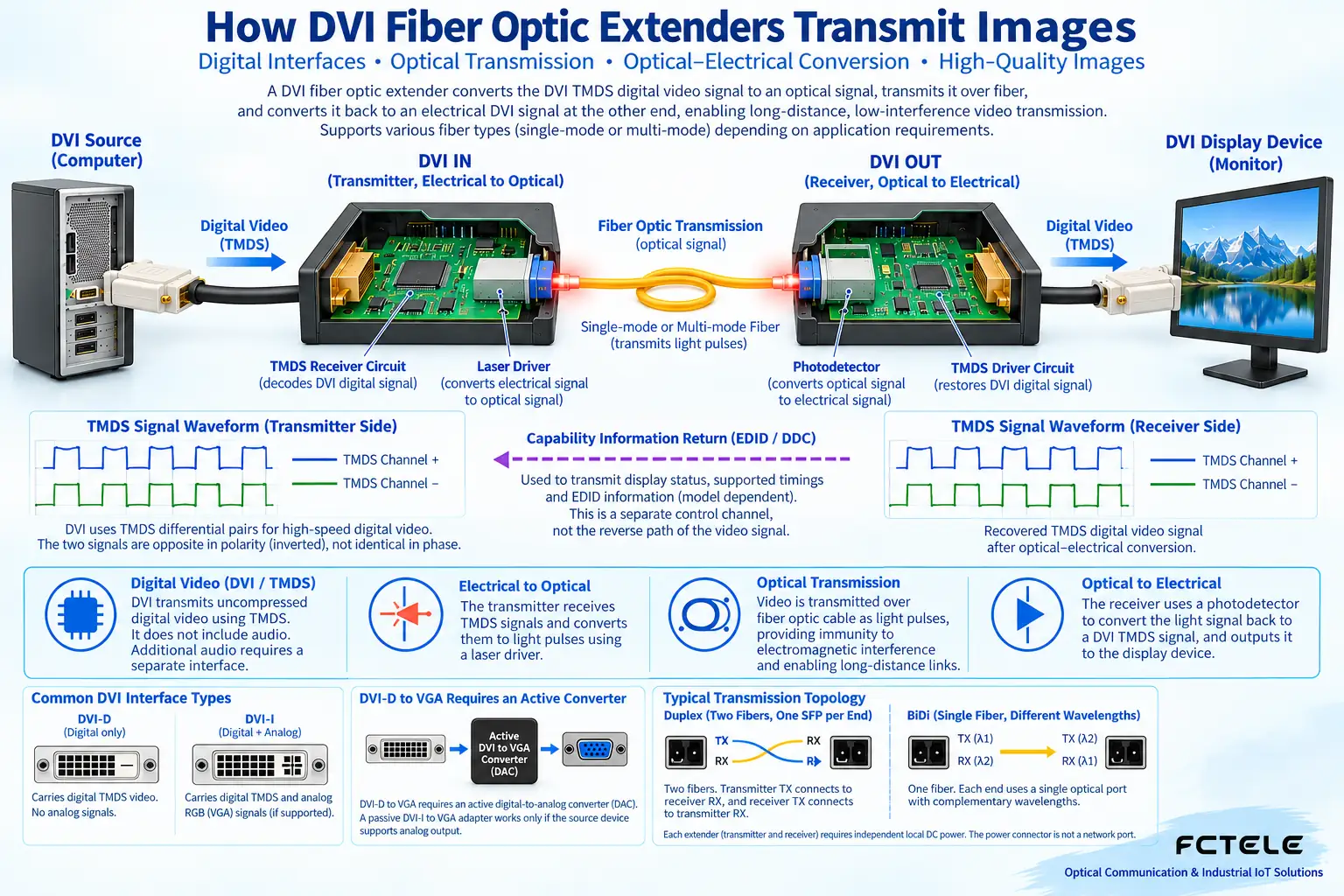
Digital DVI usually uses TMDS to transmit encoded data. You can think of it as digital information arranged in a specified order, rather than a complete photo flowing directly along one wire. The receiving device must recognize the corresponding electrical signal, encoding, and timing; being able to plug in the connector does not mean it can understand the data.
Single link and dual link are also differences in DVI interface capability, not differences between one fiber core and two fiber cores. When a higher amount of display data is needed, you should confirm whether the input end, the fiber optic extender, and the monitor all support the same link mode. You cannot infer the bandwidth capability of the DVI end from the number of optical ports.
2. What changes inside the fiber optic extender
The transmitting end receives the digital video output from the source device. The processing circuit organizes the data that needs to be transmitted into a signal suitable for the optical link and drives the optical transmitter. Light travels along the fiber and is converted into an electrical signal by a detector at the other end, then restored by the processing circuit into an output that the display interface can receive.
This kind of conversion needs power, and it also needs transmitting and receiving circuits. A passive plug adapter can only change the connection form when a compatible signal already exists; it cannot perform digital sampling, optical transmission, or video format conversion out of nothing. Therefore, a fiber optic extender and a plug adapter are not the same kind of device.
Fiber reduces the use of long-distance metal signal cables, but the local video cable at the transmitting end, the video cable at the receiving end, and the power supplies at both ends are still part of the whole system. The optical path being normal does not mean the local DVI cable, the source device output, and the monitor settings are all correct.
3. Check resolution together with refresh rate
A display format is not only the number of horizontal and vertical pixels; it also includes refresh rate, timing, and the link mode supported by the devices. The same resolution under different refresh conditions may have different transmission requirements. When you see “supports HD” or “supports 4K,” you should continue to check the complete format and cannot promise that all images with the same name can be transmitted based on that alone.
For devices that directly extend video, if the input format is not supported, switching to long-distance fiber will not solve the problem. If scaling, changing the refresh rate, or converting between analog and digital signals is truly needed, the corresponding processing function is required, and these capabilities should not be attributed to the fiber optic extender by default.
When verifying, first have the source device connect directly to the monitor with a short video cable to confirm that this set of output and display capabilities is compatible. Then insert the paired fiber optic extenders and test with a verified patch cord. This order can separate a display format that was already incompatible from the newly added transmission link.
4. EDID is a capability description, not a video converter
EDID can be understood as the capability description that the monitor provides to the source device. The source device chooses a suitable output based on it, but how the fiber optic extender returns this information to the source end may use real-time passing, caching, or presets. The method used by different models must be verified.
Some devices have special learning or saving operations, but the button positions, power requirements, and success indications are not universal rules. You cannot copy the operating steps of another older model. After changing the monitor, if the cache still holds the old capabilities, you may need to reconfirm according to the corresponding instructions.
EDID can tell the source device what the monitor supports, but it will not automatically convert video beyond that capability into a displayable format. Content protection authentication is another matter. Having evidence of picture format support does not mean all protected content can be displayed, and the protection requirements certainly cannot be bypassed in the name of a transmission device.
5. Understand analog adapters, audio, and control separately
VGA transmits analog video. If a DVI-I device truly provides the corresponding analog output, a suitable passive adapter can use those pins; a DVI-D digital output, however, cannot be turned directly into VGA with a passive plug and requires a corresponding active converter. A product name saying DVI cannot replace this check.
Audio and serial ports also cannot be assumed to exist just because there is a DVI video port. Some fiber optic extenders additionally provide audio or serial interfaces and share the optical path through multi-service processing. These functions need to be clearly specified in the order configuration, interface type, and direction; optional capabilities cannot be turned into standard features of all products.
The Feichang FCM-DV1-4k product details place the DVI video input at the transmitting end and the DVI output at the receiving end, and list the optical interface and additional services. This endpoint division helps organize the equipment list; the actual format, additional interfaces, and pairing conditions should still be checked against the selected configuration data.
6. How to explain a black screen and intermittent flickering
When the screen is black, first record whether the monitor reports no signal, the source output format, the power at both ends, and the optical path status. Test with a known format that is commonly supported, and do not change the resolution, cables, and devices all at once from the start. Being able to display one format only proves that this test works.
Intermittent flickering can be related to the local video cable connection, optical link margin, power supply, and thermal environment, and should be judged together with when it occurs and by substitution comparisons. You must not rule out all optical path problems just because the optical port light is on, and you must not conclude that the monitor is damaged just because a restart restores it.
For example, when an industrial computer connects to a remote operation screen, acceptance should cover the actual desktop display, negotiation after restart, monitor replacement, and optional serial services. Finally, leave behind the source format, paired model, fiber specifications, and test results, so the next maintenance person knows what this link has actually been verified to do.
Verification materials:Feichang DVI fiber optic extender;TI DVI/HDMI interface mechanisms. The principle diagram is used to explain general mechanisms; it is not a measured diagram or a wiring diagram for a specific model.
Translated from the Chinese technical article. Source first published: 2019-10-25. Source last revised: 2026-10-13T20:43:40+08:00. Read the Chinese source
