


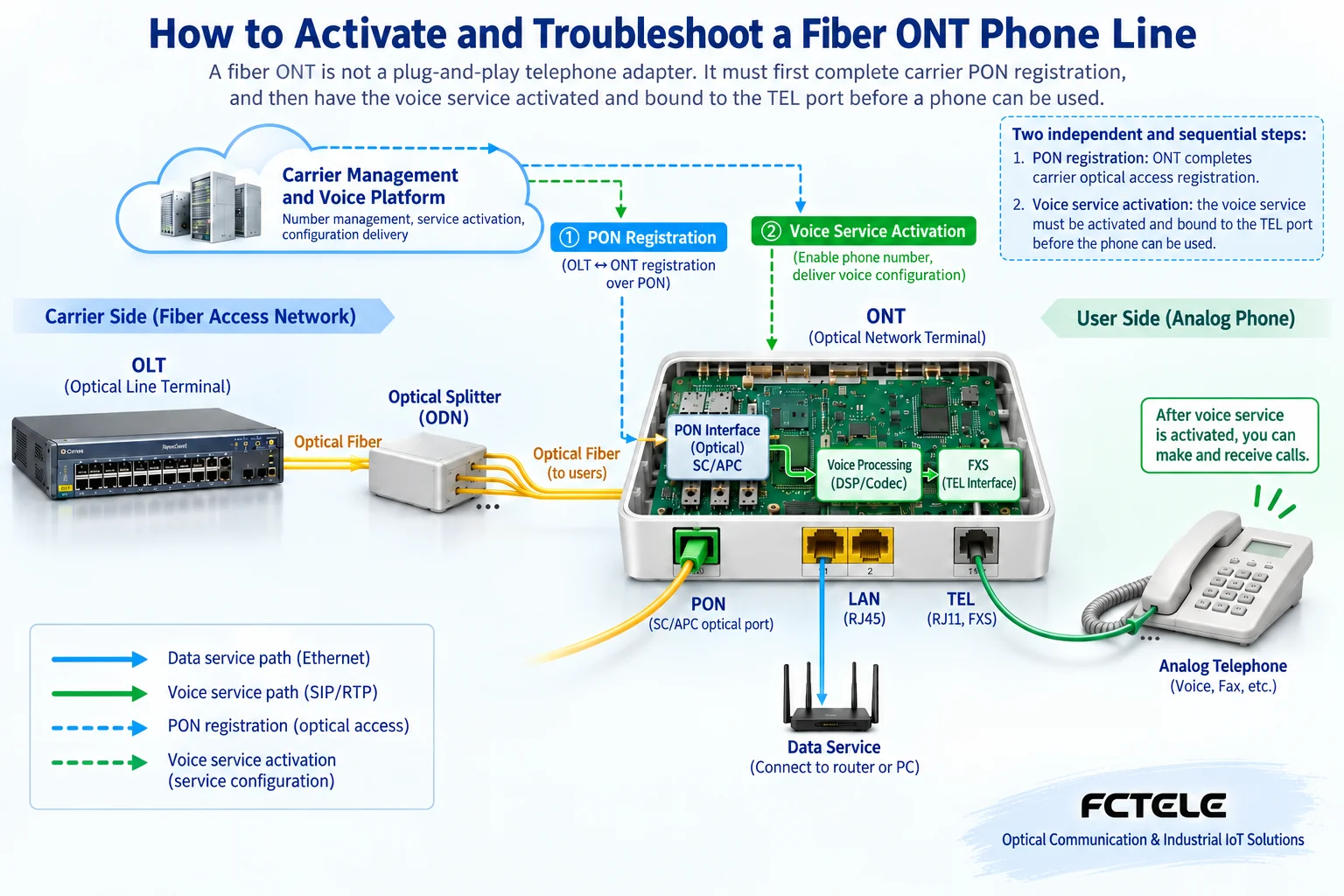
A home fiber ONT with a TEL or POTS phone port does not mean you can plug in a phone and use it. It usually needs both to complete carrier optical access registration and to have voice service that is activated and bound to the corresponding port. This type of ONT is different from a pair of analog telephone fiber extenders, so you cannot copy the wiring and configuration of FXO/FXS fiber extension equipment.
1. First distinguish a fiber ONT from a telephone fiber extender
An ONT is an optical network terminal, usually located on the user side of a carrier access system; ONU is a common name for related terminal equipment, and the specific name varies by system. Models with telephone functions can deliver voice service from the network to an ordinary analog telephone. A pair of telephone fiber extenders is often used in buildings or factory areas to extend an existing analog telephone line to a remote location; it does not need to work according to a carrier home broadband registration process.
Seeing “optical” and “telephone” in the name makes it easy to confuse the two. To judge, look at whether the device connects to a carrier PON network, whether it has access registration, and whether the telephone service depends on a carrier voice platform. If you need to extend a PBX analog extension, you can refer to telephone fiber extender installation and wiring; this article only explains the use of a fiber ONT with telephone functions and layered troubleshooting, and does not provide unauthorized methods to modify carrier configurations.
2. Why you can access the internet but cannot make phone calls
The access layer of the fiber ONT is like the gate into a campus, and telephone service is like obtaining the right to use a certain service in the campus. Entering the gate does not mean every service has been activated. After the device completes optical access registration, internet and voice may still have their own service configurations, platform status, and port bindings; therefore, it is not contradictory for web browsing to work normally while the telephone has no dial tone.
This analogy is only used to explain the layers, and does not mean there is a unified web button. Different carriers and device versions have different service configurations; some are delivered remotely by the carrier, and some are restricted by management permissions. Users should not arbitrarily change the access identifier, service bearer parameters, or voice account just to test the telephone, nor should they restore factory settings and expect all services to come back automatically.
3. How an ordinary telephone connects to network voice
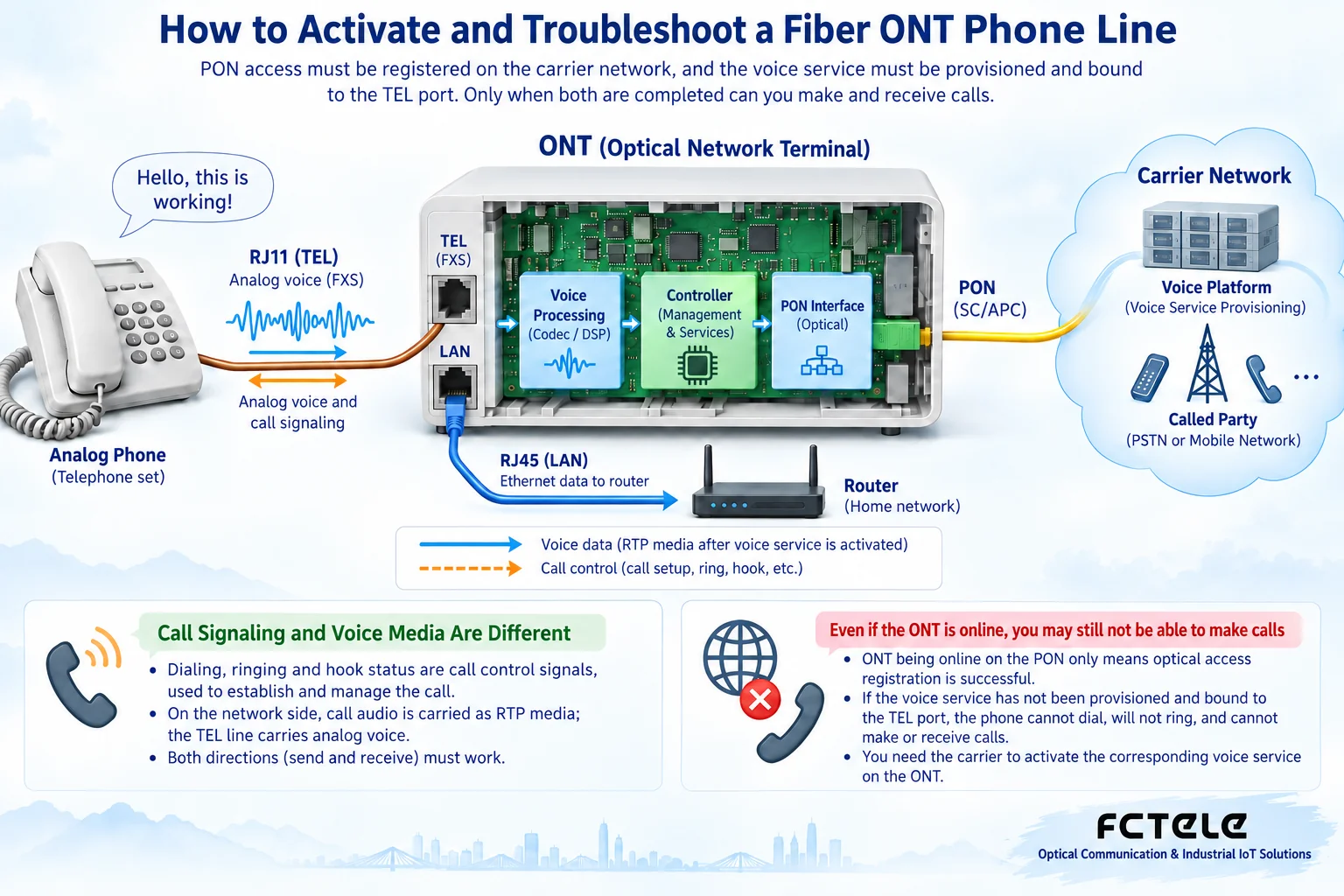
An ordinary analog telephone itself cannot directly process network voice packets. The telephone interface of the fiber ONT plays the role of an adapting line, and the voice processing circuit converts the analog electrical signal corresponding to the microphone into digital voice, then sends it into the network in a way supported by the system; voice received in the reverse direction is restored to an electrical signal that the telephone can play. Figure 2 separates the sound path from call control to explain that being able to ring, being able to dial, and being able to hear sound are not the same function.
Dialing, ringing, on-hook/off-hook, and call setup require the telephone interface to work with the voice platform. The specific signaling protocol and encoding used should be based on the actual service, and you should not treat one protocol as a fixed capability of all fiber ONTs. The two conductors of the telephone line together form the line, and it cannot be understood as one only sending and one only receiving.
4. Correct connection: look at the port label first, not the similarity of plugs
Use the power supply specified in the device manual, and confirm it is the adapter supplied with the unit or meets the specified conditions. Connect an ordinary telephone to a suitable port clearly marked TEL, PHONE, or POTS; connect a broadband router or computer to the corresponding LAN port. Do not insert the telephone line into a network port at will, and do not connect a switch extension line directly to the telephone output port of the fiber ONT, because both sides may provide line electrical conditions.
When there are multiple telephone ports, confirm which line the activated number is bound to. Moving the telephone from TEL1 to TEL2 does not necessarily give the same service. Before connecting to old residential telephone wiring, first confirm whether the line has been reliably separated from the original outside line and other feeding equipment, and have it checked by personnel with the appropriate capability, to avoid connecting different line sources to each other.
Keep the optical fiber at a suitable bending radius, and do not pull the connector; use suitable tools for end-face maintenance. Do not look directly into the optical port or fiber end, and do not verify “whether there is light” by repeatedly plugging and unplugging. Fiber ONT self-check and access may take time; observe the states defined in the device manual, and do not infer that this unit is normal based on the light colors of other models.
5. Check the phone and short cord first, then judge service problems
When the telephone cannot be used, first record which services are normal, what the light states are, and when the fault started. Use a known-good analog telephone and a reliable short telephone cord to connect to an activated port under confirmed permitted conditions, temporarily excluding the influence of residential extension lines, splitters, and parallel telephones. If the short cord works but the original wiring does not, check the external line first rather than modifying the fiber ONT account.
If the short cord also does not work, then check device power, access registration, and telephone service status. Whether the number has been activated, whether it is bound to the correct port, and whether there are problems such as platform registration or port blocking need to be verified by the carrier. Manufacturer maintenance materials also locate faults in layers: terminal, outside line, port user data, and voice resources; these backend checks are not commands that ordinary users must execute.
6. Provide information according to specific symptoms
If there is no dial tone at all, first confirm the phone, short cord, port, and service activation, and do not attribute the cause entirely to the optical fiber connector. If you can hear a dial tone but cannot make outgoing calls, record the prompt after dialing and the number type, and ask the carrier to confirm call permissions and service status. If you can make outgoing calls but it does not ring, check separately whether incoming calls can arrive, port binding, and terminal adaptation conditions.
If the call connects but one side cannot hear sound, record the direction in which it occurs, whether it happens every time, and the relevant service status, and let maintenance personnel check the voice data path and terminal. Do not adjust optical power or replace the optical module by yourself based on this phenomenon. If the fault is related to a power outage, bridge settings, or device replacement, also state the time of change, because changing the internet access method may affect the voice bearer of some systems, but you cannot directly infer that all systems are the same.
7. Which operations should be left to the carrier
Access authentication, voice service accounts, bearer configuration, and platform port data should be handled by authorized maintenance personnel according to service procedures. Do not use common administrator passwords, cracking tools, or cross-model firmware spread online. Even if the user has local management permissions, first confirm the scope of changes, record the current state, and avoid posting account information in public screenshots or article comments.
Restarting is not the same as restoring factory settings. A necessary restart should consider service interruption, and wait for the device to complete access again before testing; restoring factory settings may lose service configuration and cannot be treated as the default first troubleshooting step. Also do not try to fix unknown settings by disabling carrier remote management, as this may affect normal maintenance and service recovery.
8. Acceptance and long-term use
After handling, test outgoing calls, incoming calls, ringing, off-hook answering, two-way voice, and on-hook release separately; verify subscribed functions such as caller ID. If a fax or alarm terminal is needed, confirm service and device compatibility separately; you cannot infer that they also work normally just because ordinary calls work. Check multiple numbers and ports one by one, and record the correspondence between numbers and ports.
During a power outage, the fiber ONT and related network equipment lose power, and telephone service may also be affected; it cannot be equated with the power supply method of all traditional telephone lines. For security alarms or on-duty services that rely on the telephone, evaluate backup power and other communication paths. Normally keep the carrier contact information, device model, and fault records, maintain ventilation, avoid cable tension, and determine the scope of service impact before maintenance.
References:Huawei POTS terminal, line, and port layered troubleshooting materials. This article does not prove that a specific Feichang Technology model has carrier voice access capability; specific capabilities need to be checked against product and service materials. The principle diagrams in this article are general illustrations, not actual test or product photos.
Translated from the Chinese technical article. Source first published: 2023-12-06. Source last revised: 2026-10-13T19:28:50+08:00. Read the Chinese source
