


To choose an industrial switch, you do not need to memorize a long list of category names first. First answer what devices will be connected, how data will be aggregated, whether management and isolation are needed, and what the site power and environment are like. Then decide which kind of switch is suitable. Industrial use does not mean the device is automatically faster or has every function. Categories only help describe needs. The actual capabilities depend on the specific model and testing.
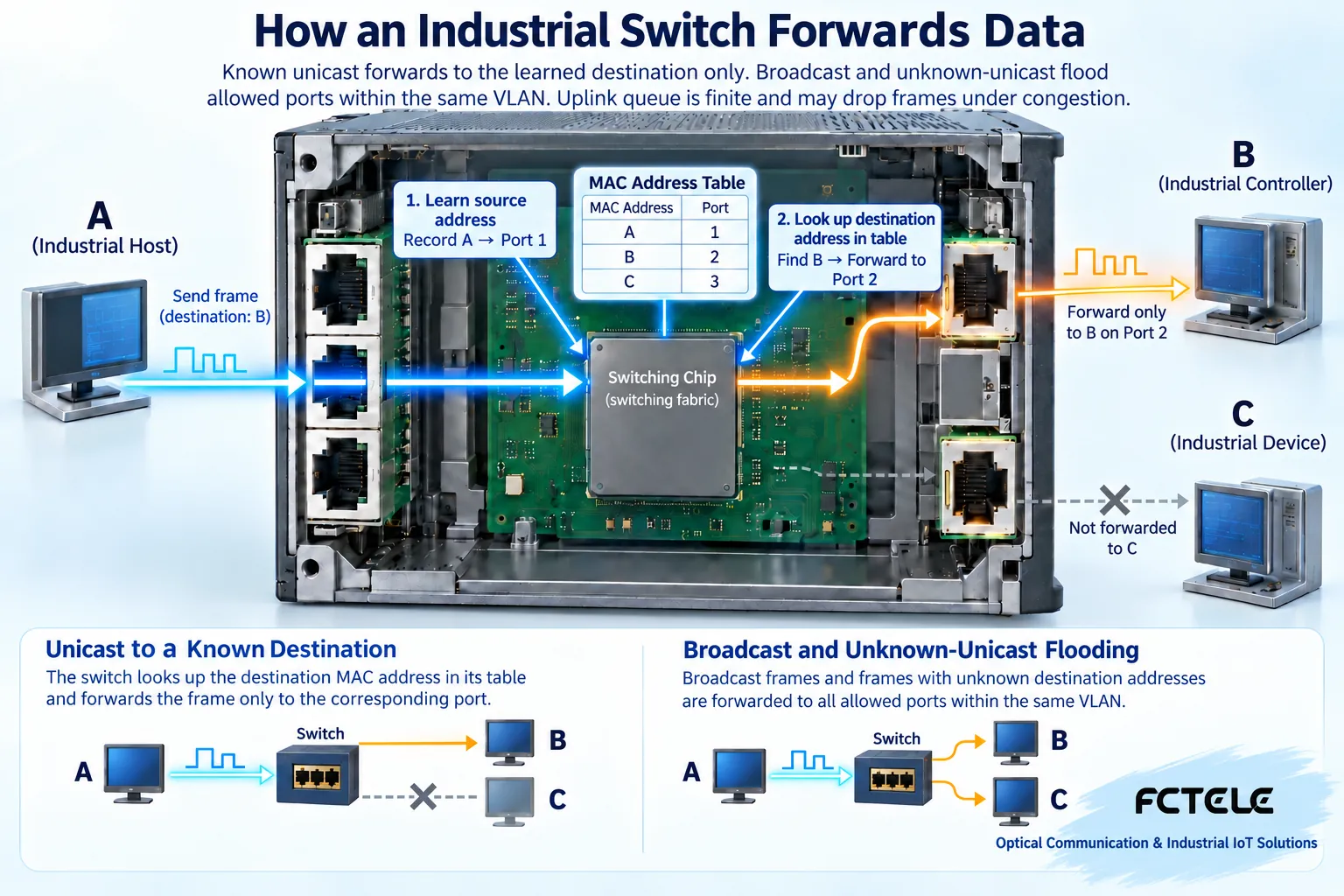
How a switch sends data to the correct port
Ethernet devices put data into frames, and the frame contains source and destination MAC addresses. A switch can learn which port a source address appears on, then look up a known destination address and send the unicast frame to the corresponding exit. MAC can be understood as a local delivery identifier, but it is not a replacement for an internet address. Unknown destinations, broadcasts, and multicasts have different handling rules. Not every frame is sent to only one port. The internal switching structure and queues determine how data passes through, while management and control handle configuration and status observation. After understanding this process, you can see that the number of ports is only part of the connection capability. Concentrated traffic, buffering, and feature configuration also affect business performance.
First describe by interfaces and speeds, not by old names
Modern industrial LANs are often based on Ethernet and can be described by copper ports, optical ports, port speeds, and uplink arrangements. Copper ports connect terminal network cables. Optical ports are used for the corresponding optical links, and both ends must match in speed and optical specifications. For pluggable module slots, you also need to confirm host compatibility. Not every module can be used. Token Ring, FDDI, or ATM in old materials belong to different technology systems and cannot be treated as interchangeable options for the same industrial Ethernet product today. First list the devices, each device’s interfaces, and reserved expansion, then consider form factor and price. If the ports are enough but the uplink is incompatible, the solution still cannot be completed.
What unmanaged, managed, and Layer 3 each solve
Unmanaged devices mainly provide preset forwarding functions and are suitable for scenarios with simple needs and no complex configuration requirements. Managed devices allow you to view and configure some network behavior, such as VLANs, port status, and traffic policies, but the specific functions depend on the model. Layer 3 capability involves routing between different IP networks. It is not automatically included just because there is an extra management IP. VLAN is logical isolation, while routing selects a forwarding path between networks. The two cannot be confused. When the need is only local connection, Layer 3 may not be necessary. When traceable operations or isolation are needed, you also cannot ignore management capability just because it works when plugged in. Listing every required function is more verifiable than only writing advanced managed.
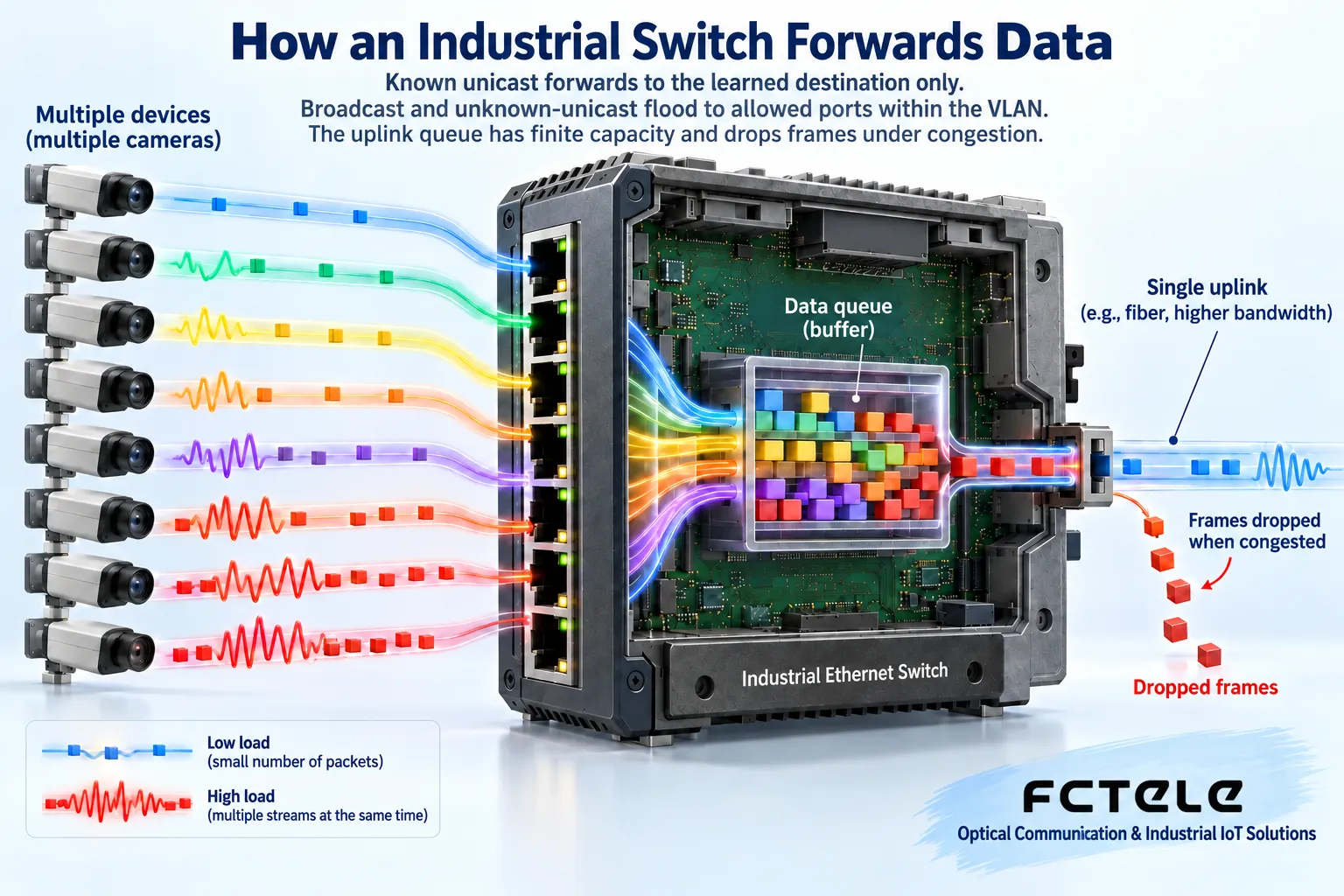
Why the uplink may become a bottleneck before the terminal ports
Suppose multiple cameras or control terminals are aggregated through one uplink port at the same time. A single device’s traffic being small does not mean the total is small. The switch temporarily puts data waiting for the exit into a queue. If the continuous arrival rate exceeds what the exit can send, the wait grows and data may be dropped. A queue is like a temporary parking area. It can handle short bursts but cannot permanently solve insufficient exit capacity. Nominal switching capacity, port line rate, and application effective throughput are not the same metric. Protocol overhead, frame length, and bidirectional traffic all affect comparison. Plan the uplink according to simultaneous peaks and leave reasonable margin. Do not just add up the daily average traffic of the terminals.
QoS, multicast, and ring networks need real business basis
Quality of service policies can arrange the priority order of different traffic according to rules during congestion, but they do not increase physical exit bandwidth. Multicast is used to deliver one copy of content to a group of receivers. Related management functions can help avoid spreading traffic indiscriminately to all ports. Ring redundancy requires a protocol to limit the forwarding loop during normal operation and adjust the path after a fault. Connecting ordinary network cables in a circle may cause a broadcast storm. Whether these mechanisms are supported, how they are configured, and whether they are compatible with existing devices must all be checked specifically. You cannot assume zero packet loss or a fixed recovery time just because you see industrial or redundant. Business application recovery may also be later than network path recovery.
Power and environment are part of selection, not something to fix after installation
Check the temperature at the installation location, heat dissipation space, power fluctuations, grounding, and protection requirements. Heat sources are concentrated inside a cabinet, and outdoor weather data cannot replace the actual temperature near the device. Dual power inputs also do not mean the entire power system is redundant. If the two paths come from the same fault source, they may fail at the same time. PoE supplies power to terminals through compatible Ethernet lines. You need to check single-port capability, total budget, and terminal standards. Do not connect any passive power supply to the device. Installation method, vibration, dust and water protection, and certifications all depend on the model and scenario. This article cannot apply a uniform rating or temperature promise to all industrial switches.
Use a requirements table to complete a factory area example
Suppose a device cabinet connects several control terminals and has one fiber uplink. First write down the number of terminal ports, interface speeds, peak traffic, whether PoE is needed, and the services that need to be isolated from upstream. Then record the fiber type and the specifications at the other end. If remote troubleshooting is needed, require clear status and log capabilities. If a backup link is needed, write down the fault scenario and recovery acceptance criteria, not just supports ring. Finally check power, temperature, and mechanical installation. Such a requirements table allows different solutions to be compared fairly and can explain why a function is worth paying for. The case does not represent an actual customer and does not constitute a performance table for any Feichang Technology product.
How to do pre-purchase demonstration and post-deployment acceptance
Use the target device or equivalent services to verify interfaces, VLANs, multicast, and peak load. Check errors, packet loss, and latency changes. For redundancy solutions, simulate permitted faults under maintenance conditions and record path recovery and application recovery separately. Do not unplug unknown production lines. Back up before configuration changes, and confirm management permissions, secure access, and recovery methods. When expanding, recheck aggregated traffic and power budget, not just idle sockets. In the end, a good selection is not the one with the most feature names, but one where every necessary function has clear conditions, repeatable tests, and maintenance records. Beginners can consider along the four lines of connection, forwarding, capacity, and site conditions, and turn a vague category question into a specific usable solution.
Principle verification materials:Official material 1;Official material 2. The general mechanisms and examples in the text do not replace the manual for the corresponding model.
Translated from the Chinese technical article. Source first published: 2019-08-16. Source last revised: 2026-10-13T19:01:44+08:00. Read the Chinese source
