


Optical module classification is not about memorizing a string of abbreviations. It is about answering four questions: what host it goes into, what service it carries, what fiber it connects to, and how the two ends pair. Package, rate, and optical type are different dimensions, and they cannot be lined up into a single queue of “bigger is more advanced.” This article explains how common classifications affect on-site choices, without using fixed kilometer numbers to replace specific specifications.
Package first determines how the host is connected
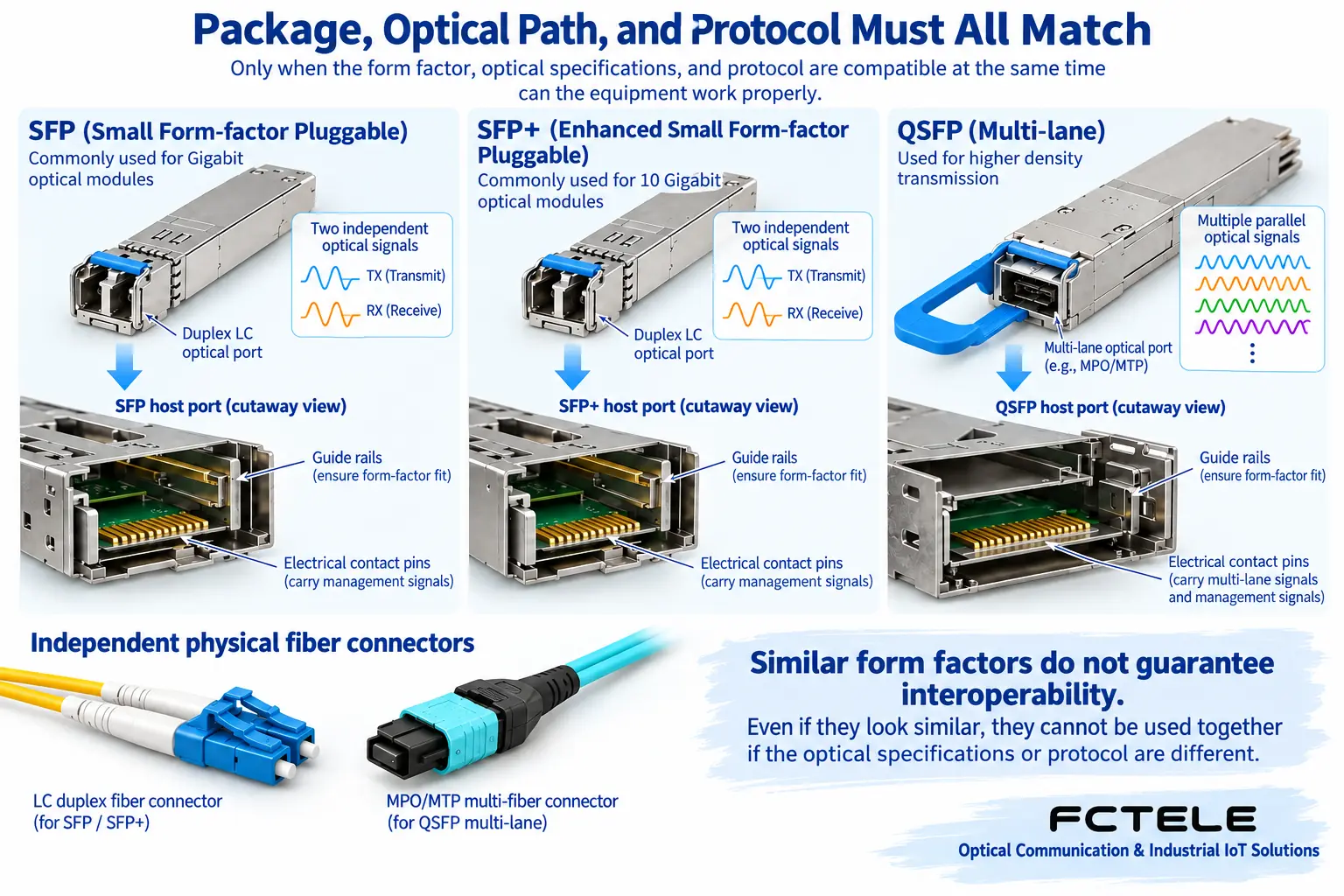
Names such as SFP, SFP+, and QSFP first help identify the mechanical form factor, electrical connection, and related conventions. Common SFP and SFP+ shapes are very similar, but whether a particular slot supports a certain module depends on the host compatibility documentation. QSFP-type modules usually involve multiple electrical-side lanes, and their shape and contacts differ from SFP, so they cannot simply be forced in; using an adapter also requires conditions explicitly supported by the host.
As package families develop, different rate, service, and optical interface versions appear. Seeing QSFP does not mean it can be directly written as fixed 40G or 100G, and seeing SFP does not mean it must be Gigabit Ethernet. When purchasing, use the complete model number, not just the abbreviation. Software identification, power consumption, heat dissipation, and supported versions between the module and host are also compatibility conditions beyond mechanical dimensions.
Rate and service cannot be mixed into one category
The line rate of a module is the processing condition for the physical signal, while Ethernet, SDH, or dedicated video transmission each have their own encoding and equipment interfaces. The same shape and a similar nominal rate do not mean they can recognize each other. A host may have multi-rate ports or may be fixed to one rate; a high-speed slot supporting a certain low-speed module requires a manufacturer compatibility table or clear test evidence, and is not a default feature.
For example, SR and LR in 10 Gigabit Ethernet are names for specific physical layer types, and manufacturers’ various long-distance extension modules should not all be treated as the same LR type. The allowed distance also depends on the corresponding fiber category, loss, and other limits. Standard type, manufacturer model, and actual cabling must be checked together, rather than judging only by the two words “10 Gigabit, 10 kilometers.”
What Single-Mode and Multimode Change
Multimode fiber allows multiple propagation modes, and the arrival time difference between modes broadens the pulse; at high-speed transmission, this may limit distance. Single-mode fiber has different propagation conditions, but it is still affected by factors such as loss and chromatic dispersion. “Single-mode must be unlimited distance” and “multimode must only reach a certain fixed number of meters” are both false. The distance for a specific combination must be checked against applicable standards and model tables.
The module light source matches the fiber core, wavelength, and coupling design. When old cabling is not clearly labeled, check cabling records or have a professional identify it; do not rely only on the color of the patch cord jacket. Some special combinations also have mode adjustment requirements, so it is not true that replacement is possible just because the connector is the same. The connector endface form must also comply with module and patch cord requirements, and different polish types must not be mixed arbitrarily.
Dual-Fiber and Single-Fiber Refer to Physical Fiber Cores
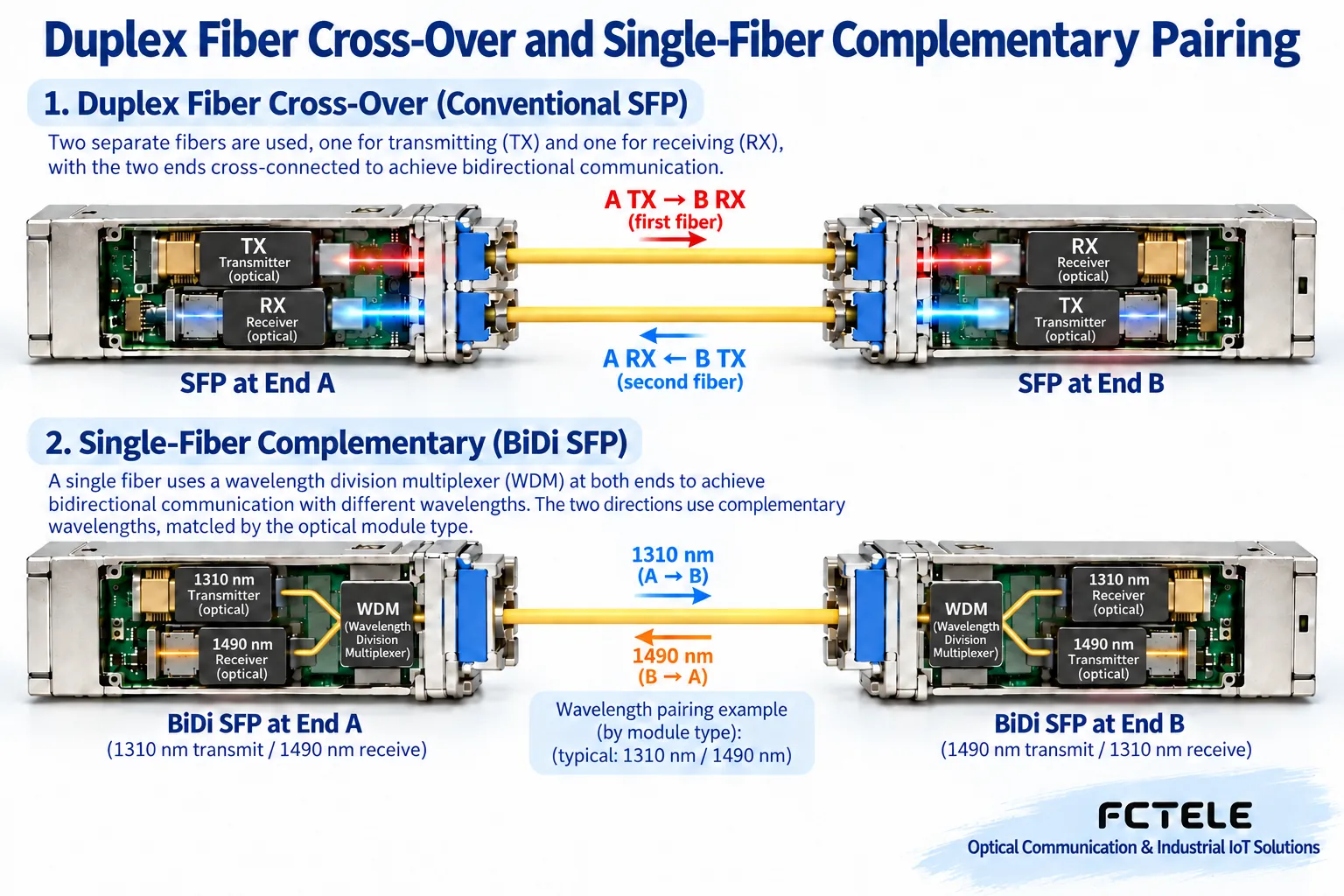
Dual-fiber bidirectional usually uses two fiber cores: TX at end A goes along one core to RX at end B, and TX at end B returns along the other core to RX at end A. This is not the same as half-duplex: two fiber cores can carry two directions at the same time. If the patch panel is already crossed, the end patch cord may not need to be crossed again; the entire fiber core mapping must be traced, not just the segment in front of you.
Single-fiber BiDi uses different wavelengths in one fiber core, separating transmit and receive through internal wavelength division multiplexers at both ends. Taking the 1310 nm and 1490 nm of some modules as an example, one end transmits 1310 and receives 1490, and the opposite end is reversed. The example is not a fixed specification for all Feichang Technology models. Buying two single-fiber modules with the same transmit wavelength may cause both sides to hear nothing; the A/B markings should also be confirmed together with the complete transmit-receive specifications.
WDM Modules Add a Layer of Channel Conditions
CWDM and DWDM use different wavelength or frequency plans respectively, allowing multiple services to share an optical path through corresponding multiplexers. When selecting such modules, the multiplexer channel and system conditions must be matched. You cannot buy two modules with the word “WDM” and consider the whole system complete, nor assume that all equipment fixedly supports the same number of channels.
Multiplexers, connectors, and splices all add loss, and wavelength channels also affect device matching. Whether WDM is needed should be based on fiber core resources, number of services, and maintenance capability. An ordinary point-to-point connection may be sufficient with matched conventional modules, and a complex name does not mean it is more suitable. Host support for the module is only one condition; the external optical path must also be fully designed.
How to View DAC, AOC, and Electrical Port Modules
DAC is a direct-attach copper cable assembly, and AOC is an active optical cable assembly. They are not synonyms for two ordinary separable optical modules. The interfaces at both ends, length, host support, and power requirements must be checked according to the assembly model. An RJ45 electrical port SFP connects to copper Ethernet, and should not replace an optical port model in an order that requires fiber. Being able to fit into the same type of slot does not mean the transmission medium is the same.
Short rack connections are sometimes suitable for these assemblies, but distance, cabling space, and heat dissipation cannot be omitted. When replacing an assembly, first check support on both devices, and do not use “roughly the same” to replace compatibility evidence. Especially on densely ported equipment, a change in one module’s power consumption may affect local temperature, so purchase price alone cannot be compared.
Environmental Classification Depends on Test Conditions
Terms such as commercial grade, extended temperature, and industrial grade should be tied to specific operating conditions and reports. Ambient temperature, case temperature, and internal diagnostic temperature are not the same measurement point. The module range and host range must both be satisfied; a module label cannot automatically give an ordinary host higher temperature resistance. Certifications, interface standards, and interoperability tests also solve different problems, and one certification cannot replace all compatibility verification.
Turn the Classification into an Order That Can Be Checked
It is recommended to record the host models and versions at both ends, service and rate, package, fiber category, connector and endface, transmit-receive wavelength, power window, environmental conditions, and diagnostic support. First choose the host, then choose the module, and finally verify the complete link. Feichang Technology FCM-OEO provides SFP-style optical interfaces and optical path conversion for different services, but the specific service scope and module combination must still be checked; a replaceable module should not be understood as arbitrary protocol conversion.
After Matching Is Complete: Installation and Cleaning Reference Optical module installation article, comprehensive transmit-receive pairing reference SFP selection article. The value of classification is not to make beginners memorize all products, but to make every name correspond to a condition that needs verification.
Verification materials:Cisco SFP+ specifications;Feichang Technology FCM-OEO details. The images are general principle illustrations, not actual product tests.
Translated from the Chinese technical article. Source first published: 2021-05-17. Source last revised: 2026-10-13T18:44:52+08:00. Read the Chinese source
