

+8618758069661 [email protected]
Product Search Guide: space = AND, | = OR, ! = NOT

Got any Questions? Call us Today!

+8618758069661

Or leave us a message

Online Message

Connecting Fiber Transmission Equipment to Switches: Ethernet and Dedicated-Service Links

Views: 146 +1Original by FCTELEAuthor: FCTELE Technical Team
AT A GLANCE

When can a fiber transmission device connect directly to an Ethernet switch's optical port?

Only when that optical interface carries a compatible Ethernet standard and its rate, fiber, wavelength, direction and receive-power conditions match the switch module. A dedicated video, telephone or E1 optical pair may carry an incompatible format despite identical connectors. If a service must become IP traffic, choose explicitly supported encoding or gateway conversion rather than relying on a patch lead or connector adapter.

Three mechanisms and their verification boundariesFollow the signal, then verify the actual service

01Check the host and module

Check the host and moduleThe switch slot and its installed module must support the required Ethernet interface.Compatible powered hostHost dataSFPHost powerHost mode, firmware and optic must agree

The switch slot and its installed module must support the required Ethernet interface.

02Match the paired optics

Match the paired opticsBoth transmission directions need compatible optical conditions.ABλ1: A TX → B RXλ2: B TX → A RXBoth directions share one physical core

Both transmission directions need compatible optical conditions.

03Convert the service explicitly

Convert the service explicitlyAn encoder can create a supported network stream from a specified video input.CVBSEncoderIP networkEncoding creates the supported network streamCheck format, latency and application support

An encoder can create a supported network stream from a specified video input.

Swipe to compare the three diagrams →

Conceptual teaching illustrations—not measured waveforms, installation wiring or the internal architecture of a specific product.
  • Check the host and module

    Compare the full standard, rate and host compatibility statement.

  • Match the paired optics

    Check wavelength complements, fiber type and power in both directions.

  • Convert the service explicitly

    Match source format, encoded service and receiving application.

Selection and verification checklistExpand the checks and related guides
Checks for this service and its actual operating conditions
CheckWhat to confirmHow to verify
Check the host and moduleThe switch slot and its installed module must support the required Ethernet interface.Compare the full standard, rate and host compatibility statement.
Match the paired opticsBoth transmission directions need compatible optical conditions.Check wavelength complements, fiber type and power in both directions.
Convert the service explicitlyAn encoder can create a supported network stream from a specified video input.Match source format, encoded service and receiving application.

Whether an fiber optic transmission device can connect directly to a fiber switch depends on whether its optical port uses a compatible Ethernet interface. Ethernet transceivers may connect directly to compatible switch optical ports; dedicated video, telephone, or E1 fiber optic transmission devices usually need a matching far-end device and cannot be plugged into an Ethernet switch just because the connector is the same.

First draw the signal, not just the fiber

An IP camera produces Ethernet traffic, and a transceiver can extend a copper cable link into an optical link. An analog camera outputs a dedicated video signal, which usually first connects to a video fiber optic transmission device and is then restored by the corresponding receiving device. Both paths may use fiber, but the protocols they carry are not the same.

Telephone, serial port, and E1 also have their own interfaces and encapsulation methods. The fact that some multi-service devices include Ethernet ports does not mean all optical ports can connect directly to an Ethernet switch. You need to look at the service definition of that port and the complete connection instructions, rather than judging based on the appearance of a network port on the chassis.
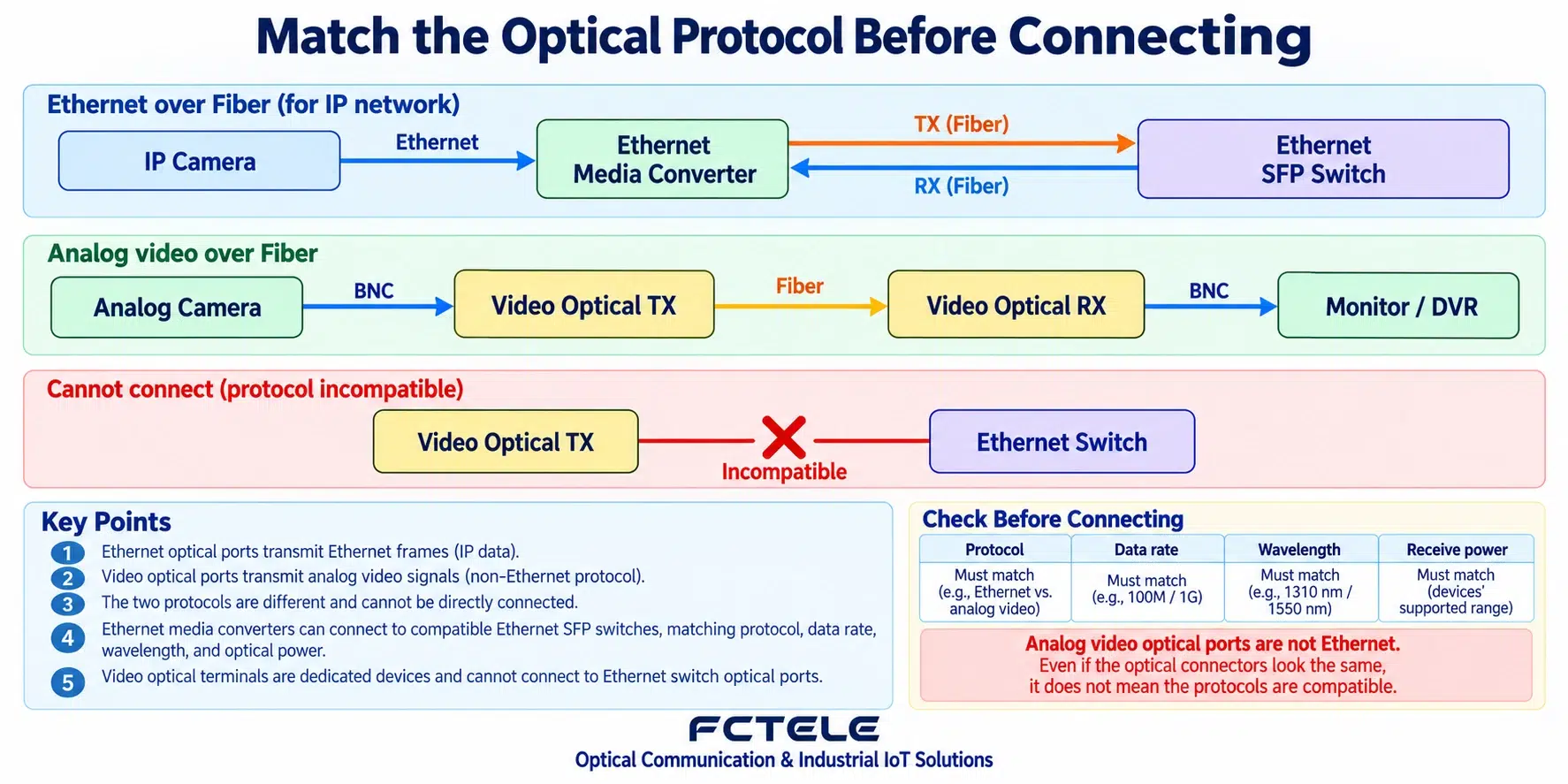
Ethernet optical links and dedicated video optical links should be connected separately, and a dedicated optical port cannot by default be connected to an ordinary Ethernet optical port.

What items does compatibility include

First check the protocol and rate, then check single-mode versus multimode, transmit and receive wavelengths, single-fiber or dual-fiber, connector, and allowed optical power. SC and LC describe connectors, not protocols; changing the patch cord to a pluggable connector will not turn a dedicated optical signal into Ethernet.

For single-fiber BiDi, the transmit wavelength of end A and the receive wavelength of end B must match, and the same applies in the reverse direction. For a dual-fiber link, TX must connect to the RX of the far end. The transmit and receive power ranges of both sides and the actual line loss must all be suitable; you cannot just look at whether the advertised distances are equal.

How Ethernet devices connect to a switch

After confirming that the transceiver optical port is compatible with the module used by the switch, the local terminal connects to the transceiver electrical port, and the fiber connects to the corresponding optical port of the switch. The switch port rate, management settings, and VLAN also need to be checked. The electrical port rate supported by the transceiver does not mean the optical port can be adjusted arbitrarily.

First test with an isolated short link, then connect the on-site fiber cable. After the link is established, verify the actual IP service and traffic, and check VLAN and uplink allowed ranges if necessary. Ordinary media conversion will not automatically replace routing or access policies; a lit link light does not mean cross-subnet communication is already correct.
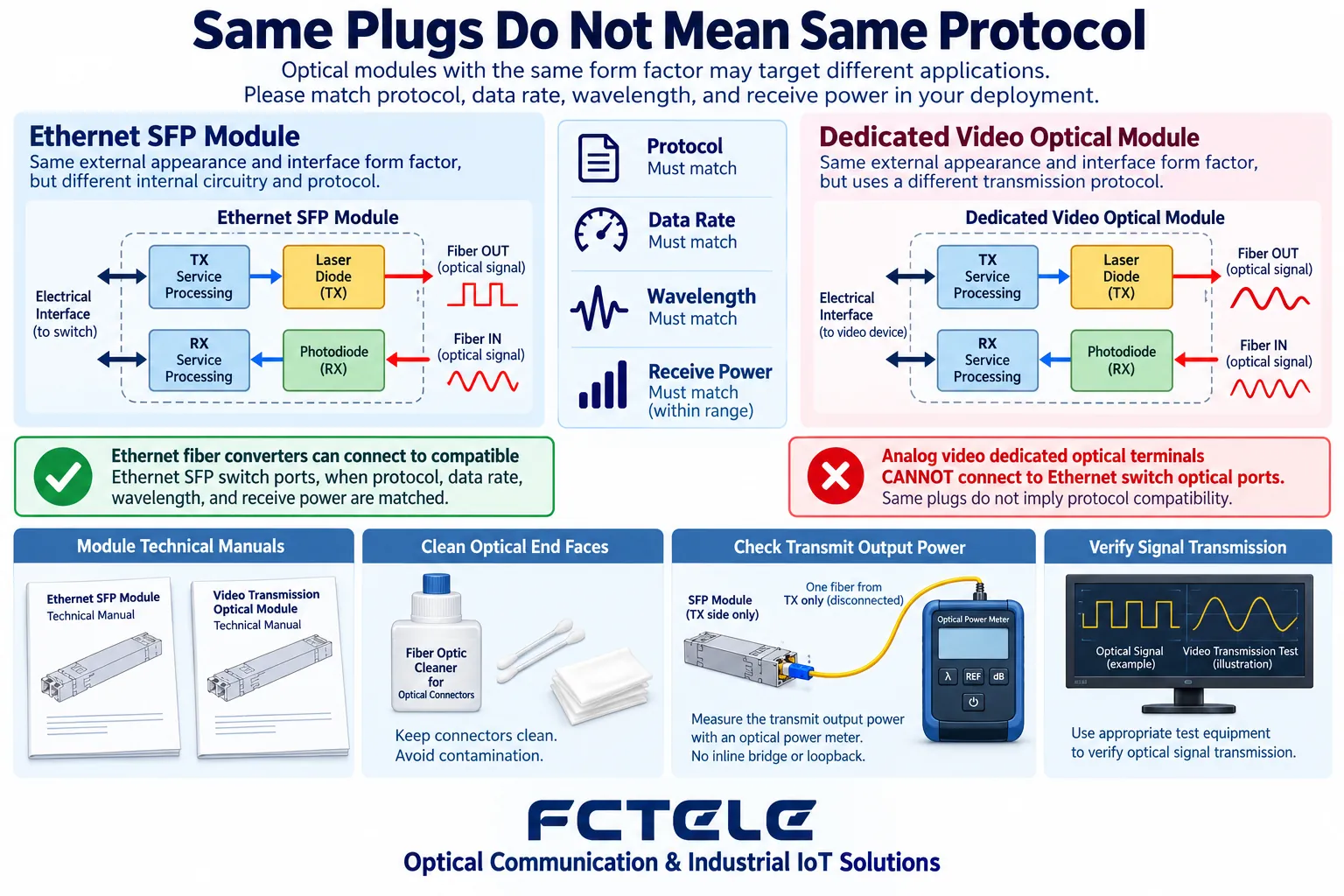
Optical connections with the same appearance do not guarantee protocol compatibility; interface standards, rates, and pairing parameters should be checked at the same time.

How dedicated services enter the network

If analog video or other dedicated signals need to be connected to an IP network, corresponding encoders, gateways, or protocol conversion devices are usually required. They handle service format conversion, while an ordinary fiber transceiver only performs media conversion. You cannot expect one fiber or one adapter to complete this work.

For example, a video encoder turns a supported video input into a network stream, which is then transmitted through a switch; analog telephone entering the network may require a corresponding voice gateway. Specific capabilities, latency, and service compatibility depend on the product implementation and cannot be directly inferred from the name “fiber optic transmission device.”

Boundaries for purchasing and acceptance

Describe the source device, target device, actual signal, number of channels, and on-site conditions, and let the supplier confirm the complete path. When replacing one end of an existing system, especially check the dedicated pairing and version. Do not repeatedly plug a production optical port into an unknown far end before the protocol is confirmed.

Acceptance should include interface compatibility, optical power, actual service, continuous operation, and recovery testing, and the topology and configuration should be saved. Specific Feichang Technology devices can be checked from Product Center For direct-connection combinations that cannot be confirmed, first test them in an isolated environment, and do not use “they are all fiber devices” as the basis for compatibility.

For old equipment with no clear label on the appearance, first check the serial number, model, and as-built records, and contact the supplier to confirm if it cannot be identified. Do not use “plug it in and try” as a substitute for interface identification, especially for dedicated optical ports and powered telephone interfaces.

Translated from the Chinese technical article. Source first published: 2019-08-05. Source last revised: 2026-10-13T23:18:15+08:00. Read the Chinese source

Common practical questions

Does an Ethernet socket elsewhere on a multi-service device make every optical port Ethernet-compatible?

No. The socket may serve a separate service or management function. Read the particular optical port's definition and supported connection path instead of generalizing from another connector on the chassis.

Can equal advertised reach and matching connectors establish direct optical interoperability?

No. Reach is only one specification. Confirm protocol, rate, transmit/receive wavelengths and receiver limits; changing SC to LC does not convert an incompatible optical signal into Ethernet.

What is missing when an analog camera's dedicated optical output cannot enter an IP switch?

A supported service conversion path may be needed, such as a matching analog receiver and encoder. An ordinary media converter changes the Ethernet medium, not an arbitrary video signal into IP.

Sources and applicable boundaries

These additions explain general mechanisms. Supported features, connection details and acceptance limits must be verified for the actual equipment, software and operating conditions; the diagrams are not measurements or certification evidence.

Share this article