


TCP server mode makes the serial server listen on a network port and wait for a computer or program to connect actively; after the connection is established, both ends transmit serial bytes. It is not a mode that automatically understands meter protocols, nor does it turn a serial device directly into a web server. Below, we first explain how data passes through the device, then give a consistent configuration example and troubleshooting order.
Server and client refer to who connects first
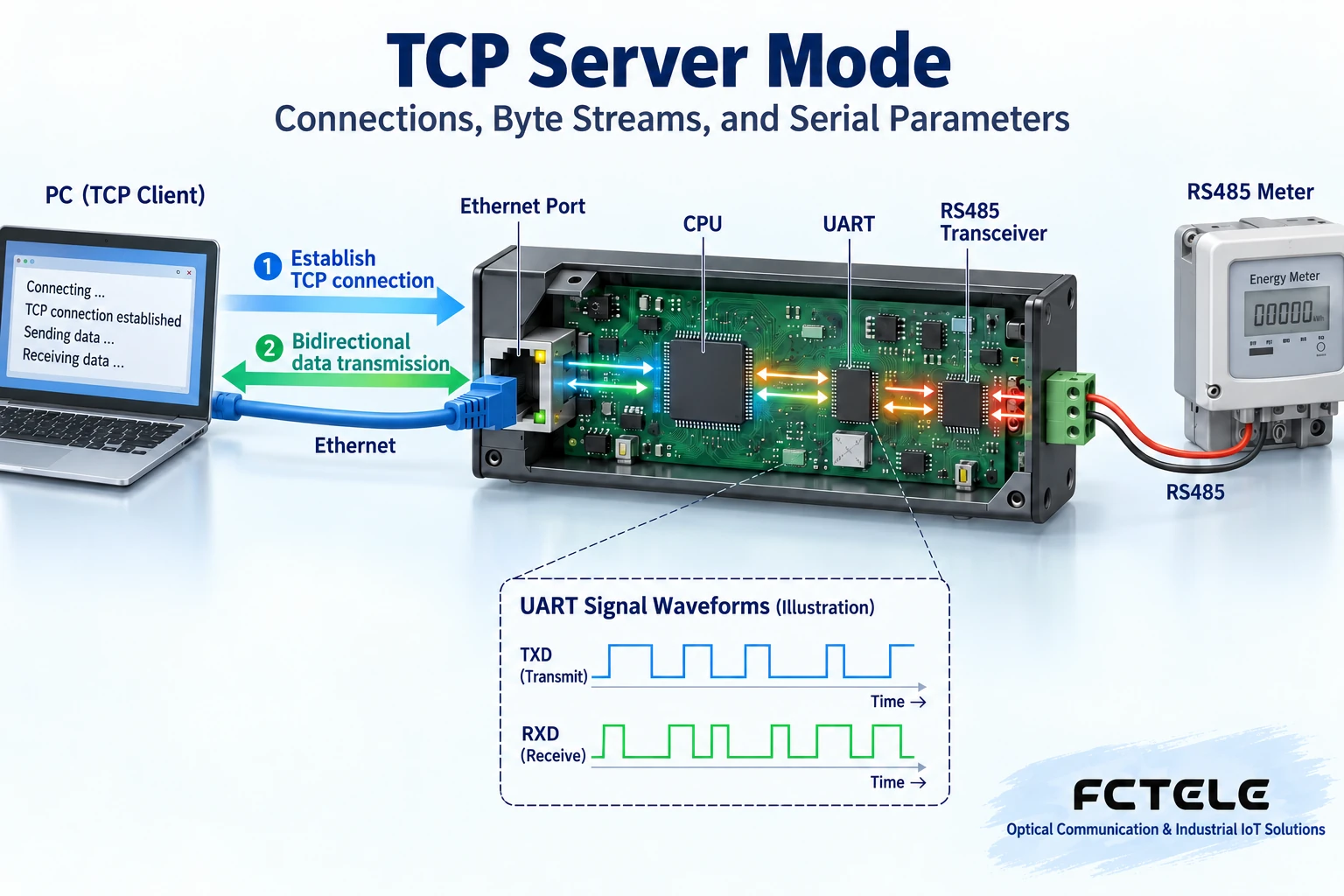
The server waits at a specified address and port, and the client initiates the connection request. After the connection is established, data can usually be transmitted in both directions, so “server” does not mean it can only receive, and “client” does not mean it can only send. A network port is a number a program chooses as a communication entry point, not a physical socket on the back of the machine for plugging in a network cable. The computer needs to know the server’s reachable IP and listening port, and the serial server needs to accept the connection. If there is no connection, how the serial device’s sent data is buffered or discarded depends on the model and configuration; you cannot assume it is always saved. Understanding the roles first, then setting the working mode, can prevent two devices from both waiting or both initiating connections to the wrong target.
What stages does one byte actually pass through?
Take a computer querying a meter as an example. The software hands the protocol request to TCP. After the network interface receives it, the server takes the bytes out of the network data and hands them to the UART serial controller. The UART converts the bytes into a continuous electrical signal according to the baud rate, data bits, parity bit, and stop bits, and then the corresponding RS232 or RS485 circuit sends it to the meter. When the meter responds, it returns along the opposite direction. The baud rate describes the rhythm of serial symbols; no matter how high the network speed is, it cannot make a low-speed meter faster out of thin air. Transparent transmission devices usually do not interpret addresses, function codes, or measured values; the interpretation work is done by the application. Having an RS485 interface does not equal having built-in Modbus protocol conversion; these two capabilities need to be checked separately.
Why does receiving once not equal receiving one message?
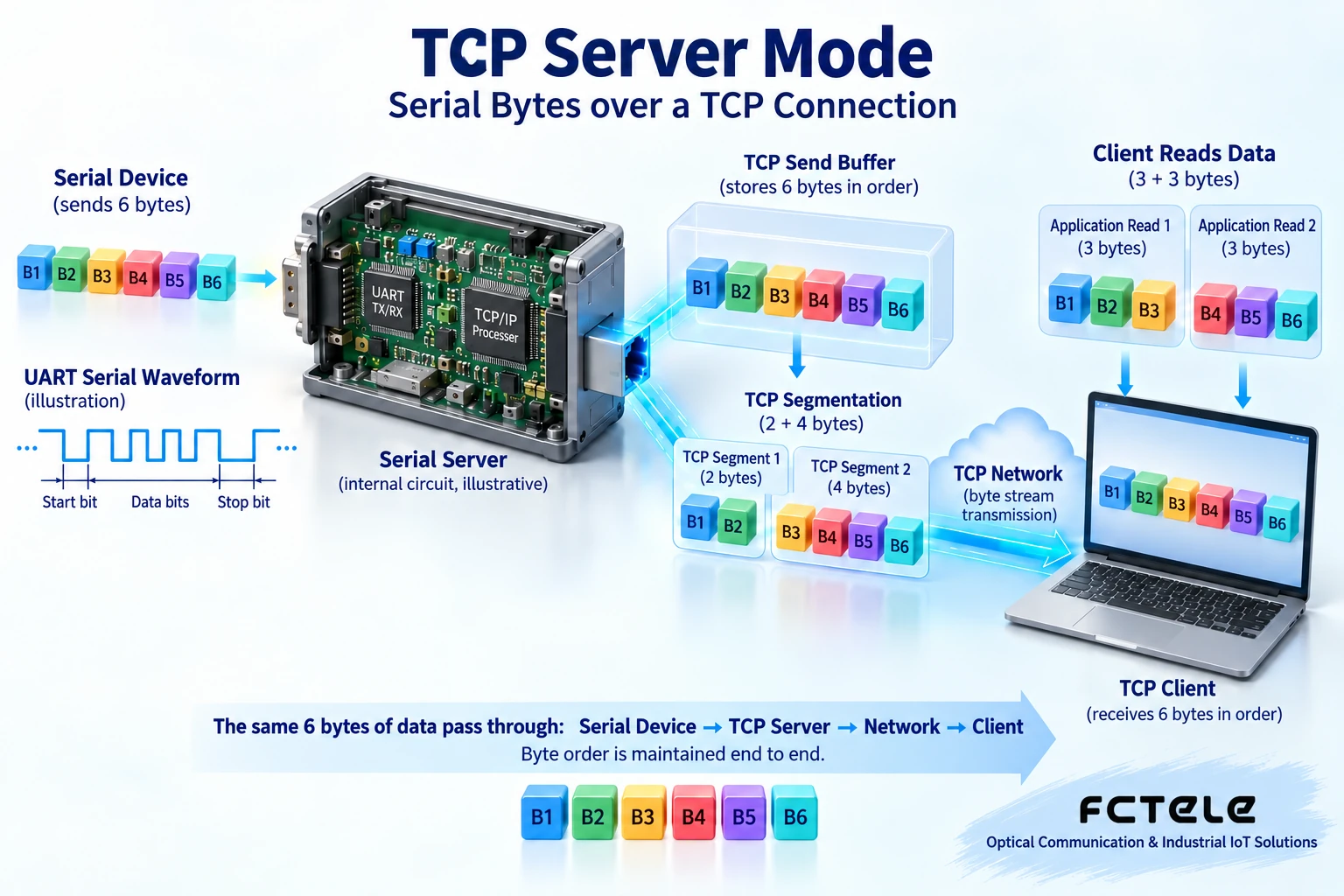
TCP provides an ordered byte stream and does not preserve the boundaries of each application send. If a program sends six bytes, the receiving program may read two bytes at one time and four bytes the next time, or it may split them into other combinations; in normal delivery on the same connection, the byte order should still be correct. This is like a continuous stream of water, not complete envelopes one by one, though the water-flow analogy cannot explain retransmission and congestion mechanisms. The application must buffer and frame according to its own protocol’s length, delimiters, or check rules, and cannot treat one read as one request or response. The device’s serial packing time affects when data is sent, but it cannot add permanent message boundaries for TCP.
Configure the network first, then use the same port example
Assume the server address is 192.168.0.148, the computer is 192.168.0.166, they are in the same example subnet that allows mutual communication, and the listening port is uniformly 4096. The example addresses and ports need to be replaced according to the site plan, and you cannot directly occupy an existing device address. When configuring the mask and gateway, confirm whether cross-subnet access is needed; even within the same subnet, VLANs or firewalls may isolate devices. After the server sets 4096, the client must also connect to 4096; you cannot write 4096 in one step and 40080 in another. Save the configuration and check whether it is retained after restart. Specific menu names depend on the firmware; this article does not assume all models have the same web interface.
Serial parameters and electrical wiring are equally important
The example can use 9600 baud, eight data bits, no parity, and one stop bit, but if the meter requires another combination, the meter manual must be followed. Inconsistent byte formats will cause garbled characters, check errors, or no response. RS232 commonly uses transmit, receive, and reference ground, while RS485 uses differential lines; the two cannot be directly mixed using only an adapter. RS485 terminal naming may differ between manufacturers, so definitions should be checked, not guessed by the letters A and B. Confirm power supply, isolation, and grounding requirements; when fieldbus is involved, operate under maintenance conditions. Software showing “connection successful” only proves the TCP channel is established; it does not prove that serial voltage, parameters, and meter protocol are correct.
Do a safe and explainable loopback test
First, in an independent test environment, use a known-good serial device or serial debugging terminal, connect to the server, and use consistent parameters. The client sends a known segment of bytes, and the serial end checks the content and order; then the serial end sends back another segment of bytes, and the client checks the response. If hexadecimal display is used, confirm that byte values are being sent, not the text characters “0” and “1”. Before connecting to a real meter, verify with a read-only query from its manual to avoid sending unknown commands to an actuator. RS232 loopback and RS485 test methods are different; do not randomly short the bus terminals. Loopback testing can separate the network and serial sides, but it cannot replace real protocol and load acceptance.
How can old software’s COM port connect to a TCP server?
The original 2301 text proposed using a virtual COM to let old programs continue using the serial interface. This idea is useful, but it cannot be understood as 100% compatibility for all software. A virtual COM is created by a computer driver as a local port, then mapped to the serial server’s IP and service listening port; when the program opens the COM, the driver handles the corresponding network connection. Programs that can directly use sockets can connect to the server according to the protocol and do not need another virtual COM layer. Both paths must check port occupation, parameters, control lines, disconnection recovery, and response time; you cannot declare success just because a COM number appears.
Another way is for the meter to remain connected to a real serial port on one computer, and that computer runs a serial sharing service for other computers to access. This does not move the physical serial port to a remote location: the sharing host must remain powered on, the service must be running, and permissions must be correct. A dedicated serial server reduces dependence on that computer, but it also has power, firmware, and network conditions. The network extends the deployable range, but it does not mean the serial cable length is unlimited, nor does it mean all control timing can be preserved exactly. Whether multiple clients can share and how arbitration works still must be verified according to the model and application.
Multiple clients, timeouts, and reconnections need clear rules
Some models allow multiple TCP clients; whether serial responses are broadcast, whether writes are restricted, and how arbitration works must all be checked. Multiple computers controlling the same RS485 meter at the same time may cause mixed requests or deliver responses to the wrong session. It is best for one host application to coordinate access, rather than treating the number of connections as control capability. After a network disconnection, the client usually needs to detect, reconnect, and restore application state; whether a previously issued control command was executed cannot be judged only by connection recovery. When designing timeouts and retries, especially avoid repeatedly executing non-idempotent commands; idempotent means the property that repeated execution does not additionally change the result.
Which layer should be checked when it does not work?
If the client fails to connect, first check the address, port, listening mode, access policy, and whether it is occupied by another connection; if the connection succeeds but there is no serial data, then check wiring, format, meter address, and protocol request. If data can be seen but cannot be parsed, look at byte values, packet buffering, and checksums; do not immediately change the baud rate and hope for luck. Do not directly expose the listening port of production equipment to the public network; use access control and secure channels according to the system design; TCP itself is not equal to encryption. Acceptance covers bidirectional transmission, disconnection reconnection, long-term operation, and real business. Separating connection, byte transport, and protocol understanding lets beginners clearly know what each step actually verifies.
Principle verification materials:Official material 1;Official material 2. The general mechanisms and examples in this article do not replace the corresponding model manual.
Translated from the Chinese technical article. Source first published: 2022-11-29. Source last revised: 2026-10-13T19:15:07+08:00. Read the Chinese source
