


When an industrial switch behaves abnormally after a configuration change, firmware upgrade, or restart, first check the “settings currently running” and the “settings loaded at startup,” then decide whether software recovery is needed. If the port light is on but service does not work, it may simply be a different VLAN setting; if the management page cannot be accessed, it does not mean data forwarding has stopped. This article specifically explains recovery of configuration, firmware, and management access. For physical cable and power supply faults, please read Layered troubleshooting article.
What firmware, running configuration, and startup configuration each handle
Firmware is the software program that runs the device. It is responsible for starting the device, providing the management interface, and controlling the hardware to perform switching work. Configuration is the specific set of rules given to this program, such as which ports belong to the same VLAN and which uplinks allow tagged data to pass. Changing firmware is not the same as modifying these rules, and restoring configuration is not the same as fixing all program problems.
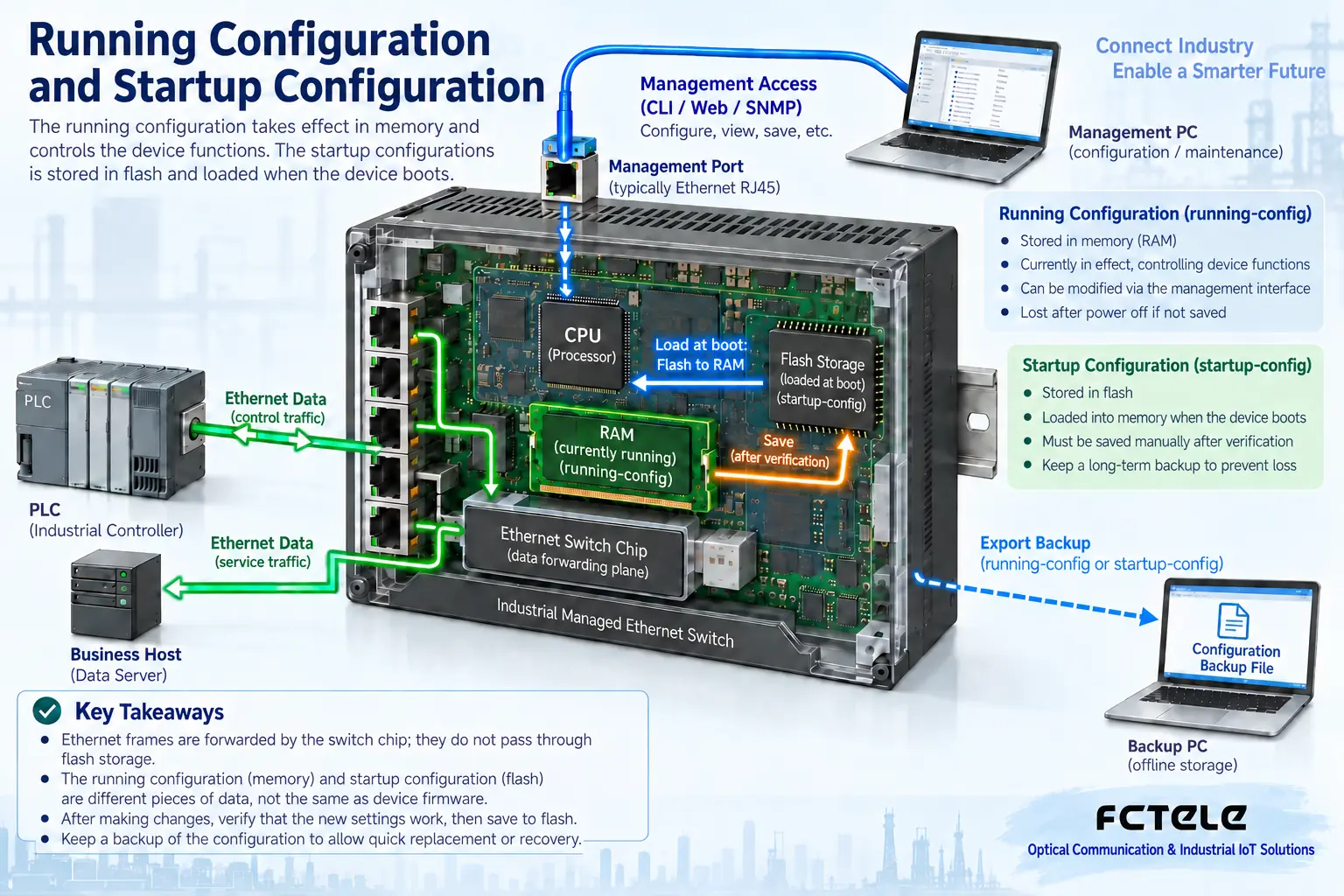
Many managed network devices call the currently effective rules the running configuration, and the rules to be read after restart the startup configuration. The former changes with adjustments, while the latter usually needs to be saved. Different vendors may also use auto-save or other mechanisms, so the model manual should be consulted. A common phenomenon is: ports were changed on site, service was normal at the time, but after a power outage it returned to the old state. This first suggests checking the save mechanism, rather than directly concluding the switching chip is damaged.
An external backup is a file kept outside the device. Saving settings only inside the switch cannot cope with device damage or complete replacement. Backups should be labeled with device number, hardware version, firmware version, export time, and port purpose, and stored in a controlled location; files may contain account or network information and should not be posted in public groups. Before recovery, also check whether the target device is compatible. Do not treat different models of the same brand as directly interchangeable.
First separate management faults from service faults
The management address is used to access device settings, while service ports are used to transmit terminal data. The two are related but are not the same test object. A changed management computer address, management VLAN restrictions, or an expired browser session can all make the page inaccessible while the PLC and host computer can still communicate. Conversely, being able to log in to the page does not prove all service ports are normal.
First record which terminals failed, whether all ports were abnormal at the same time, and what the last change before the fault was. Keep logs, current version, port status, and configuration export. If management is still available, do a read-only check first; if network management is lost, then check the computer’s subnet, the interfaces allowed for access, and the device management address. Only when the model actually provides a local console should that access be used according to the specified cable and serial parameters. Do not apply a command found online to all industrial switches.
When the link is normal, check VLAN and port rules along the service path
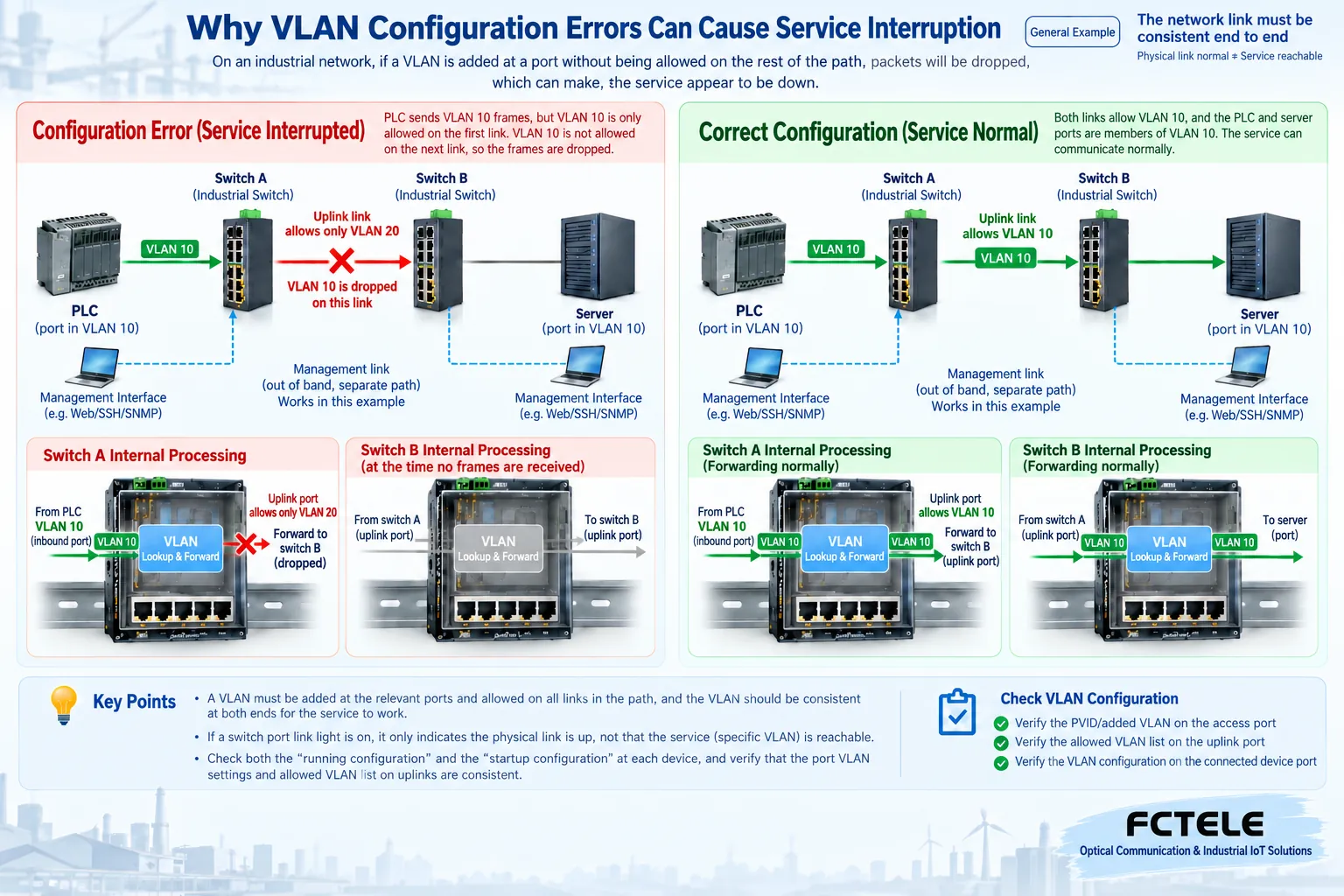
VLAN is a rule that divides a Layer 2 network into different logical ranges. Terminal access ports usually assign untagged frames to a specified VLAN; uplink ports may carry multiple tagged VLANs. Which range a port belongs to, how untagged frames are classified, and which tags the uplink allows must be checked as a set. A physical link light only indicates that both sides have established a link; it cannot prove these rules are the same.
For example, a PLC is connected to VLAN10 on switch A, and a host computer is connected to VLAN10 on switch B, but the uplink in between only allows VLAN20. The uplink lights on both devices may be on, but PLC data still cannot pass. The correct fix is to check the access port assignment and uplink allow list at both ends, not to remove all isolation rules for convenience. If the service is originally intended to cross VLANs, corresponding routing and access rules are also needed; merely letting tags pass does not automatically provide cross-subnet communication capability.
Also check whether ports have been administratively shut down, whether access control is blocking service, and whether link aggregation is consistent at both ends. Protocol support, feature names, and parameter locations vary by model. Feichang Technology’s official website Managed Industrial DIN-Rail Layer 3 Switch with Four 10G Optical Ports and Eight Gigabit Ethernet Ports provides management and Layer 3 related capabilities, suitable for scenarios requiring verification of forwarding rules; this does not mean that non-managed models can also log in and modify VLANs. Actual operation must still check the delivered model and corresponding version.
When restoring configuration, first find the last verified version
Compare the verified configuration before the fault with the current configuration, focusing on affected ports, VLANs, uplinks, and management addresses. Correct only one item at a time that can explain the phenomenon, then test the corresponding service and observe counters. If the problem was introduced by a certain change, rolling back that change is usually easier to control in scope than clearing the entire device.
Before importing a backup, confirm whether it overwrites or merges, whether it takes effect immediately, whether a restart is needed, and whether the management address will change after recovery. Some implementations add the import command to the current running configuration, while others replace the startup file; the two cannot be mixed. Prepare the post-recovery login path and record the operator and time; when production control services are on site, arrange a maintenance window and rollback steps. Verify the service before saving, to avoid solidifying a temporarily incorrect state.
How to handle firmware abnormalities, upgrades, and lost passwords
Do not conclude that firmware has a vulnerability just because of packet loss. Egress congestion, Layer 2 loops, and terminal abnormalities can also produce similar phenomena. First correlate version, logs, and known vendor issues; the impact of large amounts of broadcast depends on rate, packet size, forwarding method, and control plane load, and there is no fixed percentage threshold applicable to all switches. The data plane and management CPU also cannot be simply equated.
When an upgrade is truly needed, obtain the file matching the hardware version from the vendor’s official channel, read the upgrade path and configuration compatibility notes, and check file integrity according to the checksum provided by the vendor. Prepare a configuration backup, current version record, and executable rollback method, and ensure stable power during the upgrade. A backup image or failure recovery is not available on every device; when there is no corresponding manual and recovery access, contact the supplier first, and do not try repeatedly by power cycling.
Lost passwords should be handled according to authorization and model instructions. Some recovery procedures retain configuration, while others clear configuration or interrupt service; do not treat the reset button as a universal password recovery button. When management is lost but service is normal, preserving the running state should be the first priority. After recovery, change initial credentials, check access permissions, and update controlled maintenance records.
How to prove recovery is complete, not just that login is restored
Take a hypothetical example of an incorrectly changed uplink configuration: first save the port and VLAN information during the abnormality, find the change difference, then restore only the relevant uplink allowed range. The PLC and host computer should resume actual data exchange, port errors and discard increments should be consistent with the expected load, and the management address should also be accessible normally. After confirmation, save the configuration and export a new backup.
If the problem this time is “settings lost after restart,” verify the reload behavior in an agreed window, rather than power cycling arbitrarily on a workday. Acceptance should cover four items: service communication, management access, configuration persistence, and rollback materials. Leave the differences before and after modification, test conditions, and results, so the next maintainer knows which settings have been verified.
Reference basis:Cisco configuration file command reference used to check the difference between running and startup configuration;Cisco firmware backup and recovery instructions used to check model-related image recovery boundaries. Third-party operations cannot be directly copied to Feichang Technology devices. The two figures are general principle illustrations, not product photos or test records.
Translated from the Chinese technical article. Source first published: 2020-11-18. Source last revised: 2026-10-13T20:24:48+08:00. Read the Chinese source
