


An RS232 device server lets software access an existing point-to-point serial device over a network. It recovers bytes from valid RS232 signals and transports them. It does not automatically turn RS232 into RS485, understand every message or guarantee plug-and-play legacy software. Match electrical wiring, software access and network-adjusted timing.
Separate connector, interface and protocol
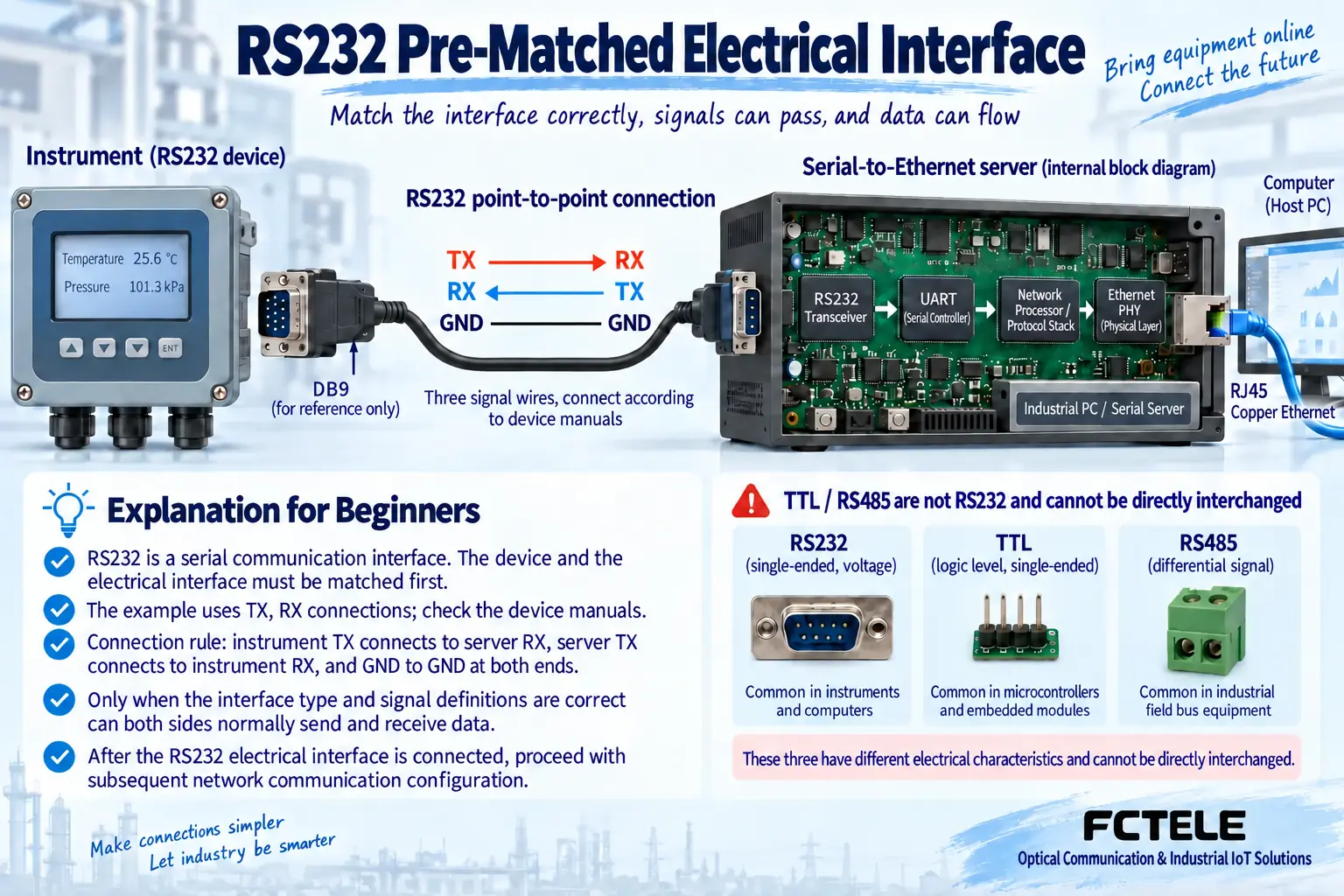
DB9 is a connector form. Consult manuals for electrical standard and pin functions. Similar connectors may not be RS232, and logic-level UART is not directly RS232. Instrument data format is an application protocol: correct wiring still needs software that interprets its bytes.
Point-to-point communication commonly connects one transmitter to the other receiver with required reference connections. Some devices need RTS/CTS or other controls, so TX/RX alone may be insufficient. Do not assume every DB9 pinout or trial-connect unfamiliar ports; incorrect wiring can damage equipment.
How the device creates network access
An RS232 transceiver converts external signals to internal digital levels. The UART recovers characters using baud, data, parity and stop settings. Bytes pass through buffers to the network stack and Ethernet. Return traffic follows the reverse serial path. Transport changes without necessarily changing original business messages.
Mismatched characters can cause garbling/errors. Networking cannot repair bytes misread at entry, and Ethernet LEDs cannot prove RS232 operation. Preserve working direct-serial messages before inserting a server to distinguish layers.
The local serial segment retains its limits
Networking moves the computer farther away, but instrument-to-server wiring remains RS232. Permitted length/rate depend on equipment, cable capacitance and environment. A network spanning sites does not permit unlimited RS232 cable length. Normally place the server near the device and use suitable networking for distance.
RS232 is generally point-to-point. Do not parallel independent device transmitters expecting automatic polling. Multiple devices can use multiple physical ports or separate servers according to interface/protocol. RS485 multidrop needs a matching electrical and service design, not renamed RS232 terminals.
Virtual COM reduces changes but needs verification
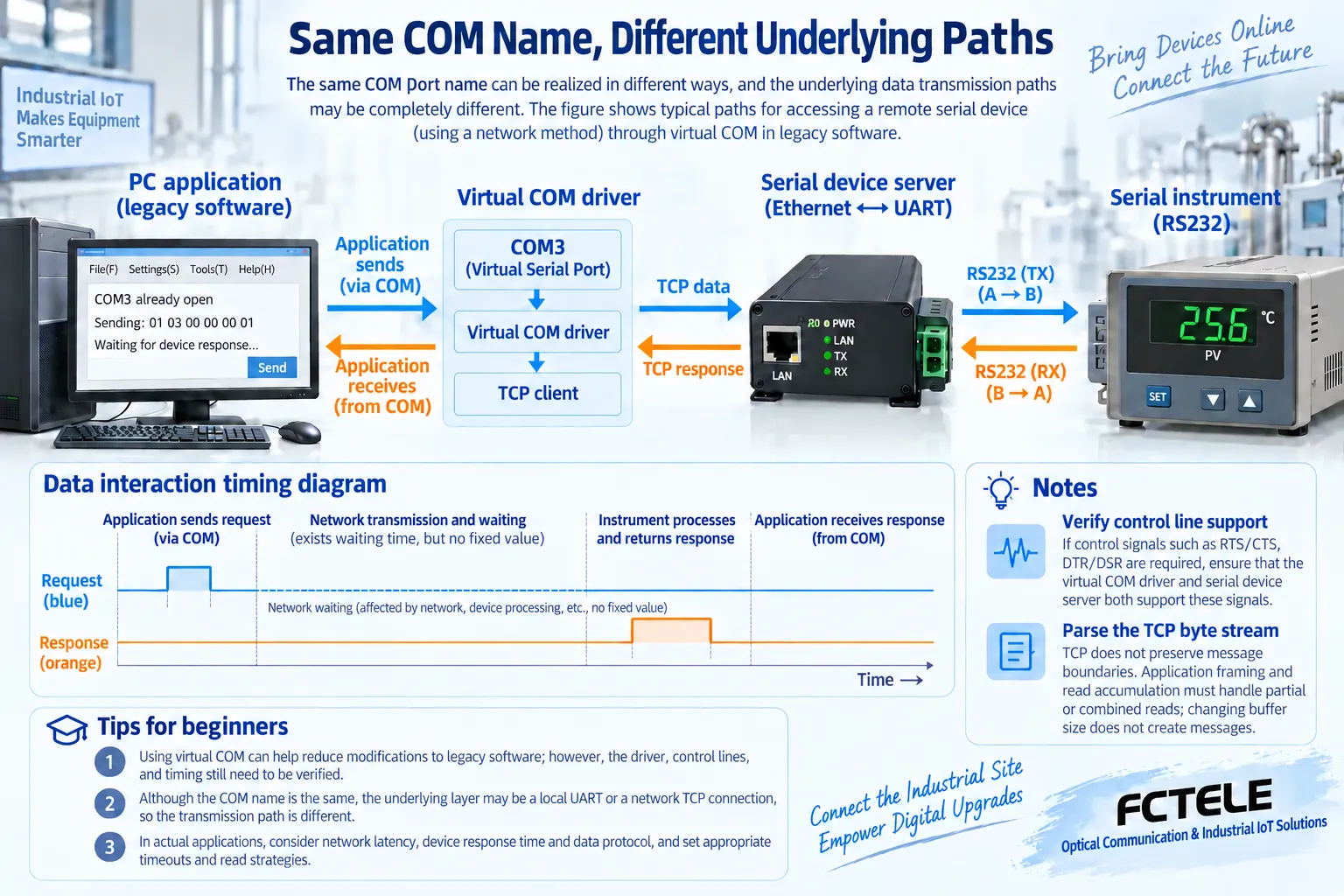
A driver presents a COM-like endpoint to legacy software and translates operations to remote access. It may reduce retrofit work, but confirm supported systems, control lines and serial operations. The same COM name does not establish identical low-level behavior.
Pay special attention to dynamic baud changes, modem status and strict send timing. USB-serial, local PCIe and network-virtual drivers are not interchangeable. A terminal utility exchanging text proves limited byte transfer, not the original software workflow.
Adapt request/reply timing to network waits
Buffers, packetization and network queues change response times. Measure complete transactions rather than use too-short or unlimited timeouts. TCP reads may contain half a reply or several messages. Parse protocol boundaries instead of treating every read as one command.
Define whether disconnected commands executed, what remains buffered and recovery behavior. Read retries mainly add load, while repeated reset/actions can affect the site. Confirm feedback/state rather than replaying everything merely because a connection returns.
Flow control and shared access have conditions
Devices may use hardware readiness, software characters or neither. Server, cable and driver must support the required method to prevent continuous-data overflow. Software flow-control bytes may collide with payload; do not enable them without understanding the protocol.
Define control ownership when several users access one RS232 device. Connection count is not master count. Interleaved requests can misattribute replies. Share observations through a collection service or explicitly coordinated access rather than promising unlimited concurrency.
From bench verification to controlled deployment
Confirm electrical interface, pins, power and characters, testing original software on a short single-device link. Add a test network, establish roles/IP/service port and compare raw bytes and parsed results. Cover ordinary transfer, continuous load, application exit, network loss and power recovery, noting states needing manual confirmation.
FCTEL products have different interfaces/modes. Check actual model, ordered version and manual rather than another vendor default address or certification. Restrict management/control access and retain configuration, drivers, firmware and channel records. Production, medical and safety systems need their own authorization/validation; successful RS232 networking does not authorize arbitrary remote operation.
References:FCTEL serial device server documentation;TCP specification. Figures show generic mechanisms, not product-specific wiring.
Translated from the Chinese technical article. Source first published: 2024-09-13. Source last revised: 2026-10-13T15:49:49+08:00. Read the Chinese source
