


DisplayPort, or DP for short, is a type of interface that computers use to send digital images to monitors. It is not an industrial fieldbus, and it does not guarantee that all similarly shaped sockets have the same functions. Understanding which channel the image travels over, how devices negotiate, and whether an adapter truly processes the signal can help you deal with black screens, flickering screens, and incorrect resolutions in a more organized way.
First, be clear about what the product is
DisplayPort on a graphics card mainly serves display connections; PROFIBUS-DP in industrial automation is a different system. Both names contain DP, but that does not mean their electrical characteristics, protocols, or uses can be interchanged. When purchasing, write the full interface name, and it is best to include the device model and a photo of the port. Mini DP and common full-size DP have different shapes, and USB-C may also carry DP video, but you cannot judge support by shape alone. So-called fiber optic extension equipment must also clearly state which video interface is being extended; do not assume it is universal just because it has an optical port.
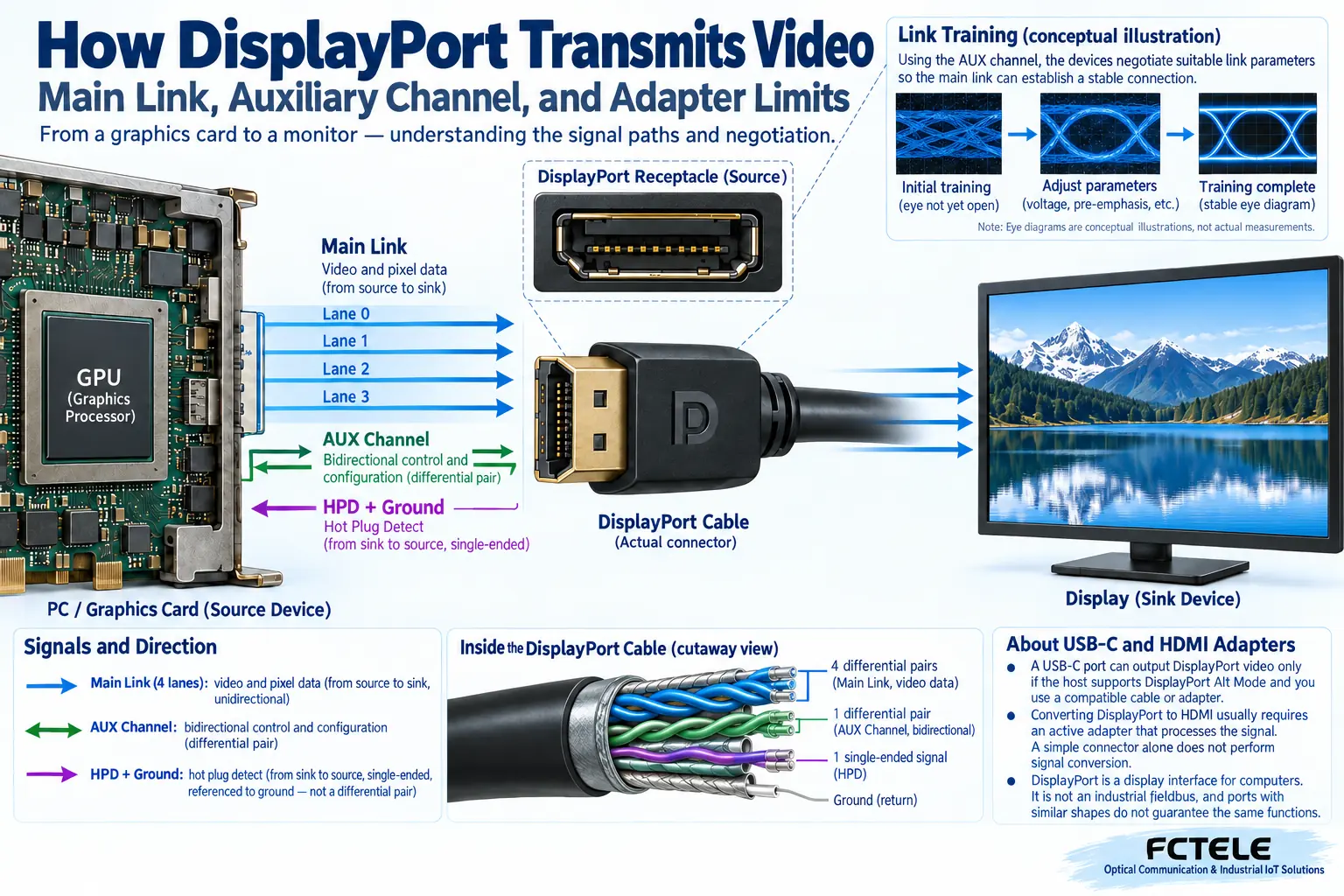
The image is mainly transmitted along the main link
The display source organizes pixel information into specified data and sends it to the monitor through high-speed differential channels. Differential can be understood as the receiving end looking at the voltage difference between two wires, rather than only looking at the voltage of one wire relative to ground; this helps handle common interference under properly designed conditions. The effective capacity of the main link is affected by the number of lanes, link rate, and encoding overhead. You cannot directly treat the nominal total rate of a certain version as the image bandwidth available to all products. The diagram in this article shows functional relationships, not the actual internal layout of a chip.
Why is an auxiliary channel also needed?
DP does not simply send all the pixels over and finish. The auxiliary channel, AUX, is responsible for reading device capabilities and related control information, and it can communicate bidirectionally; the hot plug detect signal helps the source device know whether the monitor exists and whether its status has changed. The main image link, auxiliary communication, and hot plug detection carry different tasks. Therefore, even if the plug is inserted properly, it does not mean negotiation will necessarily succeed. Monitor sleep, adapter capabilities, cable contact, or firmware settings may all affect whether the source device chooses the correct display mode.
What exactly is link training training?
Training is not about improving picture quality; it is about letting the sender and receiver establish a high-speed connection that can be read reliably. Devices negotiate suitable link parameters based on the receiving status; when transmission conditions are poor, they may drop to lower capability, or they may be unable to establish a stable connection. Beginners can understand it as both sides first confirming, “At what pace can we speak so we can hear each other clearly?” A higher-spec cable is not a universal cure for all problems; the adapter, port contamination, cable length, and display mode still need to be checked together. Do not equate occasionally lighting up with long-term error-free operation.
Whether the resolution is high also depends on refresh rate and color
At the same resolution, displaying more frames per second usually requires more data; color bit depth and encoding method also change the requirements. Features such as display compression can change the transmission arrangement, but they must be supported by the relevant devices together; you cannot rely only on the version advertised for one plug. When selecting, list the actual resolution, refresh rate, color requirements, number of monitors, and connection path. Office text display and high-refresh dynamic images have different loads; there is no need to blindly pursue the largest numbers, nor can you use the result of being able to show the desktop to prove that the target mode has been met.
Why does DP to HDMI have direction and capability limits?
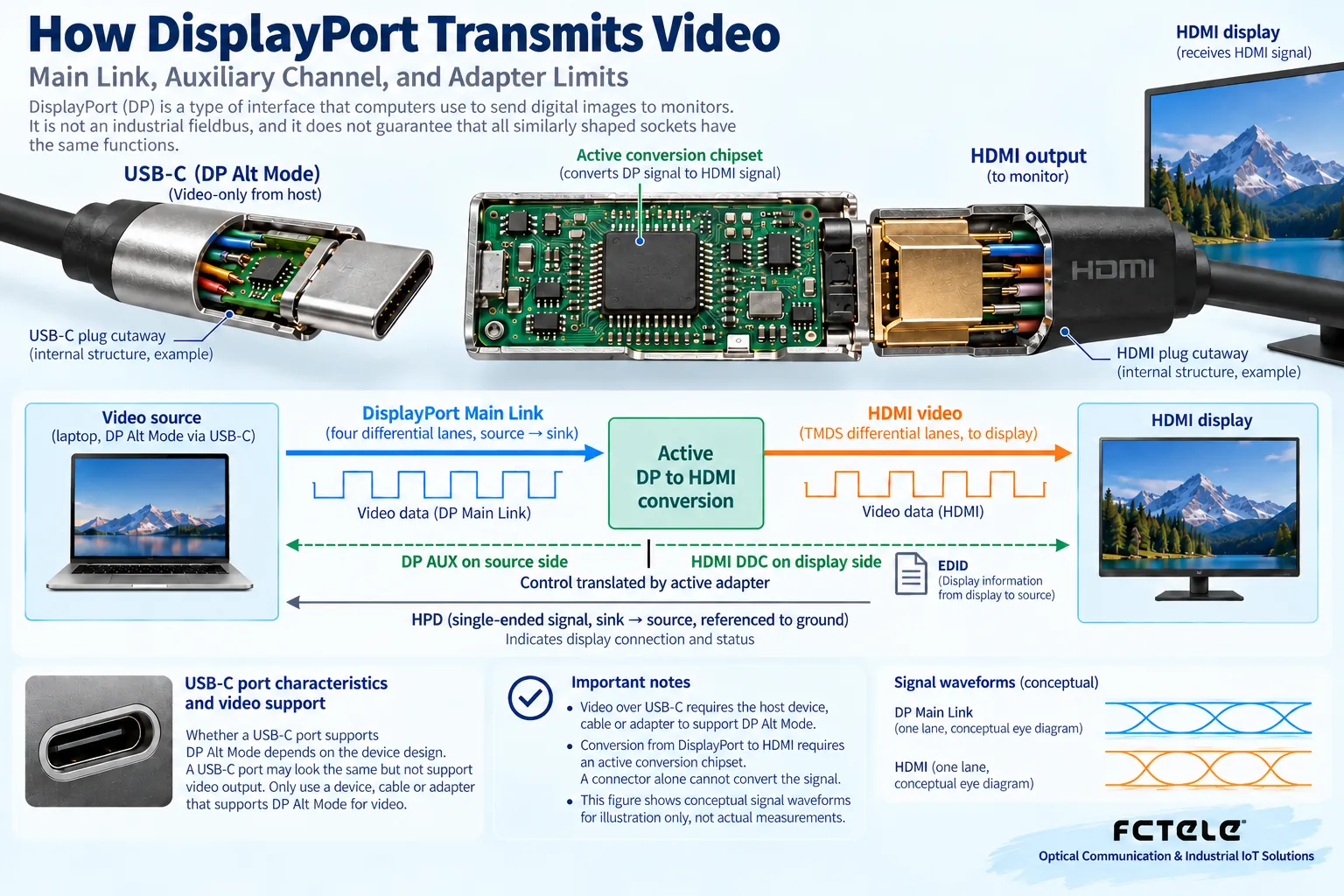
When a DP source connects to an HDMI monitor, it may use a compliant passive adapter, or it may need active conversion circuitry, depending on the source output capability and target mode. The reverse direction usually requires a separately designed product, and the same cable should not be used upside down. An active converter processes the protocol or signal, but it still must obey the capability boundaries of its input and output. Requirements such as audio, sleep wake-up, multiple screens, and content protection also need to be confirmed item by item. A merchant writing “supports high definition” cannot replace a detailed explanation of resolution and refresh rate combinations, and it certainly cannot prove that all monitors are compatible.
A USB-C port does not necessarily output video
USB-C first describes the connector shape and related interface system; whether it provides video capabilities such as DP Alternate Mode must be checked in the specific computer port and expansion device documentation. Two USB-C ports on the same computer may also have different uses. Some expansion devices use a separate USB image transmission scheme, which is not the same thing as the native DP path. When troubleshooting, first confirm the port capability, then check the cable and dock; do not repeatedly change display settings on an ordinary charging port. Using multiple levels of adapters increases compatibility variables. When a short direct connection baseline can be established, verify the baseline first and then add devices level by level.
How should Feichang Technology’s video optical transmission fit into a solution?
Feichang Technology’s official website has product categories such as video fiber optic transmission devices and related products for HDMI and VGA. The existence of a category does not prove that all models support DP input, nor does it prove that they perform DP-to-HDMI conversion. This article does not make performance promises based on any one verified DP model. If a project needs DP images to travel over fiber, first verify the complete interface chain of the source end, the required active conversion, the optical transmission end, and the display end. Explain the target mode and direction to the manufacturer and ask them to confirm the corresponding model. Do not use the functions of an analog video fiber optic transmission device to replace the capabilities of a digital display interface product.
A reproducible black screen troubleshooting example
Suppose a computer connects to a meeting room display through an adapter and the screen is black. First use a short direct connection or a verified combination to confirm that the computer can output the target image, then check the adapter direction, power, and display input selection. Lower the mode to a combination clearly supported by both sides. If it recovers, then check the bandwidth and link conditions of the higher mode. After that, add the original adapter, long cable, or optical extension segment, changing only one item at a time. Record which step fails and what the monitor indicates; this order makes it easier to preserve the cause than changing the driver, cable, and monitor all at once. The example is not a customer case that has already been implemented.
Acceptance should cover the usage process beyond the image
Finally, run continuously in the actual working mode and check dynamic images, text edges, audio synchronization, and recovery after screen off, sleep, power on, and re-plugging. In multi-monitor scenarios, also verify whether the arrangement and identification meet requirements. When flickering occurs, record the time and device logs; do not leave only “occasionally bad.” The value of DP is to establish a compliant digital display link; reliability comes from the capabilities of both sides, connection quality, and complete verification, not from the interface name. For long-distance deployment, each conversion and power segment should be included in the delivery record.
Product and principle verification materials:Principle verification material 1;Principle verification material 2. The general mechanisms and hypothetical examples in the main text do not replace the corresponding model manuals.
Translated from the Chinese technical article. Source first published: 2021-12-07. Source last revised: 2026-10-13T20:58:17+08:00. Read the Chinese source
