


A bitstream is a string of data; bitrate is how many bits per second
After sound or images are converted into digital data, they form a bit sequence organized according to certain rules, often called a bitstream. Bitrate means how many bits are produced or transmitted per second within a specified observation time, and the unit is often written as bit/s or bits per second. It describes the amount of data, not the number of screen pixels, and not the distance of an optical port. When explaining a value, you must also make clear whether you are observing audio, video, the data after both are encapsulated, or network traffic that includes protocol overhead.
Bit and Byte are different; usually one byte contains eight bits, so a pure data amount of 8 Mbit/s corresponds to about 1 MB/s. Decimal multipliers are used here: M means one million, and G means one billion; some tools use binary units such as MiB or GiB, so you cannot compare numbers without looking at the units. Mixing all storage units and network multipliers together, as in older articles, will cause deviations in bandwidth and hard disk calculations.
Uncompressed audio starts from sampled data
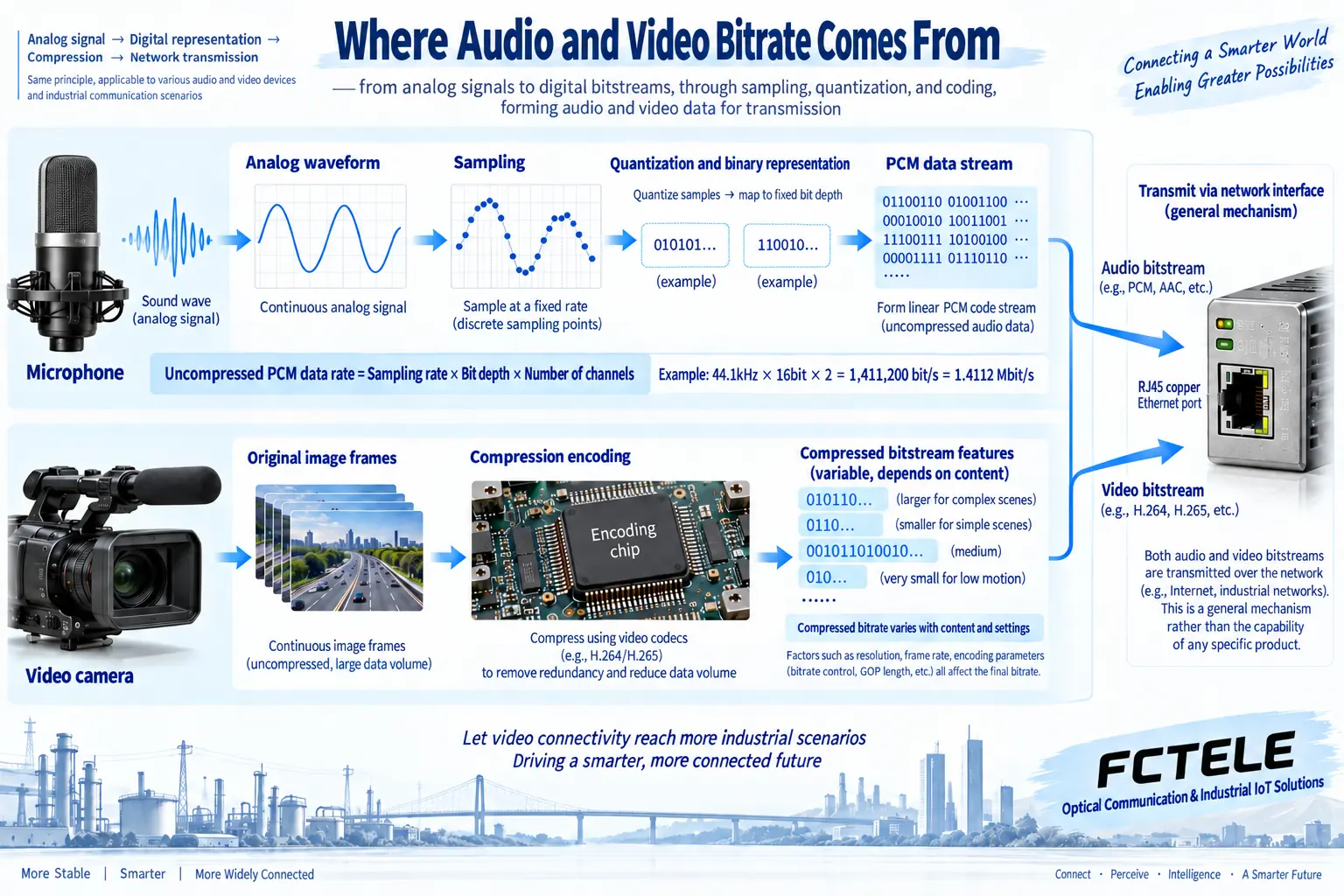
Analog sound must first be sampled and then quantized into digital samples. The sample rate means how many samples are taken per second for each channel, the bit depth means how many bits are used to describe one sample, and the number of channels means how many independent simultaneous sound paths there are. For fixed-format, uncompressed linear PCM sample data, the basic data rate can be calculated by multiplying the sample rate by the bit depth and then by the number of channels; additional encapsulation and link encoding are calculated separately.
For example, with 44.1 kHz sampling per channel, 16 bits per sample, and two channels, the sample data rate is 44100 × 16 × 2 = 1411200 bit/s, which is 1.4112 Mbit/s. This is a general calculation example, not a fixed parameter for all audio equipment. After adding file headers, timestamps, or network packets, the total amount will change; after switching to compressed audio, you also cannot continue to use this multiplication as the actual output bitrate.
Compressed video cannot be judged by resolution alone
The amount of uncompressed image data is related to the number of pixels, frame rate, color sampling method, and the number of bits per component. Compression encoding also uses related information in space and time, so under the same resolution and frame rate, a still picture and a moving crowd may produce different amounts of data. Noise, detail, encoding format, quality target, and encoder settings all affect the result, and you cannot infer a fixed bitrate from the word “high definition.”
Under the same encoding conditions, giving the encoder more data usually provides more room to preserve detail, but a higher bitrate does not guarantee a better picture. An original image that is out of focus, poor sampling quality, unreasonable encoding settings, or multiple lossy conversions cannot be fixed just by increasing the network rate. When comparing quality between different encoders and different content, you should record the format, scene, and parameters at the same time, and not treat a single bitrate number as a complete quality score.
What do average and peak values each solve?
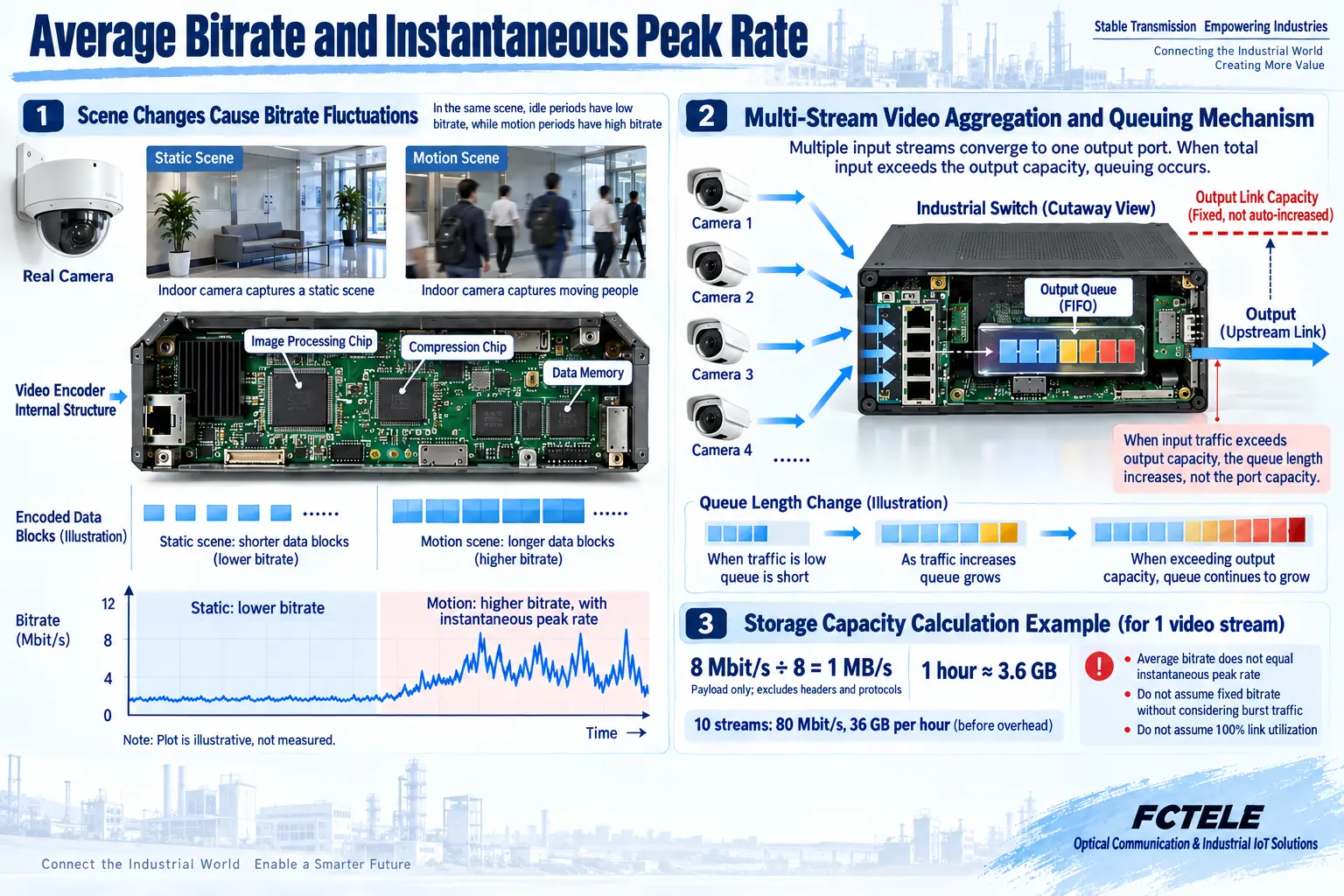
Constant bitrate usually aims to keep the output near a certain target, but actual short-term behavior is still affected by device implementation and the measurement window. Variable bitrate allows the amount of data to change with content; quiet scenes may be lower, and complex motion scenes may be higher. Some devices provide average bitrate or maximum bitrate control, and their targets, time ranges, and impact on image quality need to be checked in the device’s own documentation; options from different manufacturers cannot be treated as the same algorithm.
Long-term average bitrate is suitable for estimating storage and long-term traffic, while instantaneous peaks affect port and queue pressure. An average of 8 Mbit/s does not mean that every very short time window produces only 8 Mbit/s. When multiple cameras have motion at the same time or send data at the same time, peaks can also add up. You should observe short-term traffic and sustained load in real scenarios, rather than taking only one average value and declaring that the network has no bottleneck.
Estimating hard disk and uplink from payload
Assume that the actual effective data of one channel including audio and video averages 8 Mbit/s. One hour of pure payload is about 8 × 1000000 × 3600 ÷ 8 = 3600000000 bytes, or about 3.6 GB. Ten channels under the same conditions for one hour have a pure payload of about 36 GB. Retention time, recording ratio, and actual changes will affect the final storage, and encapsulation, file organization, and system reservation also need to be considered; the example here does not represent usable hard disk capacity or a fixed number of recording days.
Similarly, ten channels on the network are not calculated as just one 8 Mbit/s stream, but first total about 80 Mbit/s of effective data, then include protocols, control messages, peaks, and possible retransmissions. You also need to confirm which outlets the streams pass through, whether there is uplink aggregation, and whether there are other services. Caching can buffer short bursts, but when continuous input exceeds the outlet capacity, it will still accumulate or be dropped; the nominal port rate cannot all be treated as application effective data capacity.
Optical transceivers and network encoding devices must be distinguished
The Feichang Technology product numbered 218, the FCV multi-service video optical transceiver, provides product information that offers access clues for analog video and optional audio, data, and other services.
The Feichang Technology industrial switch numbered 2241 is an Ethernet forwarding device, and it can plan the path for network audio and video in combination with actual ports and VLAN and QoS management.
At acceptance, match format, traffic, and results
First record the signal source, audio and video format, encoding settings, number of simultaneously working channels, and measurement location, then observe endpoint data, switch ingress, and uplink egress separately. Before the numbers are the same, first confirm that the units and statistical windows are consistent; the application payload, file size, and network port byte count displayed by tools may count different things, and you cannot require them to be naturally exactly equal.
Verify picture and sound, peak traffic, port drops, and actual recording usage under quiet, motion, and multi-channel concurrent conditions. When stuttering occurs, distinguish source encoding, network bottleneck, and receiving decoding in turn, and do not first adjust all bitrates to the maximum. Save parameters and test scenarios, and leave capacity margin according to actual results, so that bitrate calculation can become a basis for selection and troubleshooting, rather than a promotional number divorced from the business.
Data note: The principle diagrams are used to explain general mechanisms, not product photos or measured records. Specific interfaces, modes, and capabilities are subject to the selected model, version, and on-site verification.
Verification materials: Axis network video bitrate control white paper
Axis bitrate control interface description
Feichang Technology multi-service video optical transceiver
Feichang Technology digital video optical transceiver classification
Feichang Technology managed four-optical eight-electrical layer 3 switch
Feichang Technology industrial switch classification
Related technical topic: How SRT transmits audio and video: packet loss retransmission, buffer delay, and connection modes
Translated from the Chinese technical article. Source first published: 2022-01-11. Source last revised: 2026-10-13. Read the Chinese source
