


A VGA to HDMI converter lets analog video connect to a digital display, but it cannot create detail that was never there in the first place. Whether the picture is clear depends on the source signal, cable, sampling, scaling, and display settings working together. Understanding this chain is more important than buying just because you see the words “HD conversion.”
First, understand that the two interfaces do not speak the same language
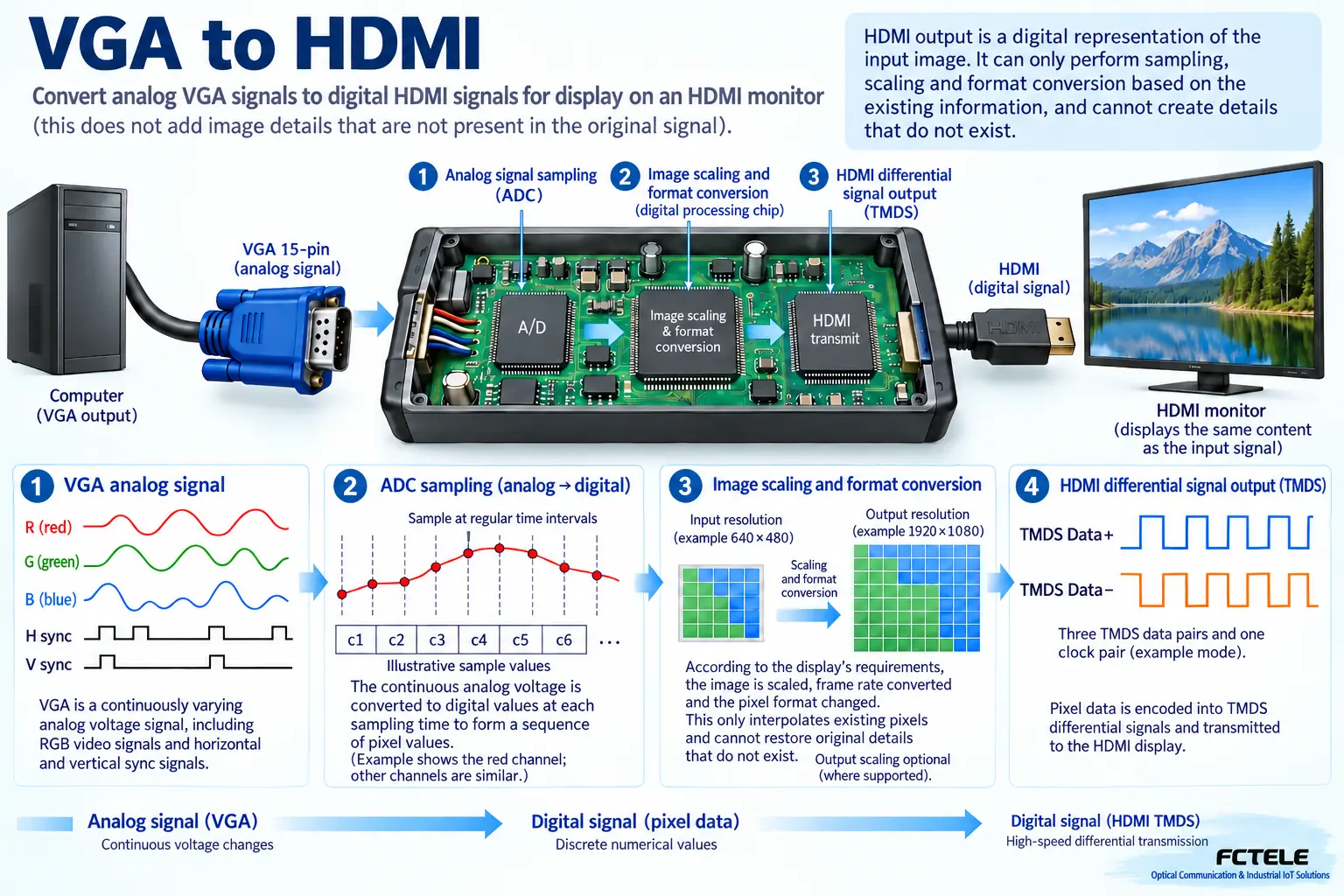
VGA represents the brightness of red, green, and blue as continuously changing voltages, then uses sync signals to tell the display device when a line and a frame begin. HDMI organizes digital video and audio according to rules. You can think of the former as a continuously drawn curve, and the latter as pixel values sent out in order. A converter needs real electronic processing circuitry, not just a changed plug shape. Direction also matters: a product with VGA input and HDMI output cannot be reversed and used as HDMI to VGA, because the two directions require different processing.
What happens first inside the converter
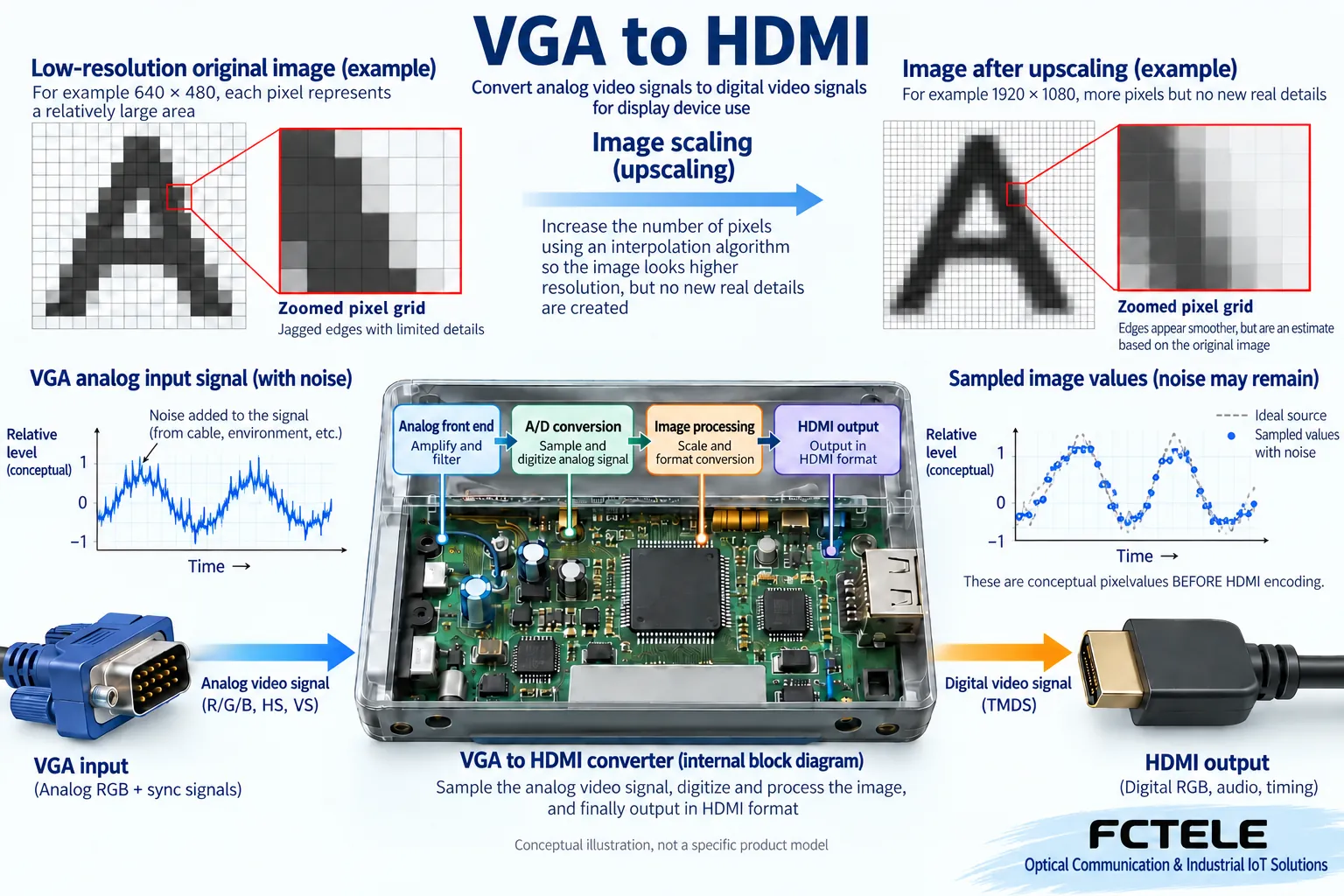
After the analog signal enters the device, the input circuit first receives and conditions the voltage, and the sync detection circuit identifies the picture timing. An analog-to-digital converter measures the voltage at a certain rhythm and turns the color at each position into digital values, and the following circuit then organizes the HDMI output. This is called sampling; it is not taking a new, clearer photo. If the sampling moment deviates from the proper position, vertical lines in text may show ghosting or jitter; if the input already has noise, the digitized values will also be affected. Therefore, with the same interface combination, actual performance still depends on the circuit and timing adaptation.
Why upscaling to a higher resolution does not equal restoring detail
Some converters include scaling processing, often called a scaler, which means converting the original pixel grid into another size. Suppose the input has only a small number of pixels and the output needs more pixels; the device can only estimate the added positions based on neighboring pixels. It is like enlarging a small photo: the paper gets bigger, but text on a distant doorplate that was originally unreadable will not automatically appear. Sharpening may make edges more noticeable, but it may also emphasize noise. Do not treat the output’s nominal resolution as the true clarity of the input content, and do not advertise interpolation results as newly captured detail.
Sometimes it looks clearer; where does the improvement come from?
If an old display or receiving circuit performs poorly with analog input, switching to a compatible converter may improve timing recognition, ratio control, or transmission stability, making the picture look neater. A shorter, qualified VGA cable can also reduce high-frequency detail loss. But these improvements preserve the source information more accurately; they do not unconditionally increase the original resolution. If the computer already provides a native digital output, using a digital connection that matches the display usually means going through one less analog conversion; the specific choice still depends on existing equipment and the application, rather than uniformly discarding old interfaces.
Aspect ratio and refresh rate must also match together
Resolution tells us how many pixels the picture has, while refresh rate tells us how many times per second it updates; the two are not the same metric. A device supporting a certain pixel count does not mean it simultaneously supports all refresh rates, sync methods, and color settings. When a widescreen display receives a traditional-ratio signal, it may leave black bars proportionally, or it may stretch the image so circles become ellipses. During acceptance testing, display text, thin lines, and circular test patterns, and check edges, proportions, and motion separately. Do not just check whether the desktop wallpaper can light up the screen; that easily hides unstable timing and cropped images.
VGA has no audio; where does HDMI audio come from?
A normal VGA connection mainly carries video, and it does not automatically have audio just because the receiving end becomes HDMI. A converter with audio embedding needs a separate audio input and corresponding processing before sound can be added to the HDMI data stream. Before buying, confirm the audio interface, input type, supported formats, and whether independent power is required. A USB power port is not the same as a USB video input; do not assume that a device can read a computer’s picture just because it has USB. Separating the three tasks of power, video, and audio makes wiring and troubleshooting much clearer.
How to read Feichang Technology related products without choosing the wrong category
The Feichang Technology official website has dedicated optical transceiver categories for VGA, HDMI, and others; they solve the corresponding business problem of fiber extension, and you cannot assume from this that every model can convert VGA to HDMI. When choosing a Feichang Technology solution, write “interface format conversion” and “same-format long-distance transmission” separately in the requirements table, then check the specific details for input, output, direction, and optional audio functions. If the product page does not clearly list VGA input and HDMI output, you cannot add that capability for it. Brand features should be based on the business that the selected model actually supports, not guessed from the category name.
Example: old industrial computer connected to a conference display
Suppose the industrial computer only has VGA and the display only has HDMI. You can first use an active converter that clearly supports that direction to establish a baseline in a short desktop cable environment. Choose an output timing supported by both sides on the computer, turn off unnecessary stretching on the display, observe whether text is clear and whether circles look normal, then test continuous display over a long period. If the site also needs fiber extension across buildings, choose a compatible transmission solution on this already-verified link. Accepting conversion and extension separately can prevent the situation where the final screen is black and you do not know which link does not match; this is a hypothetical scenario, not a customer case.
How to locate black screen, ghosting, and no sound step by step
For a black screen, first confirm the conversion direction, power, and whether the source device is actually outputting, then try a conservative timing supported by both sides. For ghosting or blurry text, first replace with a verified short VGA cable, check the connectors and shielding, then check sampling and display settings. If there is only sound and no picture, you cannot judge from that alone that the video channel is normal; if there is only picture and no sound, check whether a separate audio input is provided. Change only one condition at a time, and keep the previous settings and symptoms. Do not blame all problems on a “low-grade converter,” and do not increase the device power voltage without verification.
Final acceptance does not end with the screen lighting up
Record the input and output resolution, refresh rate, ratio settings, power method, and cables used. Test still text, moving images, recovery after power cycling and re-plugging, and confirm audio-video synchronization when needed. A link used for monitoring displays should also be observed in actual on-site operation, not replaced by a few minutes of demonstration instead of long-term use verification. The final conclusion should be that this specific set of equipment and settings meets the requirement, not that “all VGA to HDMI converters are clearer.” Format conversion gives devices a chance to interconnect; the quality of the source information, compatibility, and engineering verification determine whether it is truly usable.
Product and principle verification materials:Principle verification material 1. The general mechanisms and hypothetical examples in the main text do not replace the manual for the corresponding model.
The illustrations show general mechanisms, not measured results for a particular product.
Translated from the Chinese technical article. Source first published: 2020-02-27. Source last revised: 2026-10-13T13:13:08+08:00. Read the Chinese source
