


A video intercom protocol converter is used to connect a specific intercom system to another supported transmission network. When using it, first confirm protocol compatibility among the door station, indoor station, management center, and converter, then check power supply, service interfaces, and network configuration. An ordinary fiber optic transceiver only extends the link; it cannot automatically complete the conversion of a manufacturer’s private intercom protocol.
One call contains several different tasks
After a visitor presses the button on the door station, the system must identify the target resident, establish the call, transmit audio and video, and execute unlocking after authorization. This information may travel over different channels, or it may be encapsulated in the same network. Seeing a normal picture does not prove that call addressing and unlock control are both correct.
The converter sits between the service system and the transmission system. It may handle a dedicated bus, address mapping, or specific messages, and its functions are determined by the specific model. A switch is responsible for network forwarding, and a fiber optic transceiver is responsible for electrical-to-optical media conversion; these three types of devices cannot replace one another just because they are all installed in a low-voltage communications room.
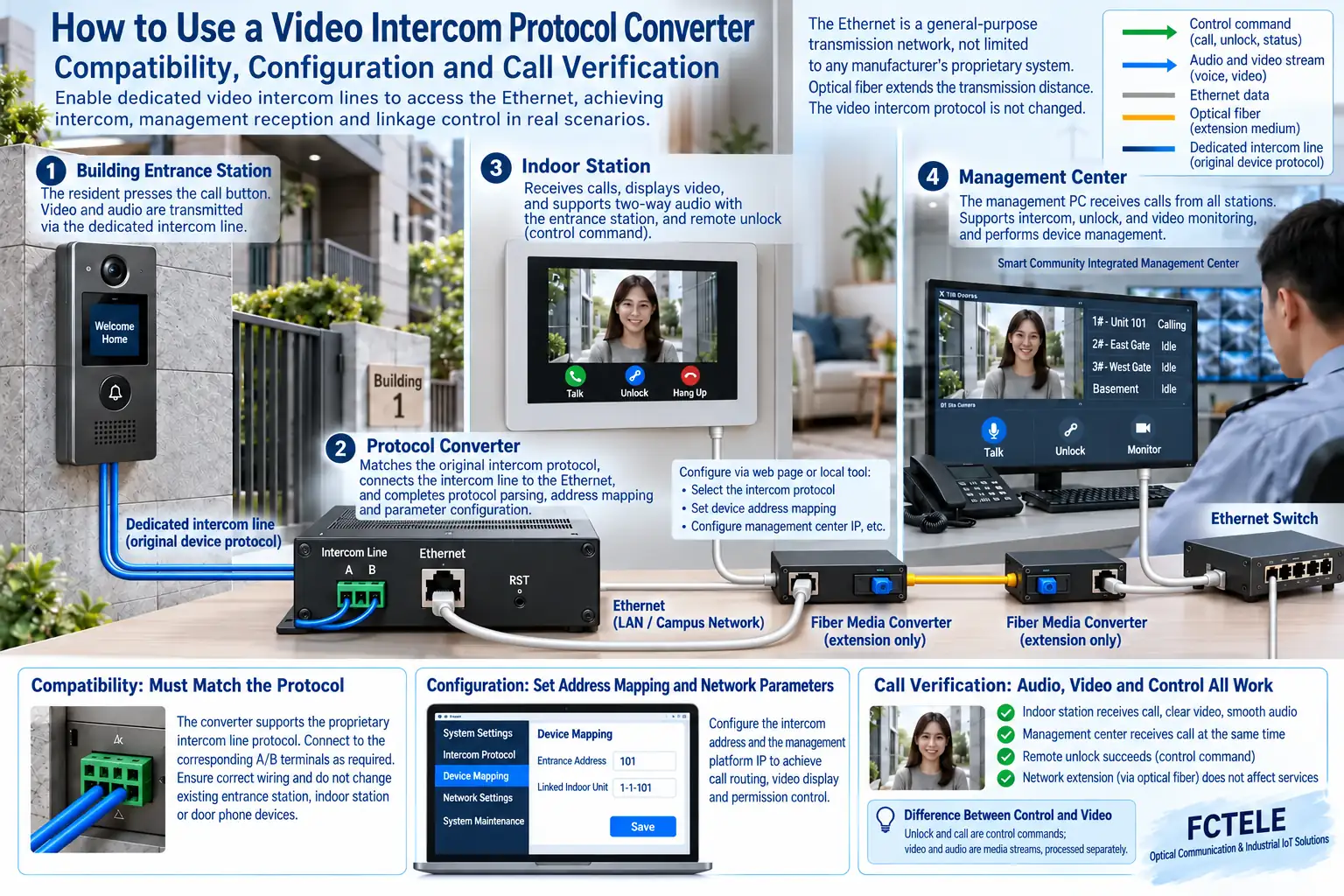
First confirm what the converter actually converts
Organize the door station and indoor station models, system version, address rules, and management center software, and confirm the supported combinations with the supplier. In older systems, key operations, dedicated terminals, and fault codes may all be tied to firmware, so it is not appropriate to treat the number of operations on one device as a universal procedure.
E1 and Ethernet conversion is a specific transmission solution, and it is not the common principle of all video intercom converters. If the actual product uses E1, configure it according to its framing, clock, time slots, and interface definitions; if it uses a dedicated IP protocol, commission it according to its service addresses and network parameters.
Confirm power supply and wiring independently first
Check the rated power supply, polarity, grounding, and service terminals, and do not treat the network port as a power port. The door lock load and its power supply should be designed according to the controller output capability, and the converter must not directly drive the electric lock without confirmation. Interfaces with PoE function must also have their power-receiving standard checked.
The fiber extension section requires compatible transceiver devices on both ends; check single-mode/multimode, transmit/receive wavelength, rate, and optical power. The fiber itself does not supply power to remote devices. If multiple buildings share an uplink, record the relationship between links and addresses to avoid mixing line problems with service number conflicts.
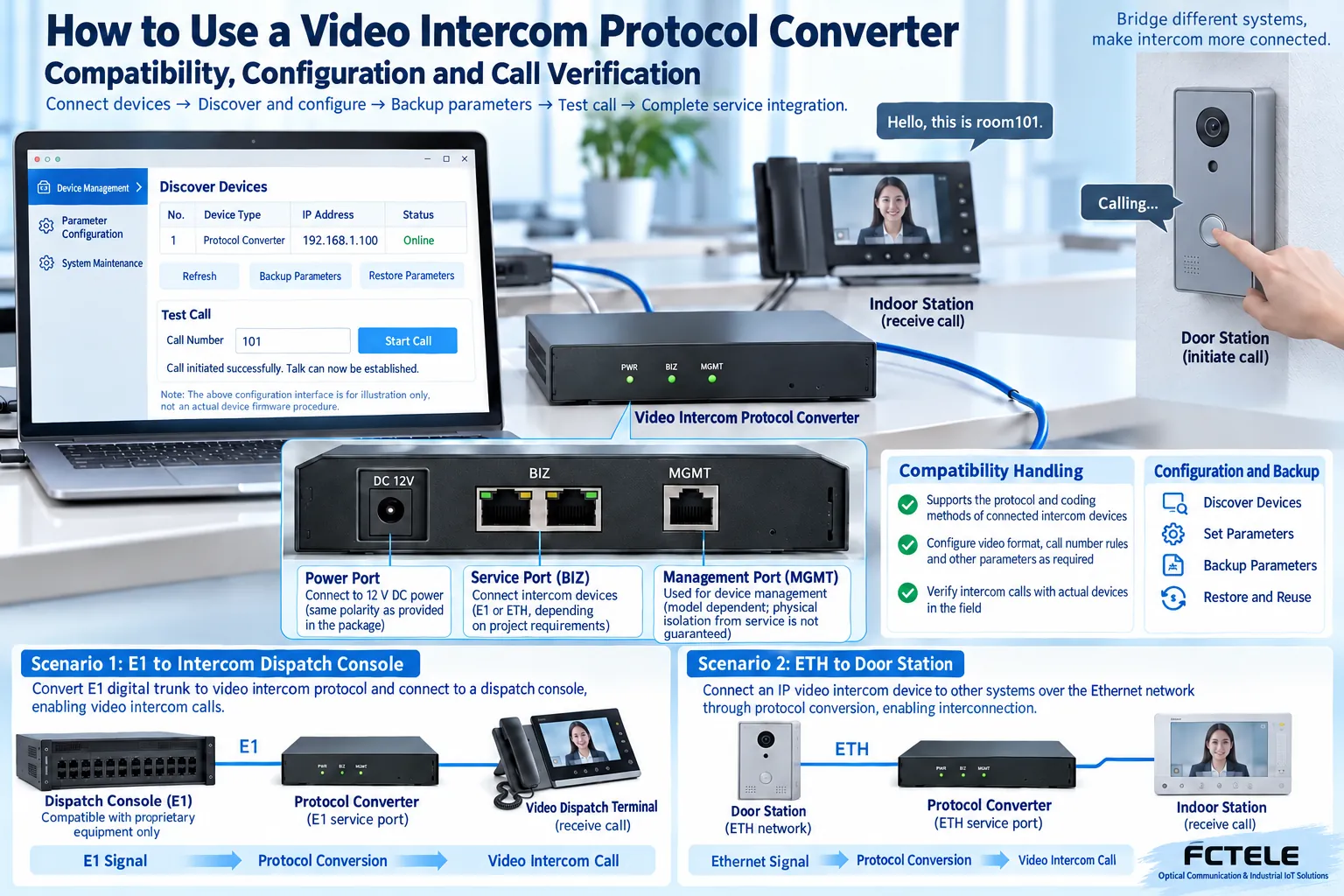
How to find the device and configure the network
First connect the computer to a controlled test network, and use the discovery tool or a known management address according to the manual. When same-subnet management is required, configure a non-conflicting test address for the computer; if there is routing, check the gateway and access policy. Do not copy example IPs from old articles into a production environment.
Read the version and existing parameters and back them up before modifying the management IP, service address, and target center settings. After changing the IP, reconnection may be required. The configuration tool must correspond to the model and firmware; do not use software from unknown sources, and do not blindly upgrade when there is no recovery method.
Test item by item, not just whether the device is online
First test one door station calling one indoor station, confirm two-way audio, image, and the target resident, then test the management center answering and authorized unlocking. For multi-building systems, also check whether the same room number is correctly distinguished by building address, to prevent mistaken calls and mistaken control.
Record call setup time, image continuity, audio abnormalities, and control results, then test network disconnection/reconnection and power failure recovery. If situations such as image without sound or call capability without unlocking occur, check along the corresponding service channel, and do not cover up the problem by repeatedly restoring factory settings.
What should be left at handover
Save the device model, version, address table, topology, and backup files, and clarify who can adjust parameters. For actual Feichang Technology devices, product documentation and technical support can confirm dedicated terminals and upgrade methods. This article explains the commissioning approach; specific keys, ports, and control outputs are subject to the manual for that model.
After the system enters the usage stage, account and control permissions are equally important. Maintenance personnel should be able to restore communication without unauthorized unlocking, and test records need to note the operation target and time. When resident images and call data are involved, follow the system’s access and retention rules, and do not use debugging convenience as a reason for public access.
Translated from the Chinese technical article. Source first published: 2019-07-26. Source last revised: 2026-10-13T13:25:53+08:00. Read the Chinese source
