


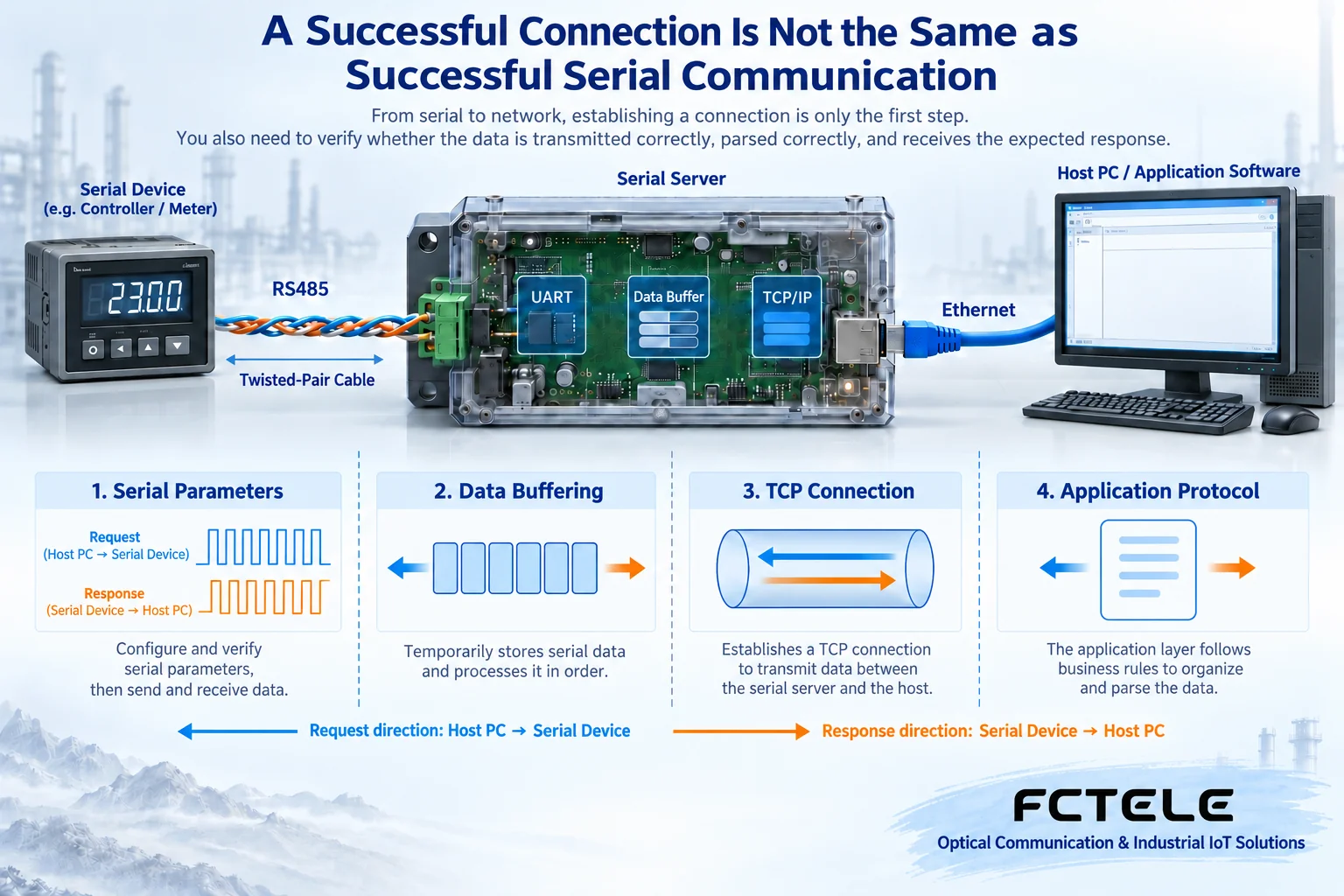
Troubleshoot serial server faults in three layers first: whether the management tool can discover the device, whether a network connection can be established, and whether serial data can correctly travel back and forth. A successful TCP connection only means the network session was established; it does not mean the serial wiring, parameters, and application protocol are all correct. Testing layer by layer along the data path is more effective than repeatedly restarting and changing all parameters.
1. First understand which segment it is responsible for
A common transparent serial server temporarily stores bytes received from the serial port, then sends them over the network to the peer program; bytes received from the network are then sent out through the serial port. It does not automatically convert Modbus RTU to Modbus TCP. When protocol conversion is needed, you must confirm that the model and working mode support it, and you cannot treat “serial to network” as automatic interworking for all protocols.
Before starting, record the device model, firmware, serial electrical type, terminal definitions, network address, TCP port, and working mode. Draw the sequence “host computer -> network -> serial server -> serial device,” and mark who sends requests and who returns responses. At an industrial site, do not disconnect all devices first; in an permitted test environment, use a single terminal, a short cable, and a known request to build a minimal system.
2. Management software cannot find the device
First confirm power supply, network port link, and the network adapter the computer is actually using. Discovery tools may use LAN broadcast or specified UDP messages, and these messages are not necessarily forwarded across routers. A computer being able to access the internet and being able to discover the device are two different things; cross-VLAN, wireless isolation, multiple network adapters, or VPN environments may also affect the discovery path.
Check the factory address or saved address, and see whether it conflicts with other devices. Test in the same controlled subnet according to the manufacturer’s instructions; do not casually change the computer’s address or insert a device with an unknown address into a production network. An administrator can check switch MAC learning, address leases, and access policies to determine whether requests reach the device side.
A firewall may block the tool, but you should not copy the old advice to “turn off all firewalls.” Confirm the management tool source, required ports, and processes, open only necessary rules, and limit the source range. One brand’s discovery port cannot be generalized to other brands; after allowing communication, keep a record of the rules, and do not directly expose the management interface to the public internet.
3. The device is found, but a TCP connection cannot be established
Clarify the TCP Server and TCP Client roles. A Server waits for connections, and someone must connect to its address and listening port; a Client actively connects to a specified peer. If both sides wait, or both sides connect to the wrong address, the result is “the device is online but there is no session.” The management web port and the service TCP port are usually not the same purpose either.
First check the IP, mask, gateway, and service port, then test whether the target port is reachable in an authorized environment. A successful Ping does not prove the TCP port is open, and a failed Ping does not necessarily prove the device is offline, because ICMP may be filtered by policy. Cross-subnet or public network use also requires checking routing, NAT, and firewalls; use a controlled network or VPN as much as possible, and do not directly open unnecessary serial service ports.
Check whether a connection is already occupied, whether the connection count has reached the limit, whether an idle timeout has triggered, or whether the server rejects unauthorized sources. Each device supports different multi-connection, reconnection, and keepalive mechanisms, and you cannot replace the manual with “polling will complete automatically.” Saving connection status and disconnection logs is more meaningful than only seeing a green icon.
4. TCP is connected, but the serial port does not respond
Check whether RS232, RS422, and RS485 match the terminal, and whether the terminals are connected according to this unit’s markings. Different manufacturers may use different A/B naming, so check the electrical definition first, then test, and do not infer polarity from color. RS485 needs to be designed together with bus topology, termination resistors, and reference ground, and multiple short stubs cannot be casually expanded into a star network.
Both sides’ baud rate, data bits, parity, stop bits, and flow control should match. The same speed alone is not enough; a parity error can also cause the receiver to reject data. When an RS232 device needs hardware flow control, missing control lines may cause transmission to stop; do not directly disable flow control or short terminals before confirming.
Use a known-correct request to check the serial transmit count, then check the response count. If bytes were sent but nothing returned, focus on wiring, terminal power, station number, and request format; if a response is received but the host computer reports an error, focus on protocol parsing, timeout, and serial parameters. Loopback testing should be performed only on interfaces and wiring methods explicitly allowed by the manual, and RS485 cannot copy the RS232 loopback method.
5. Why delay, packet splitting, and packet sticking affect polling
Serial transmission takes actual time, and device processing, network transmission, and serial server packaging also take time. Packaging conditions may include byte count, interval, or delimiter. Waiting for more bytes can reduce small packets, but it also delays the return; if the host computer waits too briefly, it may judge a correct response that is still on the way as a timeout.
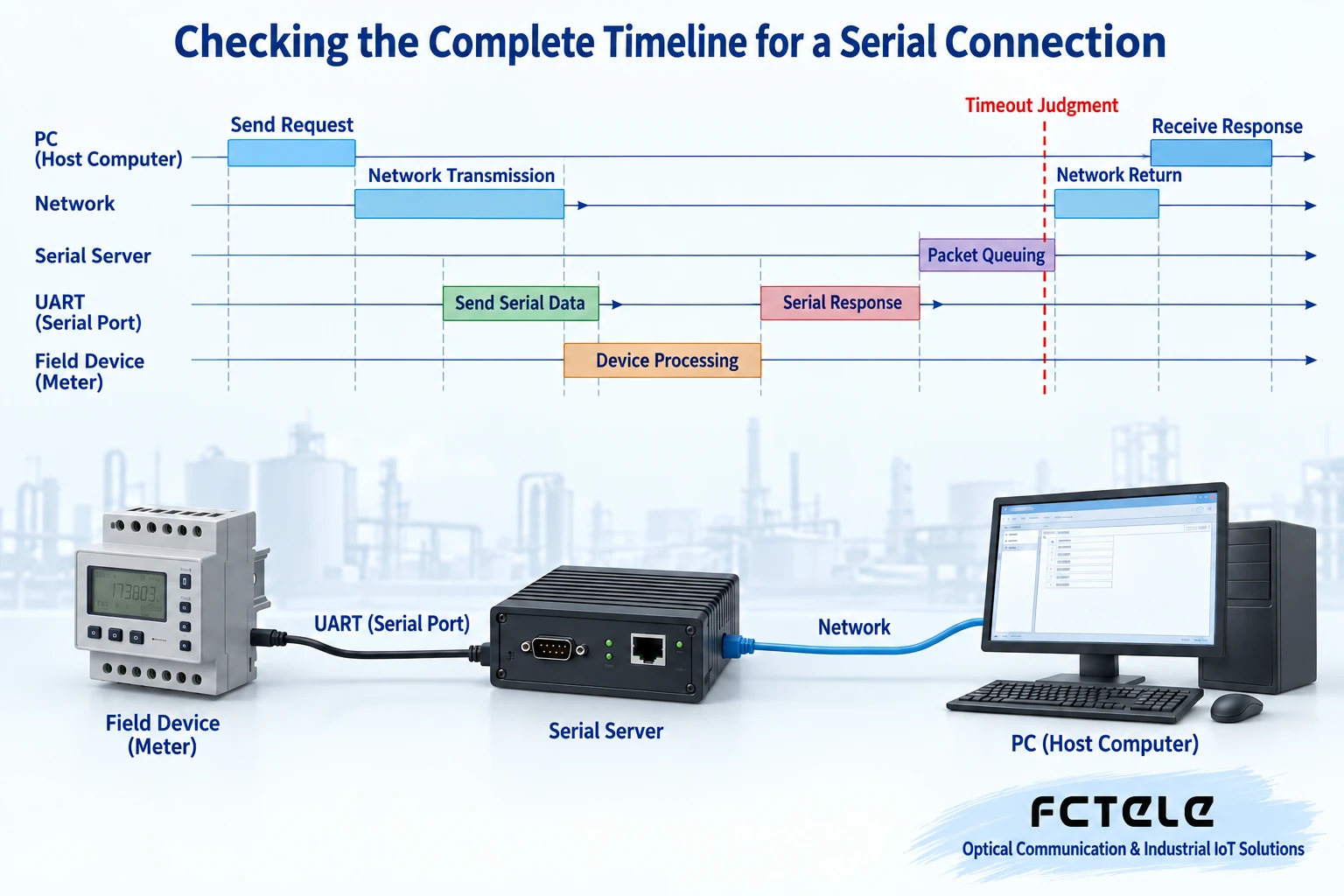
Old articles treat setting the send interval and byte count all to zero as a universal solution, but this does not apply to all models. First read the parameter meanings, measure response time on a short link, then adjust item by item according to protocol boundaries and load. Transparent TCP provides an ordered byte stream, and one read may contain half a frame or multiple frames; the host computer should accumulate, divide, and verify according to the application protocol, and should not rely on one TCP read being one complete reply.
6. Virtual serial port, file loss, and multiple clients
A virtual serial port driver lets an application access a network device like a local COM port, but the model, driver version, mode, and permissions must match. Some devices have a dedicated protocol mode, while others directly carry transparent bytes, so you cannot uniformly state that “if using Socket, a certain option must be turned off.” Check the driver and device configuration according to the manual, and avoid multiple programs occupying the COM port at the same time.
The network may enter the buffer faster than the serial port outputs. Continuous writing without suitable flow control, buffering, and application confirmation may lose data. Adjusting a “simulated baud rate” option is not a universal fix for all file transfers; first clarify whether the application supports flow control, data boundaries, and retransmission, and test the complete length and content verification.
When multiple computers access one serial device at the same time, there are also request conflicts and response ownership issues. Supporting multiple TCP connections does not equal supporting multiple masters safely controlling RS485 slaves at the same time. Requests need to be managed by application coordination, a proxy, or an explicitly supported mode, and different clients cannot be allowed to write across each other arbitrarily.
7. Retest and product verification
After repair, test startup, continuous polling, network disconnection, and recovery, and observe response correctness, reconnection time, and buffering behavior. One success does not mean stability under high load. Record the final parameters and fallback configuration, then gradually connect site nodes back, avoiding changing too many conditions at once.
The Feichang FCT-1500 series details provide configuration instructions for RS232/422/485, virtual serial ports, and related network modes; DDM diagnostics for the corresponding optical port configuration can help check optical module status. During troubleshooting, first check the actual model, port configuration, and enabled mode, then use these functions to distinguish network, optical path, and serial problems; this cannot be generalized to all serial servers.
References:Moxa serial networking and packaging instructions;Feichang product 2855 details. Incorporate the three types of anomalies, virtual serial port, and multiple client content from 2295, 2084, and 2115. The figures are general illustrations and do not represent actual products or measured times.
Translated from the Chinese technical article. Source first published: 2022-12-20. Source last revised: 2026-10-13T19:15:07+08:00. Read the Chinese source
