


PON optical modem classification should at least separate three dimensions: which access standard is used, whether it serves a single user or multiple users, and which gateway and service functions are integrated. EPON, GPON, XG-PON and XGS-PON are standards; SFU, HGU and MDU describe common function or service forms; bridging and routing are working modes. These labels cannot be arranged into a single order of “higher grade further back.” This article focuses specifically on PON terminal selection; the differences between dedicated-line E1 or V.35 optical modems can be considered separately. Optical modem names and network boundaries .
Why PON needs standard matching
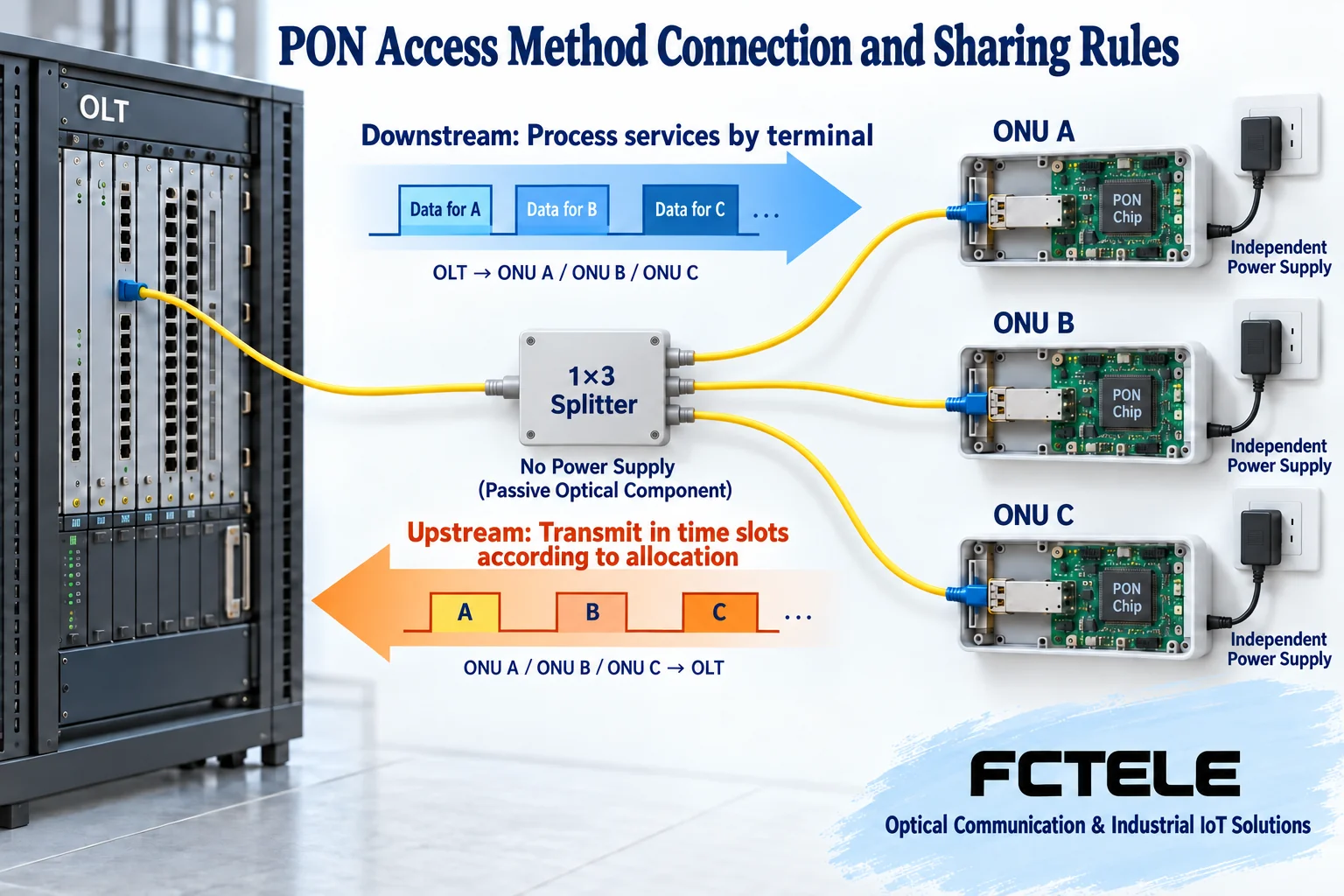
PON is a passive optical network. The central office OLT connects to multiple ONUs or ONTs through an optical distribution network. The splitter mainly distributes optical paths and usually does not need power itself; the central office and user terminals still need power. Downstream services and upstream services are organized according to the corresponding protocol. The terminal must identify its own services and follow central office management; it is not simply converting light into electricity to complete access.
When multiple terminals share an upstream trunk, they need to work according to the transmit time slots coordinated by the central office, avoiding unordered transmission by each user. The access standard defines the relevant optical interfaces and transmission processing, and the terminal and central office must support the corresponding rules. Being able to plug in an optical connector, or wavelength names looking similar, cannot prove protocol compatibility. So-called multi-standard terminals also require checking the actual firmware, supported modes and central office interoperability conditions.
EPON, GPON and faster standards are differences in network systems
EPON and GPON use different access mechanisms and cannot be treated as the same type of device with only different network port speeds. XG-PON and XGS-PON are also not the same name: the former belongs to an asymmetric ten-gigabit capability system, while the latter is a symmetric ten-gigabit capability system. Whether the central office supports it, whether the optical distribution network meets the conditions, and whether the terminal is within the allowed configuration are all practical access issues.
ITU-T G.9807.1 describes the ten-gigabit upstream and downstream capability of XGS-PON, but this is not a promise of the same dedicated bandwidth to every user. User packages, shared scheduling, service configuration and LAN port capability still affect the experience. Buying a terminal with a higher standard will not automatically upgrade a central office that does not support that standard, nor will it replace the operator activating the service.
SFU, HGU and MDU mainly depend on service and function form
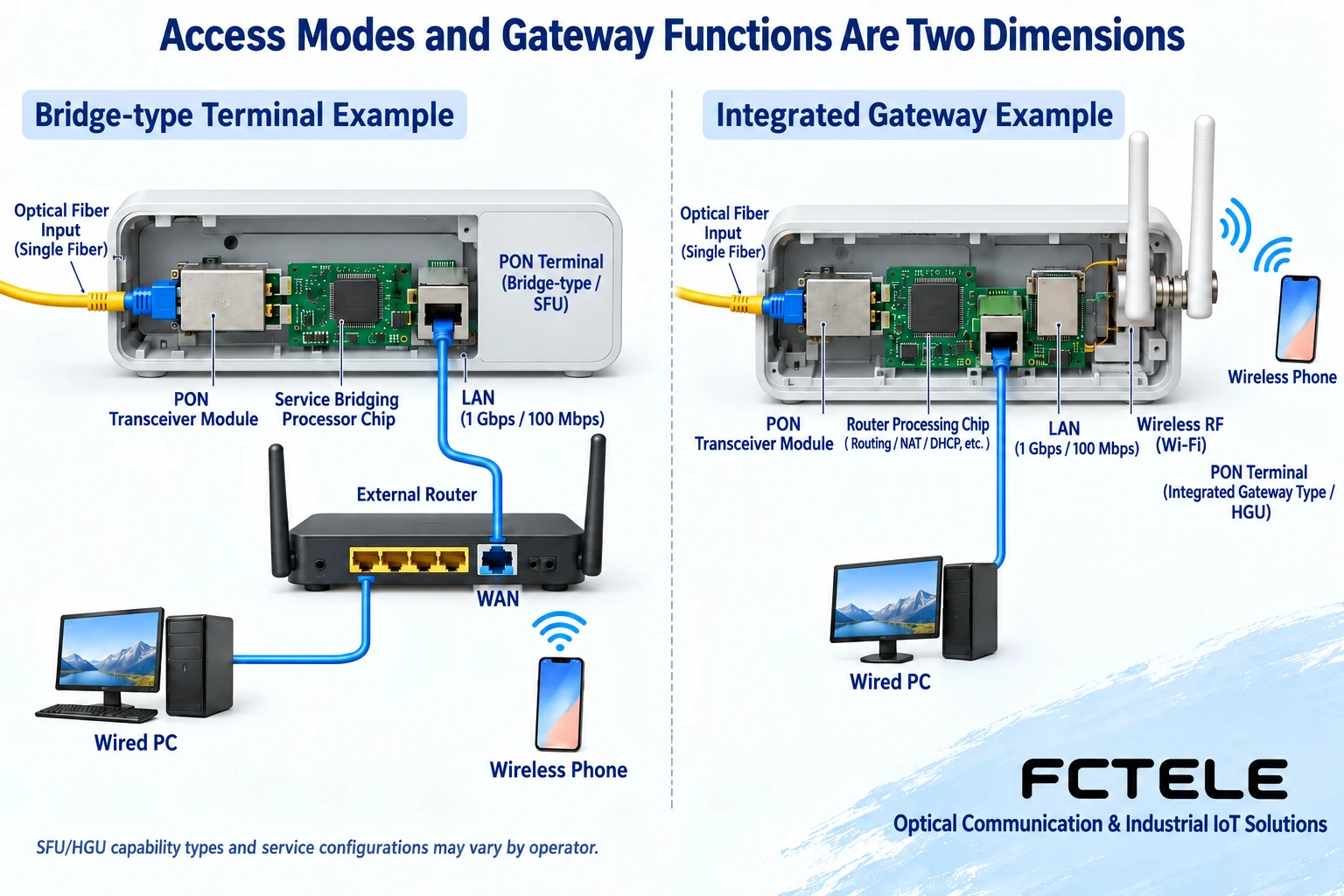
SFU usually refers to a single-family unit, often tending to hand access services to backend equipment; HGU usually refers to a terminal with an integrated home gateway, possibly including routing, address assignment, NAT, wireless and voice. Specific functions are not determined by the abbreviation alone; some device functions and software modes cross common classifications. Confirm item by item during selection, and do not write that “SFU is only optical-to-electrical conversion and does not process any protocol.” As a PON terminal, it still needs to complete the corresponding access process.
MDU usually faces multi-user services and may centrally provide multiple user interfaces in a building. The number of users, interface isolation, uplink sharing, service mapping, power supply and maintenance scope need to be checked according to the design. Multiple ports do not mean every port has the same dedicated bandwidth; centralized installation also does not automatically suit all industrial environments. Desktop, rack-mounted and DIN-rail describe installation methods, which is another classification dimension.
Bridging and routing: deciding who handles the backend gateway
Bridge mode usually hands the corresponding services to a backend router or terminal for further processing; router mode means the terminal handles routing and possibly other gateway tasks between configured networks. Bridging does not mean there is no PON registration, nor does it mean freely passing through all operator services. Which method to choose depends on how internet, IPTV, voice and management services are delivered, and who maintains them.
If there is already a suitable independent router, you may want to give the home gateway responsibilities to it; if you want one device to handle the main functions, then evaluate the performance and functions of the integrated gateway. Two devices both running routing may create double NAT, or it may be an intentional design; it cannot be judged wrong just because there are “two boxes.” Before changing, keep the configuration and confirm with the service provider to avoid affecting voice or TV services.
List ports and service inventory; avoid only asking “which type is fastest”
The requirements list should include access standard, user-side port speed and quantity, wireless requirements, telephone and TV services, installation environment, management and power supply. Wireless standards and antenna count do not equal PON bandwidth; LAN port negotiation speed also does not represent actual throughput across the access network. If a port is bound to a specific service, confirm its purpose; do not treat all LAN ports as completely identical outlets.
For example, a gigabit package with a 100 Mbps terminal electrical port will form a bottleneck at the electrical port even if optical access is normal; conversely, having high-speed electrical ports but insufficient room wireless coverage means switching to a higher PON standard may not solve the problem. First use suitable wired testing to distinguish access from wireless, then check terminal load, service configuration and upper-level service limits. Test results need time, port, connection method and load to be easy to compare.
Industrial ONU example showing that functions must be checked by model
Feichang Technology FCX-8001 The page lists EPON/GPON terminals, 4 gigabit electrical ports, router mode and optional PoE function. For scenarios requiring PON access and multiple industrial terminals, these conditions help form a configuration list, but they are not proof of XGS-PON capability, nor can they be used to conclude that it can directly replace any operator optical modem.
When ordering, confirm central office support and registration method, firmware, port service mapping, PoE option and installation conditions. When a webpage involves multiple configurations, obtain clear documentation for the delivered model. Whether an industrial terminal provides home wireless functions, voice interfaces or a certain gateway capability must also be confirmed item by item; it cannot be inferred from a metal enclosure or a “multi-service” name.
Replacement and acceptance: keep service configuration first
Operator networks often involve terminal serial numbers or other registration information, configuration delivery and service authorization. Before replacement, consult the service provider first, keep the original device and necessary information, and do not publicly write authentication content into test reports. An unconfirmed factory reset may affect internet, telephone and TV at the same time. Self-built PON also requires keeping OLT and ONU configuration and pairing records, and proceeding according to the change window.
Acceptance confirms the optical layer, registration, service configuration, LAN and actual application in sequence. Each layer being normal should have its own evidence: disappearance of optical alarms is not all services passing, a computer getting an address is not the internet being reachable, and a single speed test passing is not long-term stability. Protect and clean optical fiber end faces according to procedure, and do not look directly into optical ports. Only in this way can classification names be turned into a suitable, maintainable solution.
Translated from the Chinese technical article. Source first published: 2020-01-17. Source last revised: 2026-10-13T11:10:04+08:00. Read the Chinese source
