


The command line solves a management problem
The switch command line is the entry point for administrators to read status, modify settings, and save configurations. The same text may have different effects in different operation modes, or may not even execute. First confirm the device model, firmware, account permissions, and current prompt before operating; this is more reliable than memorizing so-called six modes common to all switches.
The command line can be entered through a Console local connection supported by the device, or through a controlled network management connection. The Console is a management interface, not an ordinary service network port; similar connector appearance does not mean the wiring order or electrical conditions are the same. First read the corresponding manual, use matching cables and terminal parameters, and do not connect unknown ports to a network switch to test connectivity.
What happens after a command enters the device
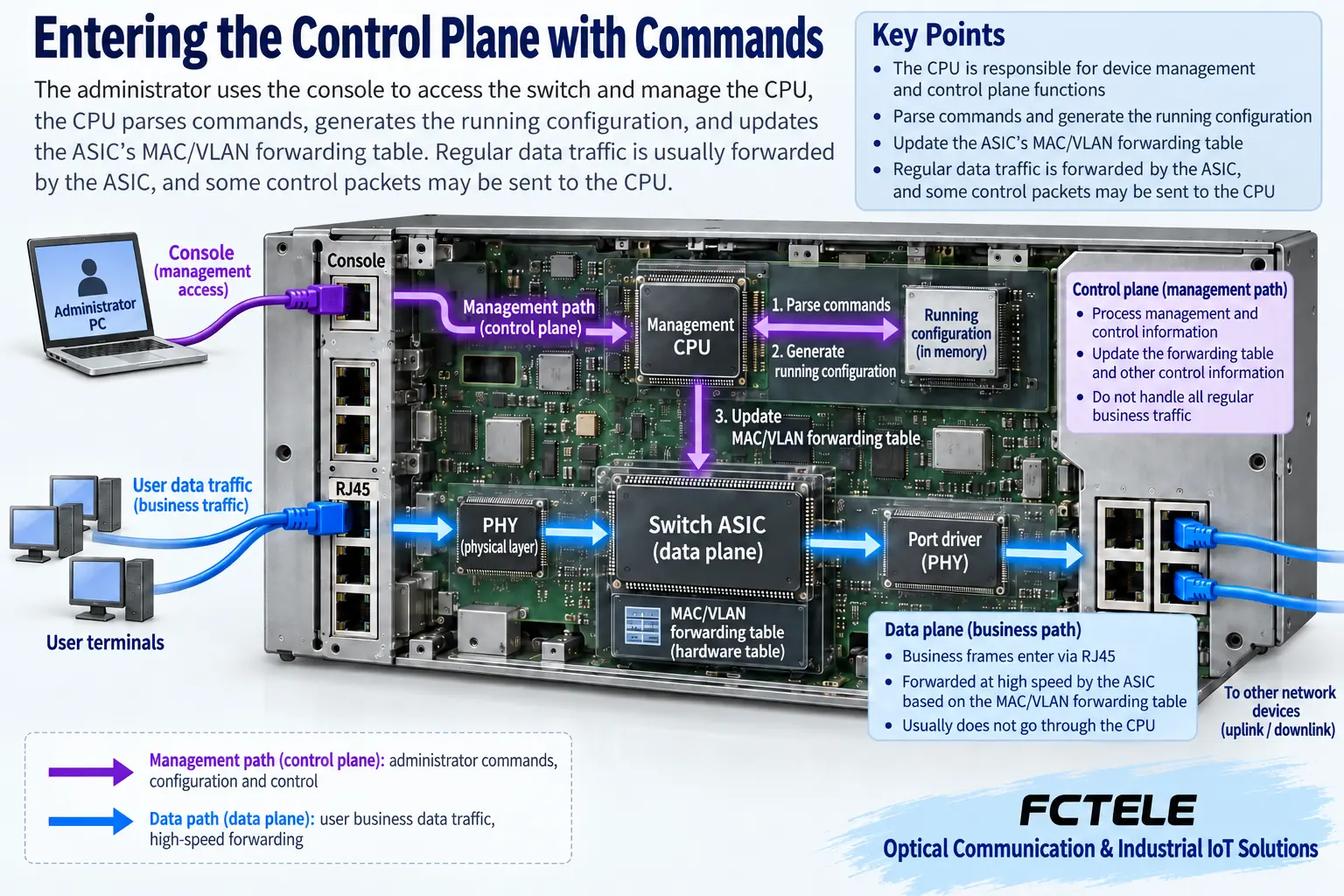
In a typical managed switch, the management processor parses the command, checks permissions and syntax, and then changes the corresponding configuration or invokes a status read. The switching chip processes service frames according to established forwarding rules; the two paths are related but perform different tasks. An administrator entering one command line does not mean every service frame must first go to the management computer.
The CPU is responsible for control and management, while the hardware forwarding table stores some actual forwarding conditions. For example, after adjusting VLAN membership, the control software may update hardware rules; the specific implementation depends on the model. Web pages, command lines, and network management protocols may lead to the same management logic, and one cannot assume that changing the management entry point bypasses functional or permission limits.
Why view mode and configuration mode are separated
Viewing status mainly answers what the device’s current situation is, while configuration operations change how it works. Platforms usually use different views and permissions to distinguish the two, reducing the chance of mistaking a query for a modification. An ordinary account being able to see port status does not mean it has the right to change VLANs, restart the device, or export the full configuration; the prompt alone also cannot prove that the current account has all permissions.
Using the naming in Cisco IOS documentation as a third-party example, user EXEC and privileged EXEC are used for different levels of operation, and configuration also enters global and corresponding sub-modes. This example explains mode layering; it is not an FCTEL device operation manual. Other platforms may use names such as user view and system view, and the enter, exit, and save commands must all be confirmed according to the current platform.
Global and interface settings have different scopes
Global settings affect certain behaviors within the device scope, while interface settings target the selected port; login lines or protocols may also have their own sub-views. Before selecting an interface, verify the port label, the actual connected object, and the numbering in the manual. Chassis slots, logical interfaces, and front-panel numbers are not necessarily exactly the same, and interface numbers cannot be copied from a screenshot to the site.
For example, if you plan to assign an instrument access port to a VLAN, first write down the port’s role and expected tag handling, then confirm how the uplink carries the corresponding service. A command executing without an error only means the platform accepted the operation; it does not mean the peer configuration matches. If you mistakenly change the port where the management link is located, you may immediately lose remote connection, so a local recovery entry point must be prepared in advance.
Runtime configuration and saved configuration are not the same thing
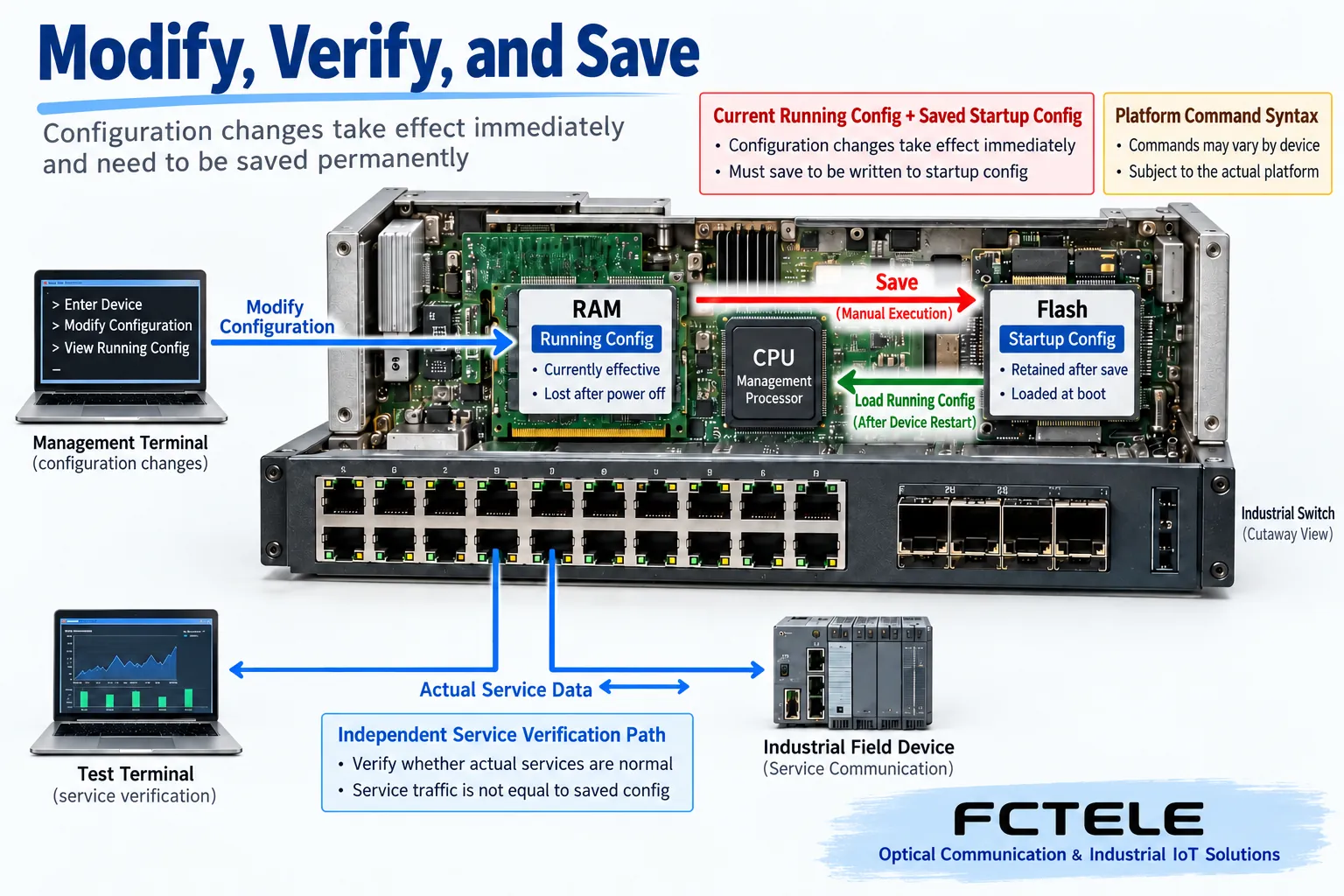
Runtime configuration is the setting the device currently uses to work; startup configuration is usually the persistent setting loaded after a restart. Some platforms take effect immediately but have not yet been saved, while some platforms require submission or support automatic saving; one mechanism cannot be treated as a general rule for all devices. The manual should be checked to confirm what actions take effect, submit, save, and roll back respectively.
Some changes still need to be explicitly written to persistent storage after verification. Without saving, they may disappear after a restart; saving incorrect settings may make the error persist. Therefore, first verify the runtime status and actual service, then save, then check the save result. The difference between the running file and the startup file is a useful clue, but it is not allowed to randomly power off a production network to prove that saving worked.
Permission and connection protection must keep up
Maintenance accounts should have appropriate permissions, and passwords should not reuse the simple numeric examples in tutorials. Network management should preferentially use the security methods actually supported by the device, and limit management sources and accessible ranges. Do not disable authentication just to make login convenient, do not treat no-login commands from old articles as recommended configuration, and do not post complete configurations containing sensitive information in public communication channels.
Logs help to know when and who changed what, but logging capabilities and recording scope also need to be verified. When multiple people maintain the system at the same time, the responsible person must be clear, avoiding one person modifying a port while another overwrites and saves. Operation records should retain the time, device version, changed items, test results, and rollback conditions; necessary information should be desensitized before being handed to support personnel.
Check functions and entry points against FCTEL products
The FCTEL number 2241 managed product details list four 10-gigabit optical ports, eight gigabit electrical ports, and Layer 2 and Layer 3 management capabilities. It can be used to check the functions required for multi-subnet aggregation, but the product page cannot replace the command reference for that delivered version. Even if function names are the same, the actual port numbering, syntax, permissions, and save actions still require obtaining the corresponding materials from the supplier.
Project selection should simultaneously confirm the available management entry points, backup and recovery methods, and firmware applicability conditions. Non-managed devices do not have these configuration entry points, and connecting a Console cable or installing terminal software cannot add network management capability. Having only one management IP also does not prove that it has service routing, arbitrary protocols, or all commands of a third-party platform.
How to make a reviewable change
Suppose you need to adjust an access port on a workshop switch. First record the existing topology, port status, and configuration backup, and operate through a reliable entry point during an approved maintenance window. Change only one clearly defined group of settings at a time, then check terminal requests and responses, uplink tags, and management reachability; retain necessary port counters and test times rather than only looking at indicator lights.
When an abnormality occurs, stop stacking more commands, restore according to the prepared rollback method, and verify the service. After verification passes, save according to platform requirements and record the file and version; the persistence check after restart should be arranged separately under permitted conditions. What is obtained this way is evidence that the device can work as required, not a long string of seemingly successful commands in a terminal window.
Material note: The schematic diagrams have been checked for technical content and are used to explain general mechanisms; they are not product photos or measured records. Specific interfaces, modes, and capabilities are subject to the selected model, version, and on-site verification.
Verification materials: Cisco IOS operation modes and login permission description
FCTEL four 10-gigabit optical and eight gigabit electrical managed switch
FCTEL industrial switch categories
Related technical topics: How to choose an H3C switch series: boundaries of campus, data center, and industrial sites How to troubleshoot no picture on a network video decoder: power, stream, decoding, and display output How E1 carries video and audio: encoding bitrate, framing, clocking, and peer matching
Translated from the Chinese technical article. Source first published: 2020-03-13. Source last revised: 2026-10-13T03:22:35+08:00. Read the Chinese source
