


IPv4 MULTICAST
Why can two IP groups share one MAC?
The mapping uses a fixed Ethernet prefix and the lowest 23 bits of the IPv4 group. Some group bits are not included, so different IP groups can share one Ethernet address. Hosts and switches may use additional information when handling packets. These are conceptual examples, not a product measurement.
Mapping
The standard mapping preserves the low 23 IPv4 bits.
Overlap
Different IP groups can share the mapped address.
Receive
The IP destination and host membership still matter.
Capture destination IP and MAC together.
Check VLAN and membership state.
Compare authorized captures at each endpoint.
Selection and verification checklist — expand
| Check | What to confirm | How to verify |
|---|---|---|
| Mapping | IP and MAC | Capture both fields |
| Membership | Group and port | Inspect host and switch state |
| Path | VLAN and forwarding | Compare captures |
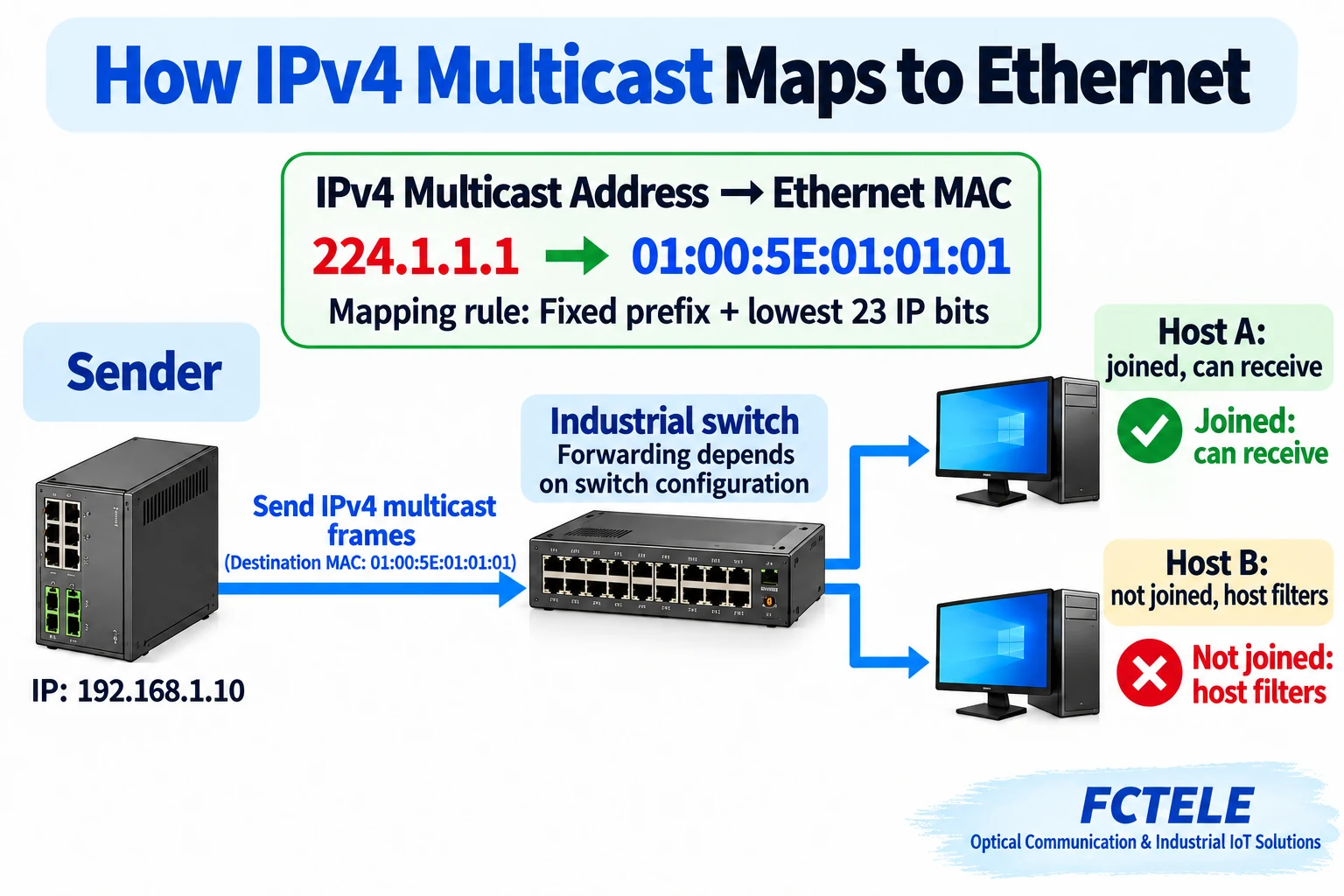
When one industrial device sends data to a group of receivers, packet captures can show something surprising: two different IPv4 multicast addresses may use the same Ethernet destination MAC address. Does that mean the switch made a mistake? No. IP and MAC addresses belong to different layers, and the standard IPv4-to-Ethernet multicast mapping is not one-to-one.
Start with one-to-one and one-to-many
Unicast generally addresses one destination, broadcast reaches a broadcast domain, and multicast targets a group whose interested receivers join it. These terms describe the communication purpose; they do not guarantee that every device will receive or process every multicast packet.
Video, monitoring and status data may need to reach multiple systems in an industrial installation. Whether multicast is appropriate, and which devices should receive it, depends on the application and the network design. A switch forwards Ethernet frames between ports; receiving hosts also check network-layer information and their group memberships before delivering data to an application.
FCTELE’s managed DIN-rail Layer 3 industrial switch documentation lists multicast management features including IGMP snooping. Check the documentation, software version and configuration for the actual model. This article explains the general address mapping and does not claim to be a field test of that product.
Why a packet has two addresses
When an IP packet is sent over Ethernet, the sender places it inside an Ethernet frame. The frame header contains a destination MAC address, while the IP packet inside has a destination IP address. They serve different purposes and occupy different fields: the MAC is used for Ethernet link handling, while the IP address identifies the network-layer destination.
For IPv4 multicast, the sender maps the multicast group address to an Ethernet multicast MAC and places it in the frame header. The switch chooses output ports according to its forwarding mechanism and available multicast state. A receiving device then checks the IP destination and local membership. Actual forwarding depends on implementation and configuration.
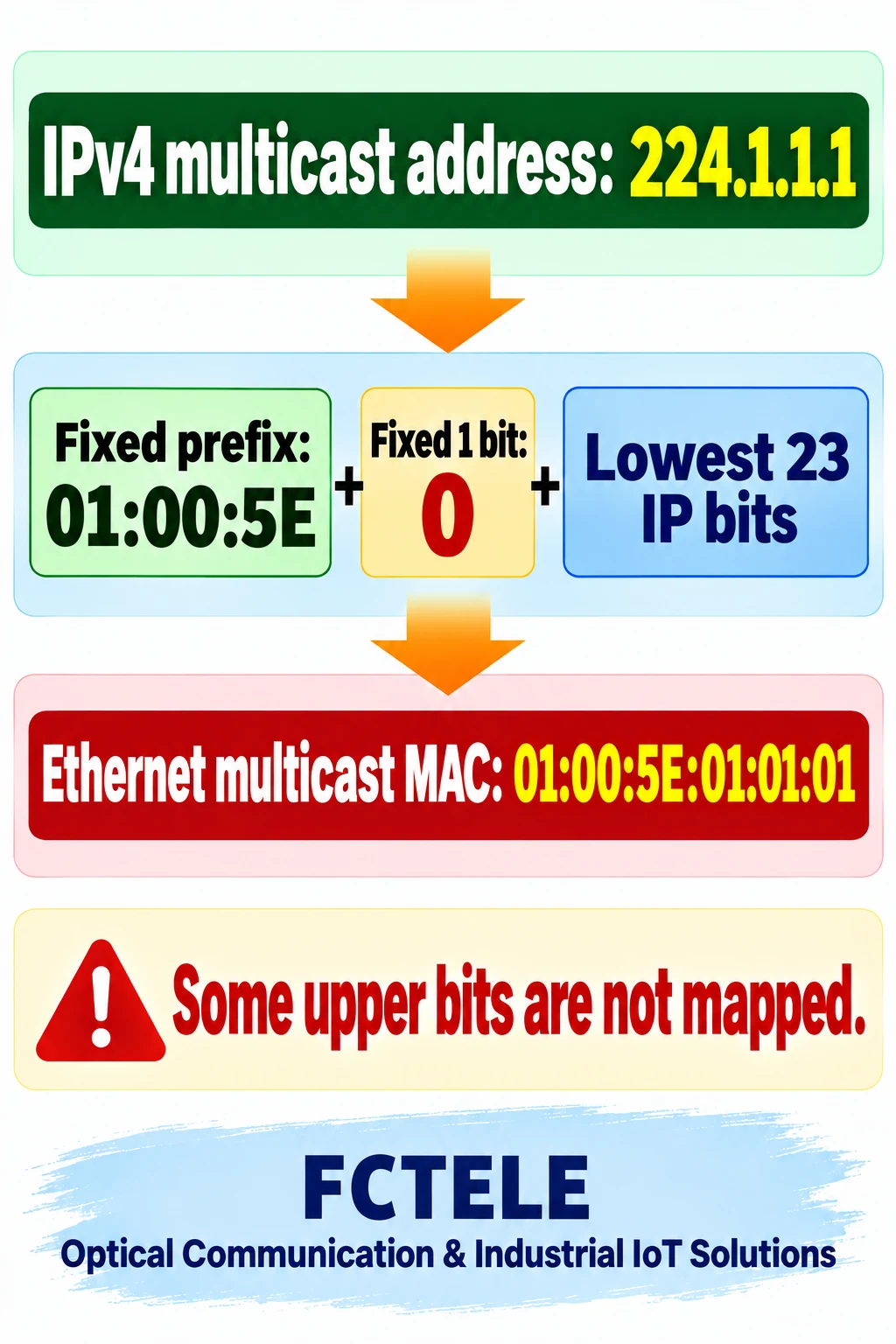
For example, IPv4 group 224.1.1.1 maps to Ethernet MAC 01:00:5E:01:01:01. The dotted decimal numbers identify an IPv4 address; the six colon-separated hexadecimal bytes identify a MAC address. They are related by a mapping, not two ways to write the same field.
The mapping keeps only part of the group address
IPv4 multicast uses a defined address range, and the Ethernet multicast MAC has a fixed prefix. The first three MAC bytes are 01:00:5E, the next bit is fixed to zero, and the last 23 bits come from the low 23 bits of the IPv4 multicast address. The illustration separates the prefix, fixed bit and retained portion.
The variable group portion of an IPv4 multicast address contains more than 23 bits. Five group bits are not carried into this MAC mapping, so different IP groups with the same low 23 bits can produce the same MAC. The overlap is a consequence of the mapping, not proof that a device calculated an address incorrectly.
Beginners do not need to calculate binary values by hand to configure a site. The important point is that the MAC is not a complete copy of the IP address. When investigating, record the destination IP, destination MAC and receiver or port state together instead of looking at a single field.
A shared MAC does not make two IP groups identical
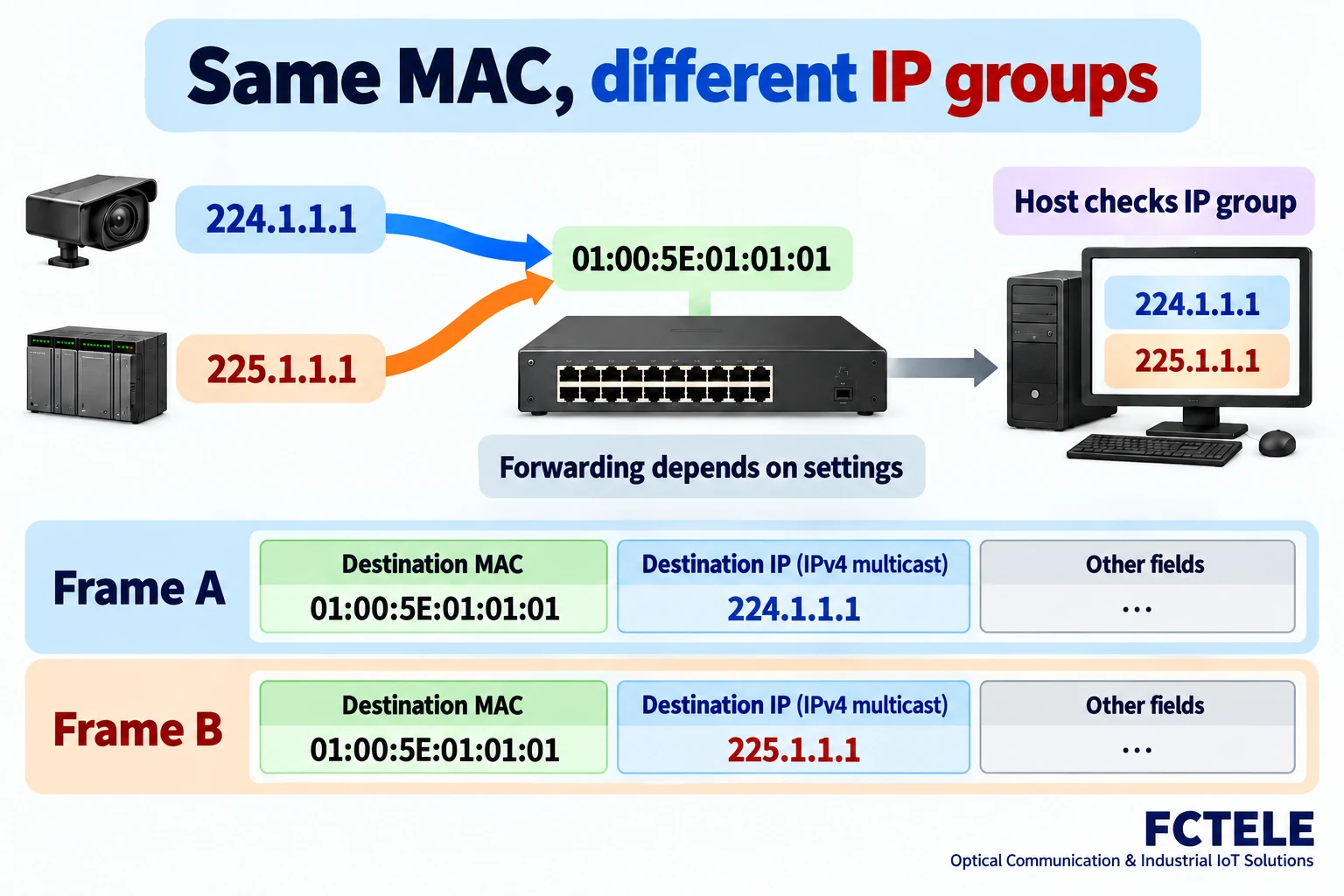
Here is a checkable example: 224.1.1.1 and 225.1.1.1 are different IPv4 multicast groups, but both map to 01:00:5E:01:01:01. These sample addresses explain the mapping; they are not a claim that a particular installation uses them or that a product was measured.
Even when two Ethernet frames have the same destination MAC, their encapsulated destination IP addresses remain different. A network adapter or switch relying only on the MAC for an initial receive or forwarding decision cannot distinguish those two groups from that field alone. Subsequent handling can also use the IP destination, multicast membership and application subscription.
Consequently, seeing the same MAC does not prove an application received the other group’s content, nor does it prove a switch completely isolates the groups. The outcome depends on the forwarding implementation, IGMP snooping state and host network stack. A screenshot showing only MAC addresses cannot establish that filtering is correct.
IGMP snooping is not the mapping
IGMP is used by IPv4 hosts to express multicast membership. A switch that supports IGMP snooping can observe relevant control messages and maintain information about groups and ports, helping reduce multicast traffic on ports that do not need it. Check the actual implementation and configuration for port tables, the querier and aging behavior.
The mapping answers which Ethernet destination MAC corresponds to an IPv4 multicast group. IGMP snooping concerns which ports need which group traffic. The mechanisms are related but not interchangeable. Knowing the MAC alone does not reveal the current receivers or prove membership state is still valid.
If a port does not see expected traffic, first check whether the host joined the right IP group, whether the VLAN matches and whether the switch has the expected membership state. Then check the querier and upstream path. Do not blame every multicast problem on an address collision or disable filtering without assessing the effect.
Capture the frame, IP address and location
A useful record includes capture location, VLAN, time, Ethernet destination MAC, IPv4 destination and relevant ports. Distinguish what was observed at a mirrored port, receiving host or sender: each position may see a different set of traffic, and a single capture does not automatically represent the whole network.
For example, if a sender emitted a packet for the intended group and the frame is visible at the switch ingress but not at the intended egress, inspect VLAN membership and forwarding policy next. If the frame reaches the host but the application sees nothing, check the chosen interface and joined group. This sequence narrows the investigation without assuming a particular internal implementation.
Interpret the querier in the context of the installation: observed membership state can change over time. Control-message reachability, configuration and aging settings can all affect the record. Note the capture time and configuration version so observations from different moments are not mistaken for one result.
To verify a shared MAC, use authorized test traffic without production-control meaning. Record the destination IP and MAC of both packets, group membership and port forwarding state. The example and illustrations explain a mechanism; they are not a field-test report for a particular product.
If an application still cannot see data, investigate host firewall rules, interface selection, how the application joins the group and any multicast routing across subnets. Ethernet switching, IP multicast routing and application subscription are different stages. Reliable reception requires the relevant stages to work together.
Map first, then check each layer
IPv4 multicast mapping retains the low 23 bits, so multiple IP groups can share one Ethernet MAC. The Ethernet frame and the IP packet inside still have their own fields; a matching MAC does not make two IP groups identical. Actual behavior must be evaluated against group membership, VLANs and forwarding settings.
Document the intended groups, receiving hosts, switch ports and querier during planning. During acceptance, collect evidence at the sender, switch and receiver. This makes it easier to distinguish an expected mapping overlap from a real forwarding problem.
References
RFC 1112: IPv4 multicast to Ethernet mapping · RFC 4541: IGMP snooping considerations · FCTELE managed industrial switch product information.
Translated from the Chinese technical article: Read the original Chinese article.
Common questions
Is every IPv4 multicast group assigned a unique Ethernet MAC?
No. Different IPv4 groups can share a MAC because only the low 23 IP bits are mapped.
Can IGMP snooping replace address mapping?
No. Mapping sets the Ethernet destination; snooping helps associate group membership and ports, depending on implementation.
Does a shared MAC mean an application gets the same content?
Not necessarily. The IP destination and host membership remain relevant, and forwarding and filtering depend on the devices and configuration.
Scope and further reading
This is a general IPv4 mapping example, not a product test or measurement.
Industrial switch functions and multicast · How industrial switches forward frames · RFC 1112 · RFC 4541
