
Pump Station Flow Monitoring
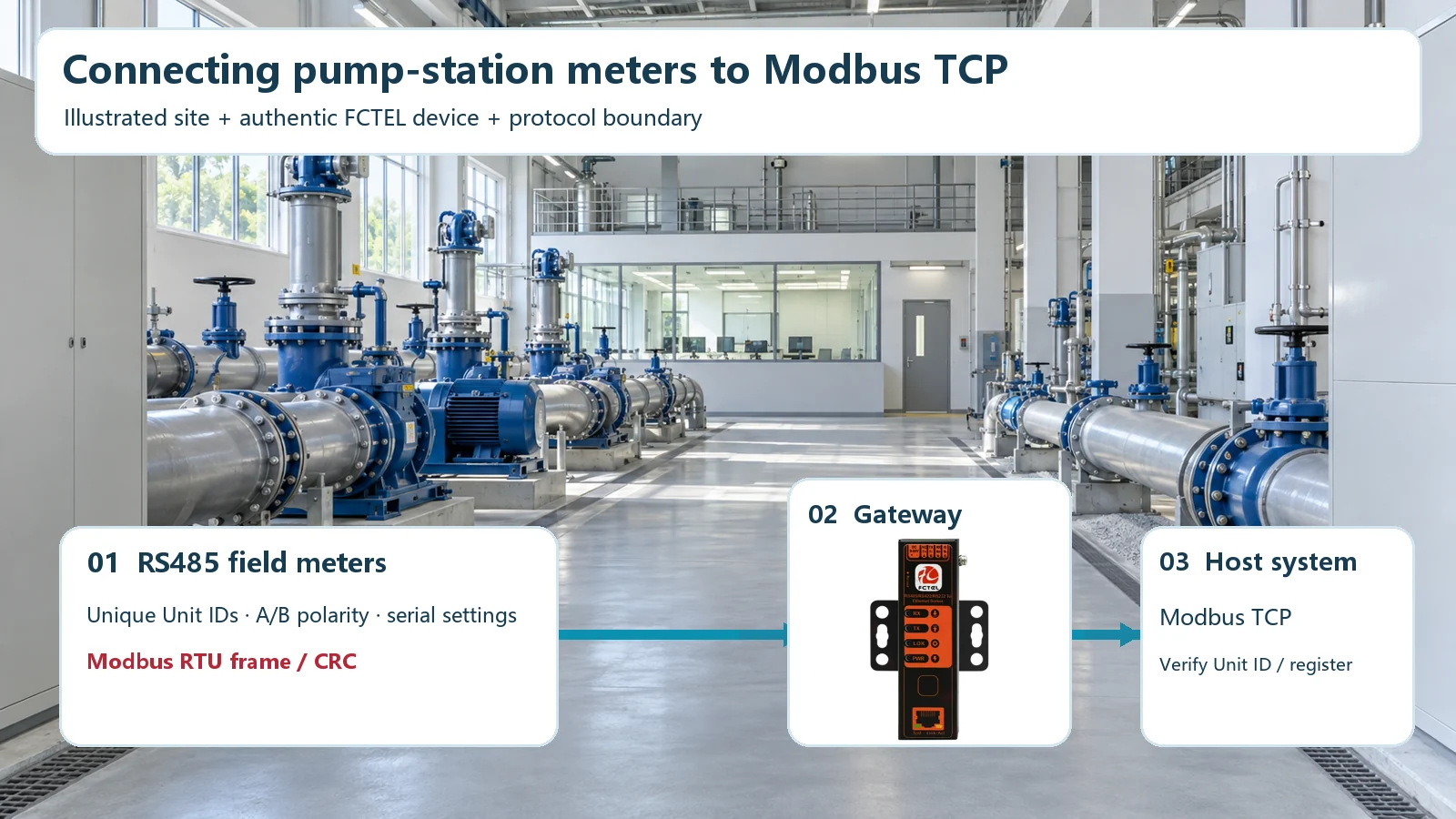
Connect the RS-485 flow meter to one server. The host reads its data over Modbus TCP. Coordinate requests if multiple sessions access the instrument.

Connect one serial device or bus to a 10/100 Mbps Ethernet network. Select the electrical interface in the web UI, then choose transparent transmission or Modbus conversion for the host application.
The fanless aluminum enclosure mounts on 35 mm DIN rail or a wall.
One serial channel shared by terminals and DB9. The Ethernet port is 10/100 Mbps.
Dual terminals: DC 9–70 V. Built-in -AC version: AC 85–265 V or DC 110–300 V.
Use 35 mm DIN rail or the wall-mount bracket.
110 × 86 × 40 mm enclosure, 130 mm horizontal wall-mount hole spacing. Allow room for wiring and connectors.
| Mode | Signal |
|---|---|
| RS-232 | Terminal blocks: RXD / TXD / GND; DB9 male: RXD / TXD / GND / CTS / RTS |
| RS-422 / four-wire RS-485 | TxD+ / TxD− / RxD+ / RxD− / GND |
| Two-wire RS-485 | A (TX+) / B (TX−) / GND |
| Item | Specification |
|---|---|
| Processor | ARM Cortex-M4, main frequency 240 MHz |
| Ethernet | 1 × RJ45; 10/100BASE-T(X), full / half-duplex adaptive, Auto-MDI/MDIX |
| MAC address table | 4096 items |
| Serial Port | 1-channel RS-232 / RS-422 / RS-485, Web selectable; terminals + DB9 male connector |
| Serial port speed | 300–921,600 bps; supports automatic scanning matching and custom baud rate |
| Terminal power supply version | Dual redundant DC 9–70 V; 4-pin 5.08 mm pluggable terminals |
| Built-in AC power version | Suffix -AC; AC 85–265 V or DC 110–300 V; three-pin cloverleaf power inlet. |
| Total Power Consumption | < 5 W |
| Power Supply Protection | Power supply, serial port: 6 kV; RJ45 network port: 4 kV surge protection; overload protection; terminal versions support reverse connection protection and internal isolation. |
| Size / Weight | 110 × 86 × 40 mm; 0.495 kg / unit |
| Enclosure / installation | Aluminum alloy, fanless; IP40; 35 mm rail or wall-mounted |
| Operating / Storage temperature | -40 ℃ to +85 ℃ |
| Operating Humidity | 0%–95% RH, no condensation |
| MTBF | > 100000 hours |
| Item | Function |
|---|---|
| Protocols | TCP, UDP, ARP, ICMP, HTTP, DNS, DHCP, SNMP, MQTT |
| Transparent transmission mode | TCP Server, TCP Client, UDP Server, UDP Client |
| Modbus conversion | Modbus RTU to Modbus TCP, for collection by upper-level machines over network |
| MQTT / JSON | Supports MQTT transparent transmission; supports Modbus to JSON data packet conversion |
| Session Connection | Up to 4 TCP or UDP sessions per serial port; UDP supports single-machine or multi-machine communication |
| Application access | TCP/IP Socket, virtual serial port driver; supports communication across gateways and routing layers |
| Data Framing | Supports serial data framing configuration |
| Operation monitoring | Serial port status and parameter monitoring; automatic connection restoration after network interruption |
| Configuration and Access | Web, Windows configuration tool, serial port configuration; supports access control, quick configuration, and SNMP network management |
| Maintenance | Supports local and remote system firmware updates |
| Interface or test item | Rating / Test Conditions | Protection Notes |
|---|---|---|
| Power Interface | Open-circuit peak voltage = 6 kV (open-circuit peak voltage) | Reduces lightning-induced surges and switch operation surges from power lines; overload protection; DC terminals support reverse connection protection |
| Three-in-one serial port | Open-circuit peak voltage = 6 kV (open-circuit peak voltage) | RS-232 / RS-422 / RS-485; reduces lightning-induced interference and switching surge risks on signal lines. |
| RJ45 Ethernet interface | 4 kV (open-circuit peak voltage) | Reduces lightning induction and switch operation surge risks from network cable |
Test Standards for Surge Protection:GB/T 17626.5 (IEC 61000-4-5) surge immunity test; Open-circuit voltage waveform:10/700 μs; Test source impedance:40 Ω
Connect the RS-485 flow meter to one server. The host reads its data over Modbus TCP. Coordinate requests if multiple sessions access the instrument.
Connect one server to the weighing instrument and the other to the serial host. Set side B in TCP Client mode and point it to side A in TCP Server mode. Match the serial interface, baud rate and frame format to the connected equipment. Use the input ratings in Technical Specifications when selecting the power supply.
| FCT- | 1300- | F1 | S1 | -AC |
|---|---|---|---|---|
| Company and product type | Industrial serial device server series | 1 Fast Ethernet copper port | 1-channel selectable RS-232/422/485 serial port | Built-in AC power option |
| NO | Name | Definition |
|---|---|---|
| 1 | Company and type | FC = Feichang; T is the type identifier in this product model. |
| 2 | Product Series | 1300 is the code for this industrial serial device server series. |
| 3 | Ethernet specifications | F = Fast Ethernet copper port; F1 = 1 10/100 Mbps RJ45 copper port |
| 4 | Serial port specifications | S = three interfaces: RS-232 / RS-422 / RS-485; S1 = 1 channel, Web selection mode. |
| 5 | Power Supply Attributes | AC = built-in AC220V power supply, denoted as -AC; input AC 85–265 V or DC 110–300 V. Without -AC, it indicates dual DC 9–70 V terminal power supply. |
| 6 | Installation and Accessories | 35 mm rail or wall-mounted unit; mounting parts, power cables, and serial cables shall be specified in the order list. |
| Full Model Code | Power and Mounting Options |
|---|---|
| FCT-1300-F1S1 | Dual redundant DC 9–70 V terminals; rail / wall-mounted and accessories based on order |
| FCT-1300-F1S1-AC | Built-in AC220V power supply; input AC 85–265 V / DC 110–300 V; accessories are provided according to order. |
Confirm the power option, mounting hardware and cables when ordering.
 Serial commissioning
Check the serial wiring and choose virtual COM or direct socket access.
 TCP and UDP modes
Choose TCP or UDP roles and verify the data path by layer.
 Modbus integration
Verify addressing, serial settings and register responses across the converter.
Tell us your application, quantity and preferred configuration.
