


First confirm where the address comes from
DHCP lets terminals obtain IP, mask, gateway, lease, and other configurations from an address service. If a misconnected or unauthorized device impersonates an address server, terminals may receive a wrong gateway or an address unsuitable for the current network. DHCP Snooping, on supported switches, inspects related packets and source ports, restricts server responses that should not appear, and maintains address binding clues. It is not responsible for replacing a legitimate DHCP server.
Before deployment, draw the path from client to server, noting the service VLAN, server location, and whether it passes through a relay. Production PLCs may use static addresses, while office terminals may use DHCP; the two cases should be separated. You cannot infer that a terminal went through DHCP assignment just because it has an IP, nor should you automatically write a static configuration as a learned dynamic lease.
Trust is not about putting a label on every uplink
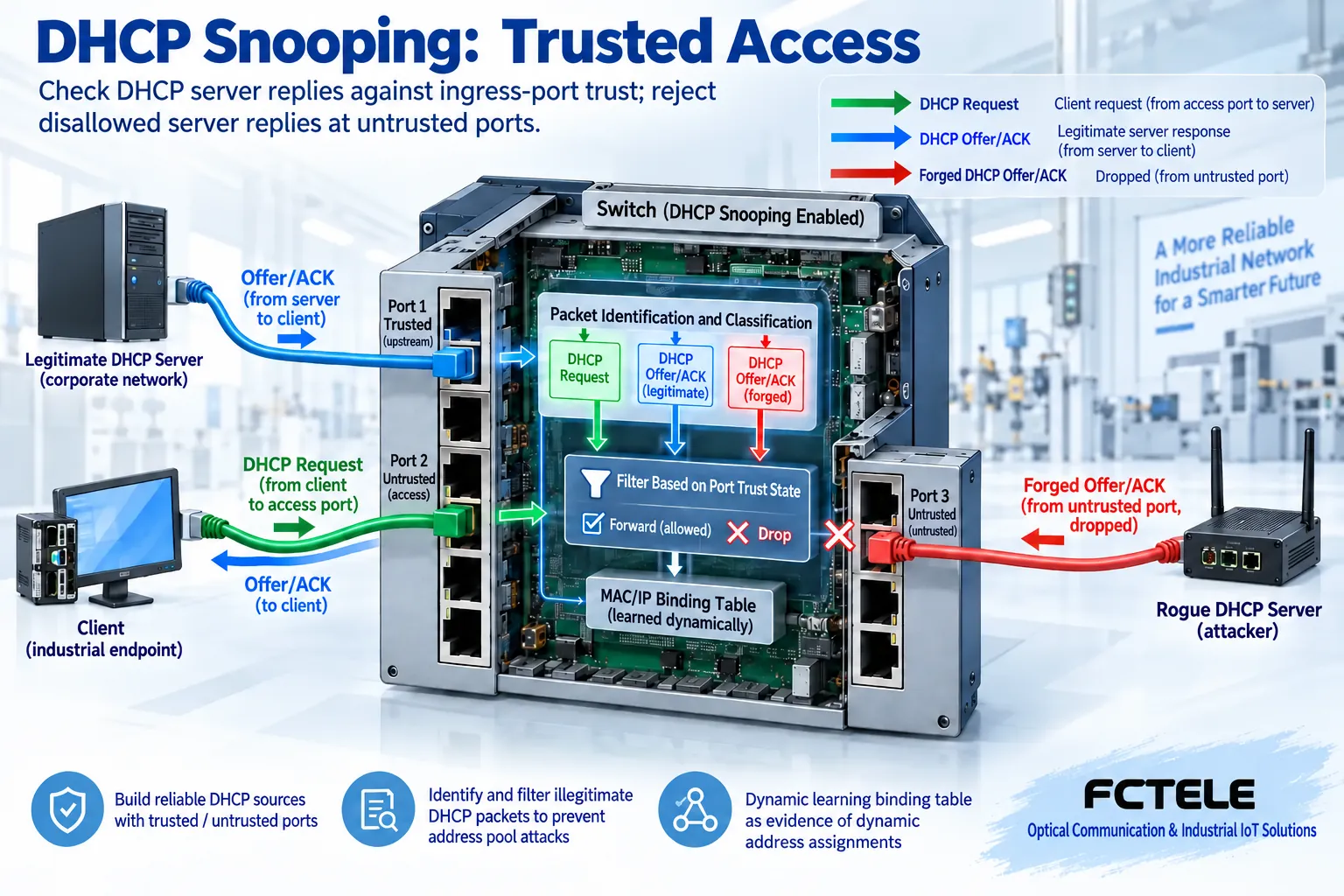
Snooping configuration usually distinguishes trusted and untrusted ports. Allowed packets from the direction of a legitimate server need to pass through the correct trusted path; ordinary terminal access ports usually should not send server Offer, ACK, and other responses. When untrusted access ports receive these disallowed server packets, the device drops them according to supported policies to prevent them from reaching other clients.
Trust describes the processing conditions when packets enter this device, not connector material or permanent identity authentication. When a server is directly connected, passes through aggregation, or passes through a relay, the ingress location may differ. You cannot mechanically set all ports called uplinks as trusted; otherwise, an unauthorized server connected from an uplink might also be allowed. Each participating switch must be checked against the actual path.
How a client completes a lease
In a typical initial assignment process, the client seeks service, the server offers candidate configurations, the client makes a corresponding request, and the server confirms with an ACK. An Offer is a choice offered; receiving an Offer alone does not mean the terminal has obtained a valid lease—the subsequent confirmation and processing result still need to be observed. Requests and responses travel in different directions, and incorrect trust configuration may let the client send out but fail to receive legitimate responses.
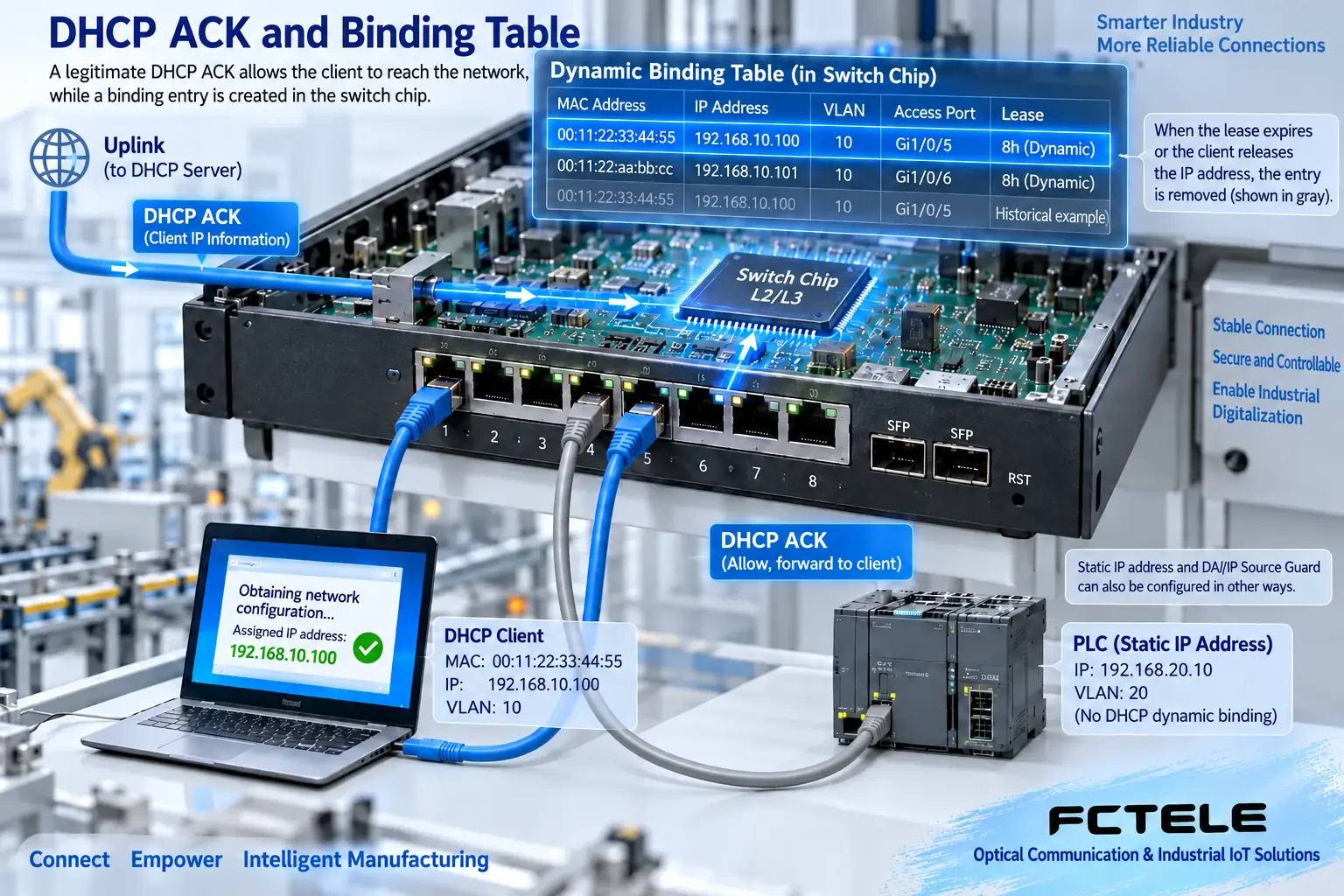
DHCP Snooping devices maintain binding records through qualifying confirmation and other packets, often involving IP, MAC, VLAN, ingress port, and lease. The records help associate an address assignment with a connection location, but they do not prove that application authentication has passed. Lease renewal, release, interface changes, or record storage methods can affect entries. You should check the lifecycle supported by the local device and how it handles restarts, and not treat records as a permanent, unchanging asset list.
Binding table and DAI are different functions
Features such as Dynamic ARP Inspection (DAI) and IP Source Guard can, in supported implementations, use the corresponding binding data, but each needs to be enabled and configured separately as required. Turning on DHCP Snooping alone does not mean all forged ARP, static IP spoofing, or other attacks are blocked. Protocol inspection, traffic filtering, and application access are boundaries at different layers; the functions that need verification should be listed separately.
PLCs or cameras using fixed addresses may not have dynamic DHCP bindings. If security functions that depend on bindings are then enabled, you must follow the manual to arrange supported static entries, trusted paths, or other methods, and verify actual services. You cannot enable all features directly “for antivirus” and then treat legitimate fixed-address devices being blocked as a device fault.
How to check Option 82 and the relay path
When the address server is not in the local broadcast domain, the relay sends related requests to the server. Option 82 is a relay agent information option that can carry information such as access location for server policies. It is not a field that all DHCP communications must have; the insertion, retention, deletion, or rejection behavior of devices, servers, and relays needs to be confirmed together.
The original text summarizes whether Option 82 is present as not affecting the original service, which is too broad a condition. Actual packets may be rejected by inspection policies, especially when untrusted ingress or multiple relays are involved. Troubleshooting should record the options, ingress, and relay information in the request, then check the drop reason and server logs. Do not mask incorrect paths by permanently opening all options and ports; only change the problem conditions for which there is evidence.
What evidence does the Feichang M12 product provide?
The Feichang product 3187 M12 managed 16-port gigabit switch page lists security directions such as DHCP Snooping, Option 82, and 802.1X. It is suitable for further checking the on-site address assignment boundary; the actually supported VLAN range, port configuration, binding capacity, and firmware behavior still need to be confirmed in delivery materials. 802.1X identity authentication is not another name for DHCP Snooping, and the service and management prerequisites of the two are also different.
The web page lists CLI, Web, and SNMP management methods, which can be used for configuration and observation of the corresponding version, but this article does not provide cross-model universal default addresses or commands. Procurement should bring a list of servers, relays, terminals, and VLANs to confirm configuration entry points and fault logs. Third-party documents help explain general mechanisms and do not prove that Feichang uses the same commands or the same default parameters.
Bring it online in stages along one representative path
First establish a baseline in an isolated network with a legitimate server and one client, recording lease acquisition, renewal, and actual services; then enable snooping for the required VLANs and the accurate trusted ingress. After verifying that the legitimate process still succeeds, under approved test conditions check that server responses on untrusted ingress are rejected, observe drop counters and logs, and do not put a fake-server test directly on the production network.
Additional functions such as rate limiting should be set according to model support and load; too low a threshold may block normal startup or many terminals obtaining addresses simultaneously. Before enabling, save the configuration and recovery entry; after enabling, compare results at the same scale and time period. Management paths, lease storage, and restart recovery conditions also need to be checked; acceptance cannot end just because one terminal obtained an address successfully for the first time.
No address? First see where the packet stops
Distinguish whether the terminal did not send a request, the switch dropped the request, the server did not respond, the response was filtered, or the terminal did not accept the configuration. Check the client status, ingress VLAN, binding table, and corresponding counters, then correlate with server or relay records; the same “cannot access the network” symptom may occur at different locations. For devices that already have static addresses, check the link, conflicts, routing, and application separately, and do not force lease troubleshooting.
Delivery records include the trusted ingress of each device, enabled VLANs, server and relay paths, Option 82 handling, static device arrangements, and test results. Dynamic binding is part of the evidence of address assignment, but the real service still must be verified in the end. Keeping legitimate paths and restricting disallowed address responses to the correct ingress is the actual goal of DHCP Snooping configuration.
Data note: The principle diagrams are used to explain general mechanisms and are not product photos or measured records. Specific interfaces, modes, and capabilities are subject to the selected model, version, and on-site verification.
Verification materials: Cisco DHCP Snooping operation and troubleshooting
Feichang M12 IP68 managed 16-port gigabit switch
Feichang industrial switch product categories
Related technical topics: How GMRP manages Layer 2 multicast: MAC registration, leaving, and differences from IGMP How industrial switch ACLs work: rule matching, binding direction, and access acceptance How switch loop detection works: probe return, port handling, and controlled recovery How multi-service video optical transceivers transmit signals: analog modulation, digital sampling, and format boundaries
Translated from the Chinese technical article. Source first published: 2022-11-09. Source last revised: 2026-10-13. Read the Chinese source
