


The management entry point of an industrial switch is used to view status, modify rules, and save configurations. It is not the same task as forwarding business traffic between PLCs and cameras. If a web page does not open, it does not necessarily mean the switch has stopped forwarding. If business traffic still passes, it does not prove that management configuration and security measures are normal. First distinguish the management path, then check the address, service, and account. Only in this way can you avoid treating factory reset as the first troubleshooting step.
1. How business forwarding and management control work together
After an Ethernet frame sent by a terminal enters a port, the switching function selects an egress port according to MAC addresses, virtual local area network VLANs, and related rules. The administrator reads counters, views alarms, and changes rules through the management interface. The former can be understood as carrying business traffic, and the latter as adjusting the carrying rules. However, the two are not completely independent of each other. Incorrect configuration, resource pressure, or an abnormal network may all affect operation.
The management IP is usually the address used to access the device control functions. It does not require all business frames passing through the switch to be destined for it. Inside the device, dedicated forwarding circuits and a processor may work together, or another architecture may be used. Some control packets or special forwarding may involve the processor. A diagram of an ASIC and CPU cannot be treated as the chip structure of every product, and it certainly cannot promise that management and business traffic will never interfere with each other.
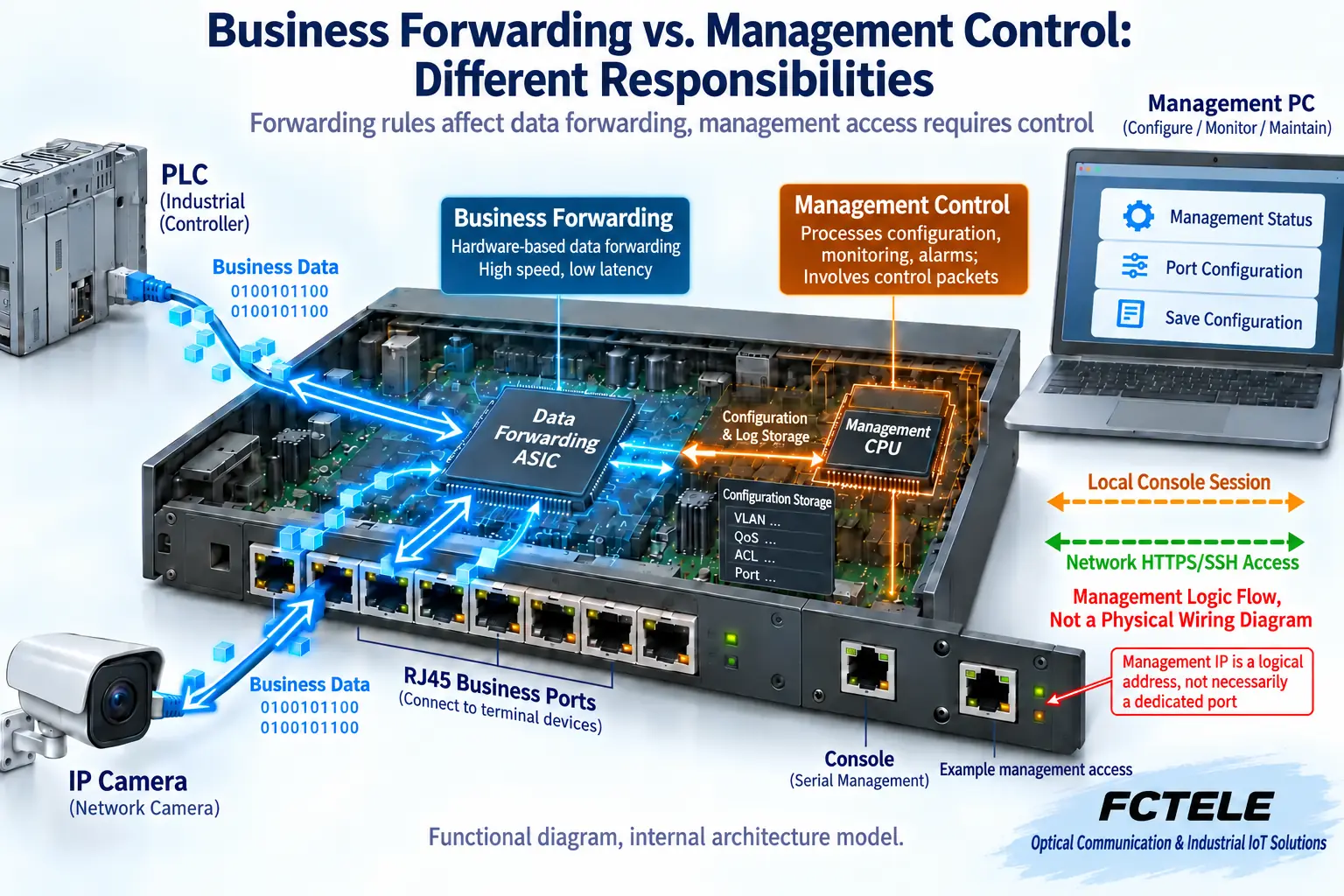
2. Console is a local entry point, not an ordinary business network port
During first-time configuration or when management network settings are incorrect, the local Console can provide a recovery entry point. Some devices use a serial interface, and some provide a specific USB form. Even if the jack shape looks like RJ45, it does not prove that an ordinary Ethernet cable can be used. Confirm the cable, pins, and terminal parameters according to the interface label and manual. Do not treat similar appearance as evidence of compatibility.
Characters appearing on the terminal are only a sign that a local session has been established. The device identity, account, and permissions still need to be verified. If the management address is unknown, you can view the effective configuration at an authorized local entry point, or check configuration backups and address allocation records. Different models do not necessarily all support Console. If the interface is absent, use the discovery or recovery method specified for that model, rather than copying another brand’s default IP and operating steps.
3. If the web page does not open, check five layers
Step one: confirm that Web management capability actually exists and whether the current configuration enables the corresponding service. Non-managed devices usually do not have this kind of configuration entry, but product naming cannot replace checking the documentation. Step two: confirm the link from the maintenance computer to the switch, the entry VLAN, and the management path. The management subnet, mask, and return path across networks must be consistent. It is not enough for only the request direction to be reachable.
Step three: confirm that you are accessing the current management address. It may be obtained by manual setting or by an address allocation mechanism, and not all models share the same default address. Duplicate addresses may cause access to land on another device. Use address records, neighbor information, and local viewing to judge. Do not conclude that the device is correct just because the page looks similar. Necessary isolation tests should be performed during a maintenance window. Do not casually unplug production uplinks.
Step four: distinguish network reachability from web service availability. The test mechanism used by ping is different from HTTPS. Being able to ping does not guarantee that the web port is open. Not responding to ping does not necessarily prove that all business traffic is interrupted. Check the protocol, service port, source restrictions, browser compatibility, and certificate. Certificate prompts should be used to verify device identity and certificate configuration. Do not develop the habit of permanently ignoring security warnings.
Step five: check the account, permissions, and session status. Authentication failures and network timeouts should be recorded separately. Clearing browser state may solve a specific compatibility problem, but it will not fix a wrong VLAN, route, or disabled service. Do not disable all access restrictions at the same time just to get a test connection. Change only one known condition at a time and keep the results before and after the operation.
4. SSH protects management sessions, but does not automatically encrypt all business traffic
When the model supports it, SSH can provide a protected remote command-line session, and HTTPS protects the corresponding web communication. Telnet and plaintext HTTP cannot be used as equally secure substitutes. Their enabling methods, accounts, and command sets vary by platform and version. Third-party materials are used to understand the mechanism and do not prove that Feichang Technology devices can directly execute the same commands.
Before remotely changing the management address or access rules, back up the configuration and prepare a local recovery entry point to avoid locking maintenance personnel out. Daily monitoring and configuration changes should use different authorization scopes. Default credentials, shared accounts, and management services open to all sources should all be included in maintenance checks. Encryption of a management session does not mean that all forwarded content, such as PLC business traffic and camera video, is also encrypted.
5. How SNMP reads status and sends alarms
Simple Network Management Protocol SNMP enables a platform and a device’s management agent to exchange information. During polling, the platform makes a query, and the device returns the status or counter of a specified object. During notification, the device actively sends an event to the platform. Trap does not require a prior query, while Inform also involves confirmation under the corresponding mechanism. The platform needs an appropriate management information base MIB description to understand the objects being read. Private items may also require manufacturer documentation.
The cumulative number of received packets, error counters, and instantaneous rate are not the same quantity. To estimate a rate over a period from cumulative counters, you need to compare two readings and the time interval, and handle cases such as counter reset or wraparound. If the platform cannot read a counter, it may be a path, permission, or object support issue. A rising error counter should also be judged together with the link, business traffic, and collection period. A single meter reading cannot determine the root cause.
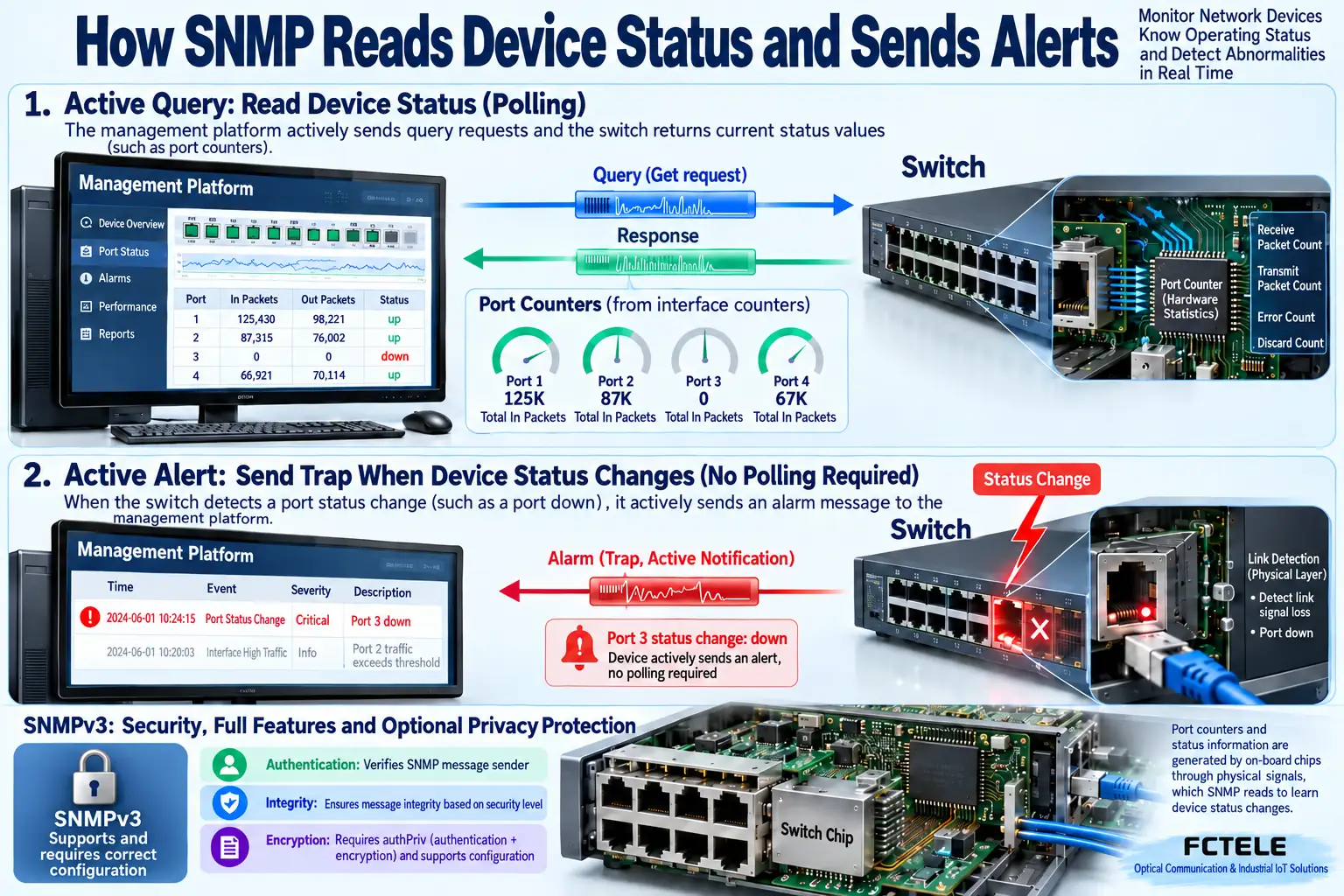
SNMPv3 is not a switch that automatically turns on all protection. Check the supported security models and levels. At the corresponding security level, authentication, integrity, and privacy protection may be used. Whether encryption is used, which algorithms are used, and how they are configured all need to be confirmed. Separate monitoring read-only permissions from configuration write permissions, restrict sources, and properly manage credentials. Do not treat an old-version community string as strong identity authentication.
6. In-band, out-of-band, and configuration saving
In-band management uses a network path related to business traffic. Link congestion, loops, or incorrect packets may affect management at the same time. Out-of-band management uses a separate maintenance path, but whether it is truly independent depends on the device structure and connections. A management VLAN helps with segmentation, but it does not automatically become independent hardware or an encrypted channel. Plan the management entry point according to project requirements, and unify time and logs to make it easier to match alarms with terminal anomalies.
After submitting web settings or executing commands, also check whether they are written into the configuration retained after restart. Different devices may have different ways of handling the current running settings and persistent saving. Do not save only a web page screenshot as a configuration backup. Necessary restart and recovery verification should be performed during an approved maintenance window. Check that the management address, VLAN, permissions, and alarm settings are still present and do not affect running production business.
7. Perform a reviewable acceptance test with Feichang Technology products
The managed DIN-rail switch details in the Feichang Technology product center list functions such as electrical and optical interfaces, VLAN, and RSTP, and can serve as an entry point for checking specific access capabilities. Managed does not prove that every management protocol, algorithm, dedicated out-of-band port, or third-party command exists. The actual entry points and firmware capabilities still must be checked in the corresponding manual. Product function evidence and the general mechanisms above should be recorded separately.
A teaching acceptance test can be performed in the order of locally identifying the device, accessing the maintenance path, read-only collection, controlled changes, and configuration recovery. Separately test the maintenance sources that should be allowed and the sources that should be rejected. At the same time, test real business traffic and monitoring status. If the platform shows offline but business traffic still passes, check the management path first. Do not immediately declare the device damaged. If the platform is online, it does not mean that all terminal business traffic has passed. Record the address, port, version, time, and result so that the next maintenance person can review it.
References and illustration notes
References RFC 3416 protocol operations , RFC 3414 User-based Security Model and Feichang Technology managed DIN-rail switch details . Standards are used to check general mechanisms and are not statements of support for a specific model. Security algorithms must be checked according to current product requirements. Do not treat the algorithm list in early specifications as deployment advice. The images are general principle illustrations and do not represent certification, actual photos, or measurement evidence.
For initial configuration, proceed in the order of connection, identity, address, and business
For first deployment, establish a management connection in an isolated test environment first, and check the Console cable, serial parameters, or management network port used. After confirming device identity, replace the initial credentials, record the management address, mask, gateway, and allowed access paths, and then configure the required VLANs, ports, and protection protocols. After completing each item, verify that the authorized maintenance terminal can still access the device, then save the configuration and verify whether it is retained after restart. Do not change the management address and all port assignments at the same time and lose the rollback path.
Command names, default addresses, and accounts may differ between manufacturers. Do not directly treat examples such as interface vlan or write memory as universal operations. Use the manual for the corresponding model and firmware, and export the current configuration first if necessary. Finally, use real business traffic to check forwarding, and at the same time confirm that disallowed management access is indeed restricted. The management page opening only shows that the management path is reachable. It cannot prove that the business network has been configured correctly.
The principle diagrams are illustrations of general mechanisms, not actual product tests or model cross-section photos. Interface, protocol, protection, and power supply capabilities must be checked according to the actual model.
Translated from the Chinese technical article. Source first published: 2019-08-06. Source last revised: 2026-10-13T10:41:21+08:00. Read the Chinese source
