


An SDI to HDMI converter processes the SDI signal output by professional video equipment into an HDMI signal that a monitor can receive. It requires active circuitry to receive, deserialize, and output the signal; it is not just a cable with a different plug. When choosing one, you should check the input format, output direction, monitor support range, audio, and power specifications. You cannot combine the 5V and 12V requirements of different models into the same parameter table.
First confirm the direction you want to convert
A camera or switcher has SDI output, and the monitor only has HDMI input—this is the typical need for SDI to HDMI. Conversely, connecting a computer’s HDMI output to an SDI device requires an HDMI to SDI device; you cannot assume the same small box works in both directions. The input and output roles marked on the connectors are more important than having two different plugs on the casing.
SDI often carries serial digital video through a BNC coaxial interface, while HDMI uses its own connection, signal, and control rules. The two interfaces are not converted by simply matching wires one-to-one. This article discusses electrical interface video conversion and does not confuse it with an SDI optical transmitter. If long-distance fiber transmission is also needed, you should separately check the optical transmission equipment and the format compatibility of the entire link.
How the input side reads back the high-speed serial signal
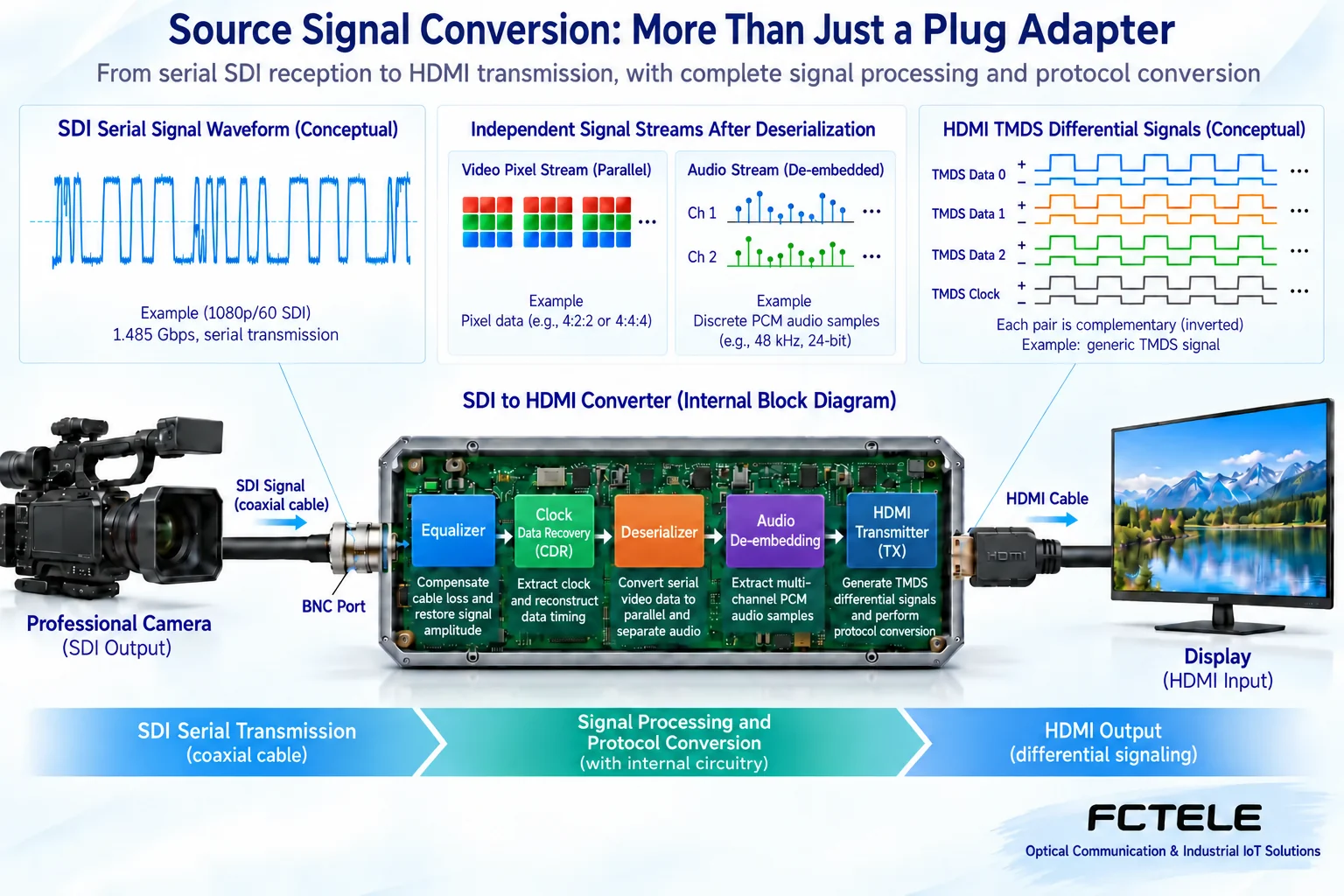
After passing through coaxial cable, the SDI signal is affected by conditions such as line attenuation. Suitable receiving circuitry can perform equalization to compensate for line effects within a specified range, and through processing such as clock recovery, help identify the serial data. The deserializer then converts the high-speed serial stream into the form needed by subsequent video processing circuits.
The “recovery” here has limits. When line conditions exceed the equipment’s capability and the data can no longer be correctly decided, the converter cannot magically retrieve lost information. Retiming also does not repair any damaged picture. The actual maximum cable length is affected by video rate, cable, connectors, and equipment specifications; you should not promise the same distance for all ordinary coaxial cables.
You can think of deserialization as arranging high-speed data that was in a single line into multiple internal data paths that can be processed. But the converter does not understand the meaning of every picture, nor does it necessarily have codec or video scaling. Ordinary interface conversion mainly changes the transmission form and does not automatically perform picture editing.
How video and audio enter the HDMI output
The input SDI may contain video and embedded audio. Suitable circuitry extracts the corresponding audio from the data, then delivers it together with the video to the HDMI transmit circuit, sending it to the monitor according to the output interface rules. Whether the required channels, sampling conditions, and audio formats are supported depends on the specific product. You cannot see “supports audio” and assume all audio encodings can be converted.
The general responsibilities of an HDMI transmitter chip include organizing the output signal and applicable auxiliary information. Official chip documentation can help understand these mechanisms, but the function of a certain chip does not prove that a specific Feichang Technology model uses it or has enabled all functions. The receiver, deserializer, and transmitter in the teaching diagram are functional illustrations, not actual teardown photos of the product.
1080p is not enough; you also need to look at frame rate and mapping
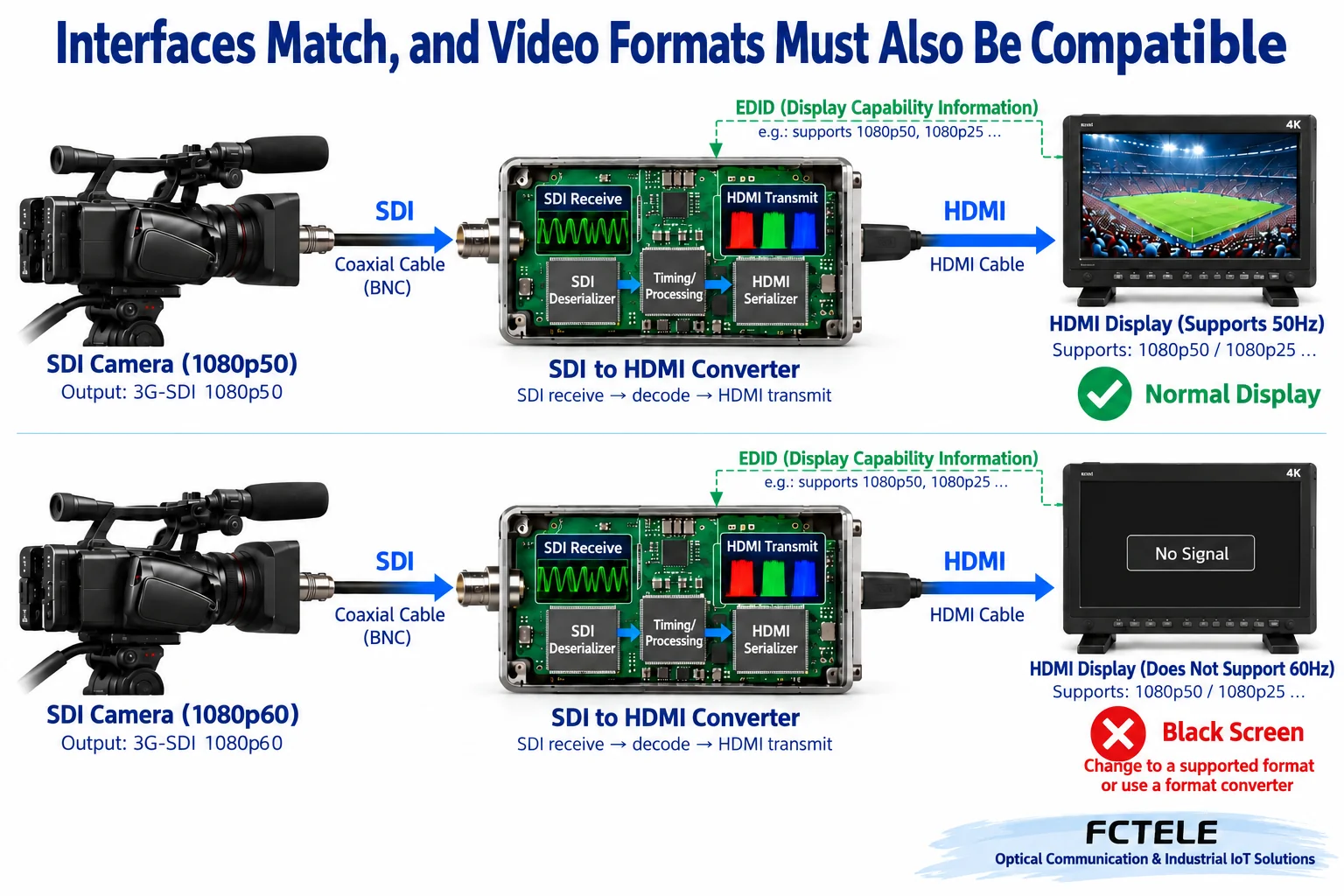
The same resolution can have different frame rates and scanning methods. For example, progressive and interlaced cannot be judged compatible just by the word “HD.” In 3G-SDI, there are also signal mapping differences such as Level A and Level B. The source device, converter, and display end must form a compatible combination; you cannot infer that supporting one 1080 format means supporting all 1080 formats.
An HDMI monitor can use EDID to tell connected devices some of its capabilities. EDID can be understood as the display end’s capability list. But reading the capability list does not mean the converter has circuitry to change the input frame rate, resolution, or scanning method, nor does it mean it can reverse-command any SDI camera to automatically change format.
If the format output by the source is not accepted by the monitor, you can select a compatible format within the range allowed by the source device, or use a device that clearly has the required format conversion capability. Do not use a passive adapter cable to replace video scaling, deinterlacing, or frame rate conversion. These are independent functions that require their own specifications and verification.
Using a specific Feichang Technology model to explain the checking method
The Feichang Technology official website FC-056202 lists SD/HD/3G-SDI input, one HDMI output, corresponding embedded audio processing, and support up to 1080p60. Its power table describes Type-C input DC 5V, and installation methods include rail or wall mounting. These features are suitable for further evaluation when connecting professional video sources to HDMI monitoring equipment, but you should still check the actual ordered version and the latest manual.
The 12V and 5V parameters, different dimensions, and different power consumption figures in older articles cannot be combined into new specifications for this model. Type-C is only one interface form, and you cannot assume the device supports arbitrary USB power negotiation or any voltage. Before installation, confirm voltage, current, and interface from the physical label and official documentation; do not test with an incompatible adapter.
For items on the webpage that may be ambiguous or conflicting, confirm with the manufacturer. For example, whether there is an additional loop output, which Level mappings are supported, and the actual audio channel combinations should not be inferred from descriptions of other products. This article also does not interpret promotional “zero delay” as physically zero time; conversion processing and monitor processing both have actual timing.
When there is no picture, troubleshoot by direction and layers
First confirm that input and output are not reversed, that the source device is indeed outputting a supported SDI format, and that the converter is powered correctly. Then check the applicable signal lock indicator and verify the coaxial cable, connectors, and line conditions. The lock light being on only means reception has reached a certain state; it does not necessarily mean the monitor can ultimately accept all output conditions.
Next, use a known-good monitor that supports the corresponding format and a short HDMI cable to establish a baseline, and check the monitor input selection, video format, and audio settings. Do not change the source, cable, converter, and monitor all at once; otherwise, even if it works, you cannot explain the original fault. For intermittent black screens or flashing dots, record the format, cable length, power, and temperature conditions when they occur, rather than just writing “occasionally unstable.”
If the picture is normal but there is no sound, separately confirm whether the source has embedded audio, whether the converter supports the audio conditions used, and whether the monitor accepts and enables the corresponding audio output. Do not directly fill analog audio plug levels or AES/EBU descriptions into a product parameter table for a device that does not have these interfaces.
Acceptance should let the actual service traffic run continuously
Monitoring tests should not only show a still image; they should also include moving pictures, planned audio, source switching, and continuous operation, observing picture, sound, and recovery behavior. For scenarios where latency matters, evaluate end-to-end delay under a clear method, distinguishing the processing of the camera, converter, and monitor. Do not use the naked eye’s “feels fast” as evidence of zero delay.
Record the source model and output format, converter version, monitor support conditions, cable, and power information. Once interface conversion, fiber transmission, and format conversion are clearly separated, the solution is usually easier to explain: SDI to HDMI solves the active conversion between applicable digital video interfaces, and stable operation depends on the compatibility of the entire link.
Verification materials:Feichang Technology FC-056202 SDI to HDMI;ADI HDMI transmitter mechanism. The principle diagram is a general principle illustration explaining general mechanisms; it is not an actual test diagram or a wiring diagram for a specific model.
Translated from the Chinese technical article. Source first published: 2019-11-15. Source last revised: 2026-10-13T13:19:24+08:00. Read the Chinese source
