
+8618758069661 [email protected]
Product Search Guide: space = AND, | = OR, ! = NOT

Got any Questions? Call us Today!

+8618758069661

Or leave us a message

Online Message

What Does a Switch Do? From MAC Address Learning to VLAN Forwarding

Views: 182 +9Original by FCTELEAuthor: FCTELE Technical Team
AT A GLANCE

What evidence explains where an Ethernet switch forwards a frame?

The switch learns the source MAC on the ingress port in its VLAN, then applies destination lookup and forwarding rules. A known destination can select an eligible port; an unknown unicast may be flooded within the permitted VLAN scope. Check the actual table, VLAN and port state. This Layer 2 behavior does not itself provide IP routing or make uncontrolled redundant links safe.

Three mechanisms and their verification boundariesFollow the signal, then verify the actual service

01Learn the source

Learn the sourceThe received source address identifies an attachment; destination lookup selects delivery.ASource → portDestination?BLearn source, then look up destinationKnown unicast example onlyOther forwarding rules apply separately

The received source address identifies an attachment; destination lookup selects delivery.

02Check forwarding resources

Check forwarding resourcesPorts share finite output and switching resources under simultaneous traffic.Input 1Input 2Input 3QueueOutput rateConcurrent arrivals share a finite outputFinite buffers cannot solve sustained overload

Ports share finite output and switching resources under simultaneous traffic.

03Resolve an unknown destination

Resolve an unknown destinationAn unlearned destination can require copies on eligible ports in the VLAN.AFDB ?123Eligible ports in the same VLAN; not ingress

An unlearned destination can require copies on eligible ports in the VLAN.

Swipe to compare the three diagrams →

Conceptual teaching illustrations—not measured waveforms, installation wiring or the internal architecture of a specific product.
  • Learn the source

    Compare the forwarding entry with the intended port and VLAN.

  • Check forwarding resources

    Compare packet rate, port mix and the test load.

  • Resolve an unknown destination

    Verify source learning, VLAN membership and expected flood scope.

Selection and verification checklistExpand the checks and related guides
Checks for this service and its actual operating conditions
CheckWhat to confirmHow to verify
Learn the sourceThe received source address identifies an attachment; destination lookup selects delivery.Compare the forwarding entry with the intended port and VLAN.
Check forwarding resourcesPorts share finite output and switching resources under simultaneous traffic.Compare packet rate, port mix and the test load.
Resolve an unknown destinationAn unlearned destination can require copies on eligible ports in the VLAN.Verify source learning, VLAN membership and expected flood scope.
Quick answer: The core job of a switch is to connect end devices within the same Layer 2 network and send Ethernet frames to the correct port based on its MAC address table. It learns “which port a device is on” by reading the source MAC of every frame, then looks up the destination MAC to decide directed forwarding, flooding, or filtering. VLANs can divide one switch into multiple broadcast domains; when traffic needs to cross VLANs or reach other IP subnets, a Layer 3 switch or router must perform routing.

A switch is not simply a multi-port splitter. A hub copies received bits to all ports, while a switch can recognize Ethernet frames, maintain a MAC address table, and let different ports communicate at the same time. To understand a switch, follow this chain: where does the frame enter — what did the switch learn — is the destination address known — where does the frame leave.
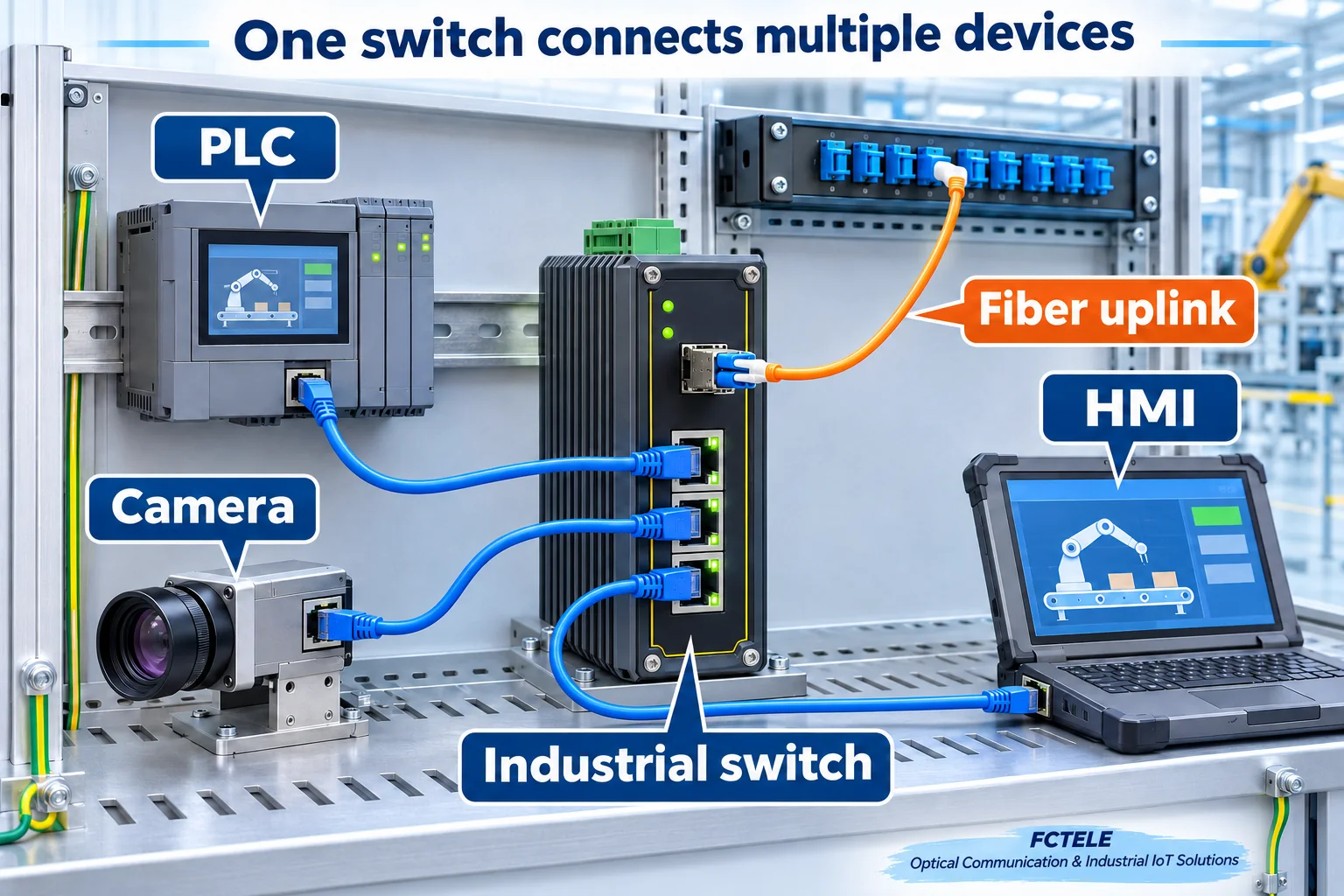
An industrial switch connects a PLC, camera and HMI over separate copper links and has a separate fiber uplink
Figure 1. The PLC, camera and HMI have their own copper connections. A separate fiber port links the switch to the upstream network. Original AI-assisted engineering illustration by FCTELE.

1. What problem does a switch solve in a network

A switch provides Ethernet access for computers, servers, IP cameras, wireless APs, PLCs, industrial controllers, and other devices. Each port forms an independent collision domain, and the switching chip can handle multiple links in parallel, so many devices do not have to contend for the same transmission medium as in early shared Ethernet.

It mainly solves three things: connecting devices, isolating unrelated traffic, and providing a stable Layer 2 channel for upper-layer protocols. An ordinary Layer 2 switch is not responsible for all IP routing; communication within the same VLAN is done by MAC forwarding, while communication across VLANs or subnets is handed to a Layer 3 gateway. Industrial switches also add redundant power, wide temperature range, protection, ring protocols, alarms, and stronger resistance to electromagnetic interference.

2. The complete process of MAC address learning and frame forwarding

When a frame enters from Port 1, the switch first reads the source MAC address and writes “source MAC — ingress port — VLAN” into the MAC address table. If that MAC already exists, it refreshes the port and the aging timer. This process is called source address learning, and it does not require manually registering each device.

The switch then looks up the destination MAC. If the table already has a matching entry, it forwards only from the target port, which is called a known unicast; if the destination MAC has not yet been learned, it copies the frame within the same VLAN to all ports except the ingress port, which is called unknown unicast flooding; broadcast frames also spread within their broadcast domain. After the end device replies, the switch can learn the reverse path, and later communication becomes directed forwarding.
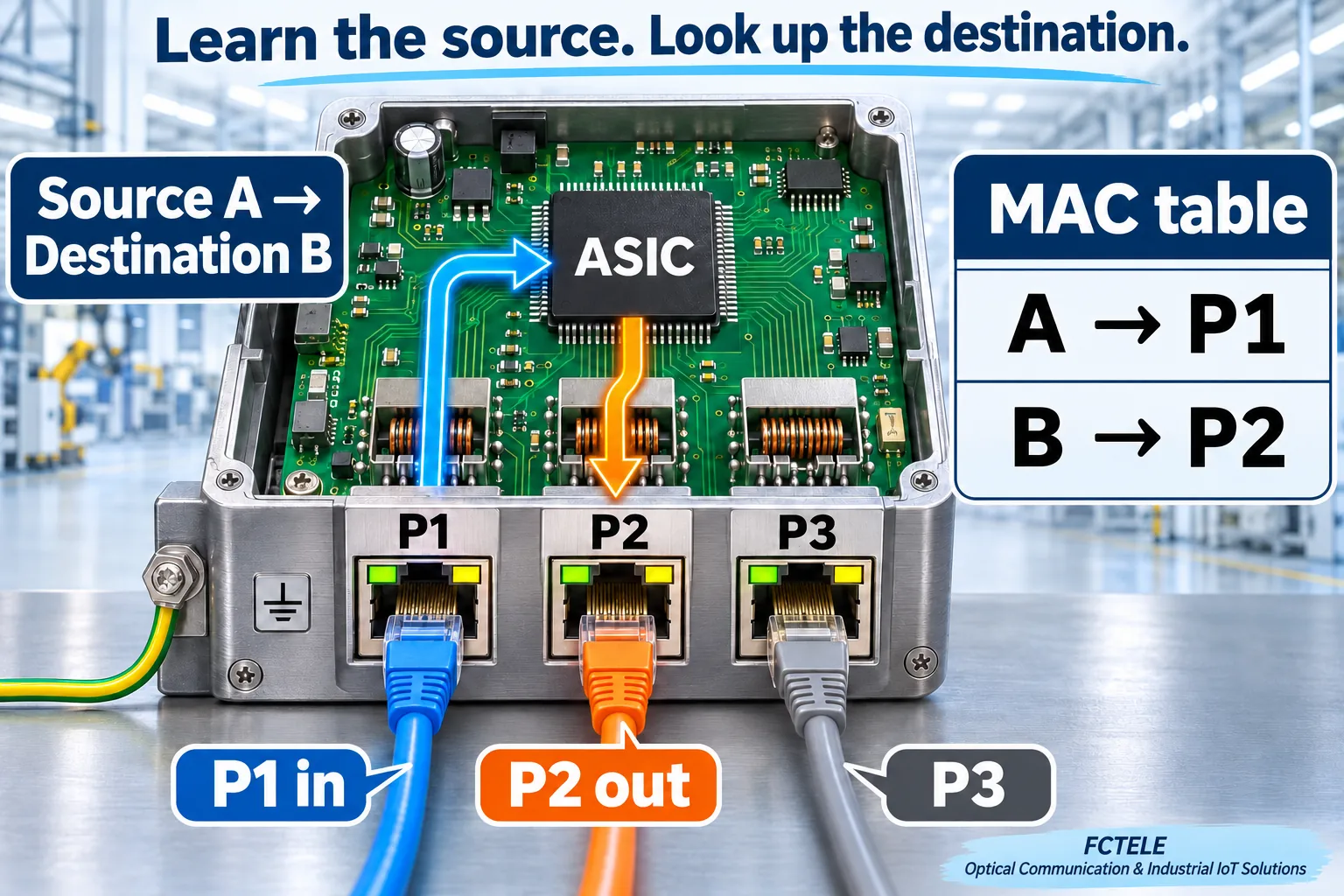
The switch learns source A on P1, then looks up destination B and forwards the frame through P2
Figure 2. All three ports belong to the same VLAN in this example. The frame arrives on P1, so the switch learns A on P1. Its table already places B on P2, so the frame leaves through P2 and does not reach P3. Original AI-assisted engineering illustration by FCTELE.

3. How VLANs, Trunks, and broadcast domains change the forwarding scope

Without VLAN segmentation, broadcasts, ARP requests, and unknown unicasts may cover a large Layer 2 area. VLANs use 802.1Q tags to divide the same physical switch into multiple logical broadcast domains: production equipment, video surveillance, and office terminals can use different VLANs, and by default they cannot communicate directly at Layer 2.

Access ports usually connect terminals and belong to only one service VLAN; Trunk ports are used between switches or between a switch and a routing device and can carry multiple VLANs. In engineering, you must check the PVID, Tagged/Untagged mode, and the list of allowed VLANs at the same time; otherwise, a VLAN may fail in one direction, a management address may become unreachable, or broadcasts may leak.
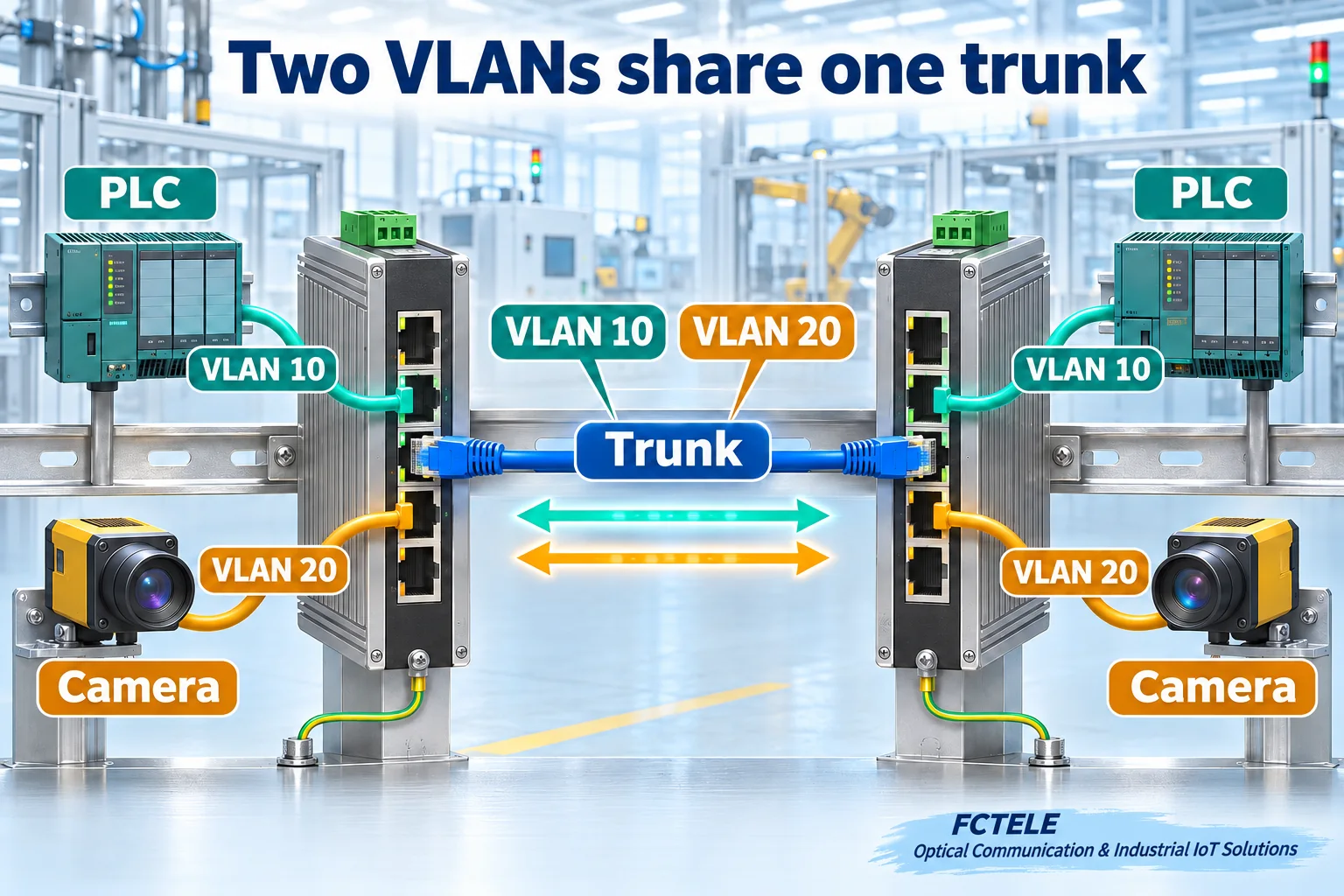
Two switches carry VLAN 10 and VLAN 20 over a single trunk
Figure 3. One trunk carries both VLANs. The tags identify the VLAN on that link. The PLCs belong to VLAN 10, and the cameras belong to VLAN 20. Original AI-assisted engineering illustration by FCTELE.

4. Why a Layer 2 loop can quickly paralyze a network

Ethernet frames themselves do not have a TTL field like IP packets. If an uncontrolled redundant link exists between two switches, broadcast frames may be copied repeatedly and circulate, causing a broadcast storm, MAC addresses drifting back and forth between ports, and the switching chip and uplink bandwidth being fully occupied. The network often shows rapidly blinking indicator lights, intermittent connectivity, and a management page that will not open.

When redundancy is needed, you cannot simply connect multiple network cables in parallel at will. Office networks usually use STP/RSTP/MSTP, and industrial ring networks can use ERPS or a vendor ring protocol depending on device capabilities. During acceptance, you should actively disconnect one link and record the service interruption time, the MAC re-learning process, and the switchback behavior after the link recovers.

5. Switch selection cannot look only at the number of ports

Ports and speed100M, 1G, 2.5G/10G; electrical ports, fixed optical ports, or SFP slots.
Switching capacityPay attention to backplane bandwidth, packet forwarding rate, and whether line-rate forwarding is supported.
Management featuresVLAN, QoS, ACL, IGMP Snooping, SNMP, port mirroring.
ReliabilityDual power supplies, wide temperature range, surge/ESD protection, fanless cooling, and ring protocols.

Camera projects also need to calculate multicast and uplink bandwidth; PoE projects need to check per-port power, total power budget, and cable voltage drop; industrial sites need to check the power supply range, grounding, temperature, vibration, and electromagnetic compatibility. The switching capacity in marketing materials cannot replace real service testing.

6. Verification sequence from power-on to delivery

  1. Record the device model, firmware version, port plan, VLANs, and management address.
  2. Verify speed and duplex negotiation port by port, and check CRC, packet loss, and error counters.
  3. Check the MAC address table to confirm that terminals appear on the expected ports and VLANs.
  4. Test same-VLAN communication, cross-VLAN routing, broadcast scope, and multicast services separately.
  5. Simulate uplink interruption, power abnormality, and loop protection switching, and record the recovery time.
  6. Save the final configuration and a backup, and label ports, fibers, power supplies, and cabinets clearly.

The integrated practical questions appear in the visible question section below.

Additional switch question

Can two switches be connected with two network cables to improve reliability?

Only after configuring link aggregation or a spanning tree/ring protection mechanism. Connecting them directly in parallel may form a Layer 2 loop.

Translated from the Chinese technical article. Source first published: 2019-09-20. Source last revised: 2026-10-13T23:45:12+08:00. Read the Chinese source

Common practical questions

Can a switch replace a router?

An ordinary Layer 2 switch cannot supply the required IP routing. A suitably configured Layer 3 switch can route supported networks, but WAN, NAT and security requirements still need separate verification for the actual application.

Does a switch with more ports always perform better?

No. Port count does not establish forwarding rate, usable uplink capacity, buffering or feature-enabled performance. Compare these conditions using representative simultaneous traffic and the project's loss and delay targets.

Why does a newly connected device first cause flooding?

If its destination MAC has not yet been learned, the switch may flood that unknown unicast within the VLAN. Subsequent frames from the device can establish its source-MAC entry, permitting later directed forwarding; check the actual table and policy.

Sources and applicable boundaries

These additions explain general mechanisms. Supported features, connection details and acceptance limits must be verified for the actual equipment, software and operating conditions; the diagrams are not measurements or certification evidence.

Share this article