

TCP RECEIVE FLOW CONTROL
Why can TCP pause on a healthy link?
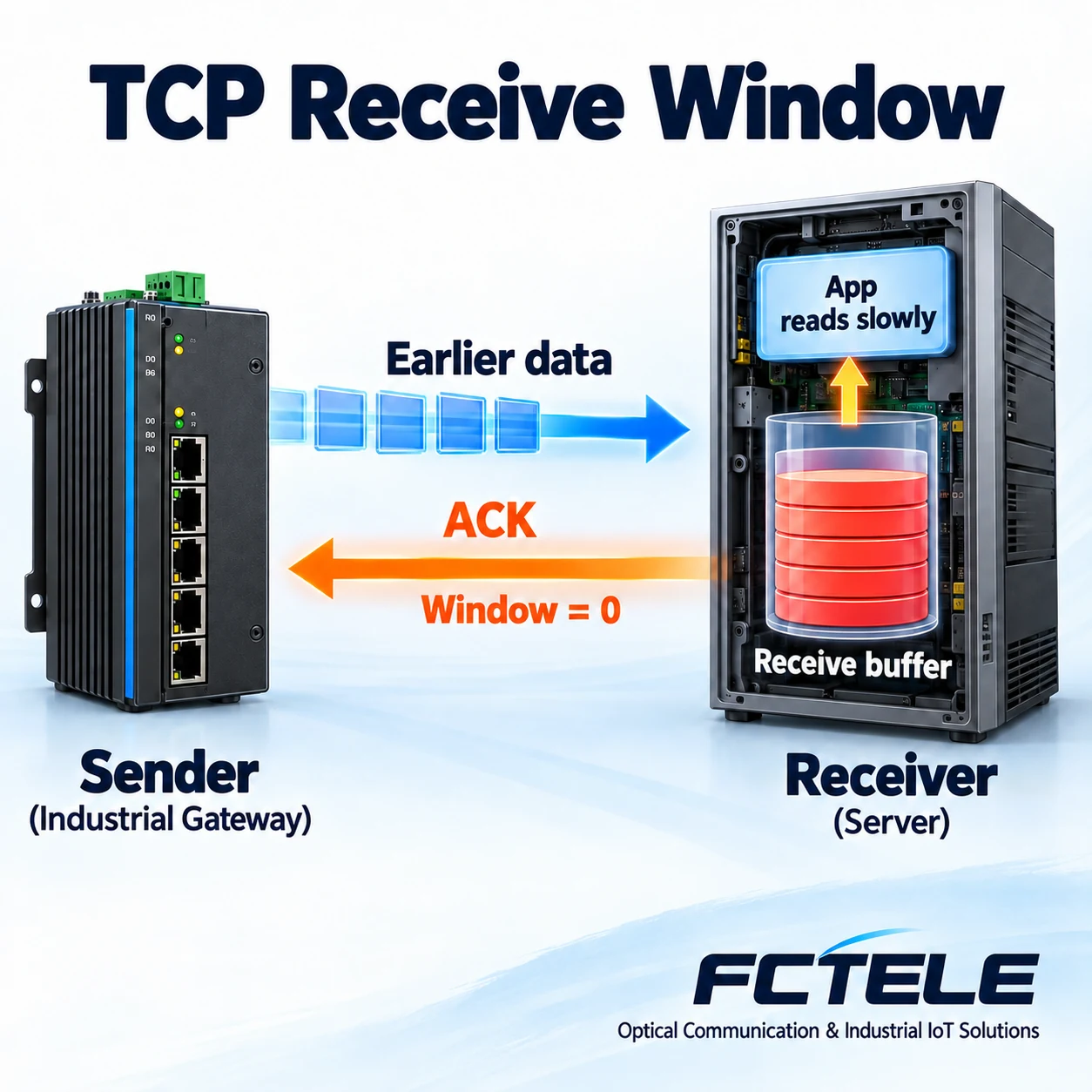
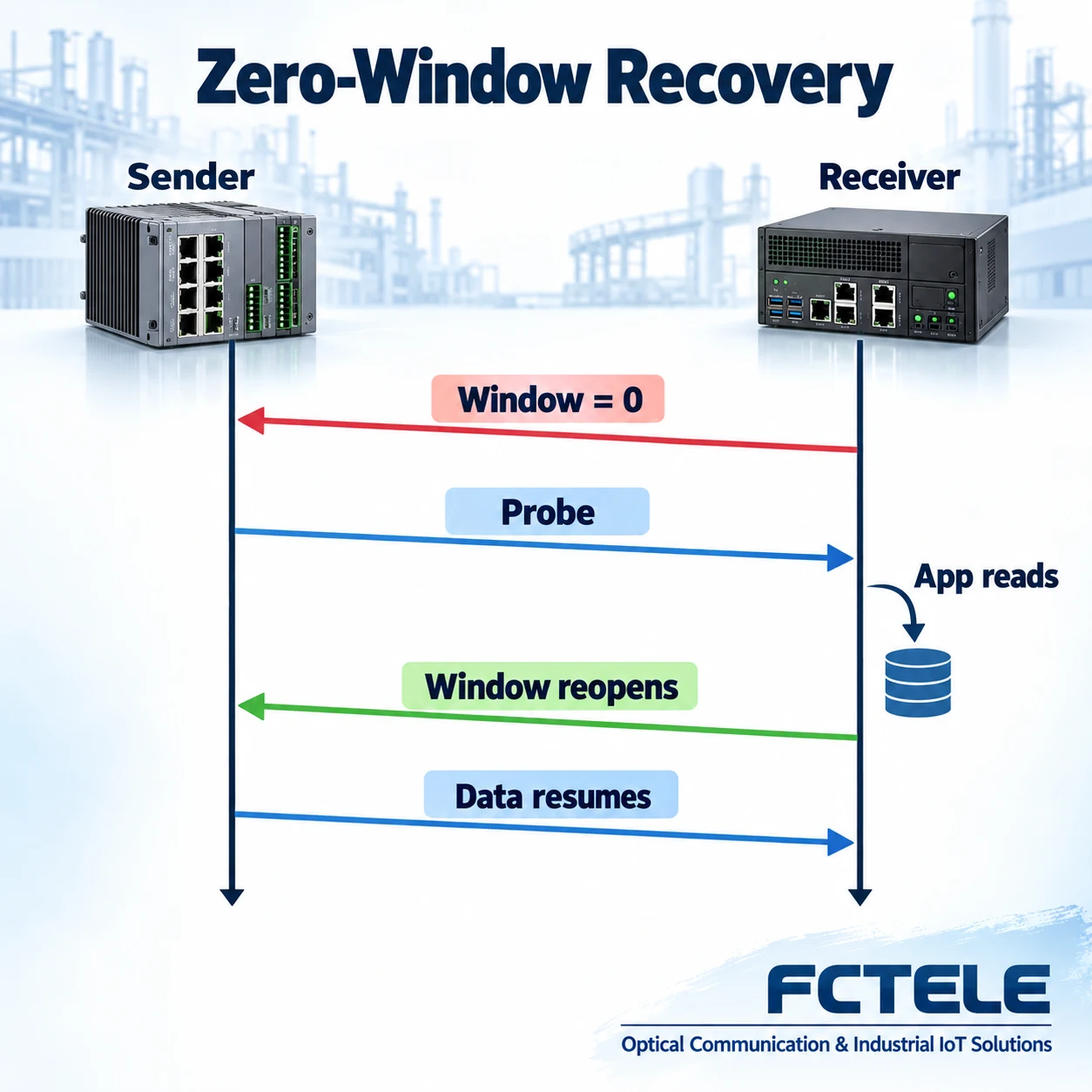
The receiving system stores TCP data until its application reads it. If reception space becomes unavailable, it can advertise a zero window. The sender respects that limit and probes for current window information. Reading may let the window reopen; probing alone cannot repair a blocked application. These are general concepts, not product measurements or fixed recovery times.
Buffer
Data can wait in the system buffer before the application reads it.
Feedback
The receiver advertises its limit back to the sender.
Reopen
Reading can free receive space; probes help obtain the current window state.
Record which endpoint advertises zero and in which connection.
Align window changes with application-read and resource logs.
Compare continuous and delayed reading in an authorized test.
Selection and verification checklist — expand
| Check | What to confirm | How to verify |
|---|---|---|
| Connection | Endpoint and direction | Capture address and port pairs |
| Receiver | Application is reading | Compare application logs and buffer state |
| Recovery | Window actually reopens | Correlate probes, updates and resumed data |
A device is online and its link light is on, but the sending application seems paused. A capture may report a zero window. This does not necessarily mean a broken cable or zero switch bandwidth. The TCP receiver may be telling its peer that it temporarily has no receive space. Follow the path from network arrival through system buffering to application reads to understand why.
Arrival at the network port is not the end of the journey
Industrial gateways, serial device servers and supervisory computers may exchange data using TCP. TCP provides an ordered byte stream; the application decides whether those bytes represent temperature records, status messages or commands. Ethernet delivering a frame completes only part of the path.
After receiving TCP data, the system checks it according to the protocol, places acceptable data in the connection’s receive buffer and waits for the application to read it. Think of a mailroom: delivery to its counter does not mean the recipient has opened and processed the package. The analogy distinguishes storage from consumption; real systems maintain sequence numbers, window information and memory state.
If the application is waiting for a disk write, processing an earlier message or not scheduling its reading thread, data can accumulate. A healthy network card and switch cannot read those bytes for the application. Looking only at port traffic can miss the software processing at the end of the path.
What capacity does the receive window advertise?
The TCP header includes a window field advertising the range of data the receiver is currently willing to accept. It depends on buffering and system policy. It need not equal the device’s unused physical memory, and it is not space in a switch’s egress queue. A zero window means no new receive window is currently available in that direction.
Suppose a gateway continuously sends acquisition records to a supervisory computer. If that application’s reading slows, the system can reduce its advertised window and eventually advertise zero. The sender should respect the limit instead of supplying unlimited new data. The connection’s reverse direction has independent state; one zero window does not establish that every exchange in both directions has stopped.
A capture tool may show the raw window value or a calculated value accounting for the window scale option. Window scaling is negotiated during connection establishment and allows larger receive windows. Check the handshake and display convention before interpreting nonzero values. Scaling zero still produces zero; understanding the pause does not require a formula exercise.
Why distinguish acknowledgment from window size?
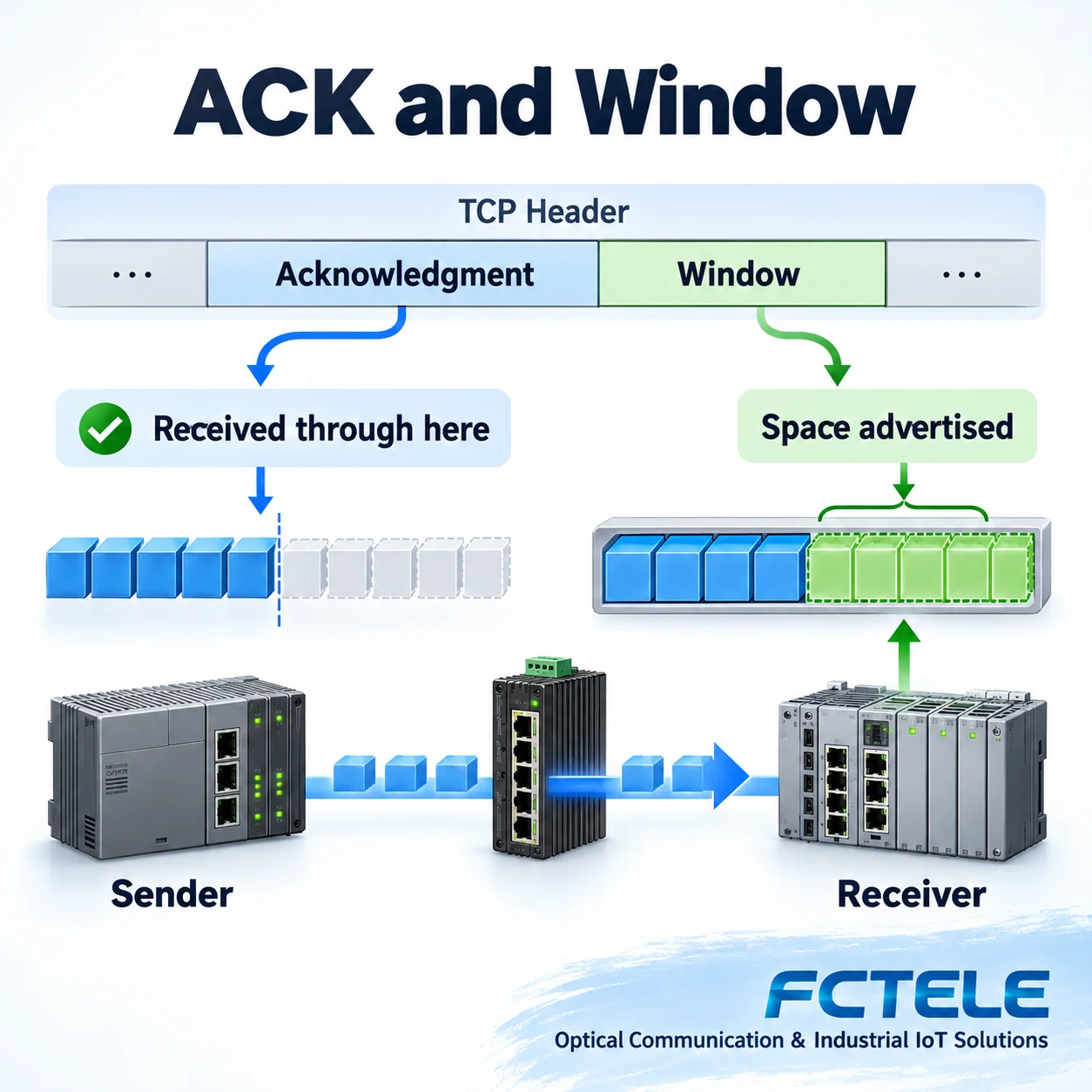
The TCP acknowledgment number expresses the next byte sequence number expected by the receiver, allowing the sender to track acknowledged contiguous data. The window expresses the range the receiver is willing to accept next. One answers how far earlier data has been received; the other concerns further reception. They appear together but serve different purposes.
The receiving system can acknowledge data it has accepted while advertising zero. Those bytes may be in its buffer without having been read by the application. A TCP acknowledgment also does not establish successful business processing: whether a database record was committed or a command accepted requires an application-level response.
Likewise, an unchanged acknowledgment number does not immediately prove packet loss. Examine direction, window changes, transmitted content and timing together. Retransmission, duplicate acknowledgments and a zero window can occur during one incident, but a capture tool’s colored labels are not independent diagnoses.
Why probe after a zero window?
When the receiving application reads again, the system may advertise an available window. That update can be lost in transit. If the sender waited silently forever while the receiver believed it had already sent an update, each could wait for the other. TCP specifies zero-window probing to obtain the peer’s current window state again.
The sender schedules probes according to protocol requirements and implementation; the receiver acknowledges with its current state. A probe is not resumed application throughput and does not prove the application has started reading. While the advertised window remains zero, ordinary new-data transmission is still restricted. Probe intervals and resource management depend on implementation, so one capture does not establish a universal product timing parameter.
Probing cannot automatically clear an application that never reads. TCP specifies connection maintenance and probing behavior, while operating-system policies, application timeouts and device resource limits also affect the outcome. Do not promise that a zero-window connection will never close or will always recover after a fixed delay.
How does this differ from an Ethernet PAUSE frame?
The TCP receive window is transport-layer feedback between the endpoints of a connection. An Ethernet PAUSE frame requests a transmission pause on an adjacent link. Congestion in a switch queue and a slow-reading host application may both slow traffic, but their locations, feedback recipients and observable fields differ.
A higher-bandwidth switch cannot guarantee recovery for an application that does not read its socket. Conversely, a normal host receive window does not prove the intermediate path is uncongested. Inspect interface errors and discards and path load separately from host buffers, process load and application logs.
For a serial device server, distinguish serial-side speed, the TCP connection and internal buffering. Whether serial bytes continue arriving during a network restriction, and what happens when buffers fill, depend on the actual model, firmware and flow-control configuration. TCP support alone does not establish lossless handling of unlimited serial input.
Collect evidence that explains the incident
First identify the connection and direction advertising zero, recording endpoint addresses, ports and device and application versions. Examine the handshake and traffic before and after the incident. Compare receive windows, acknowledgment numbers, probes and window reopening along one timeline. Preserve the capture rather than only a screenshot of a Zero Window label.
Align that timeline with receiver application logs. Was the application reading? Was it waiting for disk, database work or another thread? Were system resources abnormal? If the sender continues producing data, inspect its queue and business timeout too. Moving the backlog to the sender does not solve the underlying processing problem.
In an authorized environment, controlled low-volume tests can compare continuous reading with temporarily delayed reads to see whether the advertised window changes accordingly. Do not pause critical production processes or blindly enlarge buffers or disable timeouts to eliminate a diagnostic label. Buffering can postpone visible backlog; insufficient sustained processing capacity still needs attention.
Put each problem at the right stage
A zero window most directly indicates the receiver’s advertised reception limit. It guides investigation without proving why the application slowed. Connect four stages: arrival at the network port, TCP buffering, application reads and business processing. That distinction helps determine whether to inspect the network path, system resources or application logic.
FCTELE’s published managed industrial switch information covers industrial Ethernet access and forwarding. Check the relevant product documentation for actual interfaces, management functions and capabilities. This guide does not present general TCP behavior as a particular model’s internal design or invent buffer capacities or recovery times. Equipment selection and corrective work require endpoint protocol details, product documentation and site verification.
References
RFC 9293:zero-window probing;Microsoft:TCP windows and scaling;Linux TCP interface and buffering;FCTELE managed industrial switch information. Generic illustrations, not product measurements.
Translated from the Chinese technical article: Read the original Chinese article.
Common questions
Does a zero window mean a broken cable?
No. It is a receive limit advertised by a TCP endpoint; examine application reads and system state as well as the path.
Does a TCP acknowledgment prove business processing finished?
No. The system may have accepted bytes that the application has not yet consumed or processed.
Can probing repair a blocked application?
No. Probes obtain current window information. A persistently blocked reader needs its own investigation.
Scope and further reading
General TCP concepts, not a particular product circuit or measured timing.
Ethernet flow control and PAUSE frames · Switch forwarding and maintenance
