


Industrial switches have no universal fast Ethernet port count. Different models may offer 100M, gigabit copper ports, and different fiber port combinations, and may also come with management or PoE options. The real question to answer is how many connections the current business needs, whether the aggregated uplink can carry them, and what future expansion will change—not finding a port number that applies to all products.
First distinguish fast Ethernet and gigabit ports
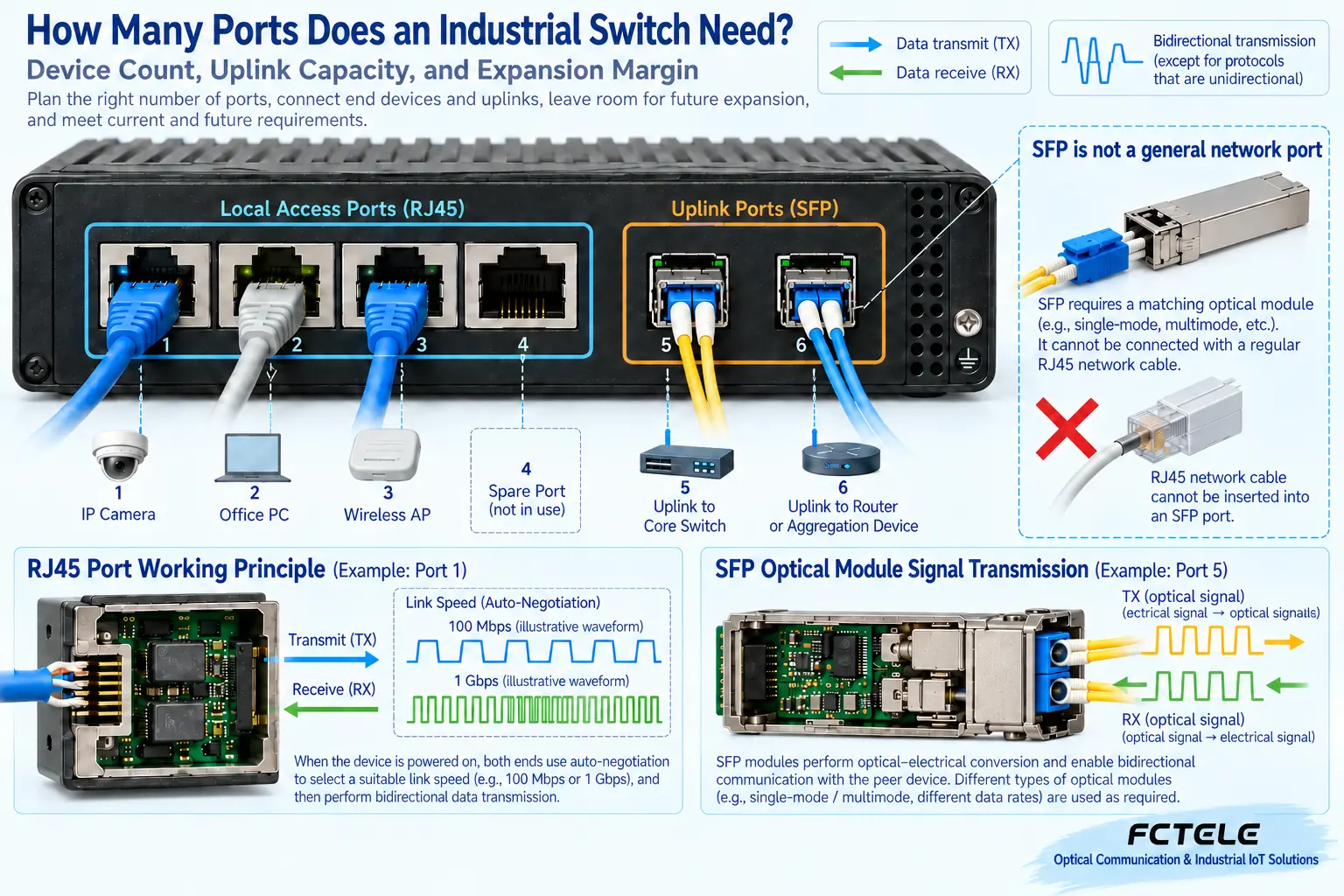
Usually, fast Ethernet refers to the 100M level, and gigabit Ethernet is another speed level. Some copper ports support multi-rate negotiation, but you cannot assume all models have gigabit capability based on that. Fiber ports also require checking the specific standard and module; inserting any SFP does not change capability. Selection records should list each port’s type and actual supported speed, not just write “eight-port switch.” The link speed shown by a computer or camera also does not mean the application can continuously get the same amount of effective data throughput.
When counting devices, don’t forget the uplink also takes a position
Suppose there are six cameras and one on-site computer, and you also need to connect to the upper network. Then you must consider the specific port arrangement for these connections at minimum. If one of the eight copper ports is used as an uplink, the copper ports left for local devices decrease by one; if the model has an independent fiber uplink, the situation is different. Ring networking usually also needs two corresponding uplink positions, and they cannot be counted at the same time as unlimited access ports. Maintenance ports, spare devices, and future expansion should also be clearly written down, to avoid discovering after installation that all interfaces are occupied.
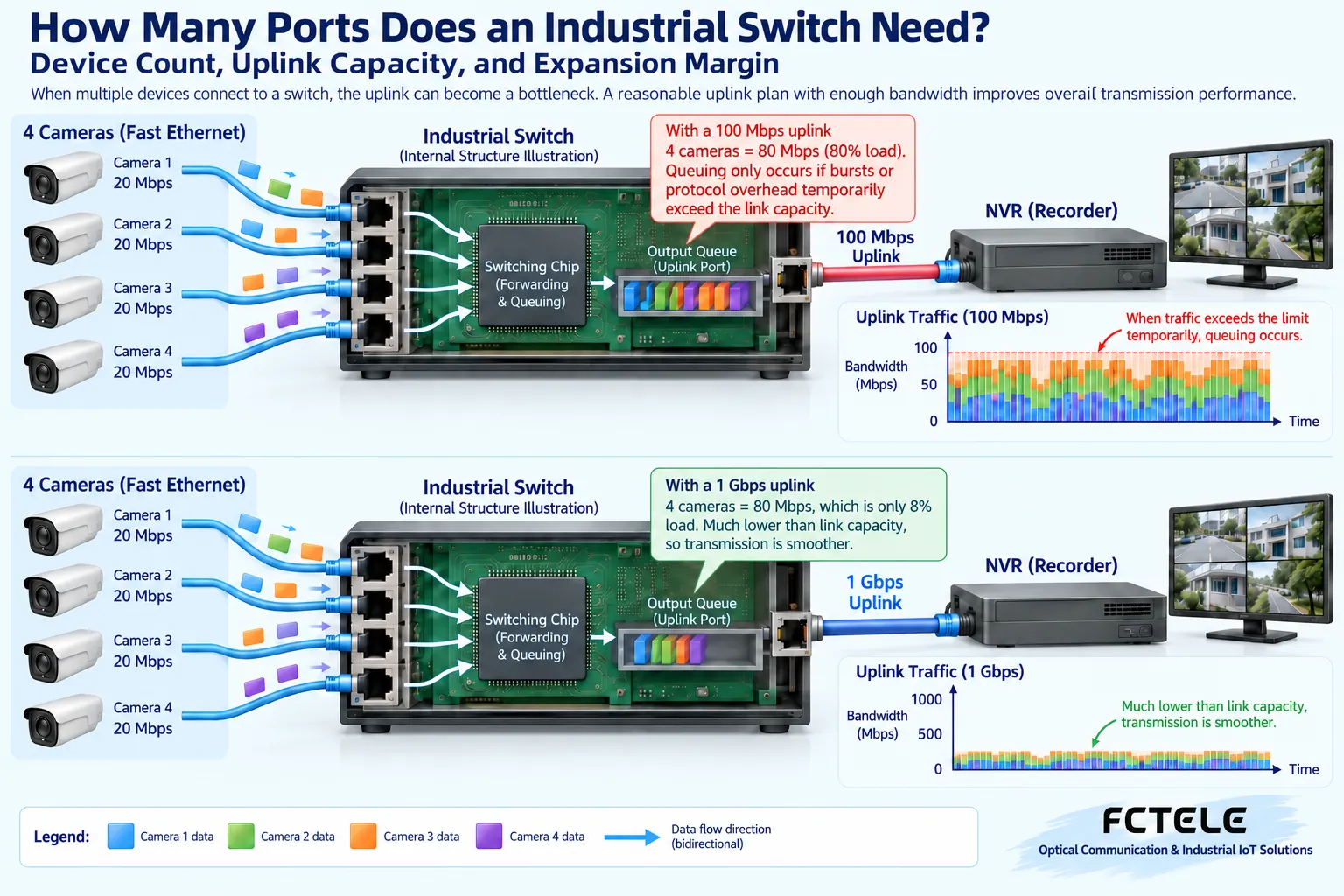
Why many inputs but the output may be congested
Traffic from multiple inputs aggregates to one output, and the output capacity does not automatically grow because there are many inputs. Suppose four services each generate 20 megabits per second of data; aggregation already creates a noticeable load, and overhead and bursts must also be considered. If continuous input exceeds the sendable capacity, the buffer can only queue temporarily, and ultimately packets may still be dropped or latency may increase. The numbers here are only for explanation and do not represent a fixed camera bitrate or the performance of a Feichang Technology model. Plan the uplink based on real business peaks and allowed latency, not just device count.
Switching capacity and application load must also correspond
Port nominal speed, switching capacity, and packet forwarding capability answer different questions. When many small packets appear, the processing pressure may differ from large packets at the same bandwidth; uplink congestion also cannot be solved by larger internal switching capacity alone. Video may also have multicast and burst behavior, and control tasks may care more about latency and packet loss. When purchasing, first describe the business, then check the relevant indicators and functions. You cannot add up all port speeds and write it as business throughput obtainable under any condition, and even less can you use a lightly loaded device test to prove a full-load scenario.
Fiber ports are not necessarily faster than copper ports
Fiber is suitable for certain distance and isolation requirements, but the speed is still determined by the port and module support. A 100M fiber port does not become gigabit because it uses fiber; two fiber ports also do not automatically combine into twice the bandwidth—link aggregation or ring networking has its own configuration conditions. The fiber type, wavelength, transmit/receive direction, and power window of the optical module need to match. Cross-building deployment also requires planning routes, end-face maintenance, and local power. Separating interface medium, speed, and network purpose helps avoid omitting uplink bandwidth calculation just because there is a “fiber port.”
PoE ports also add a power plan
Meeting the port count does not mean the switch can power all terminals. If you choose a PoE version, you need to check the standard, per-port limit, total device budget, and input power at the same time. Terminal night fill light or additional functions may change demand, so you cannot just record average power consumption. Some models have copper ports with data function while PoE is optional, and this must also be clearly stated in the order. PoE power and network speed are two independent limits; upgrading power supply capability cannot eliminate network output congestion, and upgrading the uplink cannot automatically increase the total power the device can provide.
How different Feichang Technology models correspond to planning
The Feichang Technology official website mini five-port 100M unmanaged industrial switch is suitable for clear 100M access needs; the two-fiber four-copper managed product lists gigabit copper ports, fiber ports, and management ring networking direction, and the port capabilities of the two cannot be mixed. The eight-port gigabit WEB managed model provides another combination. Their DIN-rail or wall-mount designs can be included in cabinet arrangements, but functions and PoE options must be confirmed according to the specific model. What is listed here are verified configuration differences; it does not claim that one model can satisfy all industrial environments, nor does it treat the model number as the total actual port count.
How should an on-site expansion be recalculated
Suppose there were originally three sensor devices and one maintenance computer, and later multiple video channels were added. The original switch may still have free ports, but the uplink and power supply may not have margin. First count the new stream and simultaneous operation conditions, then check port speed, multicast handling, PoE, and the upper network. If only the on-site switch is replaced while the upper output remains limited, the business may continue to be congested. The example is used to explain the expansion method, not a completed customer project. List every bottleneck on a complete data path, then determine which segment needs upgrading.
During acceptance, let all devices work together
Plugging in each device one by one and getting communication is only preliminary commissioning. Formal acceptance should run according to actual concurrency, observing link negotiation, error counters, uplink usage, video continuity, and control response. Ring networking or dual power should also verify failure and recovery under allowed maintenance conditions, and record business impact. Managed devices should save configuration backups and port descriptions, and unused interfaces should be managed according to project policy. You cannot conclude that continuous throughput and expansion planning are fully satisfied just because Ping succeeds or an image appears briefly; testing must cover the target load.
Leave a real port table at delivery
The port table should state what each interface connects to, supported and actual speed, service type, whether it supplies power, VLAN or uplink role, and reserved purpose. Attach power and optical module configuration, and record acceptance results and versions. This way, later personnel can find out whether a free port is truly usable, rather than just seeing how many jacks there are. How many ports an industrial switch should have depends on joint planning of connections, aggregation, and operating conditions. After clarifying the count, continue calculating capacity, power, and margin, so you can avoid buying a device with the right appearance but no support for the actual business.
Use an aggregation example to calculate the uplink clearly
Suppose four on-site devices each continuously send 20 megabits per second; the traffic in the aggregation direction has already reached 80 megabits per second, without yet including protocol overhead and instantaneous peaks. If the uplink negotiates to 100M, although on paper it does not exceed the nominal speed, the margin may still be insufficient. Switching to a gigabit uplink may relieve this output, but the upper interface, cabling, and other aggregated traffic must be checked at the same time. The numbers here are only a teaching assumption, not a fixed bitrate for a camera, nor a measured result of a Feichang Technology model. You can first make a table based on each service’s peak and simultaneous operation, then measure actual usage.
Free ports and expansion margin are not the same thing
An interface with no cable plugged in means there is still a connection position, not that power, uplink, and internal processing all still have sufficient margin. Adding a PoE camera may occupy one copper port while increasing power supply burden and continuous stream; adding a management computer may have very little traffic but require different access permissions. An expansion plan should separately record port positions, data capacity, power budget, and management rules. Together, the four lists are the verifiable margin. Do not directly write the number of free ports as how many arbitrary devices can still be added.
Unmanaged does not mean no planning is needed
Unmanaged devices can reduce daily setup work, but still require correct network topology, port speed, power, and cabling. Managed devices make it easier for personnel to observe ports, errors, and some service policies, but do not mean that after installation they will automatically make all decisions for the project. The Feichang Technology five-port 100M and eight-port gigabit WEB managed models are different configuration directions; before choosing, first confirm whether visualized status and segmented management are needed, then decide the specific product. A certain unmanaged device may have a specific loop protection option, and it also cannot be equated with complete RSTP managed ring networking functionality.
Product and principle verification materials:Feichang Technology product details 2263;Feichang Technology product details 2307;Feichang Technology product details 3325. The general mechanisms and hypothetical examples in the main text do not replace the corresponding model manuals.
Translated from the Chinese technical article. Source first published: 2020-06-11. Source last revised: 2026-10-13T20:58:17+08:00. Read the Chinese source
