


First list the complete business case before comparing devices
When choosing an HDMI optical transceiver, you cannot just compare the nominal distance and the word “4K.” You should write down the source device, display, input/output direction, exact video mode, whether audio is needed, and additional tasks such as keyboard/mouse, camera, or serial port. One-way display from a device to a large screen, versus sending images both ways and returning peripheral data, may require different products; they are not automatically compatible just because both use fiber.
Take a hypothetical project as an example: a computer sends a 3840×2160, 60Hz image to a remote display, the text interface needs to preserve the required chroma detail, single-mode fiber is already on site, and serial control of the screen is required. The requirements list should also state the bit depth and audio format, and where power is supplied at both ends. This example only shows how to define conditions; it does not mean a particular model will necessarily satisfy every combination.
Same resolution, but data requirements can still differ
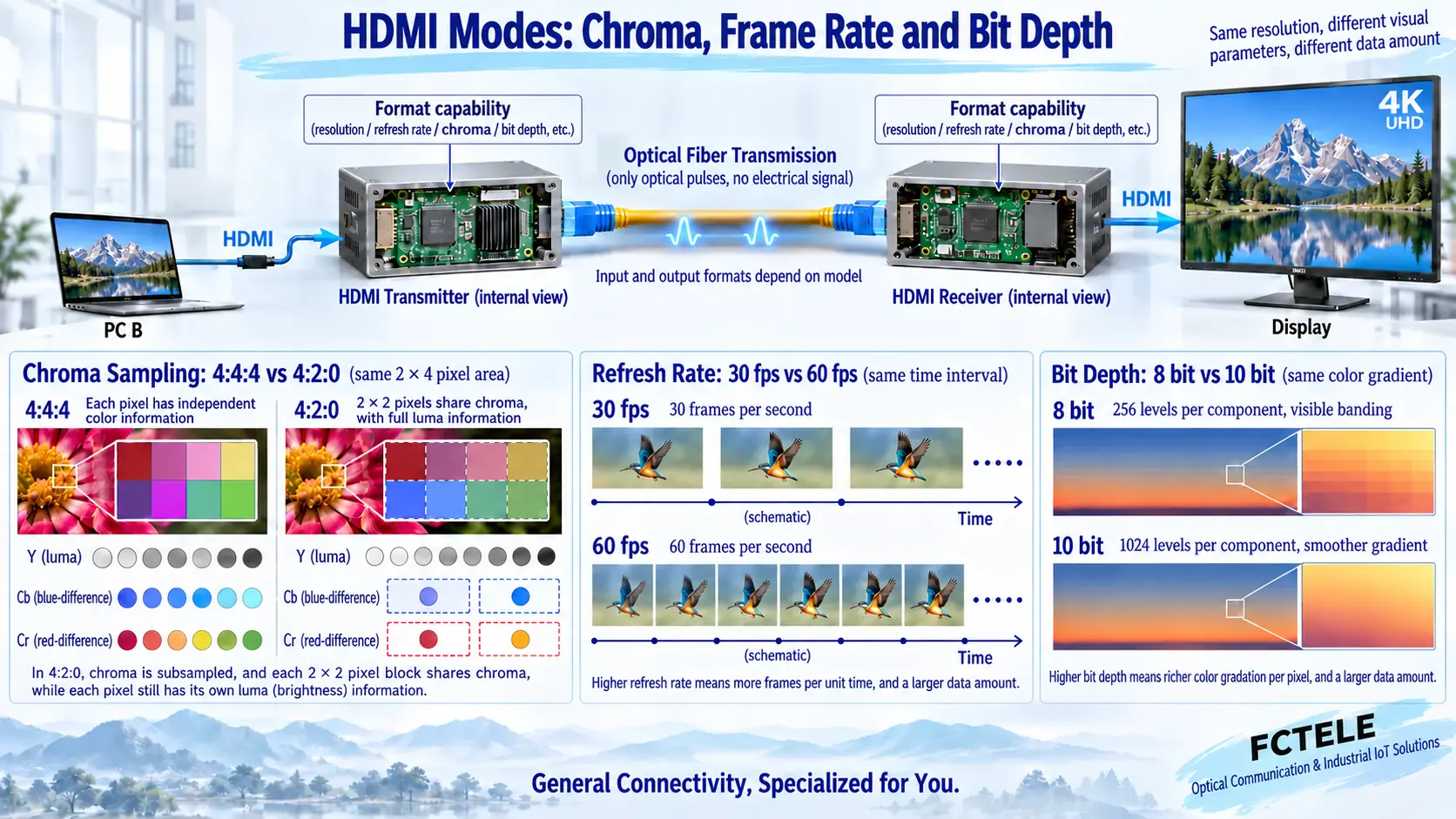
Resolution describes the number of spatial grid points in one frame of an image, and refresh rate describes how many frames are updated per second. With the same grid points, more frequent updates usually require moving more data. Bit depth describes the number of levels each color component can represent; increasing bit depth also increases the corresponding data requirement. Chroma sampling determines how color information is stored: 4:4:4 and 4:2:0 are not the same transmission condition.
4:2:0 lets adjacent pixels share some chroma information, while each pixel still has luma information, so you cannot say it deletes those pixels. Whether text edges and thin-line interfaces meet project requirements needs to be checked in practice. Writing only “supports 4K” cannot prove that all refresh rates, chroma, bit depth, and HDR conditions under 4K can be achieved at the same time; the features required for HDR also cannot be inferred from a single bit-depth number.
Input support does not mean the output stays the same
The specification table must be read for input, processing method, and output at the same time. Some devices can receive one color format but output another; some support video compression or format processing, while others transparently extend under limited conditions. There are also implementation conditions among the HDMI interface version, internal optical path rate, and specific video mode, so you cannot replace the whole device support table with the nominal bandwidth of a single optical module.
The Feichang Technology FCM-H1dG1U1 page lists conditions for 4K60 4:4:4 input and 4K60 4:2:0 output, and includes a statement about lossless video compression, so it cannot be directly written as an uncompressed device with no change to all color formats. When a certain output must be maintained, you should request an exact format table and prototype verification; where the page overview and specific fields are inconsistent, use the delivery specification confirmed by the manufacturer as the purchasing basis.
Display negotiation and content authentication also need to go into the selection table
EDID is display capability information that helps the source choose a mode; HDCP is link authentication for corresponding protected content. Both functions are related to the main video path, but they cannot be merged into one compatibility checkbox. Whether the device returns EDID in real time, supports learning, or has preset EDID should be clearly stated by model. The actual combination of display, player, and content should also be included in verification.
The Feichang Technology FCM-H1-4k2 details list EDID return, HDMI 2.0, and corresponding HDCP support items, making it suitable as a reference object for single-channel HDMI extension. Plug-and-play in the product description does not mean every source will automatically select the correct mode. If a project frequently changes computers or displays, procurement should agree on negotiation and recovery tests under these changes, rather than relying on repeated restarts after delivery and hoping for the best.
The optical budget answers whether it can reach, not just how many kilometers
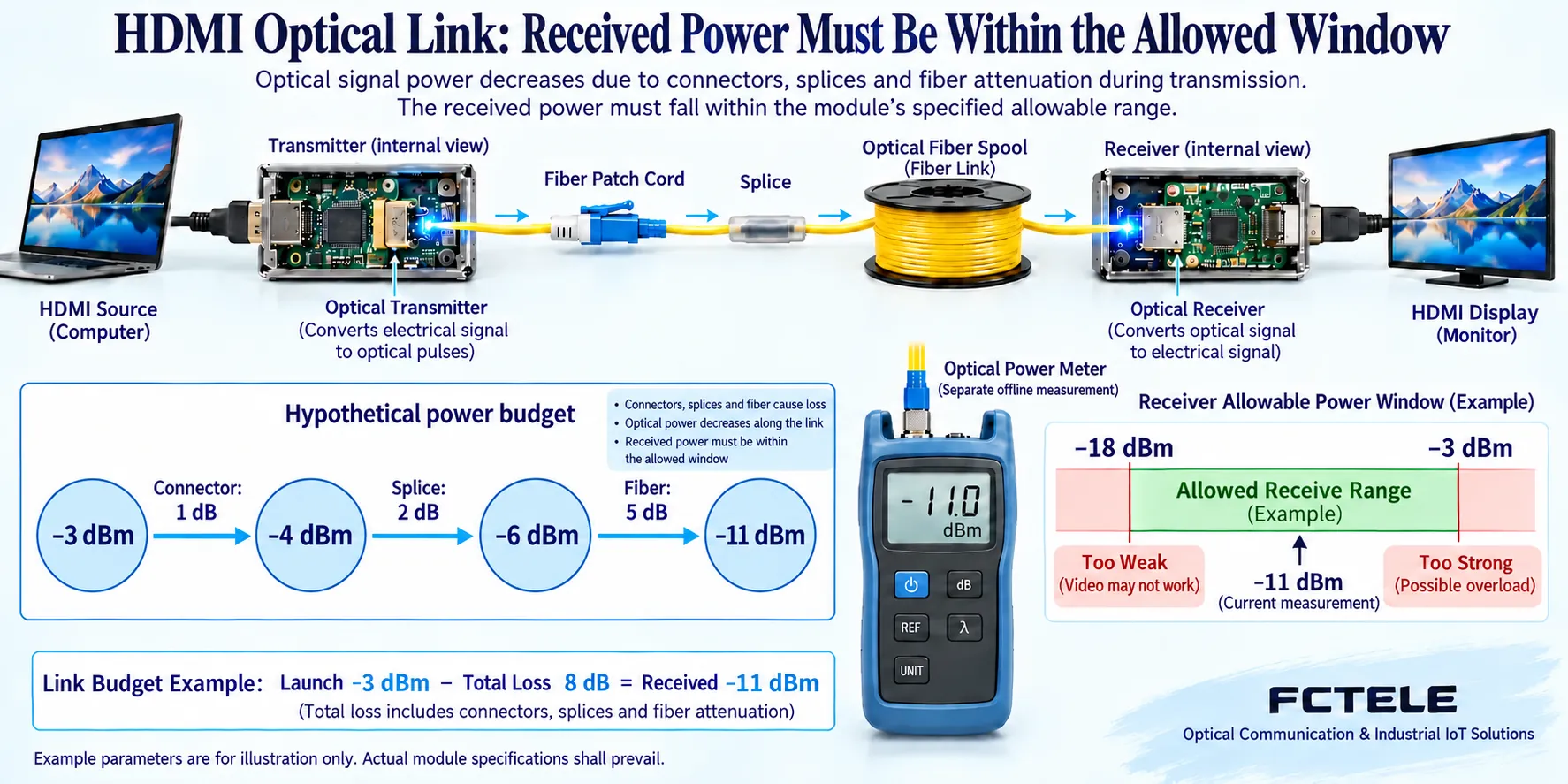
Transmit power is usually expressed in dBm, which is a power unit relative to 1 milliwatt; connector, splice point, and fiber core losses are usually expressed in dB, and the two have different uses. The receiver’s allowed power has both a lower limit and an upper limit. Subtracting the entire link loss from the transmit power gives the expected received power, which can then be compared with the receive window; specification range, measurement error, maintenance changes, and design margin should also be considered.
As a pure calculation example, transmit is −3dBm, the entire optical path loss is 8dB, and the expected receive is −11dBm. If a module’s allowed range is −18 to −3dBm, this example value falls within the window; these parameters are not a promise for a Feichang Technology model. A formal solution should use the selected module’s transmit range, receive sensitivity, and maximum allowed input, and check weak-signal and strong-signal conditions separately, rather than calculating only one typical number.
Fiber core, optical port, and module must be checked as a set
Find out whether the site is single-mode or multimode, the number of available fiber cores, connector and end-face types, cable length, and intermediate splices. The transmit/receive relationship of a single-fiber solution and the transmit/receive pairing of a dual-fiber solution must be checked against the exact model. A connector fitting does not mean the optical conditions are correct, and an ordinary Ethernet SFP does not guarantee support for dedicated HDMI equipment. Unknown combinations cannot be tried merely because they share the same wavelength or similar housing.
Even a very short optical path should be checked for maximum allowed received power; you cannot assume it is safe just because the distance is short. A very long optical path requires verifying loss and margin, and you cannot increase transmit power indefinitely. Fiber does not provide PoE power to a remote screen, so power at both ends, rack space, heat dissipation, and protection methods still need to be arranged. When outdoor or industrial environments are required, check the exact version’s environmental conditions and avoid applying another series’ wide-temperature parameters.
Compare auxiliary interfaces and network solutions separately
USB keyboard/mouse, USB camera, touchscreen, RS232, infrared, and independent audio each have their own direction and capability conditions. HID usually refers to human interface devices such as keyboard and mouse, and it cannot be inferred that any camera can be transmitted; USB2.0 full speed and high speed are also not the same rate level. Feichang Technology bidirectional multi-service models list options such as USB, Gigabit Ethernet, and serial port, but the actual peripheral category and concurrent combination should still be confirmed item by item.
Dedicated HDMI optical extension, HDMI active optical cable, and video encoding to an IP network are different solutions. The optoelectronic components of an active optical cable may be inside the connector, while a pair of optical transceivers uses separate devices; an IP encoding solution requires corresponding encoding, protocol, and receiving software or decoder. A device having an RJ45 socket does not automatically prove that the main HDMI service can pass through any switch; nor can the network port rate be treated as the bandwidth of an uncompressed video interface.
First prove the required combination, then evaluate price and brand
For acceptance, first test the prototype over a short distance with the actual source and display, then connect it to the installed optical path. Confirm the agreed mode, fine text and colored lines, audio, protected services, and auxiliary interfaces item by item, then cover the required concurrent operation and recovery conditions. Lowering the mode for troubleshooting can be used as a test, but you cannot write that the original target has been met just because it is stable after degradation; test results should include exact settings and reproducible steps.
When comparing suppliers, look at whether the model documentation is consistent, whether they can explain input/output differences, and whether they provide matching optical ports and verifiable after-sales materials, rather than relying on unverified brand rankings. The final procurement list should include device version, mode table, optical budget, module combination, power supply, peripherals, and acceptance requirements. In this way, the selection results in a verifiable service path, not a patchwork of several highest parameters.
Documentation note: The principle diagrams have been checked against technical content and are used to explain general mechanisms; they are not product photos or measured records. Specific interfaces, modes, and capabilities are subject to the selected model, version, and on-site verification.
Verification materials: Feichang Technology FCM-H1-4k2 HDMI product information
Feichang Technology FCM-H1dG1U1 multi-service product information
TI TDP0604 HDMI 2.0 electrical interface and DDC, HPD information
Extron HDMI fiber extender user manual
Related technical topics: What is an HDMI optical transceiver: electrical-to-optical conversion, display negotiation, and transmission boundaries How to install and debug an HDMI optical transceiver: short-link pair test, optical path connection, and acceptance Troubleshooting HDMI black screen and flickering Conference room display and USB, IP service planning
Translated from the Chinese technical article. Source first published: 2023-11-29. Source last revised: 2026-10-13T12:13:11+08:00. Read the Chinese source
