


Choose a VGA fiber optic extender by first confirming it can carry the picture you actually use, then check the fiber cable and extra interfaces. Writing only “HD, long distance, industrial grade” is not enough for selection: the same VGA plug may differ in resolution, refresh rate, sync method, and display identification mechanism. Devices must be compared as part of one complete link, not assumed interchangeable just because the optical ports look the same.
1. First Write the Requirements as Verifiable Data
Record what device the signal source is, whether its output interface is truly VGA, whether the display end directly receives VGA, and the resolution and refresh rate actually used. Screen size cannot replace video mode; a widescreen monitor may also accept inputs of different sizes. If the computer outputs VGA only through an adapter, the adapter should be written into the equipment list. Also list the number of fiber cores, fiber type, connectors, on-site length, power supply, and installation environment, so the supplier can explain item by item what is supported, what is limited, and what conditions remain to be confirmed.
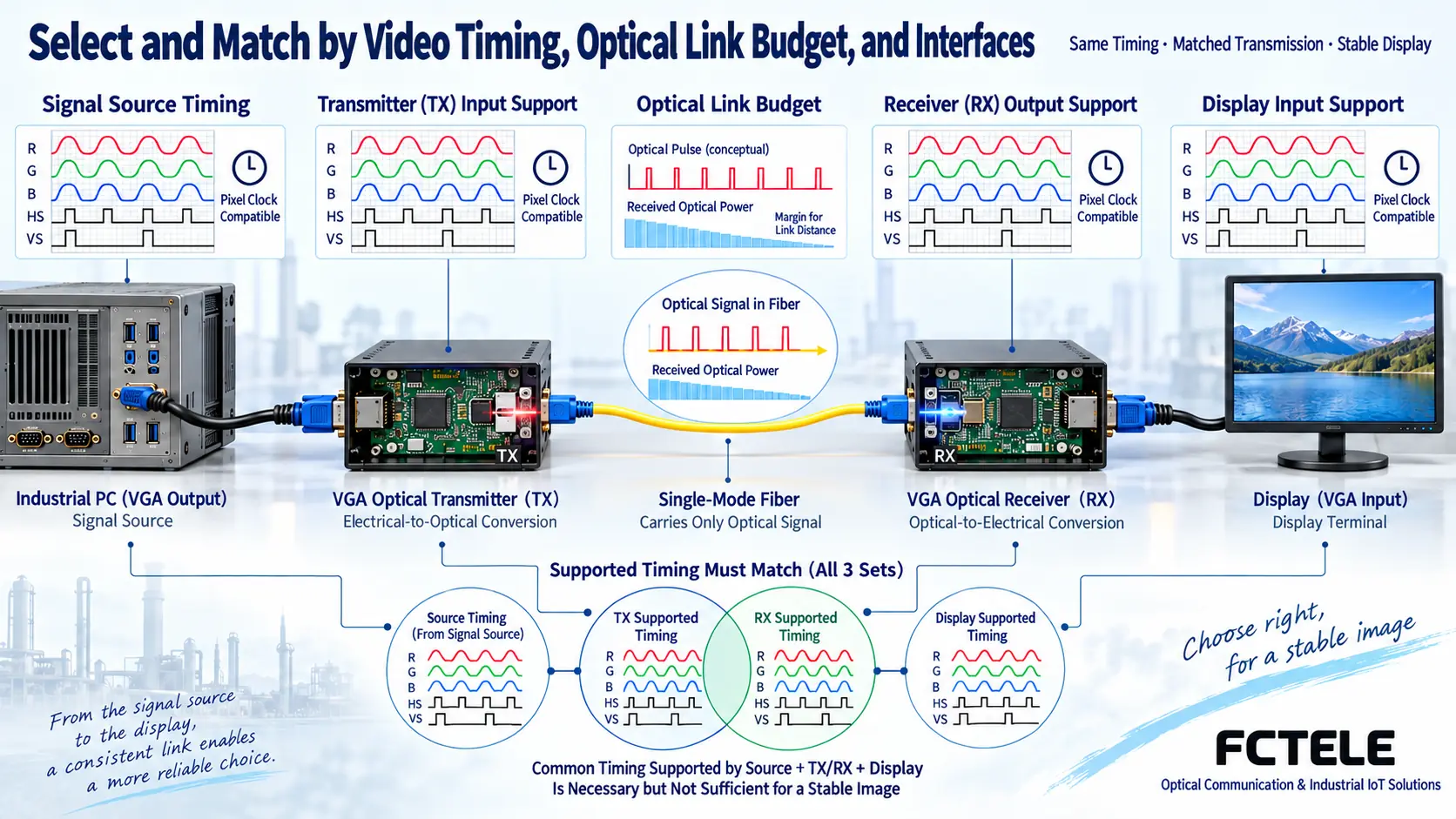
2. The Three Supported Mode Ranges Must Intersect
What the signal source can output, what the extension device can receive and rebuild, and what the display can show — these three ranges must intersect. When a device says it “supports a certain resolution,” you should continue to confirm the corresponding refresh rate and timing, rather than inferring that all refresh rates are supported. Beyond pixel count, there are also line and frame blanking and sync intervals, which affect sampling and transmission load. You can first verify with a fixed mode that both sides support in common, then evaluate the target mode; do not randomly force output parameters beyond the manual just to get a picture on screen.
3. Why Display Identification Is Also Worth Asking About
A display device tells the signal source which modes it accepts through identification information, often called EDID; the related communication channel is not the same thing as the image data. An extension device may pass through, store, or emulate this information, or it may only provide fixed supported modes. When the receiving end is disconnected, the computer is started first, or the monitor is changed, the output mode may therefore change. When selecting, ask clearly about display identification handling and the power-on sequence, and when necessary require pairing verification with the actual computer and monitor; do not treat “plug and play” as a promise of all compatibility.
4. Distance Must Be Converted into Optical Path Conditions
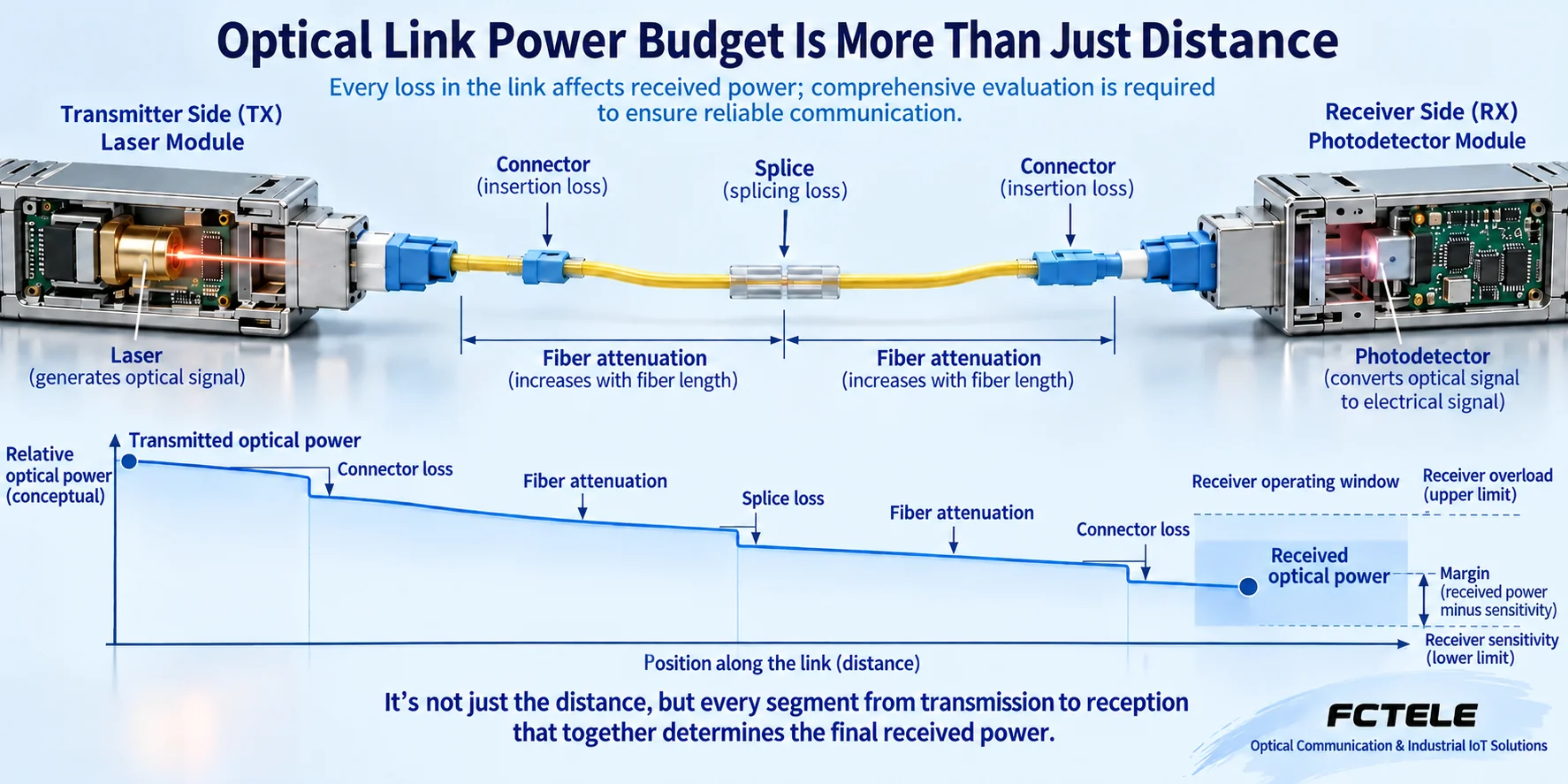
When the optical signal reaches the receiving end, it must fall within the receive range allowed by that model. The budget should include fiber loss, connectors, splice points, patch panels, and reasonable margin; you cannot compare only map distance, nor transfer the maximum distance of some type of optical module to a VGA device. Excessive loss may cause loss of lock, and some combinations also need confirmation of the receive upper limit under an overly short optical path. No universal attenuator values are provided here; whether an attenuator is needed and how to choose it must be determined by the specific transmit power, receive range, and measured results.
5. Single Mode, Multimode, and Pairing Cannot Be Guessed
Single mode and multimode are different fiber conditions, and the interface shape, polished end face, wavelength, and transmit-receive pairing must also match. How a single-fiber device carries traffic on one fiber core is determined by the manufacturer’s design; VGA video one-way transmission and additional control return cannot be mixed on this basis into arbitrary two-way video. The fact that an ordinary Ethernet SFP can be plugged in does not prove it can be used for a dedicated video optical link. When buying a replacement end, check the models and versions of both sides, rather than splicing together two boxes that “both have VGA.”
6. Extra Functions Should Become Separate Items
If you need to present sound, check the audio channel, level, interface, and direction; if you need remote operation, check the keyboard and mouse protocol and return capability. USB and PS/2 cannot be interchanged merely by an adapter plug, and local loop-out does not equal one-to-many reception. Multi-screen display, switching among multiple signal sources, recording, or network distribution may require extra equipment such as splitters, matrices, or encoders. Separating “required” from “optional” can avoid paying for functions you do not need, and can also prevent missing equipment that is actually required.
7. How to Turn Image Quality and Latency into Acceptance Conditions
You can rewrite “clear and stable” as: under the mode confirmed by both sides, fine text is legible, edges are not cropped, circles are not distorted, moving pictures show no obvious abnormality, and interruptions are recorded within the agreed observation duration. The duration of continuous operation should be agreed by the project; do not fabricate a uniform industry threshold. For situations sensitive to interactive operation, measure the response of the entire link, including display processing; the product’s fiber propagation time does not equal end-to-end interaction time. Whether compression is used and whether buffering exists should also be explained by documentation or testing.
8. A Hypothetical Example of Selection Comparison
Suppose an old industrial computer needs to send its operation interface to a duty room, and the duty room only views the picture and does not operate keyboard or mouse. Option A has only video functions, while Option B also has control return; first check whether both support the same target timing, then compare optical path conditions and installation power supply. When there is no operation requirement, you cannot use Option B’s control capability as a reason that Option A is unqualified. If the duty room monitor has only HDMI input, the conversion device and direction must also be confirmed separately; you cannot expect a VGA fiber optic extender to output HDMI directly.
9. Feichang Technology Selection Entry and Delivery Documents
The Feichang Technology official website lists VGA, SDI, and HDMI fiber optic extenders separately, which helps you first lock onto the correct product object. The category entry does not replace the specific model description, and the parameters of other transmission equipment cannot be generalized into the capabilities of all VGA fiber optic extenders. The selection result should be accompanied by the corresponding model, order configuration, supported mode table, optical port pairing, and on-site acceptance records; when evidence is insufficient, list it as to be confirmed rather than filling in parameters. The list is ultimately verified jointly by the supplier and the user according to the actual equipment.
When requesting a quote, you can ask the supplier to reply item by item using the same table: already supported, requires optional configuration, requires testing, currently not supported. Temperature range, protection rating, and certifications that are not stated should all remain to be confirmed; do not treat a metal housing as industrial certification. If the existing fiber cable has already been laid, a measurement report should be provided or measurement should be arranged before delivery; the number of connectors and line loss may be more important than the distance itself. Sample verification should use the actual terminals, to avoid judging that all screens are compatible after testing only on the supplier’s own monitor.
Sources:Analog Devices: RGB graphics sampling and sync clock materials;Analog Devices: analog graphics and HDMI interface processing materials;Feichang Technology: VGA fiber optic extender category entry. The illustrations explain general mechanisms; they are not product photos, measured waveforms, or certification documents.
Related topics:VGA fiber optic extender working principle;VGA installation troubleshooting;Classroom and meeting room planning;Difference between SDI and VGA;HDMI and VGA interfaces;VGA to HDMI and image quality;Special equipment room solutions
Translated from the Chinese technical article. Source first published: 2024-03-19. Source last revised: 2026-10-13T12:21:24+08:00. Read the Chinese source
