


Choosing between HDMI and VGA depends on the actual ports at both ends and what you want to do. When a device offers compatible digital output and input at the same time, a direct digital connection can usually reduce analog conversion steps; when an old device only has VGA, you should not assume just from the port name that it can no longer be used. Resolution, timing, cables, and display processing together determine the picture, and comparing interfaces must not turn into a promise that “all HDMI supports the same specifications.”
1. The two interfaces express images in different ways
Common VGA uses continuously varying voltages for red, green, and blue to express an image, and uses synchronization to tell the display device when a line and a frame begin. HDMI transmits video in the corresponding digital interface manner, and can also include audio and control-related information. You can think of the former as continuously changing readings and the latter as organized digital values; this analogy only explains the form of the information, and does not mean analog must be blurry or digital must be free of errors. The internal processing of an interface is still limited by device capabilities and signal conditions.
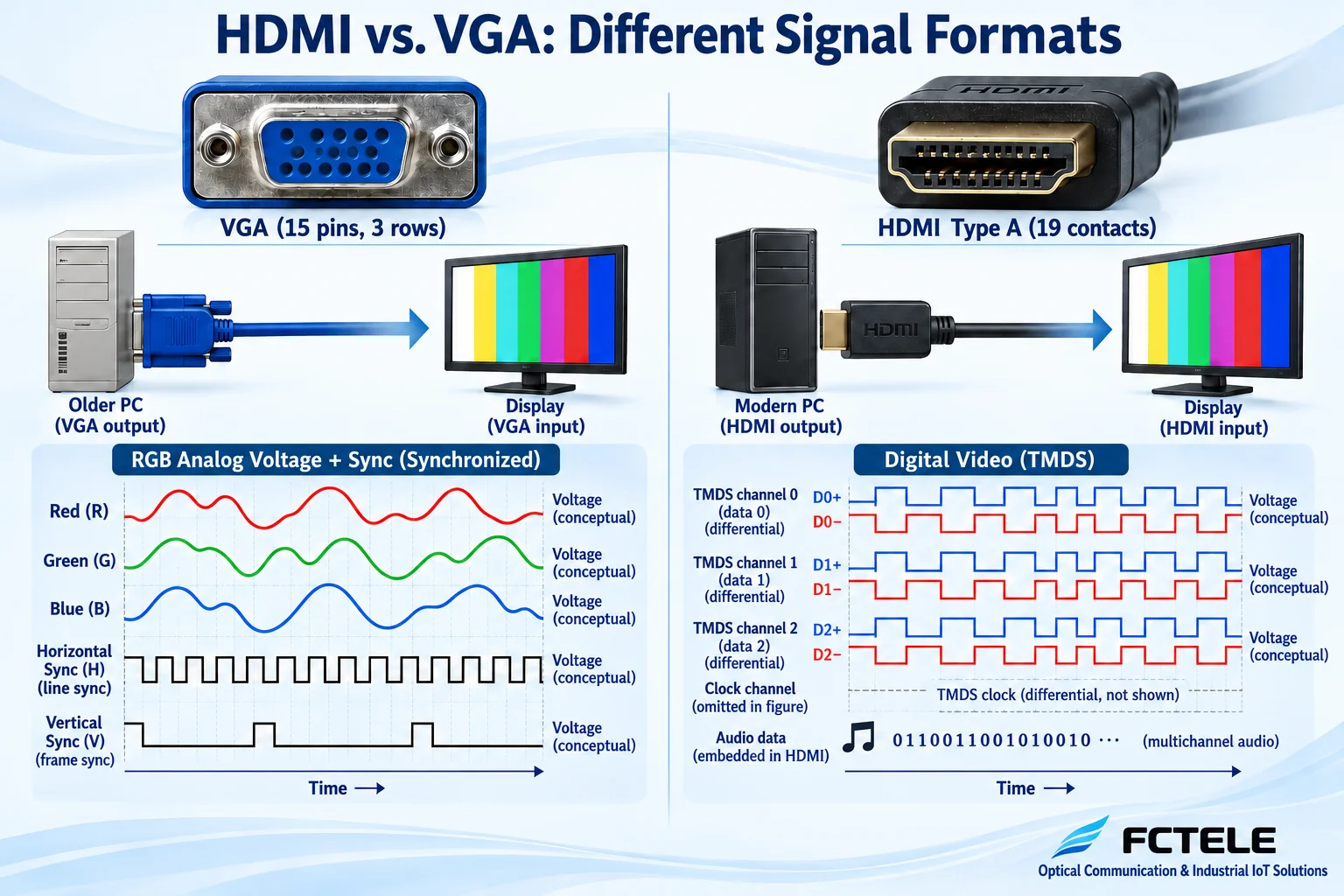
2. Why HDMI also requires checking the specific mode
Official HDMI technical materials describe different specifications and functions, but the capabilities actually implemented by a specific source, cable, and display end are not necessarily the same. The same plug does not prove that a device accepts any resolution, refresh rate, color depth, and other functions; if a device claims to support a high resolution, you also need to see whether it meets the requirements in the target mode. VGA likewise requires complete timing matching, and it cannot be fixed as equivalent to early low-resolution pictures. A procurement form should list the actual mode, not just write “HD interface.”
3. Display identification and content protection are not the same thing
Display identification information is usually called EDID, and it tells the signal source which display modes the destination can accept; the content protection mechanism HDCP, on the other hand, deals with authorization and link authentication for protected content. Both may affect whether the final image can be displayed, but they must not be mixed up as one function. When an ordinary desktop can light up but a certain protected program shows a black screen, you need to check the devices along the content protection link; when the mode changes after replacing the monitor, you need to check the handling of identification information. Bypassing protection must not be used as a general troubleshooting step, and device support should be verified under lawful conditions of use.
4. Why the conversion direction must be stated clearly
VGA to HDMI needs to receive analog RGB, sample it into digital data, and organize digital interface output; HDMI to VGA, on the other hand, must first receive digital video and then reconstruct analog RGB. They are not processes that can be completed by plugging the same cable in the reverse direction. Look at the input, output, and power supply in the product description, and do not judge direction by the shape of the cable end. Some devices depend on external power, and insufficient power may affect operation; so-called passive cables, if there is no corresponding special support at the source, also cannot replace a normal format converter.
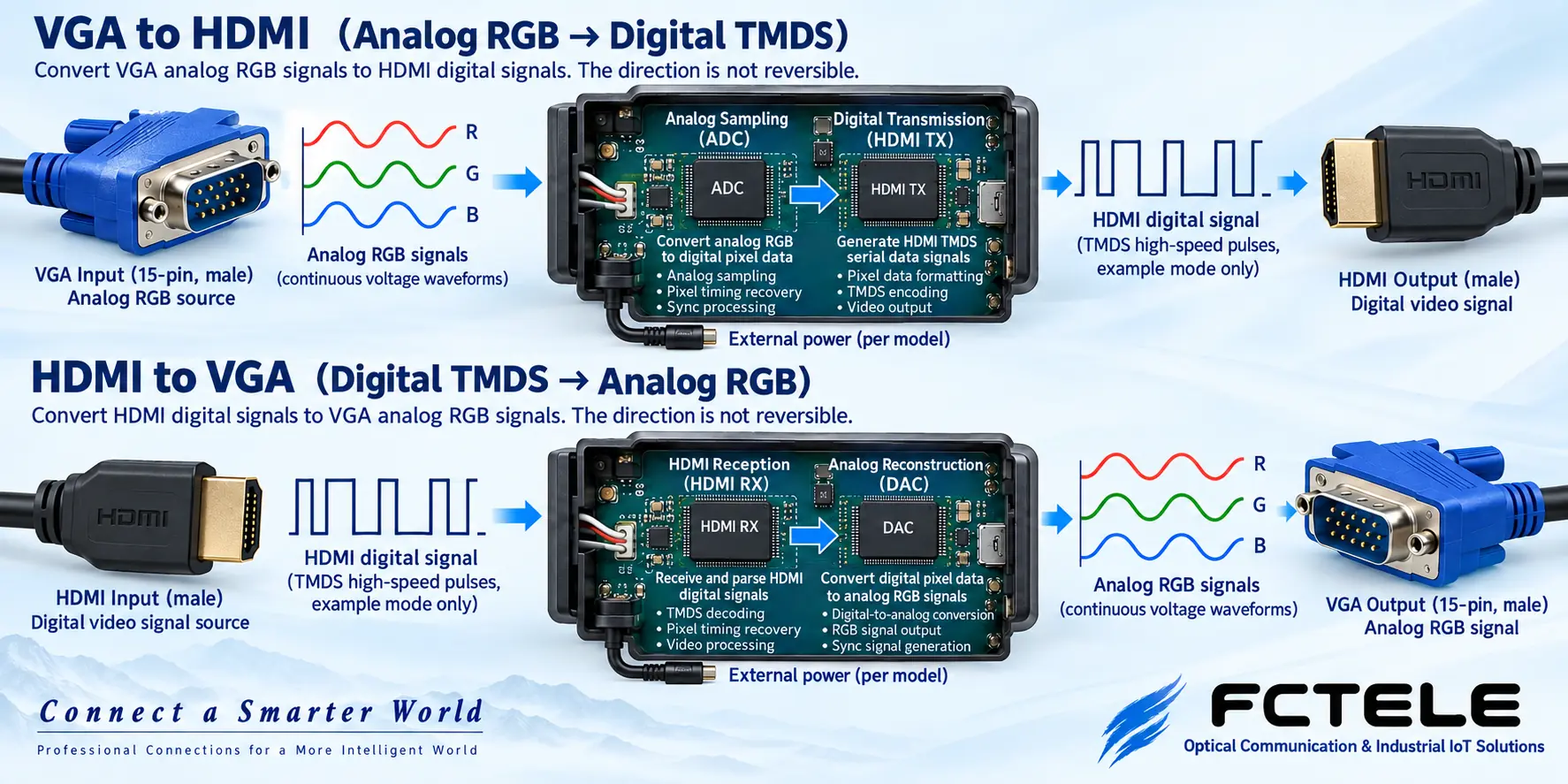
5. Why sound may disappear
A VGA video interface itself usually does not include audio. For a VGA-to-HDMI device to carry sound in the digital output, it needs an additional audio input and the corresponding processing capability; you cannot just connect VGA and expect the speakers to have sound. Whether a device in the reverse direction provides an audio separation output also needs to be checked. The fact that HDMI has an audio transmission mechanism does not mean the signal source must output sound or that the monitor must have built-in speakers; the selection of the system audio device and the playback capability at the destination still need to be checked.
6. A digital connection will not create picture detail out of nothing
Upscaling a low-definition input to more pixels only generates a denser display grid based on the existing content, and cannot restore real detail that was not captured in the first place. An analog signal has already been affected by noise, long copper cables, or scaling before input, and after conversion it will still carry these limitations. A certain conversion looking clearer may come from more suitable sampling, aspect ratio settings, or input processing at the terminal; this kind of improvement must not be advertised as if all converters can upgrade the source image. Related sampling and upscaling issues are explained in a separate article.
7. An example of replacing the monitor on an old industrial computer
Suppose the computer only has VGA, the old monitor is damaged, and the replacement monitor only has HDMI. First record the computer’s original mode, choose a conversion device clearly marked with VGA input, HDMI output, and support for that timing, then check the power supply, audio requirements, and display aspect ratio. Test fine text, circles, borders, and the actual software to confirm there is no cropping and no abnormal jitter. If the computer itself provides a compatible native digital output, you can compare a direct connection plan to reduce conversion; this is here to explain the decision process, not a delivered project case.
8. Long-distance needs require separately selected transmission equipment
Local cable extension and fiber optic extension for the two interfaces are different problems. To transmit far, you need to choose sending and receiving equipment that matches the port objects, and check the optical path, identification information handling, and all service channels. Whether the content protection and control functions of HDMI equipment are retained, and whether the sampling and supported modes of VGA equipment match, cannot be inferred from the appearance of the fiber. Fiber media can reduce electromagnetic coupling on the line, but it does not replace terminal power, grounding, permissions, and actual picture quality acceptance.
9. Feichang Technology materials should be used separately by interface
The Feichang Technology official website lists VGA and HDMI optical transceivers separately, and the selection entry should match the source and destination. The company’s publicly available material for a one-channel HDMI 2.0 optical transceiver lists specific input/output and optical port configurations; these capabilities correspond only to the ordering object of that material, cannot be transferred to VGA equipment, and do not prove that the entire HDMI series supports the same. The current VGA category does not provide enough model details, so you should request the actual mode table and manual, confirm item by item, and then purchase, avoiding carrying over generalized parameters from old articles.
The troubleshooting order should also consider the conversion chain. First verify the short cable connection between the signal source and a compatible destination, then add the converter, and finally add the long-distance equipment needed. Recording the mode, picture quality, and audio performance at each step can locate which newly added processing changed the result. Do not change cables, change power supplies, and change resolution at the same time, to avoid a problem disappearing by chance and then being impossible to explain. An unstable digital link may show loss of lock or a garbled screen, while an analog link may first appear as blurriness or abnormal color; these are only troubleshooting clues, and you should still confirm them according to the device definitions and actual comparison.
Sources:HDMI official: digital audio and video interface technology;Analog Devices: analog graphics and HDMI interface processing materials;Feichang Technology: product material for a one-channel 4K 60HZ HDMI2.0 optical transceiver;Feichang Technology: VGA optical transceiver category entry. The illustrations explain general mechanisms; they are not product photos, measured waveforms, or certification documents.
Related topics:VGA optical transceiver working principle;VGA selection check;VGA installation troubleshooting;Classroom and meeting planning;Difference between SDI and VGA;VGA to HDMI and picture quality;Special equipment room solutions
Translated from the Chinese technical article. Source first published: 2021-12-23. Source last revised: 2026-10-13T12:28:34+08:00. Read the Chinese source
