


In classrooms and meeting rooms, a VGA fiber optic extender is mainly responsible for extending an existing computer image to a distant display device. It is not a complete video conferencing platform, and it does not automatically provide multi-person interaction, multi-screen distribution, or camera networking. When planning, you should first draw a real video path, then handle sound, switching, and control separately. This way, you can avoid buying a pair of extenders only to find that the system’s functions are still incomplete.
1. First distinguish between the image source and the display endpoint
The image may come from a podium computer, an old industrial control terminal, or other devices that truly provide VGA output. The endpoint may be a projector, a monitor, or a display control device with the corresponding input. Cameras have different video interfaces, and you cannot directly connect a camera to a VGA fiber optic extender just because it can capture video. Write down the input and output direction of each port, determine whether the lecture site keeps a local preview, and then clarify whether the remote end is only for viewing or also needs to operate the signal source.
2. A pair of devices establishes one path
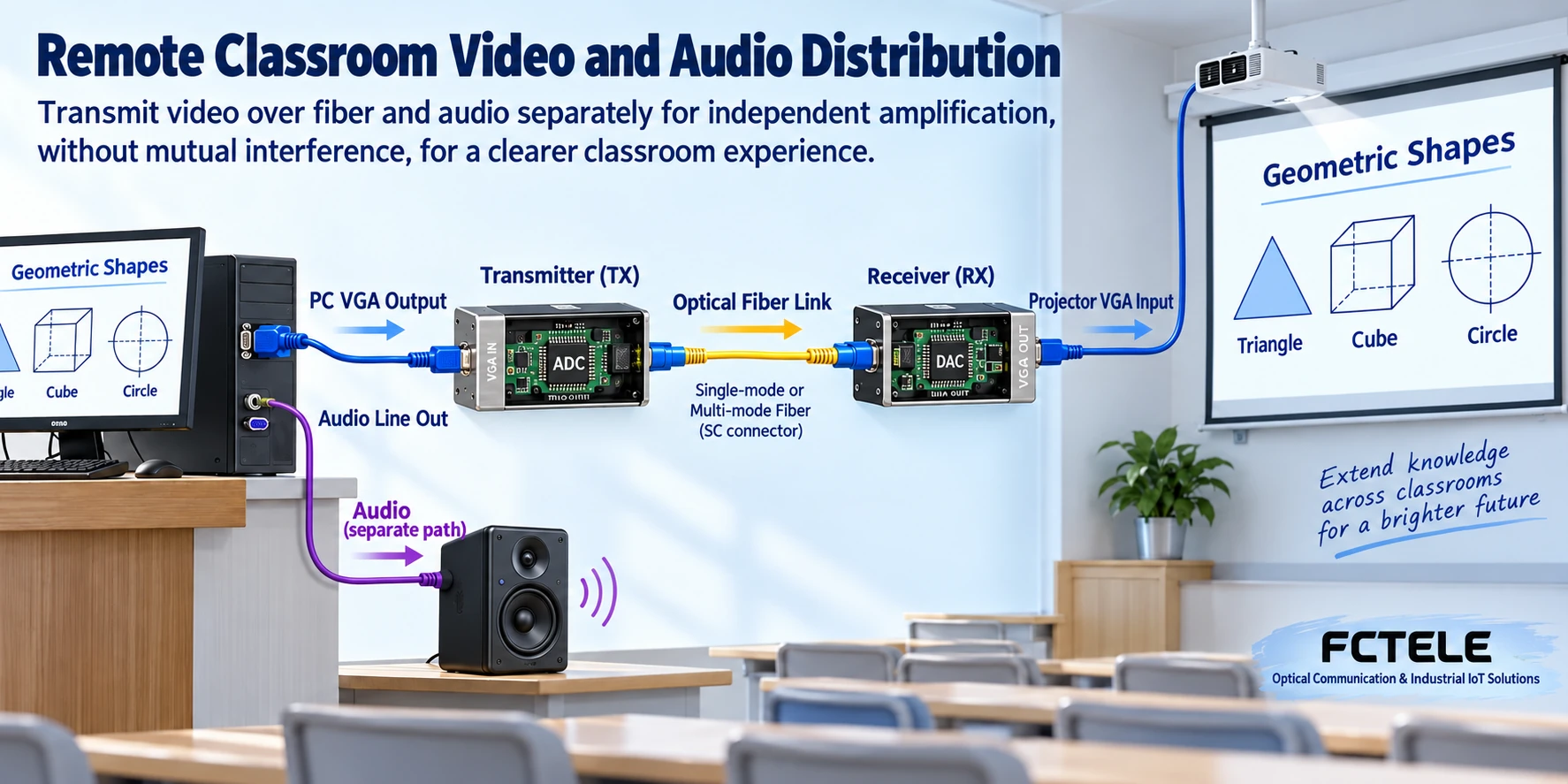
The most basic structure is a short VGA cable at the source end, a transmitter, fiber, a receiver, and a short cable at the display end. The digital device samples the analog image at the transmitter, the receiver reconstructs the output according to timing, and the display then shows it. Fiber is responsible for transmitting this segment; it is not responsible for determining course content, nor for user login. If two classrooms both need to view the same computer, a pair of single-link devices is usually not enough. You should check the splitting capability of the sending device itself or add compatible distribution and receiving devices.
3. Why multi-screen and multi-source are different
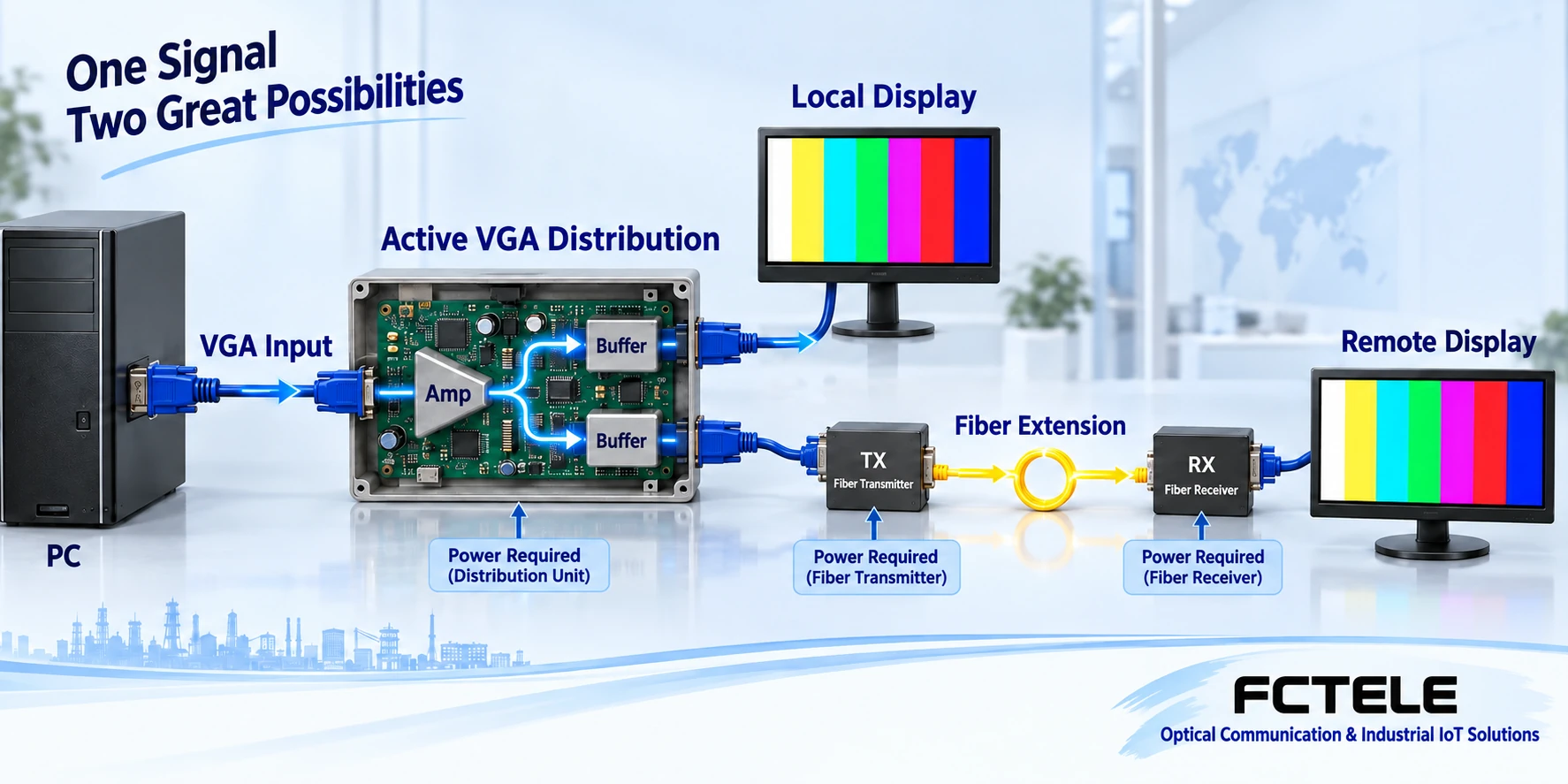
Multi-screen means one source is displayed at multiple endpoints. Multi-source means multiple computers or other inputs take turns being sent to a certain endpoint. The two require different switching relationships. A splitter copies one input, while a matrix sends different inputs to different outputs according to settings. Whether there is scaling, identification information management, or local preview should be checked in the specific device. Whether the fiber optic extender is placed before or after these devices will affect the supported modes and the debugging location. You cannot casually split one fiber into two and treat it as active video distribution; optical power and protocol conditions must also be met.
4. Which path does presentation audio take?
VGA video ports usually do not include audio. The sound from the podium computer may be sent from a separate audio port to the sound system, or it may travel to the remote end along the optical link through a separately set audio channel. Interfaces, levels, and directions must be checked. Remote microphone return, sound reinforcement, recording, and echo processing belong to other business links. Sound and image arriving at the same time does not mean they are already synchronized. Video sampling, display buffering, and audio processing times may differ. In meeting scenarios, the audio-video coordination should be tested with real speech and operation.
5. What do remote operation and remote conferencing each require?
When remote keyboard and mouse operation is needed, you must confirm KVM functionality, protocol compatibility, and control permissions. You cannot understand “the remote end can see the screen” as “the remote end can control the computer.” Cross-location network meetings also require cameras, microphones, conference terminals or software, and network conditions. VGA extension can become a certain local display connection segment, but it does not replace these systems. When shared computer control is involved, you should also plan who has permission to operate, how to take back control on site, and how to recover when operation fails.
6. Resolution should be tested based on teaching content
Text-based courses and operation demonstrations often have thin fonts, table lines, and mouse pointers, which are more sensitive to analog sampling and scaling. The source end, extension device, and display end must have a commonly accepted resolution and refresh rate. The size of the projection screen does not mean the device supports any video mode. When mixing different monitors, first confirm who provides the identification information, to avoid the computer being forced to change output by one of the monitors. Testing circles, borders, and small text makes it easier to find stretching and cropping than only showing landscape photos.
7. A hypothetical plan for two classrooms
Assume the podium keeps an old computer, one classroom projects locally, and the other classroom watches through fiber. If the sending device has a verified local loop-out, local preview can be used; if there is no loop-out, a separate splitter should be planned, and then a matching transmitter-receiver pair should be set up for the remote end. Audio should be wired separately or configured with an independent channel according to the actual sound system. This plan only explains the separation of functions; it is not a real customer case. Any function in the system cannot be assumed to exist just because of the words “fiber optic extender.”
8. How to divide construction and acceptance into stages
First verify the short-cable baseline from the source end to the local monitor, then verify the entire distribution, switching, and fiber optic extender setup on the desktop, and finally connect the field optical path. Record each mode, port, and operation sequence. Acceptance should also check same-screen display, source switching, power cycling, and audio-video coordination. If a certain screen goes black, troubleshoot that branch from the display input backward, and do not change all branches at the same time. Fiber end faces and loss should be measured according to the model. Do not look directly into optical ports. Installation power supply and grounding should follow on-site regulations.
9. How to prepare Feichang Technology entry points and solution materials
The Feichang Technology official website lists VGA, HDMI, SDI, and other fiber optic extenders separately, which can be used to first select the correct interface object. Category pages cannot replace model and ordering configuration materials, and capabilities such as no delay, multiple inputs, or arbitrary control cannot be directly inferred from the product name. When submitting a solution, attach a list of source-end, display-end, splitter, and audio equipment, and clarify which channels need to be extended and whether return transmission is needed. After obtaining model materials and performing actual pairing verification, then determine the procurement and delivery scope.
When the system is expanded, maintenance boundaries should also be reserved. Label the podium switcher, transmitter, patch panel, receiver, and endpoint separately, so personnel can know which location belongs to video, audio, or network maintenance. If upgrading to native digital interfaces in the future, conversion and distribution devices should be rechecked, rather than just replacing the VGA cable with another type of plug. Acceptance for multi-screen classrooms should record the performance of each endpoint under the same mode one by one. Success on a single screen cannot cover all branches; unverified local loop-out or multi-channel duplication capabilities should be listed as items to be confirmed.
Sources:Analog Devices: RGB graphics sampling and synchronous clock materials;Analog Devices: analog graphics and HDMI interface processing materials;Feichang Technology: VGA fiber optic extender category entry. The illustrations explain general mechanisms; they are not actual product photos, measured waveforms, or certification documents.
Related topics:VGA fiber optic extender working principle;VGA selection checklist;VGA installation troubleshooting;Difference between SDI and VGA;HDMI and VGA interfaces;VGA to HDMI and image quality;Special equipment room solutions
Translated from the Chinese technical article. Source first published: 2024-04-25. Source last revised: 2026-10-13T12:21:24+08:00. Read the Chinese source
