


The difference between SDI surveillance and IP surveillance starts with what information the camera sends to the back end. SDI outputs dedicated serial digital video, while IP cameras output video data encapsulated for network transmission, and common systems also use compression encoding. Both systems can provide monitoring and recording services, but their interfaces, bandwidth, expansion, and maintenance methods differ. You cannot simply declare that one type is naturally zero-latency or absolutely secure.
1. The two paths differ starting at the camera
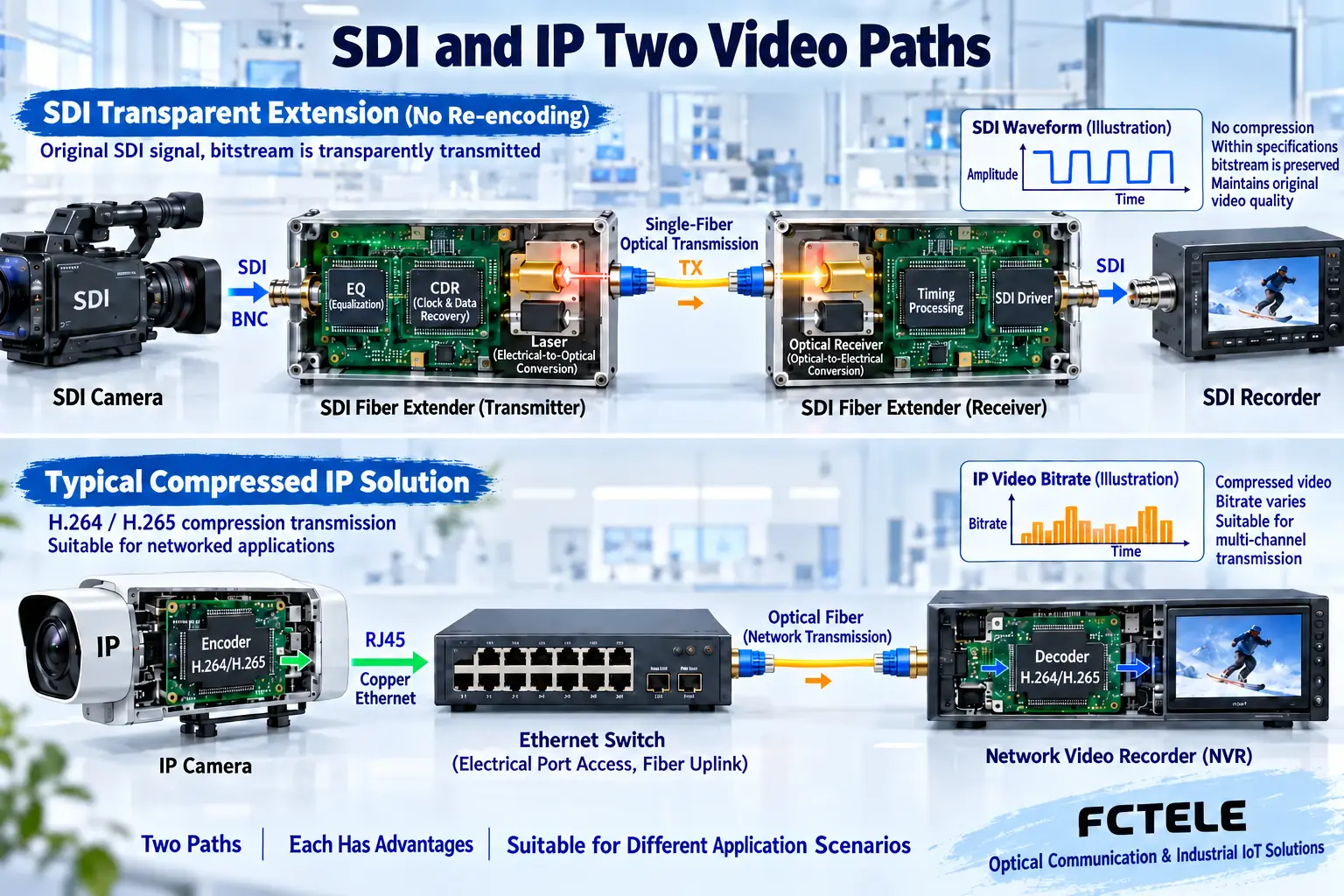
An SDI camera sends digital video to an SDI receiving device over coaxial cable. For long distances, a matching SDI fiber extender can extend the signal, which then connects to a recording device or monitor. Transparent extension does not require H.264 encoding, and the fiber extender does not automatically provide an IP address or network recording function. If the back end only has ordinary network interfaces, a corresponding video encoding device is needed. You cannot connect the SDI BNC cable directly to a switch to complete the connection.
An IP camera usually processes video inside the camera, encodes it in a corresponding format, and encapsulates it for network transmission. Switches forward the data, and the client or recording system receives and decodes it. There are also professional solutions in networks that carry uncompressed video, so “IP necessarily means compression” is not a universal rule; project selection should be based on the specific camera and system. Video fiber extenders, Ethernet optical links, and video encoders also cannot be mixed up as the same device.
2. Bandwidth calculation methods differ
An SDI link operates at a specified serial rate, and you cannot simply infer that the transmission rate becomes lower because the current picture is still or moving. 3G, 6G, and 12G represent different tiers, and the choice must cover the source format and the capabilities of all intermediate devices. The fact that an SDI fiber extender supports a certain rate does not mean the back end can accept all mappings, nor does it mean you can freely add channels; the total capacity of multiplexing should be checked according to the specific design.
Common compressed IP surveillance requires counting the actual or set bitrate of each camera, the peak, and the concurrent access method, then checking the uplink and recording system throughput. Variable bitrate is affected by the scene and settings, so you cannot estimate only by the number of cameras. You also need to consider network protocol overhead, other services, and margin. Multiple people pulling streams separately, multicast, and recording playback may create different loads, and you should test according to actual service traffic.
3. Latency must be counted from lens to screen
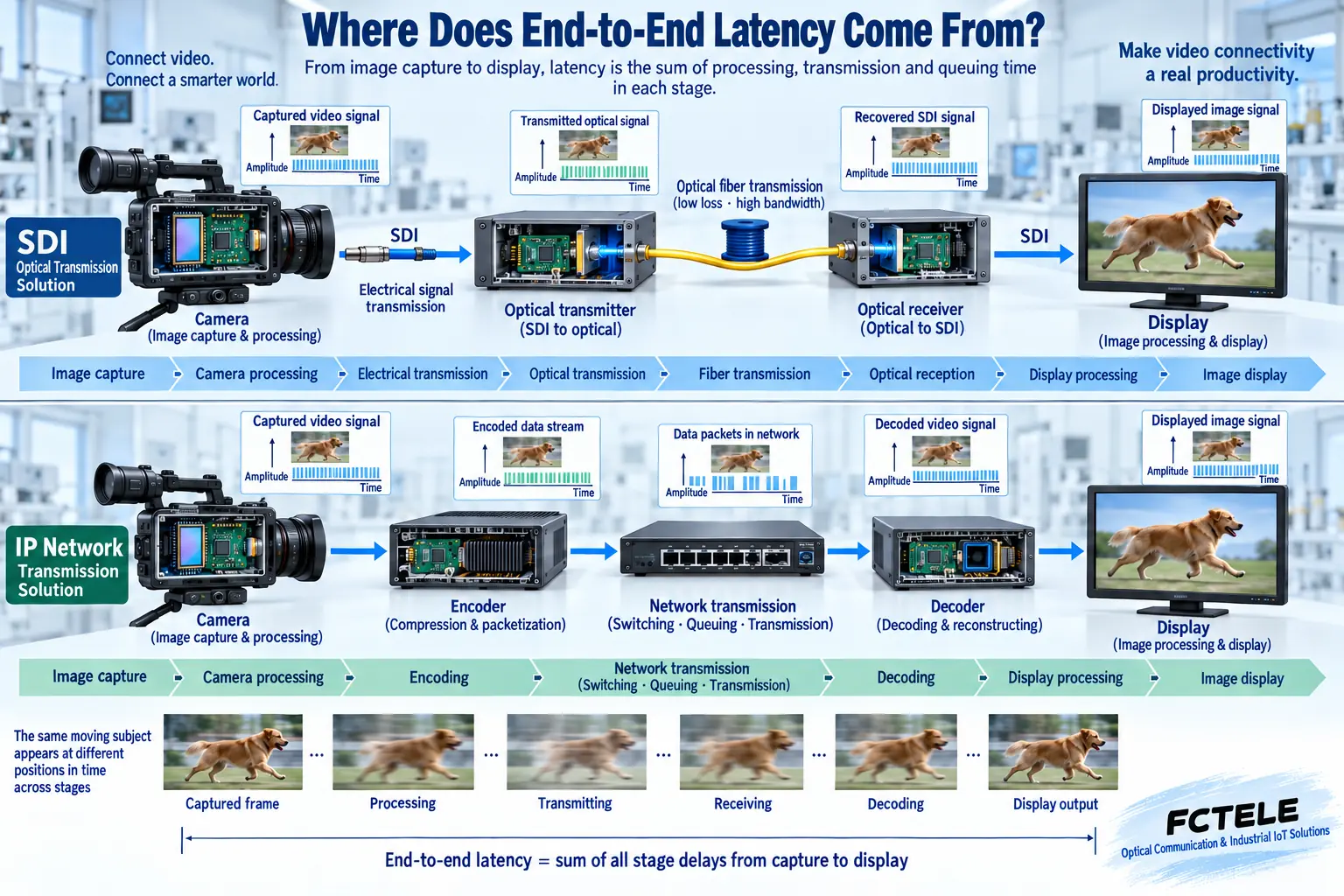
Camera capture, image processing, compression encoding, network queuing, buffer decoding, and display can all contribute latency. SDI transparent extension usually does not require full video compression, but the source, terminal, or frame synchronizer may still introduce processing and buffering. Fiber propagation itself also takes time, so you cannot directly write “no compression” as absolute zero latency, and even less can you use the value of one component to represent the entire surveillance system.
Latency in an IP system is also not fixed. Encoding method, buffering, network load, and client settings affect the result, and some systems can adjust between quality and latency. When low-latency operation is needed, measure the time from the actual source event to the terminal presentation using the method specified by the project, and keep the conditions. You cannot just observe that the picture is smooth and assume the latency is low enough; smoothness and real-time performance are two different judgments.
4. Recording and expansion each have constraints
The SDI back end must have compatible capture or recording interfaces that support the source format, channel count, and required audio. The receiver having a picture does not mean the recording file has been saved correctly. Acceptance testing should check recording, playback, time marking, and exception recovery. For switching or synchronization needs of multiple SDI sources, you should also check the switcher and reference system; the fiber extender only completes transmission and does not replace recording management and multi-camera synchronization.
An IP system can use network connections to organize multiple access, but growth in scale affects conditions such as switch uplink, server decoding, storage writing, and software licensing. Remote access also requires appropriate network and security arrangements; connecting to the Internet does not automatically provide reliable remote recording. An expansion plan should list current resources and remaining capacity, avoiding comparing only front-end device prices while missing back-end costs.
5. Security cannot be concluded only by interface type
The SDI link itself does not provide a network login entry like an IP camera, but the camera configuration, recording system, control devices, or back-end management may still have network interfaces. The physical link also needs protection. You cannot interpret not using IP to transmit video as meaning the entire system is immune to intrusion; likewise, you cannot declare that an IP system is definitely insecure just because it has a network entry point.
IP solutions need to clarify the management network, account permissions, access boundaries, upgrade maintenance, and remote access methods. Implement authentication and protection according to device and system capabilities, and verify authorized access and recording availability. You cannot claim that an ordinary VLAN automatically encrypts video, nor can you treat a single switch function as a complete security system. Both solutions should formulate measures based on threats, business, and maintenance resources, rather than relying on interface names to provide guarantees.
6. How to make a decision based on the site
For scenarios with existing SDI cameras, a dedicated back end, and a need for stable point-to-point extension, you can prioritize evaluating keeping the SDI path. Feichang Technology SDI products provide different rates and channel counts, and you need to check the source mode and optical path pairing. For projects centered on network cameras, multi-location access, and network recording, you should evaluate IP solutions and the corresponding switching network. An ordinary SDI fiber extender cannot replace an Ethernet switch.
During renovation, first inventory the front-end output, existing fiber, back-end interfaces, required latency, and recording method. Use one representative link for a pilot to verify picture, audio, recording playback, and continuous operation, then switch gradually. Keep fallback conditions for the original system and clarify which devices continue to be used. The basis for selection should be whether the entire business can meet requirements, not attaching fixed good or bad labels to SDI, HDMI, and IP.
When comparing costs, also include supporting power supplies, recording back ends, storage, software, test instruments, and maintenance arrangements in the scope. Comparing only the price of a pair of fiber extenders with one switch is not a comparison under equivalent business conditions. First clarify the number of channels, recording period, number of simultaneous viewers, and existing resources, then calculate the two complete solutions separately. Only then does the conclusion have practical meaning.
Sources:SMPTE Standards Index;Feichang Technology one-channel 3G SDI fiber extender. The illustrations explain general mechanisms; they are not product physical objects, measured waveforms, or certification documents.
Related topics:How an SDI fiber extender works: coaxial reception, clock processing, and optical-electrical conversion;How to understand SDI synchronization: differences between bit clock, line/frame markers, and studio synchronization;SDI fiber extender signal processing: what equalization, clock recovery, and retiming each solve;How to test and accept an SDI fiber extender: format, bit errors, optical power, and continuous operation;How to evaluate SDI fiber extender power consumption and temperature rise: power loss, heat dissipation, and operation arrangements;SDI fiber extender installation and troubleshooting: short cable baseline, optical-link commissioning, and segment location;How to check no picture or no sound when converting SDI to HDMI: power, locking, and display compatibility
Translated from the Chinese technical article. Source first published: 2022-07-01. Source last revised: 2026-10-13T12:28:34+08:00. Read the Chinese source
